This is the multi-page printable view of this section. .
High Availability
Overview
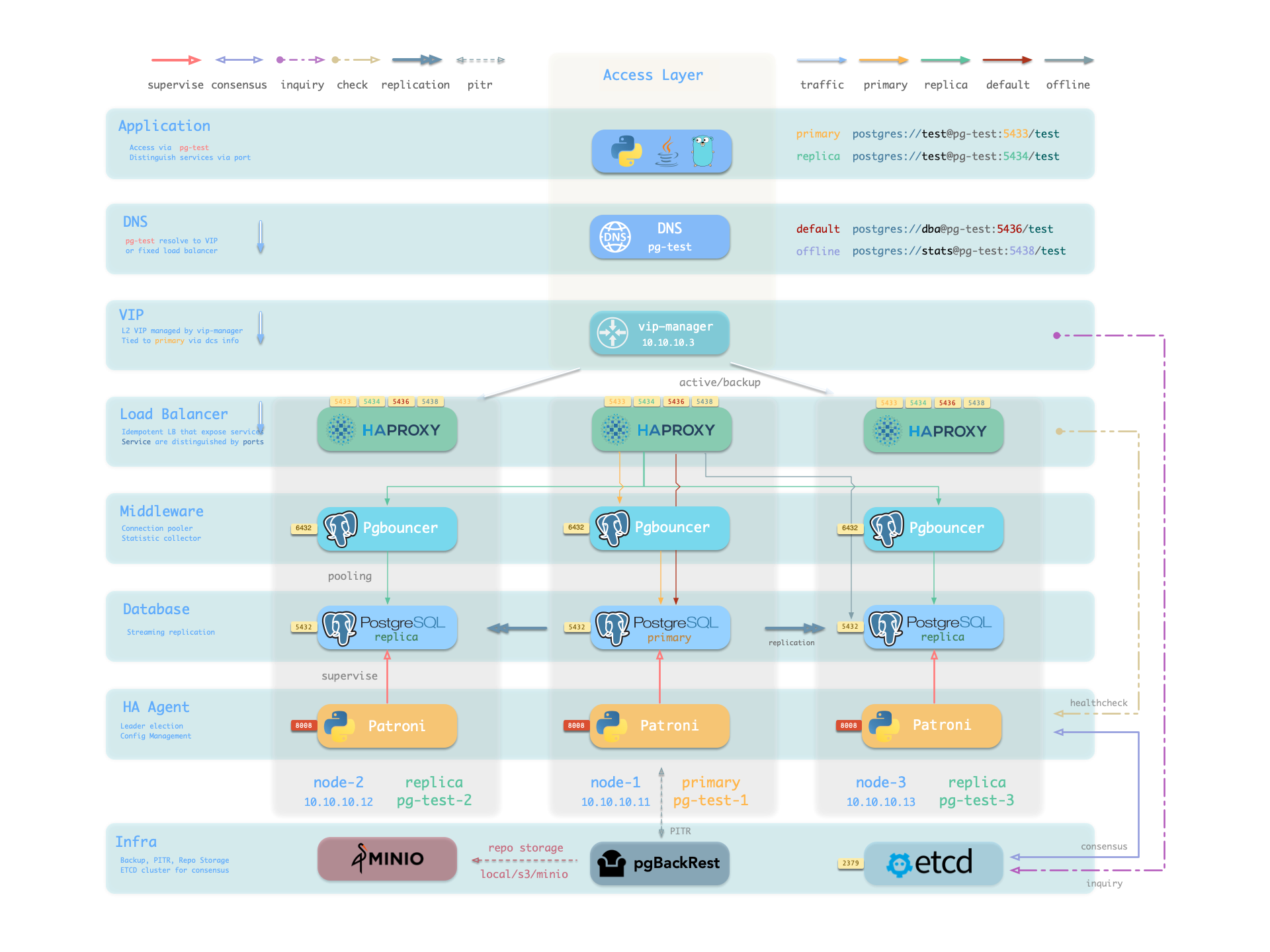
Pigsty PostgreSQL clusters include HA through Patroni, Etcd, and HAProxy.
A cluster with two or more instances gains automatic HA without extra configuration. A surviving instance can provide the complete database service. Clients can connect through any cluster node without tracking primary-replica changes.
Default norm mode targets RTO below 45 seconds. With asynchronous replication, pg_rpo=1MiB limits sampled lag for failover candidates. It does not bound actual data loss. Strict synchronous mode with crit.yml gives acknowledged transactions RPO = 0 during failover. Configure these settings for your hardware and reliability requirements.
Built-in HAProxy load balancers switch traffic automatically. Clients can use DNS, VIP, LVS, and other access methods. Failover and switchover cause brief interruptions but require no connection-string changes or application restarts. These short maintenance windows support sequential cluster maintenance and upgrades without application coordination. Automatic recovery lets staff defer hardware repairs until the next day.
Large organizations and core institutions have run Pigsty in production for extended periods. The largest deployment has 25K CPU cores and more than 220 PostgreSQL instances. Each large instance uses 64 cores, 512GB memory, and 3TB NVMe SSD storage. Over five years, this deployment maintained more than 99.999% availability despite dozens of hardware failures and other incidents.
What problems does High Availability solve?
- Improve availability in the data security C/IA model: RPO ≈ 0 and RTO < 45s.
- Perform sequential maintenance with short maintenance windows.
- Recover automatically from hardware failures without immediate staff intervention.
- Use replicas for read-only requests to reduce primary load and use available resources.
What are the costs of High Availability?
- Infrastructure: HA needs DCS, such as etcd, zk, or consul, for consensus.
- Minimum deployment: Meaningful HA requires at least three nodes.
- Resources: Each replica consumes more resources, although this is usually manageable.
- Complexity: Backup costs and operational complexity increase substantially, requiring management tools.
Limitations of High Availability
Streaming replicas receive changes in real time, including accidental or defective changes such as DROP TABLE and DELETE. HA therefore cannot recover data lost through human error or software defects. Use delayed clusters or PITR with earlier base backups and archived WAL.
| Configuration Strategy | RTO | RPO |
|---|---|---|
| Standalone + Nothing | Data permanently lost, unrecoverable | All data lost |
| Standalone + Base Backup | Depends on backup size and bandwidth (hours) | Lose data since last backup (hours to days) |
| Standalone + Base Backup + WAL Archive | Depends on backup size and bandwidth (hours) | Lose unarchived data (tens of MB) |
| Primary-Replica + Manual Failover | ~10 minutes | Lose data in replication lag (~100KB) |
| Primary-Replica + Auto Failover | Within 1 minute | Lose data in replication lag (~100KB) |
| Primary-Replica + Auto Failover + Sync Commit | Within 1 minute | No data loss |
How It Works
The HA components work together as follows:
- PostgreSQL uses standard streaming replication to build physical replicas; replicas take over when the primary fails.
- Patroni manages PostgreSQL server processes and handles high availability matters.
- Etcd provides distributed configuration storage (DCS) capability and is used for leader election after failures.
- Patroni relies on Etcd to reach cluster leader consensus and provides health check interfaces externally.
- HAProxy exposes cluster services externally and uses Patroni health check interfaces to automatically distribute traffic to healthy nodes.
- vip-manager provides an optional Layer 2 VIP, retrieves leader information from Etcd, and binds the VIP to the node where the cluster primary resides.
Primary failure triggers an election. The healthiest replica, with the highest LSN and least potential data loss, becomes primary. Read/write traffic then moves to it. From failure until promotion, writes block or fail. This write service interruption typically lasts 15–30 seconds and usually remains below 1 minute.
After a replica fails, read-only traffic moves to other replicas. If all replicas fail, the primary handles it. Queries running on the failed replica abort because their connections reset. Other available replicas immediately take over read-only service.
Patroni and Etcd detect failures together. The leader holds a lease and must renew it before its TTL expires. Default norm mode uses 30 seconds. Expiration triggers Failover and a new election.
Use Switchover to change primary without a failure. Writes experience a brief interruption before routing to the new primary. Use this for sequential server maintenance or upgrades.
1 - RPO Trade-offs
RPO (Recovery Point Objective) defines the maximum amount of data loss allowed when the primary fails.
Critical data, such as financial transactions, typically requires RPO = 0: no data loss.
Stricter RPO targets increase write latency and reduce throughput. Replica failure can also make the primary unavailable. Some workloads accept limited data loss for higher performance and availability.
Trade-offs
Asynchronous replicas normally lag behind the primary by about 10KB–100KB or 100µs–10ms, depending on network and throughput. At primary failure, a replica might not have received the latest data. Promotion can lose those unreplicated changes.
pg_rpo sets Patroni maximum_lag_on_failover. The default is 1048576 (1MiB). This is a sampled candidate-lag threshold. It does not set a hard bound on actual data loss.
After primary failure, Pigsty can promote a replica whose lag is within the threshold. If every replica exceeds it, Pigsty refuses [automatic failover] to avoid data loss. An operator must choose between waiting for primary recovery, which might never occur, and accepting loss through forced promotion.
Patroni does not sample primary WAL position continuously. Worst-case asynchronous loss can include WAL from the latest ttl window. On average, sampling adds roughly loop_wait/2 of WAL. Account for write rate when setting the threshold. A higher threshold allows more candidates and increases the chance of automatic failover.
Set pg_rpo = 0 to enable synchronous replication. The primary acknowledges writes only after at least one replica persists them. This removes replication lag for acknowledged writes, but increases latency and reduces throughput.
flowchart LR
    A([Primary Failure]) --> B{Synchronous<br/>Replication?}

    B -->|No| C{Lag < RPO?}
    B -->|Yes| D{Sync Replica<br/>Available?}

    C -->|Yes| E[Lossy Auto Failover<br/>Sampled candidate lag is within threshold]
    C -->|No| F[Refuse Auto Failover<br/>Wait for Primary Recovery<br/>or Manual Intervention]

    D -->|Yes| G[Lossless Auto Failover<br/>RPO = 0]
    D -->|No| H{Strict Mode?}

    H -->|No| C
    H -->|Yes| F

    style A fill:#dc3545,stroke:#b02a37,color:#fff
    style E fill:#F0AD4E,stroke:#146c43,color:#fff
    style G fill:#198754,stroke:#146c43,color:#fff
    style F fill:#BE002F,stroke:#565e64,color:#fff
Protection Modes
Pigsty offers three protection modes for different RPO requirements. They resemble Oracle Data Guard protection modes.
- Default asynchronous mode: Commit after local WAL persistence without waiting for replicas. Replica failures do not affect the primary.
- Primary failure can lose unsent or unreceived WAL. The 1MiB default sampled candidate threshold does not bound actual loss.
- Use for performance-sensitive workloads that tolerate limited failure-related data loss.
- Set
pg_rpo = 0to enablesynchronous_mode: true. - Normally, wait for at least one replica acknowledgement to prevent data loss. If all synchronous replicas fail, automatically switch to asynchronous operation.
- This balances data protection and availability. It is recommended for critical production workloads.
- Use
crit.ymlto enablesynchronous_mode: trueandsynchronous_mode_strict: true. - A transaction must persist on at least one replica before success. If all synchronous replicas fail, the primary refuses writes.
- Use for financial transactions, medical records, and other workloads with very strict integrity requirements.
| Name | Maximum Performance | Maximum Availability | Maximum Protection |
|---|---|---|---|
| Replication | Asynchronous | Synchronous | Strict Synchronous |
| Data Loss | Possible (replication lag) | Zero normally, minor when degraded | Zero |
| Write Latency | Lowest | Medium (+1 network RTT) | Medium (+1 network RTT) |
| Throughput | Highest | Reduced | Reduced |
| Replica Failure Impact | None | Auto degrade, service continues | Primary stops writes |
| RPO | Possible loss; 1MiB default candidate threshold | = 0 normally / possible loss after degradation | = 0 |
| Use Case | Typical business, performance first | Critical business, safety first | Financial core, compliance first |
| Configuration | Default config | pg_rpo = 0 | pg_conf: crit.yml |
Implementation
These modes use two Patroni parameters: synchronous_mode and synchronous_mode_strict.
synchronous_modeenables synchronous replication. When enabled,synchronous_mode_strictcontrols strict behavior.synchronous_mode_strict = falseis the default. If replicas fail, allow asynchronous operation so the primary continues service: Maximum Availability.synchronous_mode_strict = trueprevents asynchronous fallback. The primary stops writes until a synchronous replica recovers: Maximum Protection.
| Mode | synchronous_mode | synchronous_mode_strict | Replication Mode | Replica Failure Behavior |
|---|---|---|---|---|
| Max Performance | false | - | Async | No impact |
| Max Availability | true | false | Synchronous | Auto degrade to async |
| Max Protection | true | true | Strict Synchronous | Primary refuses writes |
Set pg_rpo to 0 to enable synchronous_mode and Maximum Availability. Select pg_conf = crit.yml to enable synchronous_mode_strict and Maximum Protection. You can also enable watchdog to fence a frozen primary node or Patroni process instead of degrading. This provides behavior equivalent to Oracle Maximum Protection.
You can configure Patroni directly. Consult Patroni and PostgreSQL documentation for stronger protection options:
- Configure the synchronous replica list. Add synchronous replicas for greater disaster tolerance, use quorum commit, or require acknowledgements from all replicas.
- Set
synchronous_committo'remote_apply'for consistent primary/replica reads and writes. Oracle Maximum Protection corresponds toremote_write.
Recommendations
Maximum Performance is the default asynchronous mode and suits most workloads. It accepts some failure-related loss for higher throughput and availability. pg_rpo sets sampled candidate lag. Actual worst-case loss also depends on write rate, ttl, and sampling time.
Maximum Availability suits high-integrity workloads. Acknowledged transactions are protected while a synchronous replica is healthy. If all synchronous replicas fail, the cluster can switch to asynchronous operation. At least two PostgreSQL nodes are required: one primary and one replica. Set pg_rpo to 0.
Maximum Protection suits financial transactions, medical records, and other workloads requiring strict integrity. Use at least three nodes: one primary and two replicas. With only two nodes, replica failure stops primary writes and reduces service availability. With three, the primary can continue after one replica fails.
2 - Failure Model
Patroni failures have 10 categories by failure target. Detection paths group them into five categories, described here.
| # | Failure Scenario | Description | Final Path |
|---|---|---|---|
| 1 | PG process crash | crash, OOM killed | Active Detection |
| 2 | PG connection refused | max_connections | Active Detection |
| 3 | PG zombie | Process alive but unresponsive | Active Detection (timeout) |
| 4 | Patroni process crash | kill -9, OOM | Passive Detection |
| 5 | Patroni zombie | Process alive but stuck | Watchdog |
| 6 | Node down | Power outage, hardware failure | Passive Detection |
| 7 | Node zombie | IO hang, CPU starvation | Watchdog |
| 8 | Primary ↔ DCS network failure | Firewall, switch failure | Network Partition |
| 9 | Storage failure | Disk failure, disk full, mount failure | Active Detection or Watchdog |
| 10 | Manual switchover | Switchover/Failover | Manual Trigger |
For RTO calculations, all failures follow two paths. This section calculates their minimum, maximum, and average recovery times.
- Passive election triggered after Patroni loses contact
- Patroni actively detects failure and triggers switchover
flowchart LR
    A([Primary Failure]) --> B{Patroni<br/>Detected?}

    B -->|PG Crash| C[Attempt Local Restart]
    B -->|Node Down| D[Wait TTL Expiration]

    C -->|Success| E([Local Recovery])
    C -->|Fail/Timeout| F[Release Leader Lock]

    D --> F
    F --> G[Replica Election]
    G --> H[Execute Promote]
    H --> I[HAProxy Detects]
    I --> J([Service Restored])

    style A fill:#dc3545,stroke:#b02a37,color:#fff
    style E fill:#198754,stroke:#146c43,color:#fff
    style J fill:#198754,stroke:#146c43,color:#fff
2.1 - Model of Patroni Passive Failure
infographic list-row-simple-horizontal-arrow
data

  desc Lease Expiration Stages
  items
    - label Lease Expiration
    - label Replica Detect
    - label Elect & Promote
    - label Haproxy Up
theme light
  palette antv
RTO Timeline
tooltip: { trigger: axis, axisPointer: { type: shadow }, formatter: $fn:fmt }
legend: { top: 0, itemGap: 12, data: [Lease Expiration, Replica Detection, Lock Contest & Promote, Health Check] }
grid: { left: 64, right: 24, bottom: 32, top: 40 }
xAxis: { type: value, name: Seconds, nameLocation: end, max: 160, axisLine: { show: true }, axisTick: { show: true }, splitLine: { show: true, lineStyle: { type: dashed, opacity: 0.5 } }, minorTick: { show: true, splitNumber: 5 }, minorSplitLine: { show: true, lineStyle: { type: dotted, opacity: 0.2 } } }
yAxis: { type: category, axisLine: { show: true }, axisTick: { show: true }, splitLine: { show: false }, axisLabel: { fontSize: 10, fontFamily: monospace }, data: [wide-max, wide-avg, wide-min, "", safe-max, safe-avg, safe-min, "", norm-max, norm-avg, norm-min, "", fast-max, fast-avg, fast-min] }
series:
  - { name: Lease Expire, type: bar, stack: main, barWidth: 20, z: 2, emphasis: { focus: series }, itemStyle: { color: "#e15759" }, data: [120, 110, 100, "-", 60, 55, 50, "-", 30, 27, 25, "-", 20, 17, 15] }
  - { name: Replica Detect, type: bar, stack: main, z: 2, emphasis: { focus: series }, itemStyle: { color: "#edc949" }, data: [20, 10, 0, "-", 10, 5, 0, "-", 5, 3, 0, "-", 5, 3, 0] }
  - { name: Elect & Promote, type: bar, stack: main, z: 2, emphasis: { focus: series }, itemStyle: { color: "#59a14f" }, data: [2, 1, 0, "-", 2, 1, 0, "-", 2, 1, 0, "-", 2, 1, 0] }
  - { name: HAProxy Check, type: bar, stack: main, z: 2, emphasis: { focus: series }, itemStyle: { color: "#4e79a7" }, data: [8, 6, 4, "-", 6, 5, 3, "-", 4, 3, 2, "-", 2, 2, 1] }
  - { name: Total RTO, type: bar, barGap: "-100%", barWidth: 20, z: 1, itemStyle: { color: "#888", opacity: 0 }, emphasis: { itemStyle: { opacity: 0 } }, data: [150, 127, 104, "-", 78, 66, 53, "-", 41, 34, 27, "-", 29, 23, 16] }
  - { name: RTO Budget, type: bar, barGap: "-100%", barWidth: 20, z: 0, itemStyle: { color: "rgba(0,0,0,0.08)" }, emphasis: { itemStyle: { color: "rgba(0,0,0,0.12)" } }, data: [150, 150, 150, "-", 90, 90, 90, "-", 45, 45, 45, "-", 30, 30, 30] }
Failure Model
| Phase | Best | Worst | Average | Description |
|---|---|---|---|---|
| Lease Expiration | ttl - loop | ttl | ttl - loop/2 | Best: crash just before refresh Worst: crash right after refresh |
| Replica Detect | 0 | loop | loop / 2 | Best: exactly at check point Worst: just missed check point |
| Election Promote | 0 | 2 | 1 | Best: direct lock and promote Worst: API timeout + Promote |
| HAProxy Check | (rise-1) × fastinter | (rise-1) × fastinter + inter | (rise-1) × fastinter + inter/2 | Best: state change before check Worst: state change right after check |
Key Difference Between Passive and Active Failover:
| Scenario | Patroni Status | Lease Handling | Primary Wait Time |
|---|---|---|---|
| Active Failover (PG crash) | Alive, healthy | Actively tries to restart PG, releases lease on timeout | primary_start_timeout |
| Passive Failover (Node crash) | Dies with node | Cannot actively release, must wait for TTL expiration | ttl |
During passive failure, Patroni stops with the node and cannot release the Leader Key. An election waits until the DCS lease TTL expires.
Timeline Analysis
Phase 1: Lease Expiration
Primary Patroni renews the Leader Key each loop_wait cycle and resets its TTL.
- Best case: Failure occurs just before lease refresh (elapsed
loopsince last refresh), remaining TTL =ttl - loop - Worst case: Failure occurs right after lease refresh, must wait full
ttl - Average case:
ttl - loop/2
Phase 2: Replica Detection
Each loop_wait cycle, replicas check the DCS Leader Key.
- Best case: Replica happens to wake when lease expires, wait
0 - Worst case: Replica just entered sleep when lease expires, wait
loop - Average case:
loop/2
Phase 3: Lock Contest & Promote
After detecting Leader Key expiration, replicas begin an election. The winner acquires the key and runs pg_ctl promote.
- Query replica replication positions in parallel through REST APIs. Typical response time is 10ms; the hardcoded timeout is 2s.
- Compare WAL positions and select the best candidate. Replicas attempt atomic CAS creation of the Leader Key.
- Run
pg_ctl promote. Its duration is usually negligible.
- Best case: Single replica or immediate lock acquisition and promotion, constant overhead
0.1s - Worst case: DCS API call timeout:
2s - Average case:
1sconstant overhead
Phase 4: Health Check
HAProxy requires rise consecutive successful checks before routing traffic to the new primary.
- Best case: New primary promoted just before check,
(rise-1) × fastinter - Worst case: New primary promoted right after check,
(rise-1) × fastinter + inter - Average case:
(rise-1) × fastinter + inter/2
RTO Formula
Add the phase durations to calculate total RTO:
Best Case
Average Case
Worst Case
Model Calculation
Apply the four RTO presets to these formulas:
Four Mode Calculation Results (unit: seconds, format: min / avg / max)
| Phase | fast | norm | safe | wide |
|---|---|---|---|---|
| Lease Expiration | 15 / 17 / 20 | 25 / 27 / 30 | 50 / 55 / 60 | 100 / 110 / 120 |
| Replica Detection | 0 / 3 / 5 | 0 / 3 / 5 | 0 / 5 / 10 | 0 / 10 / 20 |
| Lock Contest & Promote | 0 / 1 / 2 | 0 / 1 / 2 | 0 / 1 / 2 | 0 / 1 / 2 |
| Health Check | 1 / 2 / 2 | 2 / 3 / 4 | 3 / 5 / 6 | 4 / 6 / 8 |
| Total | 16 / 23 / 29 | 27 / 34 / 41 | 53 / 66 / 78 | 104 / 127 / 150 |
2.2 - Model of Patroni Active Failure
infographic list-row-simple-horizontal-arrow
data
  desc When Patroni is healthy but PostgreSQL crashes
  items
    - label Crash Found
    - label Restart Timeout
    - label Replica Detect
    - label Elect Promote
    - label HAProxy Check
theme light
  palette antv
RTO Timeline
tooltip: { trigger: axis, axisPointer: { type: shadow }, formatter: $fn:fmt }
legend: { top: 0, itemGap: 12, data: [ Crash Found, Restart Timeout, Replica Detection, Elect Promote, HAProxy Check] }
grid: { left: 64, right: 24, bottom: 32, top: 40 }
xAxis: { type: value, name: Seconds, nameLocation: end, max: 160, axisLine: { show: true }, axisTick: { show: true }, splitLine: { show: true, lineStyle: { type: dashed, opacity: 0.5 } }, minorTick: { show: true, splitNumber: 5 }, minorSplitLine: { show: true, lineStyle: { type: dotted, opacity: 0.2 } } }
yAxis: { type: category, axisLine: { show: true }, axisTick: { show: true }, splitLine: { show: false }, axisLabel: { fontSize: 10, fontFamily: monospace }, data: [wide-max, wide-avg, wide-min, "", safe-max, safe-avg, safe-min, "", norm-max, norm-avg, norm-min, "", fast-max, fast-avg, fast-min] }
series:
  - { name: Crash Found, type: bar, stack: main, barWidth: 20, z: 2, emphasis: { focus: series }, itemStyle: { color: "#b07aa1" }, data: [20, 10, 0, "-", 10, 5, 0, "-", 5, 3, 0, "-", 5, 3, 0] }
  - { name: Restart Timeout, type: bar, stack: main, z: 2, emphasis: { focus: series }, itemStyle: { color: "#f28e2c" }, data: [95, 95, 0, "-", 45, 45, 0, "-", 25, 25, 0, "-", 15, 15, 0] }
  - { name: Replica Detect, type: bar, stack: main, z: 2, emphasis: { focus: series }, itemStyle: { color: "#edc949" }, data: [20, 10, 0, "-", 10, 5, 0, "-", 5, 3, 0, "-", 5, 3, 0] }
  - { name: Elect Promote, type: bar, stack: main, z: 2, emphasis: { focus: series }, itemStyle: { color: "#59a14f" }, data: [2, 1, 0, "-", 2, 1, 0, "-", 2, 1, 0, "-", 2, 1, 0] }
  - { name: HAProxy Check, type: bar, stack: main, z: 2, emphasis: { focus: series }, itemStyle: { color: "#4e79a7" }, data: [8, 6, 4, "-", 6, 5, 3, "-", 4, 3, 2, "-", 2, 2, 1] }
  - { name: RTO Total, type: bar, barGap: "-100%", barWidth: 20, z: 1, itemStyle: { color: "#888", opacity: 0 }, emphasis: { itemStyle: { opacity: 0 } }, data: [145, 122, 4, "-", 73, 61, 3, "-", 41, 35, 2, "-", 29, 24, 1] }
  - { name: RTO Budget, type: bar, barGap: "-100%", barWidth: 20, z: 0, itemStyle: { color: "rgba(0,0,0,0.08)" }, emphasis: { itemStyle: { color: "rgba(0,0,0,0.12)" } }, data: [150, 150, 150, "-", 90, 90, 90, "-", 45, 45, 45, "-", 30, 30, 30] }
Failure Model
| Item | Best | Worst | Average | Description |
|---|---|---|---|---|
| Crash Found | 0 | loop | loop/2 | Best: PG crashes right before check Worst: PG crashes right after check |
| Restart Timeout | 0 | start | start | Best: PG recovers instantly Worst: Wait full start timeout before releasing lease |
| Replica Detect | 0 | loop | loop/2 | Best: Right at check point Worst: Just missed check point |
| Elect Promote | 0 | 2 | 1 | Best: Acquire lock and promote directly Worst: API timeout + Promote |
| HAProxy Check | (rise-1) × fastinter | (rise-1) × fastinter + inter | (rise-1) × fastinter + inter/2 | Best: State changes before check Worst: State changes right after check |
Key Difference Between Active and Passive Failure:
| Scenario | Patroni Status | Lease Handling | Main Wait Time |
|---|---|---|---|
| Active Failure (PG crash) | Alive, healthy | Actively tries to restart PG, releases lease after timeout | primary_start_timeout |
| Passive Failure (node down) | Dies with node | Cannot actively release, must wait for TTL expiry | ttl |
During active failure, Patroni remains available. It detects a PostgreSQL crash and attempts a restart. If restart succeeds, service recovers locally. If recovery times out, Patroni releases the Leader Key and triggers an election.
Timing Analysis
Phase 1: Failure Detection
Each loop_wait cycle, Patroni checks PostgreSQL through pg_isready or a process check.
- Best case: PG crashes right before Patroni check, detected immediately, wait
0 - Worst case: PG crashes right after check, wait for next cycle, wait
loop - Average case:
loop/2
Phase 2: Restart Timeout
After detecting a crash, Patroni attempts to restart PostgreSQL. There are two possible results:
Path A: Self-healing Success (Best case)
- PostgreSQL restarts and service recovers.
- No failover occurs, so RTO is very short.
- Wait:
0relative to the failover path.
Path B: Failover Required (Average/Worst case)
- PostgreSQL does not recover before
primary_start_timeout. - Patroni releases the Leader Key.
- Wait:
start.
Note: The average assumes failover is necessary. A quick local restart can substantially reduce RTO.
Phase 3: Standby Detection
Standbys check the DCS Leader Key each loop_wait cycle. After the primary releases it, they detect its absence and begin an election.
- Best case: Standby wakes right when lease is released, wait
0 - Worst case: Standby just went to sleep when lease released, wait
loop - Average case:
loop/2
Phase 4: Lock & Promote
When the Leader Key is absent, standbys begin an election. The winner acquires the key and runs pg_ctl promote.
- Query standby replication positions in parallel through REST APIs. Typical response time is 10ms; the hardcoded timeout is 2s.
- Compare WAL positions and select the best candidate. Standbys attempt atomic CAS creation of the Leader Key.
- Run
pg_ctl promote. Its duration is usually negligible.
- Best case: Single standby or direct lock acquisition and promote, constant overhead
0.1s - Worst case: DCS API call timeout:
2s - Average case:
1sconstant overhead
Phase 5: Health Check
HAProxy requires rise consecutive successful checks before it marks the new primary healthy.
- Best case: New primary comes up right at check time,
(rise-1) × fastinter - Worst case: New primary comes up right after check,
(rise-1) × fastinter + inter - Average case:
(rise-1) × fastinter + inter/2
RTO Formula
Add the phase durations to calculate total RTO:
Best Case (PG instant self-healing)
Average Case (Failover required)
Worst Case
Model Calculation
Apply the four RTO presets to these formulas:
Calculation Results for Four Modes (unit: seconds, format: min / avg / max)
| Phase | fast | norm | safe | wide |
|---|---|---|---|---|
| Failure Detection | 0 / 3 / 5 | 0 / 3 / 5 | 0 / 5 / 10 | 0 / 10 / 20 |
| Restart Timeout | 0 / 15 / 15 | 0 / 25 / 25 | 0 / 45 / 45 | 0 / 95 / 95 |
| Standby Detection | 0 / 3 / 5 | 0 / 3 / 5 | 0 / 5 / 10 | 0 / 10 / 20 |
| Lock & Promote | 0 / 1 / 2 | 0 / 1 / 2 | 0 / 1 / 2 | 0 / 1 / 2 |
| Health Check | 1 / 2 / 2 | 2 / 3 / 4 | 3 / 5 / 6 | 4 / 6 / 8 |
| Total | 1 / 24 / 29 | 2 / 35 / 41 | 3 / 61 / 73 | 4 / 122 / 145 |
Comparison with Passive Failure
| Phase | Active Failure (PG crash) | Passive Failure (node down) | Description |
|---|---|---|---|
| Detection Mechanism | Patroni active detection | TTL passive expiry | Active detection discovers failure faster |
| Core Wait | start | ttl | start is usually less than ttl, but requires additional failure detection time |
| Lease Handling | Active release | Passive expiry | Active release is more timely |
| Self-healing Possible | Yes | No | Active detection can attempt local recovery |
RTO Comparison (Average case):
| Mode | Active Failure (PG crash) | Passive Failure (node down) | Difference |
|---|---|---|---|
| fast | 24s | 23s | +1s |
| norm | 35s | 34s | +1s |
| safe | 61s | 66s | -5s |
| wide | 122s | 127s | -5s |
Analysis: In
fastandnorm, active failures wait forprimary_start_timeout(start), making RTO slightly longer than for passive failures. Insafeandwide,start < ttl - loop, so active recovery is faster. A successful local restart can make the best-case active RTO much shorter.
2.3 - Network Partition
infographic list-row-simple-horizontal-arrow
data
  title Network Partition Failover Flow
  desc Primary partitioned from DCS, Patroni proactively demotes to prevent split-brain, waits for TTL expiration before switchover
  items
    - label Primary Demote
      desc Patroni demotes PG after retry timeout
      icon mingcute/shield-fill
    - label Lease Expiration
      desc Leader Key TTL expires
      icon mingcute/close-circle-fill
    - label Replica Detection
      desc Replica detects lease expiration, starts election
      icon mingcute/key-2-fill
    - label Lock & Promote
      desc Replica acquires lock and promotes to new primary
      icon mingcute/radar-fill
    - label Health Check
      desc HAProxy detects new primary online
      icon mingcute/arrow-up-circle-fill
theme light
  palette antv
RTO Timeline
tooltip: { trigger: axis, axisPointer: { type: shadow }, formatter: $fn:fmt }
legend: { top: 0, itemGap: 12, data: [Primary Demote, Lease Expiration, Replica Detection, Lock & Promote, Health Check] }
grid: { left: 64, right: 24, bottom: 32, top: 40 }
xAxis: { type: value, name: sec, nameLocation: end, max: 160, axisLine: { show: true }, axisTick: { show: true }, splitLine: { show: true, lineStyle: { type: dashed, opacity: 0.5 } }, minorTick: { show: true, splitNumber: 5 }, minorSplitLine: { show: true, lineStyle: { type: dotted, opacity: 0.2 } } }
yAxis: { type: category, axisLine: { show: true }, axisTick: { show: true }, splitLine: { show: false }, axisLabel: { fontSize: 10, fontFamily: monospace }, data: [wide-max, wide-avg, wide-min, "", safe-max, safe-avg, safe-min, "", norm-max, norm-avg, norm-min, "", fast-max, fast-avg, fast-min] }
series:
  - { name: Primary Demote, type: bar, stack: main, barWidth: 20, z: 2, emphasis: { focus: series }, itemStyle: { color: "#76b7b2" }, data: [50, 40, 30, "-", 30, 25, 20, "-", 15, 13, 10, "-", 10, 8, 5] }
  - { name: Lease Expiration, type: bar, stack: main, z: 2, emphasis: { focus: series }, itemStyle: { color: "#e15759" }, data: [70, 70, 70, "-", 30, 30, 30, "-", 15, 15, 15, "-", 10, 10, 10] }
  - { name: Replica Detection, type: bar, stack: main, z: 2, emphasis: { focus: series }, itemStyle: { color: "#edc949" }, data: [20, 10, 0, "-", 10, 5, 0, "-", 5, 3, 0, "-", 5, 3, 0] }
  - { name: Lock & Promote, type: bar, stack: main, z: 2, emphasis: { focus: series }, itemStyle: { color: "#59a14f" }, data: [2, 1, 0, "-", 2, 1, 0, "-", 2, 1, 0, "-", 2, 1, 0] }
  - { name: Health Check, type: bar, stack: main, z: 2, emphasis: { focus: series }, itemStyle: { color: "#4e79a7" }, data: [8, 6, 4, "-", 6, 5, 3, "-", 4, 3, 2, "-", 2, 2, 1] }
  - { name: RTO Total, type: bar, barGap: "-100%", barWidth: 20, z: 1, itemStyle: { color: "#888", opacity: 0 }, emphasis: { itemStyle: { opacity: 0 } }, data: [150, 127, 104, "-", 78, 66, 53, "-", 41, 34, 27, "-", 29, 23, 16] }
  - { name: RTO Budget, type: bar, barGap: "-100%", barWidth: 20, z: 0, itemStyle: { color: "rgba(0,0,0,0.08)" }, emphasis: { itemStyle: { color: "rgba(0,0,0,0.12)" } }, data: [150, 150, 150, "-", 90, 90, 90, "-", 45, 45, 45, "-", 30, 30, 30] }
Failure Model
| Phase | Best | Worst | Average | Notes |
|---|---|---|---|---|
| Demote | retry | loop + retry | loop/2 + retry | Patroni retries after detecting partition, demotes after timeout |
| Lease Expiration | ttl - loop - retry | ttl - loop - retry | ttl - loop - retry | Remaining TTL time after demotion (approximately constant) |
| Replica Detection | 0 | loop | loop/2 | Best: Right at detection point Worst: Just missed detection |
| Lock & Promote | 0 | 2 | 1 | Best: Direct lock and promote Worst: API timeout + Promote |
| Health Check | (rise-1) × fastinter | (rise-1) × fastinter + inter | (rise-1) × fastinter + inter/2 | Best: State changes before check Worst: State changes right after check |
Key difference between network partition and node crash:
| Scenario | Patroni State | PostgreSQL State | Lease Handling | Split-brain Risk |
|---|---|---|---|---|
| Node Crash (Expire) | Dies with node | Completely unavailable | Passive wait for TTL expiration | None |
| Network Partition (This scenario) | Alive but cannot access DCS | May still be running (needs active demotion) | Passive wait for TTL expiration | Yes, needs protection |
During a network partition, the primary can continue accepting writes, creating split-brain risk. If Patroni cannot renew the Leader Key, it actively demotes PostgreSQL to read-only or shuts it down.
Timeline Analysis
Phase 1: Primary Demotion
If a network partition blocks DCS access, primary Patroni retries its failed Leader Key renewal.
- Detection: The next
loop_waitcycle detects the partition. - Retry: Patroni retries DCS operations during
retry_timeout. - Demotion: After retries time out, Patroni demotes PostgreSQL to prevent split brain.
Design constraint: loop_wait + 2 × retry_timeout ≤ ttl lets the primary demote before the lease expires.
Phase 2: Lease Expiration
After demotion, the Leader Key remains in DCS until its TTL expires.
After demotion, the cluster waits for the remaining TTL. Partition detection and remaining TTL are negatively correlated in this model. An earlier partition means slower detection but more remaining TTL. Their sum is constant:
Note: Demotion plus lease expiration takes approximately ttl, as with an expired lease after node failure.
Phase 3: Replica Detection
Each loop_wait cycle, a replica checks the DCS Leader Key.
- Best case: Replica wakes right when lease expires, wait
0 - Worst case: Replica just entered sleep when lease expires, wait
loop - Average case:
loop/2
Phase 4: Lock & Promote
After detecting Leader Key expiration, replicas begin an election.
- Best case: Single replica or directly acquires lock and promotes,
≈ 0 - Worst case: DCS API call timeout,
2s - Average case:
1s
Phase 5: Health Check
HAProxy requires rise consecutive successful checks before it marks the new primary healthy.
- Best case:
(rise-1) × fastinter - Worst case:
(rise-1) × fastinter + inter - Average case:
(rise-1) × fastinter + inter/2
RTO Formula
Add the phase durations to calculate total RTO.
Demotion plus lease expiration is approximately ttl. Thus, the network-partition RTO formula matches the expired-lease failure formula:
Best Case
Average Case
Worst Case
Model Calculation
Apply the four RTO presets to these formulas:
Patroni constraint validation (loop + 2×retry ≤ ttl):
| Mode | loop | retry | TTL | loop + 2×retry | Meets constraint? |
|---|---|---|---|---|---|
| fast | 5 | 5 | 20s | 15s | ✓ Safe |
| norm | 5 | 10 | 30s | 25s | ✓ Safe |
| safe | 10 | 20 | 60s | 50s | ✓ Safe |
| wide | 20 | 30 | 120s | 80s | ✓ Safe |
Four mode calculation results (seconds, format: min / avg / max)
| Phase | fast | norm | safe | wide |
|---|---|---|---|---|
| Primary Demote | 5 / 8 / 10 | 10 / 13 / 15 | 20 / 25 / 30 | 30 / 40 / 50 |
| Lease Expiration | 10 | 15 | 30 | 70 |
| Replica Detection | 0 / 3 / 5 | 0 / 3 / 5 | 0 / 5 / 10 | 0 / 10 / 20 |
| Lock & Promote | 0 / 1 / 2 | 0 / 1 / 2 | 0 / 1 / 2 | 0 / 1 / 2 |
| Health Check | 1 / 2 / 2 | 2 / 3 / 4 | 3 / 5 / 6 | 4 / 6 / 8 |
| Total | 16 / 23 / 29 | 27 / 34 / 41 | 53 / 66 / 78 | 104 / 127 / 150 |
Network partitions and node crashes have the same RTO in this model because both wait for TTL expiration.
Split-brain Protection
Split brain is the main partition risk: the old primary might still accept writes. Patroni provides these protections:
1. Primary Self-Demotion
If Patroni cannot renew the Leader Key, it actively demotes PostgreSQL.
2. Linux Watchdog
If Patroni hangs and cannot demote PostgreSQL, Linux watchdog forces a system restart.
3. Fencing Mechanism
Configure fencing scripts to isolate the old primary forcibly, for example by disabling its network interface or stopping services.
Special Scenarios
Scenario A: Primary partitioned from DCS, replicas normal
The following is the most common partition scenario and the main subject of this page.
- Primary Patroni cannot refresh Leader Key → Active demotion
- Replica normally detects TTL expiration → Elected as new primary
- RTO ≈ Expire failure RTO
Scenario B: Primary normal, replica partitioned from DCS
- Primary normally refreshes Leader Key
- Replica cannot participate in election (but replication can continue)
- No failover triggered, service continues normally
Scenario C: All nodes partitioned from DCS
- Primary demotes, replica cannot elect
- Cluster completely unavailable
- Requires manual intervention to restore DCS connectivity
Comparison with Other Failures
| Failure Type | Primary State | Lease Handling | RTO | Split-brain Risk |
|---|---|---|---|---|
| Expire Failure | Node crash | Passive wait TTL expiration | 16s ~ 150s | None |
| Crash Failure | PG crash, Patroni alive | Release after restart timeout | 1s ~ 111s | None |
| Network Partition | Alive but isolated from DCS | Passive wait TTL expiration | 16s ~ 150s | Yes, needs protection |
| Manual Switchover | Normal or failed | Direct release/acquire | 1s ~ 11s | None |
A network partition has the same RTO as an expired-lease failure, but also needs split-brain protection. The constraint loop_wait + 2 × retry_timeout ≤ ttl is central to that protection.
3 - RTO Trade-offs
RTO (Recovery Time Objective) defines the maximum time required for the system to restore write capability when the primary fails.
Critical transaction systems typically need the shortest practical RTO, often below one minute.
Shorter RTO increases false failover risk. Network jitter can appear to be a failure. Cross-datacenter or cross-region deployments often allow 1–2 minutes to reduce this risk.
Trade-offs
pg_rto controls the failover unavailability limit. Presets fast, norm, safe, and wide support different network and deployment conditions. The default is norm, approximately 45 seconds.
Recovery includes detection, DCS lock expiration, election, promotion, and HAProxy detection of the new primary. Shorter phase timeouts reduce RTO. They also increase sensitivity to network jitter and false failover risk.
Choose a preset that balances recovery speed and false failover risk for your network. Poor networks need longer timeouts. Stable networks can use shorter timeouts.
flowchart LR
    A([Primary Failure]) --> B{Patroni<br/>Detected?}

    B -->|PG Crash| C[Attempt Local Restart]
    B -->|Node Down| D[Wait TTL Expiration]

    C -->|Success| E([Local Recovery])
    C -->|Fail/Timeout| F[Release Leader Lock]

    D --> F
    F --> G[Replica Election]
    G --> H[Execute Promote]
    H --> I[HAProxy Detects]
    I --> J([Service Restored])

    style A fill:#dc3545,stroke:#b02a37,color:#fff
    style E fill:#198754,stroke:#146c43,color:#fff
    style J fill:#198754,stroke:#146c43,color:#fff
Four Modes
Select one of four RTO presets for the network conditions.
| Name | fast | norm | safe | wide |
|---|---|---|---|---|
| Use Case | Same rack | Same datacenter (default) | Same region, cross-DC | Cross-region/continent |
| Network | < 1ms, very stable | 1-5ms, normal | 10-50ms, cross-DC | 100-200ms, public network |
| Target RTO | 30s | 45s | 90s | 150s |
| False Failover Risk | Higher | Medium | Lower | Very Low |
| Configuration | pg_rto: fast | pg_rto: norm | pg_rto: safe | pg_rto: wide |
- Use for stable networks below 1ms latency, such as one rack or switch.
- Average RTO: 14s; worst case: 29s. TTL is 20s; check interval is 5s.
- This needs the best network quality. Jitter can trigger failover, so false failover risk is higher.
- Default mode for normal same-datacenter networks, 1–5ms latency, and reasonable packet loss.
- Average RTO: 21s; worst case: 43s. TTL is 30s, allowing some network variation.
- This balances recovery speed and stability for most production environments.
- Use for same-region or same-area datacenters with 10–50ms latency and occasional jitter.
- Average RTO: 43s; worst case: 91s. TTL is 60s.
- The 60s primary restart wait allows more local recovery time and reduces false failover risk.
- Use across regions or continents with 100–200ms latency and possible public-network packet loss.
- Average RTO: 92s; worst case: 207s. TTL is 120s.
- Slower recovery provides a very low false failover rate for geographic disaster recovery.
RTO Timeline
Patroni HA has two main paths. Active detection finds a PostgreSQL crash and attempts a restart. Passive lease expiration waits for the TTL after node failure, then starts an election.
tooltip: { trigger: axis, axisPointer: { type: shadow }, formatter: $fn:fmt }
legend: { top: 0, itemGap: 10, data: [Lease Expiration, Failure Detection, Restart Timeout, Replica Detection, Lock & Promote, Health Check] }
grid: { left: 110, right: 24, bottom: 32, top: 40 }
xAxis: { type: value, name: Seconds, nameLocation: end, max: 160, axisLine: { show: true }, axisTick: { show: true }, splitLine: { show: true, lineStyle: { type: dashed, opacity: 0.5 } }, minorTick: { show: true, splitNumber: 5 }, minorSplitLine: { show: true, lineStyle: { type: dotted, opacity: 0.2 } } }
yAxis: { type: category, axisLine: { show: true }, axisTick: { show: true }, splitLine: { show: false }, axisLabel: { fontSize: 9, fontFamily: monospace }, data: [wide-passive-max, wide-passive-avg, wide-passive-min, wide-active-max, wide-active-avg, wide-active-min, "", safe-passive-max, safe-passive-avg, safe-passive-min, safe-active-max, safe-active-avg, safe-active-min, "", norm-passive-max, norm-passive-avg, norm-passive-min, norm-active-max, norm-active-avg, norm-active-min, "", fast-passive-max, fast-passive-avg, fast-passive-min, fast-active-max, fast-active-avg, fast-active-min] }
series:
  - { name: Lease Expiration, type: bar, stack: main, barWidth: 16, z: 2, emphasis: { focus: series }, itemStyle: { color: "#e15759" }, data: [120, 110, 100, "-", "-", "-", "-", 60, 55, 50, "-", "-", "-", "-", 30, 27, 25, "-", "-", "-", "-", 20, 17, 15, "-", "-", "-"] }
  - { name: Failure Detection, type: bar, stack: main, z: 2, emphasis: { focus: series }, itemStyle: { color: "#b07aa1" }, data: ["-", "-", "-", 20, 10, 0, "-", "-", "-", "-", 10, 5, 0, "-", "-", "-", "-", 5, 3, 0, "-", "-", "-", "-", 5, 3, 0] }
  - { name: Restart Timeout, type: bar, stack: main, z: 2, emphasis: { focus: series }, itemStyle: { color: "#f28e2c" }, data: ["-", "-", "-", 95, 95, 0, "-", "-", "-", "-", 45, 45, 0, "-", "-", "-", "-", 25, 25, 0, "-", "-", "-", "-", 15, 15, 0] }
  - { name: Replica Detection, type: bar, stack: main, z: 2, emphasis: { focus: series }, itemStyle: { color: "#edc949" }, data: [20, 10, 0, 20, 10, 0, "-", 10, 5, 0, 10, 5, 0, "-", 5, 3, 0, 5, 3, 0, "-", 5, 3, 0, 5, 3, 0] }
  - { name: Lock & Promote, type: bar, stack: main, z: 2, emphasis: { focus: series }, itemStyle: { color: "#59a14f" }, data: [2, 1, 0, 2, 1, 0, "-", 2, 1, 0, 2, 1, 0, "-", 2, 1, 0, 2, 1, 0, "-", 2, 1, 0, 2, 1, 0] }
  - { name: Health Check, type: bar, stack: main, z: 2, emphasis: { focus: series }, itemStyle: { color: "#4e79a7" }, data: [8, 6, 4, 8, 6, 4, "-", 6, 5, 3, 6, 5, 3, "-", 4, 3, 2, 4, 3, 2, "-", 2, 2, 1, 2, 2, 1] }
  - { name: RTO Total, type: bar, barGap: "-100%", barWidth: 16, z: 1, itemStyle: { color: "#888", opacity: 0 }, emphasis: { itemStyle: { opacity: 0 } }, data: [150, 127, 104, 145, 122, 4, "-", 78, 66, 53, 73, 61, 3, "-", 41, 34, 27, 41, 35, 2, "-", 29, 23, 16, 29, 24, 1] }
  - { name: RTO Budget, type: bar, barGap: "-100%", barWidth: 16, z: 0, itemStyle: { color: "rgba(0,0,0,0.08)" }, emphasis: { itemStyle: { color: "rgba(0,0,0,0.12)" } }, data: [150, 150, 150, 150, 150, 150, "-", 90, 90, 90, 90, 90, 90, "-", 45, 45, 45, 45, 45, 45, "-", 30, 30, 30, 30, 30, 30] }
Implementation
Each preset selects values for these 10 Patroni and HAProxy parameters:
| Component | Parameter | fast | norm | safe | wide | Description |
|---|---|---|---|---|---|---|
patroni | ttl | 20 | 30 | 60 | 120 | Leader lock TTL (seconds) |
loop_wait | 5 | 5 | 10 | 20 | HA loop check interval (seconds) | |
retry_timeout | 5 | 10 | 20 | 30 | DCS operation retry timeout (seconds) | |
primary_start_timeout | 15 | 25 | 45 | 95 | Primary restart wait time (seconds) | |
safety_margin | 5 | 5 | 10 | 15 | Watchdog safety margin (seconds) | |
haproxy | inter | 1s | 2s | 3s | 4s | Normal state check interval |
fastinter | 500ms | 1s | 1500ms | 2s | State transition check interval | |
downinter | 1s | 2s | 3s | 4s | DOWN state check interval | |
rise | 3 | 3 | 3 | 3 | Consecutive successes to mark UP | |
fall | 3 | 3 | 3 | 3 | Consecutive failures to mark DOWN |
Patroni Parameters
ttl: Leader lease lifetime. Failure to renew triggers expiration and election. It sets passive detection delay.loop_wait: Main loop interval. Each cycle checks health and synchronizes state.retry_timeout: DCS retry period. After partition-related retries fail, the primary demotes to prevent split brain.primary_start_timeout: Time allowed for local restart after a PostgreSQL crash. On expiration, release the Leader lock and fail over.safety_margin: Watchdog time allowance for restarting the system before split brain can occur.
HAProxy Parameters
inter: Check interval while service state is stable.fastinter: Shorter check interval during state changes.downinter: Check interval for recovery after a service is marked DOWN.rise: Consecutive successes required for UP. A new primary must pass this many checks before receiving traffic.fall: Consecutive failures required for DOWN.
Key Constraint
Patroni constraint: The primary must complete demotion before TTL expiration to prevent split brain.
Data Summary
Recommendations
fast requires latency below 1ms and very low packet loss. Use it only within one rack or switch for strict RTO targets. Test it thoroughly in production before enabling it.
norm is the default for most same-datacenter deployments. This page’s model gives passive and active averages of about 34 and 35 seconds. Its timeout allowance reduces false failovers from jitter.
safe suits same-city datacenters with higher latency or occasional jitter. Longer timeouts reduce false failovers. It is recommended for cross-datacenter recovery.
wide suits high-latency, cross-region or cross-continent networks, including public-network packet loss. It favors stability over speed. Its long timeouts keep false failover rates very low.
| Mode | Target RTO | Passive RTO | Active RTO | Scenario |
|---|---|---|---|---|
fast | 30 | 16 / 23 / 29 | 1 / 24 / 29 | Same switch, high-quality network |
norm | 45 | 27 / 34 / 41 | 2 / 35 / 41 | Default, same DC, standard network |
safe | 90 | 53 / 66 / 78 | 3 / 61 / 73 | Same-city active-active / cross-DC DR |
wide | 150 | 104 / 127 / 150 | 4 / 122 / 145 | Geo-DR / cross-country |
default | 326 | 22 / 34 / 46 | 2 / 314 / 326 | Patroni default params |
Set pg_rto to a preset name to configure Patroni and HAProxy automatically. The template checks pg_rto in pg_rto_plan. A numeric or unknown key falls back to norm. This fallback does not support an RTO expressed as seconds.
Presets come from pg_rto_plan. Override this mapping for a custom RTO strategy.
4 - Service Access
Split read and write operations, route traffic correctly, and deliver PostgreSQL cluster capabilities reliably.
A service exposes database cluster capabilities through a stable interface that hides the underlying cluster details.
Services provide stable production access, especially during HA failover. Personal users usually do not need this abstraction.
Personal Users
Services are mainly for production. Personal users with one node can connect directly through the instance name or IP address.
For example, connect to the default single-node pg-meta.meta database with any of these three users:
Service Overview
Production clusters commonly use primary-replica replication. Exactly one primary accepts writes. Replicas continuously receive its change logs and can serve read-only requests. This reduces primary load for read-heavy workloads. Separate write requests from read-only requests to use this capacity.
Pgbouncer reduces connection and backend-process overhead for frequent short connections. ETL and change operations can bypass the pool for direct access. Failover changes the primary, so write traffic must follow the new leader automatically. The Service abstraction combines read/write separation, pooled or direct access, and automatic failover routing.
Every database cluster needs this basic service:
- Read-write service (primary): Can read from and write to the database
Production clusters should provide at least these two services:
- Read-write service (primary): Write data: Can only be served by the primary.
- Read-only service (replica): Read data: Can be served by replicas; falls back to primary when no replicas are available
Depending on the workload, add services such as:
- Default direct service (default): Let administrators bypass the connection pool.
- Offline replica service (offline): Use a dedicated replica for ETL and analytics, separate from online reads.
- Sync replica service (standby): Serve reads without replication delay from a synchronous standby or primary.
- Delayed replica service (delayed): Read earlier cluster data from delayed replicas.
Access Services
Pigsty provides service access up to the cluster HAProxy endpoints. Clients can reach these load balancers in several ways.
Typically, DNS or a VIP points to one or more cluster load balancers.
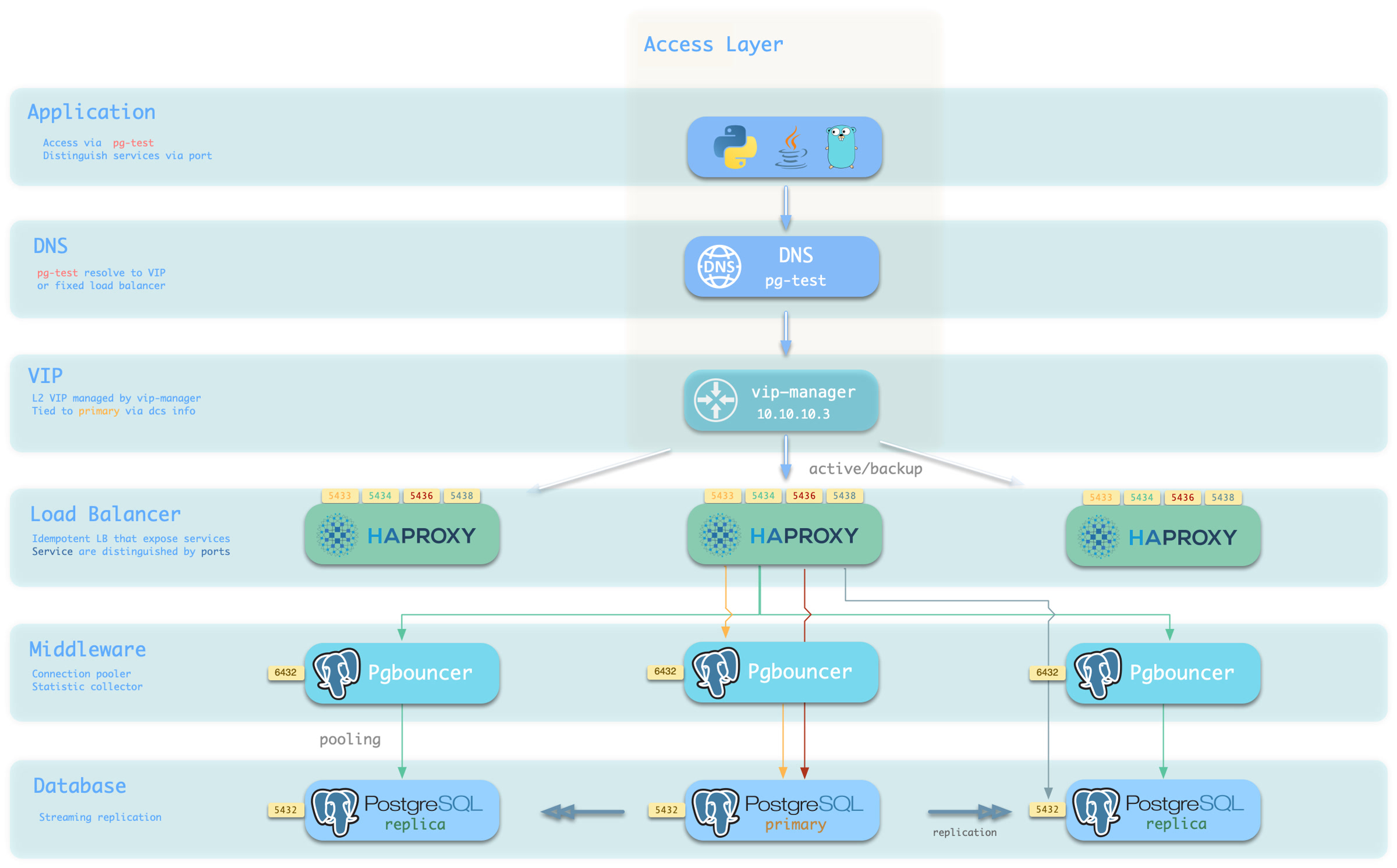
Choose a host and port combination for the required access method.
Host
| Type | Sample | Description |
|---|---|---|
| Cluster Domain Name | pg-test | Resolved by dnsmasq on INFRA nodes; with pg_dns_target: auto, points to the VIP when enabled, otherwise to the primary IP |
| Cluster VIP Address | 10.10.10.3 | When pg_vip_enabled is enabled, an L2 VIP managed by vip-manager and bound to the primary node |
| Instance Hostname | pg-test-1 | Access via any instance hostname (resolved by dnsmasq @ infra nodes) |
| Instance IP Address | 10.10.10.11 | Access any instance’s IP address |
Port
Different ports select different PostgreSQL services.
| Port | Service | Type | Description |
|---|---|---|---|
| 5432 | postgres | Database | Direct access to postgres server |
| 6432 | pgbouncer | Middleware | Access postgres through connection pool middleware |
| 5433 | primary | Service | Access primary pgbouncer (or postgres) |
| 5434 | replica | Service | Access replica pgbouncer (or postgres) |
| 5436 | default | Service | Access primary postgres |
| 5438 | offline | Service | Access offline postgres |
Combinations