This is the multi-page printable view of this section. .
Security and Compliance
- 1: Security Model
- 2: Authentication
- 3: Access Control
- 4: Encrypted Communication
- 5: Data Security
- 6: Compliance
Databases usually store the most valuable and sensitive data in an information system. Attacks and failures can therefore have severe consequences. Security requires multiple controls: who can connect, what they can do, and whether traffic is protected. It must also record operations and support recovery of damaged, lost, or deleted data.
Pigsty provides a default security baseline through declarative configuration. Declare HBA rules, roles and privileges, certificates, encryption, backups, and audit policies as parameters in the inventory. Idempotent playbooks render and apply these settings.
Security as Code supports policy versioning, review, and traceability. One inventory provides a consistent baseline across instances. To audit database access, start with the YAML declaration. Then verify generated HBA rules and database grants against the running system.
Security as Code
Manual operations can scatter security settings across pg_hba.conf, DBA-issued GRANT statements, and temporary incident firewall rules. Documentation can then diverge from the running configuration. This makes each instance’s effective rules difficult to determine.
Pigsty stores security policy in the cluster definition alongside other properties.
Declare users, privileges, and HBA rules. Playbooks apply them idempotently to each instance, including new instances. Git history records configuration changes. Manual GRANT statements, runtime parameter changes, and node file edits can still cause drift. In production, regularly compare declared and actual state.
Default Security Baseline
The default configuration enables these controls to reduce omissions:
| Capability | Default Behavior | Related Parameter |
|---|---|---|
| Password hashing | New or updated PostgreSQL passwords use SCRAM-SHA-256 | pg_pwd_enc |
| Data checksums | Page checksums are enabled during cluster initialization to detect silent corruption | pg_checksum |
| Server-side TLS | PostgreSQL server certificates are installed and ssl is enabled, so TLS connections are accepted | — |
| Local CA | A self-signed CA is created automatically for managed component certificates | ca_create |
| etcd encryption and authentication | TLS for client and peer traffic, plus RBAC password authentication | etcd_root_password |
| MINIO object storage HTTPS | Silo backup traffic uses HTTPS by default | minio_https |
| Nginx HTTPS | Web ingress listens on both ports 80 and 443 by default | nginx_sslmode |
| HBA rules | Layered access: local ident, intranet password authentication, and SSL required for public administrator access | pg_default_hba_rules |
| Roles and privileges | A four-tier role model and default privilege templates provide a least-privilege baseline | pg_default_roles |
| Backup and recovery | pgBackRest is enabled by default, with two full backups retained in the local repository | pgbackrest_enabled |
| Firewall | Zone mode trusts intranet CIDRs and exposes only required ports to public networks | node_firewall_mode |
| Restricted sudo | Sudo access for the database OS user is limited to the required command set | pg_dbsu_sudo |
Hardening with Trade-offs
Defaults target a trusted intranet. Some controls need explicit enablement because of performance costs, compatibility limits, or required operator decisions:
- Examples contain public default passwords for quick starts and local tests. Before production, run
./configure -gto randomize recognized credentials. Then check the pgBackRest passphrase, Silo users inha/safe, and all custom values. - The Patroni REST API and PgBouncer disable TLS by default. Explicitly enable
patroni_ssl_enabledandpgbouncer_sslmodewith the issued certificates. - Password checks (
passwordcheck) and auditing (pgaudit) are disabled by default. Confirm package availability, then configure preloading and policy. - SELinux defaults to
permissive. Remove the demo firewall exception for port5432in production. - Local backups have no encryption by default. The remote
miniopreset enables AES-256 encryption. Change its default encryption passphrase.
The ha/safe template combines TLS, certificate authentication, password checks, and backup encryption. Use it with the consistency-first CRIT parameter template as a starting point. Review public credentials, audit extensions, and the failure model explicitly. See Security Model for the full hardening path.
This Chapter
| Section | Question Answered |
|---|---|
| Security Model | Where is the root of trust? How many defensive layers exist? How should the baseline be hardened? |
| Authentication | Who can connect? How is identity proven? How are HBA rules declared and applied? |
| Access Control | What can a connected user do? How does least privilege become the default? |
| Encrypted Communication | How is traffic encrypted? Who issues, distributes, and rotates certificates? |
| Data Security | How is data kept intact, recoverable, confidential, and traceable? |
| Compliance | How do security capabilities map to MLPS and SOC 2 controls? |
Related Topics
These pages provide operational security guidance:
- 🔰 Security Recommendations: minimum hardening for a quick single-node deployment
- 🛡️ Security Considerations: production hardening checklist
- 📄
ha/safeTemplate: complete hardening configuration reference - 🔑 HBA Rules: detailed PGSQL HBA configuration
- 👤 Access Control: role and privilege parameter reference
- ♾️ High Availability: business continuity
- ⏰ Backup and Recovery: PITR and disaster recovery
1 - Security Model
Identify the root of trust and defensive layers before selecting security features. The root of trust needs the strongest protection. Multiple layers preserve some protection if one fails.
Trust Boundaries
Pigsty uses Ansible for declarative deployment. Its administration node is the control plane and needs the strongest protection.
| Role | Assets and Privileges |
|---|---|
| Admin node | The pigsty.yml inventory, which normally contains system and application credentials; the CA private key; SSH administration access to every node |
| INFRA nodes | Monitoring and alerts, DNS, Nginx ingress, and software repositories |
| Database nodes | Database instances, local dbsu, and restricted sudo |
| Clients | Database credentials or client certificates; access through service ports, HBA, and authentication |
These roles have different capabilities, not a simple hierarchy. Protect these three assets in particular:
- The
pigsty.ymlinventory contains component passwords and credentials. Strictly restrict administration node access and access to any Git configuration repository. - The CA private key,
files/pki/ca/ca.key, anchors deployment trust. Its holder can issue any trusted certificate. The file uses mode0600inside a0700directory. Keep an offline backup. - The administration user’s SSH private key provides passwordless sudo access to all enrolled nodes. It effectively grants root access throughout the managed deployment.
Pigsty’s security policy defines this trust boundary. Attacks requiring administration node access, or both pigsty.yml and the CA private key, are not product vulnerabilities. These control-plane assets have high trust by design. Protect them accordingly.
Seven Defensive Layers
Defense in depth combines controls so that one failure does not remove all protection. Pigsty provides seven security layers:
| # | Layer | Mechanisms | Details |
|---|---|---|---|
| 1 | Network boundary | Firewall zones, constrained listen addresses, centralized ingress | This page |
| 2 | Transport encryption | Local CA and TLS between components | Encrypted Communication |
| 3 | Authentication | HBA rules, SCRAM passwords, client certificates | Authentication |
| 4 | Access control | Role model, default privileges, database isolation | Access Control |
| 5 | Host security | SELinux, restricted sudo, dedicated OS users | This page |
| 6 | Data security | Checksums, backup and encryption, PITR, deletion safeguards | Data Security |
| 7 | Audit trail | DDL and connection logs, audit extensions, centralized logs | Data Security |
Layers 2, 3, 4, 6, and 7 have dedicated chapters. The following sections cover the network and host layers.
Network Boundaries
Node provisioning enables firewalld or ufw, depending on the OS. node_firewall_mode defaults to zone. node_firewall_intranet places 10.0.0.0/8, 172.16.0.0/12, and 192.168.0.0/16 in the trusted zone. Public networks can reach only node_firewall_public_port ports. Defaults are 22 for SSH and 80/443 for web traffic.
The demo
pigsty.ymlalso exposes5432for local evaluation. Remove this exception in production. If direct database access is needed, restrict sources to explicit CIDRs through security groups, host firewalls, and HBA.
PostgreSQL listens on all addresses by default: pg_listen is 0.0.0.0. Listen addresses, firewall rules, and HBA jointly control access. For stricter access, constrain the listener:
The default firewall blocks direct public access to Grafana, VictoriaMetrics, and other web infrastructure. External web traffic normally uses the Nginx portal. Database traffic uses HAProxy service ports. Fewer entry points simplify hardening and auditing.
Host Security
Give each OS user only the privileges its job requires.
- The database superuser
postgres(pg_dbsu) has no password by default. It can enter the database only through localident.pg_dbsu_sudodefaults tolimit. This permits passwordless database servicesystemctloperations and log viewing, without unrestricted root access. - Operators and playbooks use
node_admin_username, defaultdba. It receives passwordless sudo (nopass) by default. For stricter control, setnode_admin_sudotoallto require a password, orlimitto restrict commands. node_selinux_modedefaults topermissive. SELinux records violations without blocking them, providing a baseline beforeenforcing.
Pigsty does not manage SSH server configuration. Put password-login restrictions, remote-root restrictions, and similar OS hardening in your host security baseline.
Hardening Levels
Harden the deployment in stages. Each level adds to the previous level:
Level 1: default baseline. Defaults provide SCRAM passwords, data checksums, a local CA, component certificates, layered HBA, four-tier roles, backups, and firewall zones. This suits development, testing, and evaluation on a trusted intranet. For production, review credentials and network boundaries, and configure client verification.
Level 2: randomized credentials. Change all public default passwords before any network-exposed deployment. Add -g to randomize recognized built-in parameters and example credentials:
This option does not replace pgBackRest cipher_pass, all Silo examples in ha/safe, or custom values. See the Default Credentials Checklist for coverage.
Level 3: policy hardening with ha/safe. conf/ha/safe.yml combines controls for further customization:
- TLS and certificates: Main TCP HBA rules use
ssl. Public administrator access requires a client certificate. PgBouncer usesrequire, and Patroni API uses HTTPS. Localidentand selected localhost password rules remain. - Password policy: The template preloads
passwordcheckand setsexpire_infor built-in users. Review and replace example passwords. - Reduced exposure: Listen addresses are limited to
${ip},${vip},${lo}. Public connection-pool access is explicitly denied for monitoring and administration accounts. - Backup encryption: pgBackRest uses the remote
miniopreset with AES-256-CBC. Replace the predictable examplepgBR.${pg_cluster}. - Security extensions: The template installs
passwordcheck,credcheck,pgaudit,pgsodium,anonymizer, and related extensions. Installation does not preload, create, or configure them.
Level 4: database hardening with crit.yml. The safe template selects CRIT for workloads that prioritize consistency. Compared with oltp, CRIT:
- Requires checksums regardless of
pg_checksum. - Enables strict synchronous replication (
synchronous_mode_strict). Writes needing synchronous acknowledgment block if no synchronous replica is available. - Logs connections and disconnections. PostgreSQL 18 separates connection receipt, authentication, and authorization.
- Sets watchdog to
automatic. It activates only if a usable device exists.
Strict synchronous mode aims to preserve acknowledged transactions. It depends on synchronous_commit, synchronous replica state, and failover eligibility. Verify RPO with failure exercises on the target topology.
You can select individual controls instead of the whole template:
Next
- 🔑 Authentication: HBA rules and password policy
- 👤 Access Control: roles and least privilege
- 🔐 Encrypted Communication: local CA and TLS
- 🔒 Data Security: integrity, backup, and audit
- ✅ Compliance: MLPS and SOC 2 mapping
2 - Authentication
pg_hba.conf defines PostgreSQL Host-Based Authentication. It controls who can connect, the source address, the database, and the required identity check.
Manual HBA maintenance across a cluster requires care. Primary and replica rules can differ, and each instance stores its configuration in its data directory. Without a shared declaration and refresh process, instance rules can diverge.
Pigsty declares HBA rules in the inventory through declarative configuration. Playbooks render and distribute them consistently.
HBA as Code
Cluster HBA combines global defaults in pg_default_hba_rules with cluster additions in pg_hba_rules. PgBouncer has separate equivalents: pgb_default_hba_rules and pgb_hba_rules.
Rules support two forms. The recommended alias form expresses one rule per line:
Use the raw form for cases aliases cannot express. It contains a literal pg_hba.conf line.
In addition to user, address, database, and authentication method, each rule has two control fields:
ordersets render order. HBA uses the first matching rule, so order sets priority. By convention,0-99is for high-priority user rules and100-999for defaults. Rules withoutordercome last.rolefilters by instance role.commonanddefaultapply everywhere.primary,replica,offline,standby, anddelayedapply only to matching instances.role: offlinealso applies to instances marked withpg_offline_query. One declaration therefore generates appropriate rules without separate manual primary and replica files.
After editing the declaration, run the wrapper script to render and reload the rules:
pg_hba_rules adds rules but does not automatically restrict broader defaults. For stricter access, also review pg_default_hba_rules. Inspect the resulting pg_hba.conf on every instance.
Address and Authentication Aliases
Aliases name common cases. Each addr value expands into address blocks:
| Alias | Expands To | Meaning |
|---|---|---|
local | Unix socket | Local socket only |
localhost | Unix socket, 127.0.0.1/32, and ::1/128 | Local host |
admin | <admin_ip>/32 | Admin node |
infra | /32 address of each INFRA node | Infrastructure nodes |
cluster | /32 address of every cluster member | Cluster-internal traffic |
intra | 10.0.0.0/8, 172.16.0.0/12, 192.168.0.0/16 | Intranet CIDRs, customizable with node_firewall_intranet |
world | 0.0.0.0/0 and ::/0 | Any address |
| CIDR | Unchanged | Custom network |
Values in auth select the authentication method and whether TLS is mandatory:
| Alias | Authentication Method | Notes |
|---|---|---|
deny | reject | Explicit rejection |
trust | trust | Unconditional access; use with care |
pwd | scram-sha-256 or md5 | Follows pg_pwd_enc; SCRAM by default |
sha | scram-sha-256 | Force SCRAM |
md5 | md5 | Compatibility for legacy clients |
ssl | hostssl with password authentication | Password authentication over mandatory TLS |
ssl-sha | hostssl with scram-sha-256 | Mandatory TLS and SCRAM |
cert | hostssl with cert | Client certificate authentication |
ident, os | ident (peer in PgBouncer) | OS user mapping |
peer | peer | Local OS user |
The user field supports four placeholders: ${dbsu} (superuser), ${repl} (replication user), ${monitor} (monitoring user), and ${admin} (administration user). Rendering replaces them with actual names. +role matches all members of that role.
auth: ssl requires TLS but does not require client verification of the server identity. Security-sensitive clients should use sslmode=verify-full with a trusted CA. See Encrypted Communication.
Default Rules Explained
The default HBA policy requires stronger authentication for more distant sources. These PostgreSQL defaults come from the source configuration:
Layer by layer:
- Local access:
postgrescan connect only through a local Unix socket withident. It needs no password and cannot log in remotely. Thus, dbsu has no default password. - Intranet access: Replication and application accounts use SCRAM password authentication. Remote monitoring and administration connections mainly come from INFRA nodes.
- Public access: Only the administrator can connect from any address by default. Both a password and TLS are required.
PgBouncer explicitly denies public access for monitoring and administration accounts. Application users can connect only from localhost and intranet sources.
The default +dbrole_offline rule has no role filter and applies to every instance. Add role: offline to restrict it to pg_role: offline or pg_offline_query: true instances.
The default policy lets application accounts connect from the intranet with passwords. ha/safe changes the main TCP rules to ssl. Administrators outside the intranet must present a client certificate (cert). Local ident and selected localhost password rules remain.
Password Policy
Pigsty defaults to PostgreSQL’s recommended scram-sha-256 password storage through pg_pwd_enc. Use md5 only for legacy clients.
Before ALTER USER ... PASSWORD, the workflow runs SET log_statement TO 'none' to temporarily disable statement logging. This keeps passwords out of PostgreSQL logs. The inventory still contains plaintext passwords. Rendered user SQL is stored at /pg/tmp/pg-user-<name>.sql with mode 0640. Related Ansible tasks do not consistently use no_log. Restrict access to the administration node, configuration repository, and automation output.
Avoid --diff for tasks that contain credentials.
Password strength checks are disabled by default. If required, preload passwordcheck or the more configurable credcheck:
ha/safe sets this pg_libs value explicitly. Selecting CRIT alone does not load passwordcheck.
Set account lifetime with expire_in (days after creation) or expire_at (absolute date). Combine this with your organization’s rotation process:
Certificate Authentication
Passwords can be phished, reused, or guessed. For privileged accounts, such as administrators, set HBA auth: cert to require client certificates. The local CA must sign the certificate, and its CN must match the database user name. If the rule accepts only cert, a leaked password alone cannot authenticate.
Issue client certificates with the built-in cert.yml playbook:
The files are files/pki/misc/<cn>.crt and files/pki/misc/<cn>.key. Deliver the private key through a controlled channel. The client should use verify-full to verify the database server. See Encrypted Communication.
Connection Pool and Component APIs
The database is not the only authenticated entry point.
PgBouncer has separate HBA rules and a separate user list. pgbouncer_auth_query is disabled by default. Only users with pgbouncer: true enter userlist.txt and can authenticate through the pool. Review permitted logins before enabling dynamic authentication queries.
The Patroni REST API controls operations such as restart, switchover, and configuration reload. Writes require HTTP Basic authentication through patroni_username and patroni_password. Source-address allowlists also restrict writes. Enable patroni_ssl_enabled to use HTTPS throughout.
The inventory also declares credentials for Grafana, HAProxy administration, the MINIO-selected object storage backend, etcd, and other components. See the Default Credentials Checklist for the full list and update instructions.
Next
- 📖 Complete HBA reference: HBA Rules
- 👤 Access Control: authorization after authentication
- 🔐 Encrypted Communication: TLS and client certificate infrastructure
3 - Access Control
Authentication verifies identity. Authorization determines what that identity can do.
PostgreSQL GRANT and REVOKE provide precise control. Privilege problems usually arise from missing default conventions. Examples include making an application account the owner, retaining temporary superuser access after troubleshooting, and omitting grants on new tables.
Pigsty provides four role tiers, default privileges, and database isolation. This starting model reduces manual grants per database. Operators must still assign roles to match business boundaries and regularly review effective privileges.
Role System
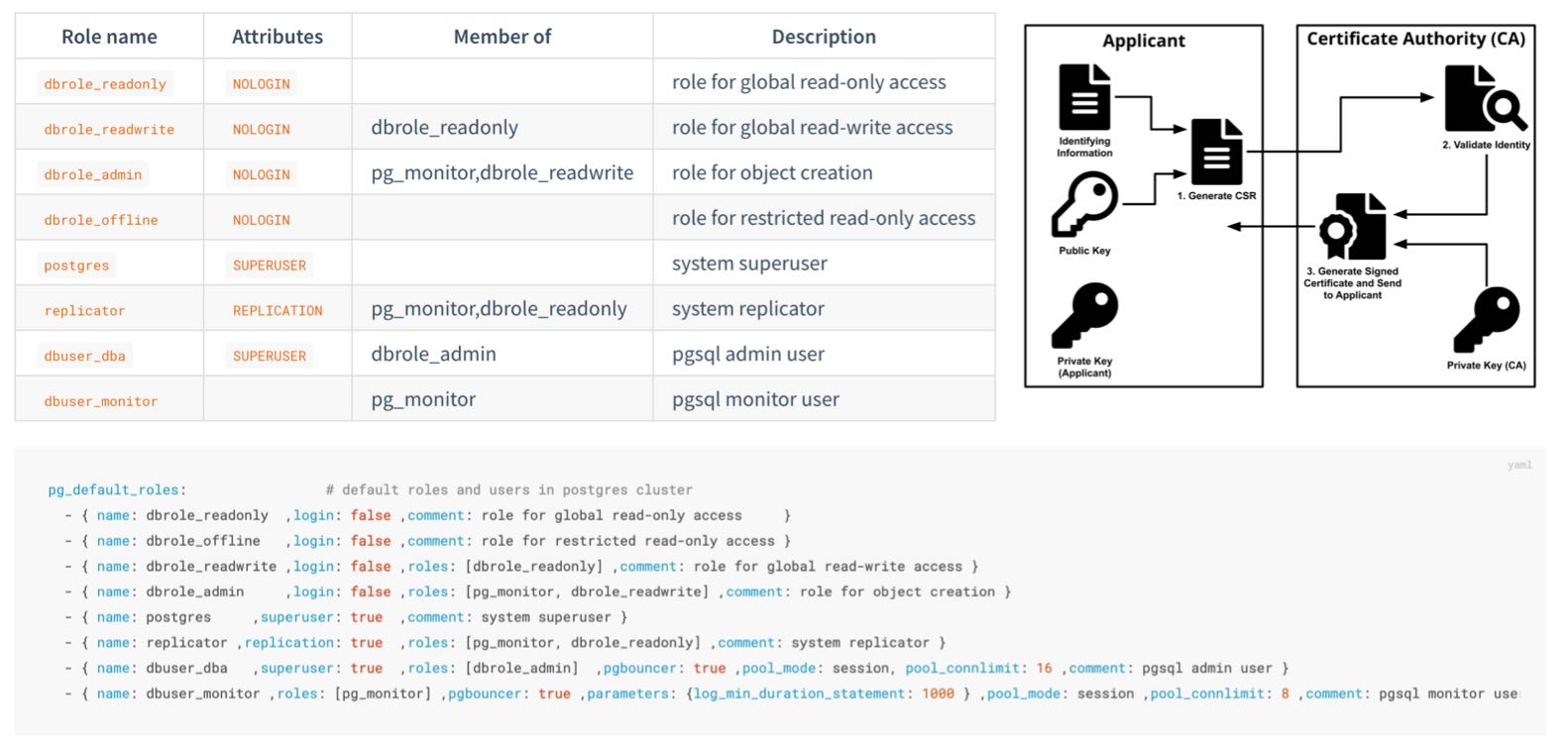
Pigsty creates four business roles by default. They form privilege groups and cannot log in:
| Role | Attribute | Inherits | Purpose |
|---|---|---|---|
dbrole_readonly | NOLOGIN | — | Global read-only access |
dbrole_readwrite | NOLOGIN | dbrole_readonly | Global DML access; the default choice for application accounts |
dbrole_admin | NOLOGIN | dbrole_readwrite, pg_monitor | Object creation and DDL for administration and release workflows |
dbrole_offline | NOLOGIN | — | Independent read-only role that can be restricted to offline instances through HBA |
Pigsty also creates four system users, each with a specific responsibility:
| User | Attribute | Purpose |
|---|---|---|
postgres | SUPERUSER | Database superuser; no password and local ident login only |
replicator | REPLICATION | Streaming replication and backup, with pg_monitor and read-only privileges |
dbuser_dba | SUPERUSER | Routine administration user that inherits dbrole_admin |
dbuser_monitor | — | Monitoring user with only pg_monitor and read-only privileges |
Application accounts join role groups through the roles field and inherit their privileges:
Customize the declarative role system through pg_default_roles. This parameter replaces the complete list. Retain all required system users and default roles. Also check references in HBA rules, default privileges, and scripts.
Default Privileges
Roles define who receives privileges. Default privileges give newly created objects the required grants automatically.
PostgreSQL provides ALTER DEFAULT PRIVILEGES. Pigsty declares these rules through pg_default_privileges:
The read-only role can query data and execute functions. The read-write role also has DML privileges. The administrator role adds privileges needed for object management.
Ownership Convention
Default privileges apply only to objects created by identities with those defaults configured. Pigsty configures them for:
- the database OS user
pg_dbsu, which defaults topostgres; - the administration user
pg_admin_username, which defaults todbuser_dba; dbrole_admin;- each database owner declared in
pg_databases.
Application DDL should normally run as the declared database owner. Administration and release workflows can use dbuser_dba or first run SET ROLE dbrole_admin. Other users need their own ALTER DEFAULT PRIVILEGES configuration. Otherwise, objects they create do not receive this default privilege model.
PostgreSQL default privileges follow the object creator. They do not propagate automatically from the database or session login name. This is PostgreSQL behavior, not a Pigsty limitation.
Database Isolation
By default, PostgreSQL grants database CONNECT to PUBLIC. If HBA permits it, a login role can enter a database it does not own. Restrict this default when multiple applications share a cluster.
Set revokeconn in a database definition to revoke public connection access:
This revokes CONNECT from PUBLIC. It grants access explicitly to the replication, monitoring, and administration users and the database owner. The owner receives GRANT OPTION and can grant access to others. Without additional grants or inherited roles, app_a cannot connect to app_b.
Cluster initialization also revokes CREATE from PUBLIC on the database and the public schema:
Ordinary users cannot freely create objects in public databases or schemas. This reduces risks from unsafe search_path settings and object shadowing. PostgreSQL 15 restricted the default CREATE privilege on the public schema. Pigsty applies this boundary to all supported major versions.
Offline Role and Instance Isolation
dbrole_offline provides independent read-only privileges for ETL, reporting, and ad hoc queries. It controls object access, not which instance accepts connections.
The default intranet HBA rule for +dbrole_offline has no role filter, so it applies to every instance. To restrict it to pg_role: offline or a replica with pg_offline_query: true, change the complete pg_default_hba_rules list:
pg_default_hba_rules replaces the entire list; do not use the example rule alone. HBA limits expensive queries to offline instances only if it filters by instance role. Users must also lack other inherited roles permitted by broader rules. Add a dedicated service endpoint, connection limits, and query resource controls for resource isolation.
Beyond the Database
Least privilege also applies at the host level:
- The
postgressuperuser has no password and permits only localidentlogin. Its sudo access defaults to required database service and log commands (pg_dbsu_sudo:limit). dbuser_monitorhaspg_monitor, the read-only role, and privileges on themonitorschema. By default, it cannot write business tables.replicatorreceives only directory function privileges needed for backup and recovery, without general superuser access.
Next
- 📖 Complete role and privilege reference: Access Control Configuration
- 🔑 Authentication: the first gate before authorization
- 🔒 Data Security: protection beyond privileges
4 - Encrypted Communication
TLS can provide transport encryption, server authentication, and client authentication. Configure each protection separately. Enabling server TLS does not make clients verify the server or make the server require client certificates.
Most TLS operational work involves certificate issuance, distribution, trust, and rotation. Without central management, services often skip verification or keep plaintext connections.
Pigsty manages PKI declaratively. Deployment creates a local self-signed CA, issues component certificates, and distributes trust. TLS is then ready for use.
Local CA
During initial deployment, Pigsty checks for a CA on the administration node. It creates one when required:
| File | Description | Permissions |
|---|---|---|
files/pki/ca/ca.key | CA private key and root of trust for the deployment; protect it carefully | 0600, with directory mode 0700 |
files/pki/ca/ca.crt | CA root certificate; safe to distribute | 0644 |
ca_createcontrols CA behavior. Pigsty reuses an existing key and certificate unchanged. If only the key exists, it issues a replacement certificate with that key.ca_create: falseprevents creation of a missing private key. Ifca.keyis absent, deployment stops instead of creating an unexpected trust root. Always back up and restoreca.keyandca.crttogether.ca_cnsets the certificate CN, defaultpigsty-ca. The key is RSA 4096.- The root CA is valid for 100 years. Component certificates default to 20 years (
cert_validity:7300d). The browser-facing Nginx certificate is an exception, with a current default of 397 days.
Long default lifetimes reduce initial maintenance for private infrastructure. Production still needs certificate rotation. Organizations with a certificate policy should shorten lifetimes and monitor expiration.
Trust Distribution
Every node must trust the CA. When managing a node, Pigsty copies the CA certificate to /etc/pki/ca.crt and links it into the OS trust store:
- EL family (RHEL, Rocky, Alma): link under
/etc/pki/ca-trust/source/anchors/and runupdate-ca-trust - Debian and Ubuntu: link under
/usr/local/share/ca-certificates/and runupdate-ca-certificates
Clients that use the OS trust store, such as curl, can then verify Pigsty CA certificates. The Nginx portal also publishes ca.crt at its site root for browsers and external clients.
By default, PostgreSQL libpq clients look for ~/.postgresql/root.crt and use sslmode=prefer. They do not directly use the OS trust store to verify server identity.
Server Identity Verification
Security-sensitive PostgreSQL clients should use sslmode=verify-full and specify the Pigsty CA:
verify-full checks the certificate chain and connection hostname. The server certificate SAN must contain the client’s DNS name or IP address. External clients must install ca.crt or specify it with sslrootcert.
Certificate Matrix
The local CA issues certificates for these components under one trust chain:
| Component | Certificate Identity (CN) | Deployment Path | Encryption State |
|---|---|---|---|
| PostgreSQL | <cluster>-<sequence> | /pg/cert/server.{crt,key} | Server-side SSL enabled by default; HBA determines whether it is mandatory |
| PgBouncer | Reuses the PostgreSQL certificate | /pg/cert/ | TLS disabled by default (pgbouncer_sslmode) |
| Patroni | Reuses the PostgreSQL certificate | /pg/cert/ | API HTTPS disabled by default (patroni_ssl_enabled) |
| etcd | <instance-name> | /etc/etcd/server.{crt,key} | TLS for client and peer traffic |
| Silo | <node-name> | ~minio/.minio/certs/ | Silo HTTPS is enabled by default (minio_https) |
| Kafka | <cluster>-<sequence> | /etc/kafka/pki/kafka.pem | SASL_SSL/SSL with kafka_security: scram; defaults to plaintext |
| MySQL | <instance-name> | /etc/mysql/pki/server.{crt,key} | Secure transport enforced; clients and group replication verify the certificate chain |
| Nginx | pigsty, with portal domains in SAN | /etc/nginx/conf.d/cert/ | HTTPS enabled by default (nginx_sslmode) |
| INFRA node | <node-name> | /etc/pki/infra.{crt,key} | Available to infrastructure components |
These defaults distinguish available TLS from enabled TLS:
- Enabled at deployment: PostgreSQL accepts SSL connections. etcd uses TLS for clients and peers.
- Encrypted by default: Object storage backup traffic through MINIO and Nginx web traffic use HTTPS.
- Available but disabled: Patroni API and PgBouncer TLS is disabled, with certificates already installed. Enable the corresponding parameters.
ha/safeenables both.
SSL support, mandatory encryption, and client verification of server identity are separate states. HBA enforces encryption with auth: ssl or cert. Client sslmode and trust settings control server verification. Default rules require TLS only for administrator connections from arbitrary sources. The safe template uses ssl or cert for main TCP rules. It retains local ident and selected localhost password rules.
Client Certificates
cert.yml issues client certificates. For HBA cert authentication, the certificate CN represents the database user name:
The files are files/pki/misc/<cn>.key and files/pki/misc/<cn>.crt. Deliver private keys through a controlled channel and allow only the corresponding user to read them. Client certificates let the server verify clients. The client must still use verify-full to verify the database server.
Using an Enterprise CA
Pigsty can issue certificates from an existing enterprise CA or an intermediate signed by its root. Put the certificate and private key at these paths. Playbooks reuse an existing CA:
Also set ca_create: false. Deployment then stops if the private key is missing, rather than creating a new trust root. However, an existing key with a missing certificate still causes certificate reissuance. Verify and restore both files together.
Key Protection and Rotation
- The CA private key exists only on the administration node. It and
pigsty.ymlare among the deployment’s highest-trust assets. Keep an offline backup. See Trust Boundaries. - If the CA key is compromised, establish a new trust root and reissue every component and client certificate. Plan a period of trust in both CAs to avoid interrupting all connections together.
- Component certificate sources reside at
files/pki/<component>/on the administration node. Node files are deployment copies. Deleting only a node copy restores the same certificate. To rotate, update or remove the source, rerun the relevant playbook, and reload or roll the component as required.
Next
- 🔑 Authentication: use HBA to decide who must use SSL or client certificates
- 🔒 Data Security: encryption for stored data and backups
- ✅ Compliance: evidence for certificate management
5 - Data Security
Network boundaries, authentication, and access control reduce incident risk. Data controls must limit damage and support recovery after hardware failure, leaked credentials, or operator errors.
Data security must provide integrity, recoverability, confidentiality if copied, and records of what happened.
Integrity
Bad disk sectors, memory bit flips, and firmware defects can cause silent data corruption, with no immediate error. Pigsty enables pg_checksum: true by default. Initialization uses data-checksums. PostgreSQL calculates each page checksum on write and checks it on read.
Page checksums mainly detect corruption in storage, the I/O path, or pages after writing. They cannot detect every memory error, logical error, or incorrect application write. They do not replace backups.
CRIT requires checksums regardless of the parameter. Its strict synchronous replication (synchronous_mode_strict) blocks writes needing synchronous acknowledgment when no synchronous replica is available. This protects acknowledged transactions under specific conditions. Clients must not reduce synchronous_commit; a synchronous replica must participate in commits. Failover must select a node containing the required WAL. Verify RPO with failure exercises on the target topology.
Recoverability
Replicas mainly handle node failures. Backups cover accidental deletion, logical errors, cluster corruption, and wider disasters. HA can shorten interruptions after primary failure. However, replication copies accidental deletions to every replica, so backups remain essential.
Pigsty enables pgBackRest by default through pgbackrest_enabled. Base backups and continuous WAL archives provide Point-in-Time Recovery. Restore to a target within the retained backup and WAL window.
Select the backup repository with pgbackrest_method:
| Repository | Location | Default Retention | Encryption |
|---|---|---|---|
local (default) | Local /pg/backup directory | Latest 2 full backups | None |
minio | Silo or external S3-compatible object storage | 14 days | AES-256-CBC |
Two additional controls reduce damage from accidental deletion:
- Delayed replica: For a critical cluster, declare
pg_delay: 1h. Before the error replays, pause replication and extract the required data. A delayed replica eventually catches up and does not replace backup. - Removal safeguards: Enabling
pg_safeguardoretcd_safeguardblocks the corresponding removal playbook. This reduces accidental cluster removal.
Test that backups can restore data through routine recovery exercises. See Backup and Recovery for mechanisms and procedures.
Confidentiality
Protect data at rest at three layers:
Backup encryption. pgbackrest_method: minio selects S3-compatible storage. Providers include MINIO-managed Silo, independently managed MinIO or RustFS, and external S3 services. The preset enables AES-256-CBC encryption. Change its public pgBackRest passphrase in production. ha/safe derives an example passphrase from the cluster name:
pgBR.${pg_cluster} is predictable, and configure -g does not replace it. In production, use a unique random passphrase. Store it separately from the backup. Without it, recovery is impossible.
Local backups have no encryption by default. Encryption reduces disclosure if someone copies backup files or media separately. Protection is limited when keys and backups share a host.
Transport encryption. Uploads to Silo or external S3 use HTTPS. HBA can require SSL for PostgreSQL clients and replication. Clients should also verify server certificates. See Encrypted Communication.
Encryption at rest. Upstream PostgreSQL currently lacks general built-in transparent data encryption (TDE). Pigsty offers two options. Use pg_tde with Percona Distribution for PostgreSQL for table-level encryption; see pgtde. Use security extensions such as pgsodium, pgcrypto, and anonymizer for column encryption and masking. The safe template installs this category. Full-disk encryption, such as LUKS or dm-crypt, adds OS-level protection against stolen media.
Audit and Traceability
Incident records must identify who did what and when. Pigsty provides these logging layers:
Default baseline: Log all DDL with log_statement: ddl. Log statements longer than 100 ms with log_min_duration_statement: 100. PostgreSQL 18 and later also record connection authorization.
CRIT template: log_connections and log_disconnections record connection events. PostgreSQL 18 can distinguish receipt, authentication, and authorization.
pgaudit: Install pgaudit and preload it through pg_libs for detailed statement auditing. This includes object reads, writes, and role-based audit classes. The safe template installs the extension. Declare loading and audit policy explicitly.
With INFRA logging enabled and Vector configured, PostgreSQL logs go to VictoriaLogs for centralized storage. Retention defaults to 15 days and can meet other compliance periods. Logs and metrics support search, alerts, and incident reconstruction. Classification, response, and evidence preservation still require an operational process.
Next
- ⏰ Backup and Recovery: PITR principles and practice
- ♾️ High Availability: replicas and backups as complementary safeguards
- ✅ Compliance: audit logs as compliance evidence
6 - Compliance
Compliance requires continuous evidence of three elements:
- Configuration: Security controls must be enabled. Pigsty directly provides configuration.
- Process: The organization must establish access approval, change management, recovery exercises, and related procedures.
- Evidence: Records must show that configuration and processes remain effective. The inventory, runtime logs, and monitoring system provide part of this evidence.
This page provides a pre-launch checklist and maps Pigsty capabilities to common compliance frameworks. These mappings support architecture and gap analysis. They are not an MLPS assessment, SOC 2 audit opinion, or legal advice.
Default Credentials Checklist
Default credentials are public in documentation and source code. Use them only for demonstrations and local development. Change every applicable default before production or network-exposed deployment:
| Scope | Example Default | configure -g |
|---|---|---|
| Grafana administrator and viewer | pigsty, DBUser.Viewer | Yes |
| HAProxy administration interface | pigsty | Yes |
| PostgreSQL administration, monitoring, and replication users | DBUser.DBA, DBUser.Monitor, DBUser.Replicator | Yes |
| Patroni REST API | Patroni.API | Yes |
| etcd root | Etcd.Root | Yes |
| MINIO module object-storage root | S3User.MinIO | Yes |
| Object-storage backup and example application users | S3User.Backup, S3User.Meta, S3User.Data | Yes |
| Example database users | DBUser.Meta, DBUser.Supa, Vibe.Coding | Yes |
| pgBackRest encryption passphrase | cipher_pass: pgBackRest | No |
Silo users and pgBR.${pg_cluster} in ha/safe | Template example values | No |
| User-defined credentials | Custom values | No |
Use -g to randomize built-in parameters and example strings recognized by the configuration wizard:
The wizard prints generated passwords to the terminal. Protect terminal history and automation logs as sensitive data. Then inspect the configuration. Replace pgBackRest cipher_pass, uncovered MINIO values in ha/safe, and all custom credentials.
Launch Hardening Checklist
Before deployment:
- Define the network boundary. Do not expose database ports publicly. Remove the demo firewall exception for
5432. - Select the built-in CA or enterprise PKI. See Using an Enterprise CA.
- Plan client verification. Set
sslmode=verify-fulland a trusted CA on database clients. - Assign application accounts through the four-tier roles. Declare
expire_in. - Plan the backup repository, retention, encryption passphrase, and off-site copies.
- Decide whether to use
ha/safeand the CRIT parameter template.
After deployment:
- Confirm that all default credentials have changed. Include values covered by
configure -gand uncovered backup, object storage, and custom credentials. - Compare
/pg/data/pg_hba.confwith the declared HBA policy and intended access boundary. - Query effective users, roles, default privileges, and database
CONNECTgrants. Compare them with the inventory. - Run a full backup and recovery exercise to validate the backup path.
- Confirm log collection, monitoring alerts, and notification channels.
Periodically:
- Audit privileges: compare
pg_usersdeclarations with effective grants, and remove expired or departed-user accounts - Rotate credentials and certificates
- Exercise recovery and failover
- Track security updates for Pigsty and upstream components
Compliance Evidence
Use declarative configuration as a starting point for audit evidence. Retain runtime state to prove that the configuration was applied and remains effective.
| Evidence | Source |
|---|---|
| Security baseline and change history | The pigsty.yml inventory and Git history |
| Access-control matrix | pg_default_roles, pg_users, and pg_hba_rules declarations |
| Effective authentication policy | Rendered pg_hba.conf on each instance, compared with declarations to detect drift |
| Effective users and privileges | PostgreSQL catalogs, database ACLs, \du+, and \ddp+ |
| Operation and connection logs | PostgreSQL DDL, slow-query, and connection logs retained in VictoriaLogs |
| Backup records | pgBackRest information and monitoring dashboards |
| Security incidents and alerts | Monitoring alert history |
| Certificate inventory | files/pki/ and deployed component certificates |
MLPS Level 3 Mapping
This table maps database-related capabilities to the secure computing environment controls in GB/T 22239-2019 Level 3:
| Control | Pigsty Capability | Additional Requirement |
|---|---|---|
| Unique identity | Independent accounts and SCRAM-SHA-256 password storage | Real-name account management process |
| Password complexity and rotation | passwordcheck, credcheck, and expire_in | Enable extensions and establish a rotation process |
| Login failure handling | Can be implemented with credcheck and related extensions | Enable and configure as required |
| Access control and least privilege | Four-tier roles, default privileges, and database isolation | Privilege approval workflow |
| Security audit | DDL, connection, and slow-query logs; pgaudit; centralized retention | CRIT or manual connection logging; required retention period |
| Communication confidentiality | Local CA and TLS; HBA-enforced ssl or cert | Enforce TLS, client verify-full, and certificate rotation |
| Data integrity | Page checksums by default and strict synchronous replication with CRIT | Storage protection, defined failure model, and exercises |
| Data confidentiality | AES-encrypted backup plus TDE and column-encryption options | Enable as required |
| Backup and recovery | pgBackRest, PITR, and a remote S3-compatible repository | Recovery exercise process |
| Residual information protection | — | Media destruction and erasure process |
MLPS also covers physical security, networks, and management systems beyond a database distribution. Pigsty supports database-related technical controls. The overall system must address facilities, network devices, and governance.
SOC 2 Mapping
Database-related controls in the SOC 2 Trust Services Criteria (TSC) include:
| Criterion | Pigsty Capability | Additional Requirement |
|---|---|---|
| CC6.1 Logical access security | HBA, RBAC, default privileges, and database isolation | Privilege design, approval, and periodic review |
| CC6.2 User registration and authorization | Declarative users, roles, and expiration | Joiner, mover, leaver, and identity-verification process |
| CC6.3 Access changes and revocation | pg_users, role changes, REVOKE, and expiration | Tickets, approval evidence, and timely revocation |
| CC6.6 External boundary threats | Firewalls, listen addresses, HBA, and restricted management ingress | Network architecture, boundary devices, and continuous validation |
| CC6.7 Information transmission and movement | TLS, client verification, and backup encryption | Policies for exports, media, and third-party transfer |
| CC7.2 System monitoring | Victoria observability stack with extensive metrics and alerts | Alert-response process |
| CC7.3 Incident traceability | Centralized logs and audit extensions | Log-review process |
| A1.2 Availability and recovery | High Availability and PITR | Exercise records and RTO/RPO objectives |
Supply Chain and Vulnerability Response
Compliance reviews also cover the software supply chain. Pigsty provides these distribution and response controls:
Package integrity: Pigsty repository RPM and DEB packages (repo.pigsty.io, repo.pigsty.cc) are GPG-signed. Verify fingerprint 9592 A7BC 7A68 2E73 3337 6E09 E793 5D8D B9BD 8B20 (B9BD8B20) before trusting the key. Deployment-generated repository definitions and the INFRA node local repository do not enforce verification for every package by default. In production, review package-manager trust and signature settings.
Vulnerability response: Report issues privately through GitHub vulnerability reporting or email as specified in SECURITY.md. The project targets acknowledgment within three business days and initial assessment within seven days.
Version support: Security fixes ship in the latest stable release. Update to receive them. Subscription services provide extended support for users who must retain a version longer.
Next
- 🛡️ Security Model: from the default baseline to hardening levels
- 🔰 Security Recommendations: minimum hardening for quick-start deployments
- 📄
ha/safeTemplate: hardening configuration example