Access Control
Authentication answers “Who are you?” Authorization answers “What may you do?”
Privilege failures rarely result from a lack of mechanisms—PostgreSQL GRANT and REVOKE are sufficiently precise. The usual problem is the absence of conventions that are applied by default:
an application account is made the owner at launch, temporary superuser access is not revoked after troubleshooting, or grants are missed when new tables are created and cause failures in production.
Pigsty provides an out-of-the-box access control model as a starting point: four role tiers, default privileges, and database isolation. It reduces per-database manual grants, but operators must still assign roles according to business boundaries and review effective privileges regularly.
Role System
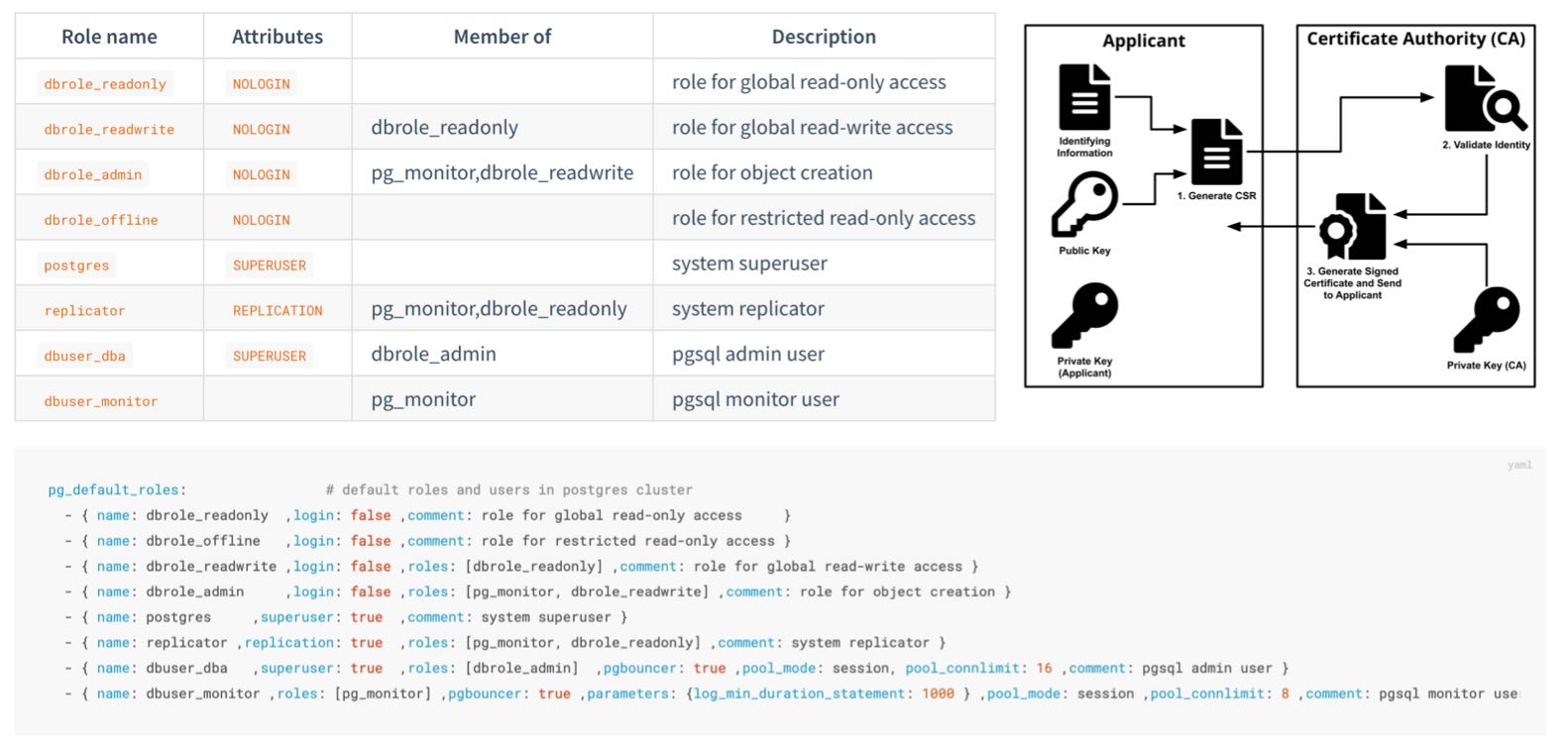
Pigsty creates four business roles by default. They cannot log in and are used as privilege groups:
| Role | Attribute | Inherits | Purpose |
|---|---|---|---|
dbrole_readonly | NOLOGIN | — | Global read-only access |
dbrole_readwrite | NOLOGIN | dbrole_readonly | Global DML access; the default choice for application accounts |
dbrole_admin | NOLOGIN | dbrole_readwrite, pg_monitor | Object creation and DDL for administration and release workflows |
dbrole_offline | NOLOGIN | — | Independent read-only role that can be restricted to offline instances through HBA |
Pigsty also creates four system users, each with a specific responsibility:
| User | Attribute | Purpose |
|---|---|---|
postgres | SUPERUSER | Database superuser; no password and local ident login only |
replicator | REPLICATION | Streaming replication and backup, with pg_monitor and read-only privileges |
dbuser_dba | SUPERUSER | Routine administration user that inherits dbrole_admin |
dbuser_monitor | — | Monitoring user with only pg_monitor and read-only privileges |
Application accounts join role groups through the roles field and inherit their privileges:
The role system is itself declarative (pg_default_roles) and can be customized.
This parameter is a complete list. Preserve all required system users and default roles when changing it, and check references from HBA rules, default privileges, and scripts at the same time.
Default Privileges
Roles answer “Who receives a privilege?” The other half of the problem is: How do newly created objects receive the correct privileges automatically?
PostgreSQL provides ALTER DEFAULT PRIVILEGES. Pigsty declares these rules through pg_default_privileges:
The read-only role receives query and function execution privileges, the read-write role adds DML, and the administrator role adds the supporting privileges required for object management.
Ownership Convention
Default privileges have an often-missed prerequisite: they apply only to objects created by identities for which those defaults were configured. Pigsty configures default privileges for:
- the database OS user
pg_dbsu, which defaults topostgres; - the administration user
pg_admin_username, which defaults todbuser_dba; dbrole_admin;- each database owner declared in
pg_databases.
Application DDL should normally run as the declared database owner. Platform administration and release workflows can use dbuser_dba or first execute SET ROLE dbrole_admin. Objects created directly by other users do not enter this default privilege model unless ALTER DEFAULT PRIVILEGES is also configured for those users.
This is PostgreSQL behavior, not a Pigsty limitation: default privileges follow the object creator; they do not automatically propagate from the database or the session login name.
Database Isolation
PostgreSQL grants CONNECT on databases to PUBLIC by default. If HBA also permits a connection, a login role may enter a database it does not own. This default is particularly important to tighten when several applications share a cluster.
Set revokeconn in a database definition to revoke public connection access:
When enabled, CONNECT is revoked from PUBLIC and granted explicitly to the replication, monitoring, and administration users and to the database owner.
The owner receives GRANT OPTION and can decide who else may connect. Without additional grants or inherited roles, the app_a account cannot connect to app_b.
Cluster initialization also revokes CREATE from PUBLIC on the database and the public schema:
Ordinary users can no longer create objects freely in public databases or schemas, reducing risks from unsafe search_path settings and object shadowing.
PostgreSQL 15 tightened the default CREATE privilege on the public schema; Pigsty applies the same boundary consistently across all supported major versions.
Offline Role and Instance Isolation
dbrole_offline provides an independent set of read-only privileges for ETL, reporting, and ad hoc queries. The role controls object privileges only; it does not automatically restrict which instance a user may connect to.
In the current default HBA rules, the intranet rule for +dbrole_offline does not set role and therefore applies to every instance. To restrict it to a dedicated pg_role: offline instance, or to a regular replica marked with pg_offline_query: true, modify that rule in the complete pg_default_hba_rules list:
Defining pg_default_hba_rules replaces the entire default list; the example rule cannot be used alone. Expensive queries are limited to offline instances only when HBA filters by instance role and the user does not inherit another role allowed by broader rules. Resource isolation should also use a dedicated service endpoint, connection limits, and query resource controls.
Beyond the Database
Least privilege also applies at the host level:
- The
postgressuperuser has no password and can log in only through localident. Its sudo access defaults to a restricted set of database service and log commands (pg_dbsu_sudo:limit). - The monitoring user
dbuser_monitorholdspg_monitor, the read-only role, and privileges on the dedicatedmonitorschema; it cannot write business tables by default. - The replication user
replicatorreceives only the directory function privileges required for backup and recovery instead of broad superuser access.
Next
- 📖 Complete role and privilege reference: Access Control Configuration
- 🔑 Authentication: the first gate before authorization
- 🔒 Data Security: protection beyond privileges