This is the multi-page printable view of this section. .
PG Kernels
- 1: PostgreSQL
- 2: Supabase
- 3: Babelfish
- 4: Percona
- 5: openHalo
- 6: OrioleDB
- 7: Cloudberry
- 8: AgensGraph
- 9: pgEdge
- 10: DocumentDB
- 11: Citus
- 12: IvorySQL
- 13: PolarDB PG
- 14: PolarDB Oracle
- 15: PostgresML
- 16: Greenplum
- 17: Neon
In Pigsty, you can replace the native PostgreSQL kernel with a variant that provides specialized features.
Pigsty supports multiple PostgreSQL kernels and compatibility branches within one operational framework. These kernels provide compatibility layers, multi-master replication, graph queries, MPP warehousing, transparent encryption, and other features.
The level of Pigsty integration differs between kernels.
PostgreSQL, Citus, Babelfish, IvorySQL, PolarDB, AgensGraph, and pgEdge have defined templates and configuration procedures.
Cloudberry and Greenplum usually use gpsql mode.
For their MPP initialization and scale-out operations, upstream tools remain the preferred method.
| Kernel | Key Feature | Description |
|---|---|---|
| PostgreSQL | Native kernel, full extension set | Vanilla PostgreSQL with 600 extensions |
| Supabase | Backend as a Service | PostgreSQL-based BaaS, Firebase alternative |
| Citus | Horizontal scaling | Distributed PostgreSQL via native extension |
| Babelfish | SQL Server compatible | SQL Server wire-protocol compatibility (PG17/18) |
| IvorySQL | Oracle compatible | Oracle syntax and PL/SQL compatibility |
| OpenHalo | MySQL compatible | MySQL wire-protocol compatibility |
| Percona | Transparent data encryption | Percona distribution with pg_tde |
| DocumentDB | MongoDB migration | DocumentDB + FerretDB wire compatibility |
| OrioleDB | OLTP optimization | Zheap, no bloat, S3 storage |
| PolarDB | Aurora-style RAC | RAC, China-local compliance scenario |
| Cloudberry | Open-source MPP warehouse | Cloudberry integrated through gpsql mode |
| AgensGraph | Property graph + Cypher | Graph query capability inside PostgreSQL |
| pgEdge | Spock multi-master replication | Distributed PostgreSQL for edge scenarios |

Versions
| Kernel | Debian / Ubuntu | EL |
|---|---|---|
| PostgreSQL / Citus | PostgreSQL 18.6 (Ubuntu 18.6-1.pgdg26.04+1) on x86_64-pc-linux-gnu, compiled by gcc (Ubuntu 15.2.0-16ubuntu1) 15.2.0, 64-bit | PostgreSQL 18.6 on x86_64-pc-linux-gnu, compiled by gcc (GCC) 14.3.1 20251022 (Red Hat 14.3.1-4), 64-bit |
| IvorySQL | PostgreSQL 18.4 (IvorySQL 5.4) on x86_64-pc-linux-gnu, compiled by gcc (GCC) 9.5.0, 64-bit | PostgreSQL 18.4 (IvorySQL 5.4) on x86_64-pc-linux-gnu, compiled by gcc (GCC) 9.5.0, 64-bit |
| Babelfish | Babelfish 17.7 on x86_64-pc-linux-gnu, compiled by gcc (Ubuntu 15.2.0-16ubuntu1) 15.2.0, 64-bit | Babelfish 17.7 on x86_64-pc-linux-gnu, compiled by gcc (GCC) 14.3.1 20251022 (Red Hat 14.3.1-4), 64-bit |
| PolarDB | PostgreSQL 17.10 (PolarDB 17.10.1.0 build accf02e2) on x86_64-linux-gnu | PostgreSQL 17.10 (PolarDB 17.10.1.0 build accf02e2) on x86_64-linux-gnu |
| Percona | PostgreSQL 18.4 - Percona Server for PostgreSQL 18.4.1 on x86_64-pc-linux-gnu, compiled by gcc (Ubuntu 15.2.0-16ubuntu1) 15.2.0, 64-bit | PostgreSQL 18.4 - Percona Server for PostgreSQL 18.4.1 on x86_64-pc-linux-gnu, compiled by gcc (GCC) 14.3.1 20250617 (Red Hat 14.3.1-2), 64-bit |
| OrioleDB | OrioleDB 18.4 (OrioleDB 1.8-beta16) on x86_64-pc-linux-gnu, compiled by gcc (Ubuntu 15.2.0-16ubuntu1) 15.2.0, 64-bit | OrioleDB 18.4 (OrioleDB 1.8-beta16) on x86_64-pc-linux-gnu, compiled by gcc (GCC) 14.3.1 20251022 (Red Hat 14.3.1-4), 64-bit |
| OpenHalo | openHalo 14.18 on x86_64-pc-linux-gnu, compiled by gcc (Ubuntu 15.2.0-16ubuntu1) 15.2.0, 64-bit | openHalo 14.18 on x86_64-pc-linux-gnu, compiled by gcc (GCC) 14.3.1 20251022 (Red Hat 14.3.1-4), 64-bit |
| DocumentDB | PostgreSQL 18.6 (Ubuntu 18.6-1.pgdg26.04+1) on x86_64-pc-linux-gnu, compiled by gcc (Ubuntu 15.2.0-16ubuntu1) 15.2.0, 64-bit | PostgreSQL 18.6 on x86_64-pc-linux-gnu, compiled by gcc (GCC) 14.3.1 20251022 (Red Hat 14.3.1-4), 64-bit |
| AgensGraph | PostgreSQL 17.10 (AgensGraph 2.17.0) on x86_64-pc-linux-gnu, compiled by gcc (Ubuntu 15.2.0-16ubuntu1) 15.2.0, 64-bit | PostgreSQL 17.10 (AgensGraph 2.17.0) on x86_64-pc-linux-gnu, compiled by gcc (GCC) 14.3.1 20251022 (Red Hat 14.3.1-4), 64-bit |
| pgEdge | PostgreSQL 18.4 (pgEdge 5.0.10) on x86_64-pc-linux-gnu, compiled by gcc (Ubuntu 15.2.0-16ubuntu1) 15.2.0, 64-bit | PostgreSQL 18.4 (pgEdge 5.0.10) on x86_64-pc-linux-gnu, compiled by gcc (GCC) 14.3.1 20251022 (Red Hat 14.3.1-4), 64-bit |
| Cloudberry | PostgreSQL 14.4 (Apache Cloudberry 2.0.0-incubating build 1) on aarch64-unknown-linux-gnu, compiled by gcc (GCC) 11.5.0 20240719 (Red Hat 11.5.0-11), 64-bit |
1 - PostgreSQL
PostgreSQL is a widely used open-source database.
Pigsty installs PostgreSQL 18 by default. It supports PostgreSQL 14 ~ 18 and provides 600 PG extensions.
Quick Start
Install Pigsty using the pgsql configuration template.
Most configuration templates use the PostgreSQL kernel by default. Examples include:
meta: Default, postgres with core extensions (vector, postgis, timescale)rich: postgres with all extensions installedslim: postgres only, no monitoring infrastructureha/full: 4-node sandbox for HA demonstrationpgsql: minimal postgres kernel configuration example
Configuration
The native PostgreSQL kernel requires no special configuration changes:
Version Selection
To select a different PostgreSQL major version, use -v:
If a PostgreSQL cluster is already installed, uninstall it before you install a new version:
Extension Ecosystem
Pigsty provides PostgreSQL extensions. See the Extension Catalog for details.
2 - Supabase
Supabase — Build in a weekend, Scale to millions
Supabase is an open-source Firebase alternative built on PostgreSQL. It provides authentication, ready-to-use APIs, edge functions, real-time subscriptions, object storage, and vector embeddings. The low-code backend platform can replace much of the backend development work. Database design and frontend knowledge can be sufficient to build a product.
Supabase’s motto is: “Build in a weekend, Scale to millions”. Its cloud service can be cost-effective for small deployments, such as 4c8g. For millions of users, consider self-hosting to meet functionality, performance, and cost requirements.
Pigsty provides an automated solution to self-host the complete Supabase stack. It includes PostgreSQL monitoring, IaC, PITR, and high availability. Compared with Supabase cloud services, this solution provides up to 600 ready-to-use PostgreSQL extensions. It can also make fuller use of the performance and cost advantages of modern hardware.
For the complete procedure, see: Supabase Self-Hosting Guide
Quick Start
Pigsty’s default supabase.yml configuration template defines a single-node Supabase.
The current application combination tracks self-hosted/v0.8.2 (commit 564eab8), with Envoy and external Pigsty-managed PostgreSQL 18 as the defaults. The template still supports PostgreSQL 15–18. See the self-hosting guide for complete versions and the upgrade procedure for existing deployments.
First, use Pigsty’s standard installation process to install the Silo and PostgreSQL instances required for Supabase:
Before you deploy Supabase, adjust the Supabase parameters in pigsty.yml for your environment.
In particular, change the passwords.
Then run docker.yml and app.yml to deploy the Supabase containers:
In China, configure Docker mirrors or proxy servers to bypass GFW restrictions when you pull DockerHub images. Professional subscriptions include offline installation of Pigsty and Supabase without internet access.
By default, Pigsty exposes web services through Nginx on the administration node/INFRA node.
Add local DNS resolution that points supa.pigsty to this node.
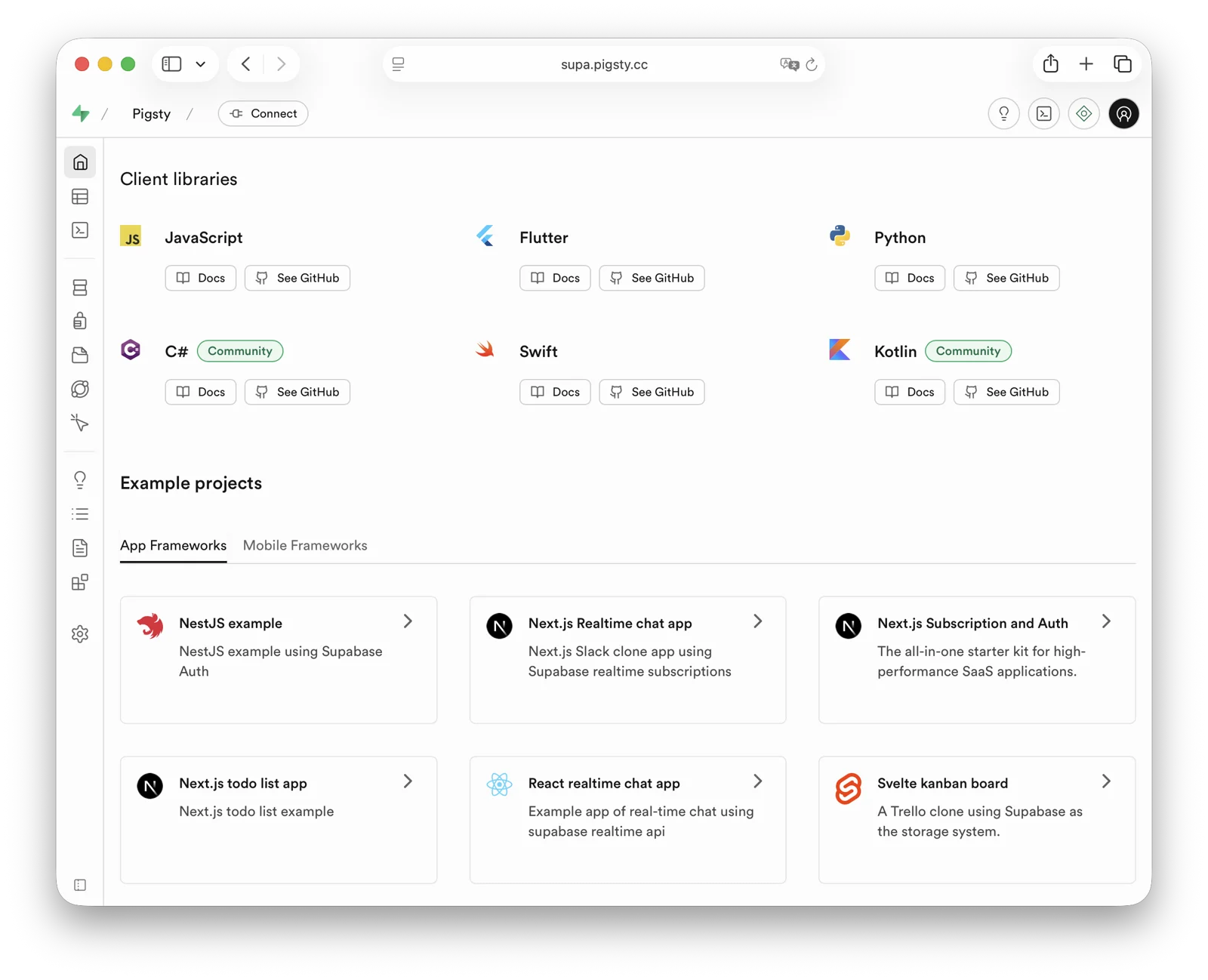
Then open https://supa.pigsty in a browser to access the Supabase Studio management interface.
Default username and password: supabase / pigsty
demo/supabase.cast — /demo/supabase.cast
Configuration Details
./configure -c supabase generates ~/pigsty/pigsty.yml. Before running ./deploy.yml, review and update at least the passwords, keys, and domains in this file.
For complete configuration guidance, see the Supabase Self-Hosting Guide.
3 - Babelfish
Babelfish is a PostgreSQL-based SQL Server compatibility layer, open-sourced by AWS.
Overview
Deploy Babelfish in mssql mode to add these features to PostgreSQL:
- SQL Server wire protocol compatibility (TDS,
1433) - T-SQL compatibility
- Unified integration with Pigsty capabilities (HA, backup, monitoring, IaC)
In Pigsty v4, Babelfish supports PostgreSQL 17/18.
The default template uses pg_version: 17.
Babelfish is part of Pigsty’s standard delivery process and supports all Linux platforms.
Current Behavior
The current behavior differs from older Babelfish/PG15 documentation as follows:
- Supported kernel majors are PG17/18; the template defaults to PG17 (
pg_version: 17) - Default package group:
babelfish + pgsql-common + sqlcmd - Mainstream platform coverage:
- OS:
el8,el9,el10,d12,d13,u22,u24,u26 - Arch:
x86_64,aarch64
- OS:
mssqltemplate no longer requires an extramssqlrepo module (defaults tonode,infra,pgsql)
Older docs may still contain deprecated naming. Pigsty now consistently uses
Babelfishandbabelfishaliases.
Quick Start
Use the built-in Pigsty template:
After deployment, connect directly with SQL Server clients:
Key Configuration
Core parameters in the mssql template:
Connectivity and Ports
Babelfish clusters expose two protocol endpoints:
- PostgreSQL protocol:
5432 - SQL Server protocol (TDS):
1433
Through Pigsty services, you can also use these ports:
5433: fixed route to primary14335434: route to readable node1433
Notes
- Babelfish auth rules must use
md5instead of defaultscram-sha-256. - Default migration mode is
multi-db; switch withbabelfishpg_tsql.migration_modeif needed. - Some native PostgreSQL extensions cannot run directly on Babelfish kernels. Verify package availability and compatibility first.
- For production, restrict HBA rules and network access. Do not keep the open rules from the demonstration configuration.
Related Docs
Available Extensions
The Babelfish kernel has 55 available extensions. The following table lists the extra extensions, excluding bundled PG Contrib extensions:
| Extension | Version | Description |
|---|---|---|
| babelfishpg_common | 5.4.0 | Transact SQL Datatype Support |
| babelfishpg_money | 1.1.0 | babelfishpg_money |
| babelfishpg_tds | 1.0.0 | TDS protocol extension |
| babelfishpg_tsql | 5.4.0 | Transact SQL compatibility |
4 - Percona
Percona Postgres is a patched Postgres kernel with pg_tde (Transparent Data Encryption) extension.
From v4.4.0, Pigsty installs Percona PostgreSQL under the private prefix /usr/pgtde-$v.
Version v4.5.0 keeps this layout, with /usr/pgtde-18 for PostgreSQL 18.
The pgtde package alias installs both the kernel package and its contrib package.
These packages include pg_tde, PostGIS, pgvector, wal2json, pg_repack, pgaudit, and pg_stat_monitor.
Quick Start
Use Pigsty’s standard installation process with the pgtde configuration template.
Configuration
To deploy a Percona cluster, adjust these parameters:
Pigsty’s pgsql repository module supplies the pgtde packages.
The legacy percona module is not required by this template.
Available Extensions
The Percona Postgres kernel has 73 available extensions. The following table lists the extra extensions, excluding bundled PG Contrib extensions:
| Extension | Version | Description |
|---|---|---|
| address_standardizer | 3.5.7 | Parses an address into its elements. Usually supports address normalization for geocoding. |
| address_standardizer_data_us | 3.5.7 | Address Standardizer US dataset example |
| pg_repack | 1.5.3 | Reorganize tables in PostgreSQL databases with minimal locks |
| pg_stat_monitor | 2.3.2 | Monitors PostgreSQL query performance. Based on the PostgreSQL contrib module pg_stat_statements. Provides aggregated statistics, client information, execution plans and plan details, and histogram information. |
| pg_tde | 2.2.1 | pg_tde access method |
| pgaudit | 18.0 | provides auditing functionality |
| postgis | 3.5.7 | PostGIS geometry and geography spatial types and functions |
| postgis_raster | 3.5.7 | PostGIS raster types and functions |
| postgis_sfcgal | 3.5.7 | PostGIS SFCGAL functions |
| postgis_tiger_geocoder | 3.5.7 | PostGIS tiger geocoder and reverse geocoder |
| postgis_topology | 3.5.7 | PostGIS topology spatial types and functions |
| set_user | 4.2.0 | similar to SET ROLE but with added logging |
| vector | 0.8.3 | vector data type and ivfflat and hnsw access methods |
Key Features
- Transparent Data Encryption: Provides data-at-rest encryption using the pg_tde extension
- PostgreSQL 18 Compatible: Based on the Percona PostgreSQL 18 package set
- Enterprise Extensions: Includes enterprise-grade features like pgaudit, pg_stat_monitor
- Complete Ecosystem: Supports popular extensions like pgvector, PostGIS
Note: Currently in stable stage - thoroughly evaluate before production use.
5 - openHalo
OpenHalo is an open-source PostgreSQL kernel that provides MySQL wire-protocol compatibility.
openHalo is based on PostgreSQL 14.18 and provides wire-level compatibility with MySQL 5.7.32-log / 8.0.
Pigsty delivers it through pg_mode: mysql and the openhalo package alias.
Pigsty supports OpenHalo deployment on all supported Linux platforms.
- RPM build spec: github.com/pgsty/rpm/rpmbuild/specs/openhalodb.spec
- DEB build spec: github.com/pgsty/deb/debbuild/openhalodb
Quick Start
Use Pigsty’s standard installation flow with the mysql template.
Cluster Config
The OpenHalo extension aux_mysql provides functions and types for MySQL compatibility.
Enable it in the postgres database for full compatibility behavior.
- aux_mysql 1.5: MySQL Supplementary Extension
/usr/halo-14/share/postgresql/extension/aux_mysql.control$libdir/mysm,mysm.so
Usage
MySQL connections use the postgres database.
A MySQL database maps to a PostgreSQL schema.
Thus, use mysql selects the mysql schema in the postgres database.
Use the PostgreSQL usernames and passwords for MySQL access.
Client Access
OpenHalo listens on port 3306 for MySQL wire protocol clients.
Pigsty’s conf/mysql installs a MySQL client by default.
OpenHalo upstream currently reports that Navicat works normally on this port. IntelliJ DataGrip may fail.
Compatibility Parameters
Pigsty sets database_compat_mode to mysql by default.
To adjust compatibility behavior, use settings such as:
Patch Notes
Pigsty packages the OpenHalo kernel from HaloTech-Co-Ltd/openHalo with these adjustments:
- Restore default database name from
halo0roottopostgres - Remove
1.0.prefix in the default version string, keeping14.18 - Adjust default config to enable MySQL compatibility and listen on
3306
Pigsty does not provide warranty coverage for OpenHalo kernel behavior. Contact the upstream vendor about kernel-specific issues.
Warning: This kernel is currently in beta1. Evaluate its risks carefully before production use.
Available Extensions
The OpenHalo kernel has 59 available extensions. The following table lists the extra extensions, excluding bundled PG Contrib extensions:
| Extension | Version | Description |
|---|---|---|
| aux_mysql | 1.5 | MySQL Supplementary Extension |
| hstore_plpython2u | 1.0 | transform between hstore and plpython2u |
| hstore_plpythonu | 1.0 | transform between hstore and plpythonu |
| jsonb_plpython2u | 1.0 | transform between jsonb and plpython2u |
| jsonb_plpythonu | 1.0 | transform between jsonb and plpythonu |
| ltree_plpython2u | 1.0 | transform between ltree and plpython2u |
| ltree_plpythonu | 1.0 | transform between ltree and plpythonu |
6 - OrioleDB
OrioleDB is a PostgreSQL storage engine extension. It claims to provide 4x OLTP performance and to eliminate xid wraparound and table bloat issues. It also claims to provide cloud-native storage, with data stored in S3.
Pigsty ships OrioleDB as a patched PostgreSQL kernel plus the OrioleDB extension.
You can run OrioleDB as an RDS with Pigsty.
Current packages support PostgreSQL 16, 17, and 18 on supported Linux platforms.
Set pg_mode to oriole to use the /usr/oriole-$v installation path.
The orioledb package alias resolves to versioned kernel packages, such as orioledb-16, orioledb-17, and orioledb-18.
The current Pigsty package line is OrioleDB 1.8 beta16.
Quick Start
Follow Pigsty’s standard installation process using the oriole configuration template.
For production deployment, change the password parameters in pigsty.yml before you run the install playbook.
Configuration
Usage
To use OrioleDB, install the orioledb package alias.
Pigsty uses pg_version to select the PG16, PG17, or PG18 OrioleDB kernel package.
Initialize TPC-B-like tables with pgbench using 100 warehouses:
Next, rebuild these tables with the orioledb storage engine and compare performance:
Key Features
- No XID Wraparound: Eliminates transaction ID wraparound maintenance
- No Table Bloat: Advanced storage management prevents table bloat
- Cloud Storage: Native support for S3-compatible object storage
- OLTP Optimized: Designed for transactional workloads
- Improved Performance: Better space utilization and query performance
Note: Currently in Beta stage - thoroughly evaluate before production use.
Available Extensions
The OrioleDB kernel has 53 available extensions. The following table lists the extra extensions, excluding bundled PG Contrib extensions:
| Extension | Version | Description |
|---|---|---|
| orioledb | 1.8 | OrioleDB – the next generation transactional engine |
7 - Cloudberry
gpsql mode.Cloudberry is an open-source MPP data warehouse kernel derived from the Greenplum ecosystem. It supports large-scale parallel analytics workloads.
Overview
In Pigsty, Cloudberry uses gpsql mode and shares the same identity model, monitoring logic, and directory conventions as Greenplum / MatrixDB.
- Kernel package:
cloudberry - Mode identifier:
pg_mode: gpsql - Role flag:
gp_role: master | segment - Current repo version:
Cloudberry 2.1.0 - Current main package version: DEB
2.1.0-2PIGSTY, RPM2.1.0-3PIGSTY - Default binary directory:
/usr/cloudberry
Pigsty currently provides package delivery, node management, monitoring integration, access control, and configuration management for Cloudberry. For MPP cluster initialization, scale-out, rebalance, and other upstream operations, you should use the official Cloudberry tools.
The current Pigsty repository provides
cloudberry,cloudberry-backup, andcloudberry-pxfpackages for both DEB and RPM platforms.
Installation
There is no standalone cloudberry deployment template yet.
The usual procedure is:
- Enroll the target nodes into Pigsty.
- Install the
cloudberrykernel package. - Describe the coordinator / segment topology with
gpsqlmode. - Use Pigsty to unify monitoring, accounts, access control, and backup integration.
If you only need to install the kernel package on a node:
For an existing Cloudberry cluster, usually keep the original initialization procedure. Add the Pigsty inventory and monitoring configuration incrementally.
Configuration
Cloudberry uses gpsql mode.
There is no dedicated cloudberry mode.
In addition to standard PostgreSQL identity parameters, you need pg_shard and gp_role.
To label shard groups explicitly, you can also add pg_group.
This example shows a minimal topology:
Apply these role settings:
- Use
gp_role: masterfor the coordinator / master node. Applications usually connect to this node. gp_role: segmentnodes usually needpg_exporterto connect inutilitymode for monitoring.
Client Access
Cloudberry uses the PostgreSQL wire protocol for application and BI access. Most PostgreSQL-compatible clients, drivers, and BI tools can connect without special configuration.
Use these access guidelines:
- Applications and analytics queries should connect to the master / coordinator, not directly to segment nodes.
- Segment nodes are better treated as data/compute shards and monitoring targets.
- If you want a unified access endpoint, you can still use Pigsty’s HAProxy / PgBouncer / DNS service abstractions.
Extensions and Ecosystem
Cloudberry differs from native PostgreSQL with added extensions. For extension packages in Pigsty, consider these two categories:
- Pure SQL objects or components with weak ABI coupling are usually easier to adapt.
- Extensions that depend on PGXS or the kernel C ABI often need separate validation. They may also need recompilation with the Cloudberry version and toolchain.
If your workload requires postgis, vector extensions, FDWs, auditing, or custom C extensions, first validate them on the target Cloudberry version.
Do not copy a native PostgreSQL extension list without this check.
Notes
- Cloudberry currently has no dedicated Pigsty template. You should define its configuration manually with
gpsqlmode. - Pigsty currently provides packages, configuration, and monitoring. Use the official Cloudberry tools for MPP initialization and scale-out.
- Cloudberry is an MPP distributed kernel. Native PostgreSQL operating assumptions may not apply to every Patroni / PgBouncer / PgBackRest node role.
- If you need horizontal PostgreSQL scaling rather than a full MPP warehouse, Citus is usually the better first choice.
Related Docs
8 - AgensGraph
AgensGraph is a property graph database kernel built on PostgreSQL. It supports openCypher queries and mixed Cypher/SQL workflows.
Overview
Pigsty integrates AgensGraph through pg_mode: agens while preserving most of the standard PostgreSQL operational model.
- Kernel package:
agensgraph - Mode identifier:
pg_mode: agens - Current template version:
AgensGraph 2.17.0 - Current version string:
PostgreSQL 17.10 (AgensGraph 2.17.0) - Built-in template:
agens - Typical use cases: graph relationship analysis, path queries, knowledge graphs, and risk/association analysis layered onto relational data
AgensGraph uses the PostgreSQL wire protocol.
Standard PostgreSQL clients, drivers, and connection pools can connect directly.
AgensGraph adds graph objects, Cypher syntax, and the agtype data type to the database.
Installation
Use the built-in Pigsty template:
The agens template automatically enables pg_mode: agens and installs the agensgraph kernel package.
After deployment, verify the kernel version:
Configuration
Key configuration for AgensGraph in Pigsty:
AgensGraph does not require a special preload stack, unlike pgEdge or Babelfish.
Most standard Pigsty procedures for HA, backup, monitoring, access control, and IaC remain applicable.
If graph traversal and complex path queries dominate the workload, examine work_mem, shared_buffers, and planner cost settings.
Do not assume that the default OLTP settings are suitable.
Usage
After you connect to the database, usually create a graph first and set graph_path:
Create labels, vertices, and edges:
Run graph queries and updates:
To call Cypher from within SQL, use the cypher() function:
Projects commonly combine relational tables, graph labels, and Cypher queries.
Transactions, privileges, and backup procedures still follow PostgreSQL.
Graph analysis uses AgensGraph graph objects and the cypher() interface.
Notes
- AgensGraph currently uses the PG17-compatible line. Do not assume that PG18 extensions are available.
- The default
agenstemplate uses one node for quick validation. Production deployments should use an HA topology. - Third-party PostgreSQL extensions may be incompatible with AgensGraph. Verify compatibility first.
- Graph objects and relational objects can coexist in one database. For production, clear database or naming conventions usually help you distinguish them.
- Tune memory and cost parameters for the size of your graph model. Check that the defaults are suitable before you use them.
- For compatibility or semantic issues with the AgensGraph kernel, consult the official manual and upstream issues first.
Related Docs
- Pigsty config template:
conf/agens - PGSQL kernel mode config
- AgensGraph repository: https://github.com/skaiworldwide-oss/agensgraph
- AgensGraph official docs: https://tech.skaiworldwide.com/docs/en/agensgraph/latest/
- AgensGraph Quick Guide: https://tech.skaiworldwide.com/docs/en/agensgraph/17/quick_guide/index.html
- AgensGraph 2.17.0 Release Notes: https://tech.skaiworldwide.com/docs/en/agensgraph/latest/release_notes/agensgraph_release_notes_2_17_0.html
Available Extensions
The AgensGraph kernel has 60 available extensions. The following table lists the extra extensions, excluding bundled PG Contrib extensions:
| Extension | Version | Description |
|---|---|---|
| meta | 1.0 | Utility functions for agensgraph |
9 - pgEdge
pgEdge is a distributed PostgreSQL distribution for edge deployments. It uses Spock multi-master logical replication.
Overview
Pigsty integrates pgEdge through pg_mode: pgedge and delivers it through the standard PostgreSQL cluster workflow:
pgedge: a PG15, PG16, PG17, and PG18 compatible kernel; the template defaults to PG18spock: Active-active multi-master logical replicationsnowflake: Distributed unique sequenceslolor: Large object logical replication compatibility layer
The current Pigsty repository supplies the versioned kernel packages pgedge-15, pgedge-16, pgedge-17, and pgedge-18.
The template defaults to pg_version: 18.
The pgedge-$v kernel package includes the control files, SQL files, and shared libraries for spock, snowflake, and lolor.
Thus, these extensions are no longer separate packages in pg_extensions.
pgEdge supports the PostgreSQL wire protocol, so psql, JDBC/ODBC, DBeaver, and similar tools work as usual.
First validate the kernel on one node. Then expand to a replication topology with multiple nodes. The template configures the kernel, extensions, monitoring, backup, and access control. Design the multi-master topology for your workload consistency requirements and conflict strategy.
Installation
Use the built-in Pigsty template:
The template installs spock, snowflake, and lolor in the meta database.
After deployment, verify the kernel and extensions:
For the full template and parameters, see:
pgedgeconfig template.
Configuration
Key parameters in the pgedge template (matching conf/pgedge.yml):
For a future multi-node multi-master topology, we recommend explicit settings for logical replication capacity and snowflake.node:
snowflake.node must be unique on every writable node.
Otherwise, distributed IDs will collide.
Usage
First validate the kernel on one node. Then expand to a Spock replication topology with multiple nodes.
If you need these capabilities in a business database as well, create the extensions first:
Then use the Spock SQL API or the pgEdge CLI to create nodes, replication sets, and subscriptions.
If your schema uses serial or identity, plan the snowflake sequence migration before you enable multi-master writes.
Otherwise, primary key collisions between nodes are likely.
Notes
- Configure pgEdge replication for each database. There is no instance-wide switch to enable multi-master replication for all databases.
- Replicated tables should have a
PRIMARY KEYor an appropriateREPLICA IDENTITY. UNLOGGEDandTEMPORARYtables do not participate in Spock logical replication.- Spock configuration and operations usually require superuser privileges. Production deployments should define privilege boundaries clearly.
- If your workload requires large object replication, use
lolorexplicitly. Do not assume that native large objects will replicate correctly. - Before you configure multi-master replication across regions, evaluate network latency, conflict handling, and the write model.
Related Docs
- PGSQL Kernel Overview
pgedgeconfig template- PGSQL kernel mode config
spockextensionsnowflakeextensionlolorextension- pgEdge official docs
- Spock Limitations
- Snowflake Sequences
Available Extensions
The pgEdge kernel has 63 available extensions. The following table lists the extra extensions, excluding bundled PG Contrib extensions:
10 - DocumentDB
Microsoft maintains DocumentDB, an open-source PostgreSQL document database extension. FerretDB is a stateless protocol translation proxy built on DocumentDB. Together, they provide a MongoDB wire-compatible endpoint for a standard PostgreSQL kernel. Applications can connect directly with MongoDB drivers. FerretDB translates their requests into PostgreSQL operations.
This stack is not a standalone PostgreSQL fork.
The data layer uses native PostgreSQL 16–18, which the standard PGSQL module manages.
PostgreSQL provides persistence, transactions, high availability, backup, monitoring, and access control.
FerretDB runs as a Pigsty Docker APP and handles only protocol translation.
Pigsty is a FerretDB community partner.
It provides binary packages for FerretDB and the DocumentDB extensions.
Use the mongo configuration template to deploy the complete stack.
Quick Start
Use Pigsty’s standard installation flow with the mongo configuration template:
By default, FerretDB listens on the local loopback address at port 27017.
Connect with mongosh or any MongoDB-compatible client:
Configuration
Source: pigsty/conf/mongo.yml. See the Mongo configuration template documentation for the complete template.
The key PostgreSQL settings are the documentdb extension and its preload libraries, plus the backend superuser used by FerretDB:
FerretDB runs as a Docker APP.
Set its configuration overrides under apps.ferretdb.conf.
The container connects to the local primary service on port 5436 through host.docker.internal:
High Availability
FerretDB is fully stateless, so its HA topology follows the standard PostgreSQL cluster pattern.
The template includes a commented three-node pg-mongo example.
Each node runs a FerretDB container on local port 27018.
HAProxy routes access to these containers through the floating endpoint 10.10.10.4:27017 (mongo.pigsty).
Patroni and etcd manage PostgreSQL failover. The Mongo endpoint automatically recovers after the primary switches.
Notes
- FerretDB enables authentication by default (
FERRETDB_AUTH: true). It does not yet implement MongoDB authorization roles. PostgreSQL users and HBA rules control access. - Client-side MongoDB TLS is disabled by default. The Mongo endpoint is not exposed to the network. Change
FERRETDB_BIND_ADDRonly when remote access is required. - The backend cluster uses standard PostgreSQL parameters, playbooks, and dashboards. There is no independent FERRET module or
mongo_*parameter group. - Repeat an authenticated CRUD smoke test after upgrading FerretDB or DocumentDB.
11 - Citus
Pigsty natively supports Citus. This is a distributed horizontal scaling extension based on the native PostgreSQL kernel.
Installation
Citus is a PostgreSQL extension plugin. Use the standard extension installation procedure to install and enable it on a native PostgreSQL cluster.
Configuration
To define a Citus cluster, set these parameters:
pg_modemust be set tocitusinstead of the defaultpgsql- You must define the shard name
pg_shardand shard numberpg_groupon each shard cluster - You must define
pg_primary_dbto specify the database managed by Patroni - You can run administration commands as
postgresfrompg_dbsu, instead of the defaultpg_admin_username. If you use this account, you must setpg_dbsu_passwordto a non-empty plaintext password.
You also need HBA rules that allow SSL access from localhost and other data nodes.
You can define each Citus cluster as a separate group, as with standard PostgreSQL clusters.
The current complete template is conf/ha/citus.yml:
You can also specify identity parameters for all Citus cluster members within a single group, as shown in conf/ha/citus.yml:
Usage
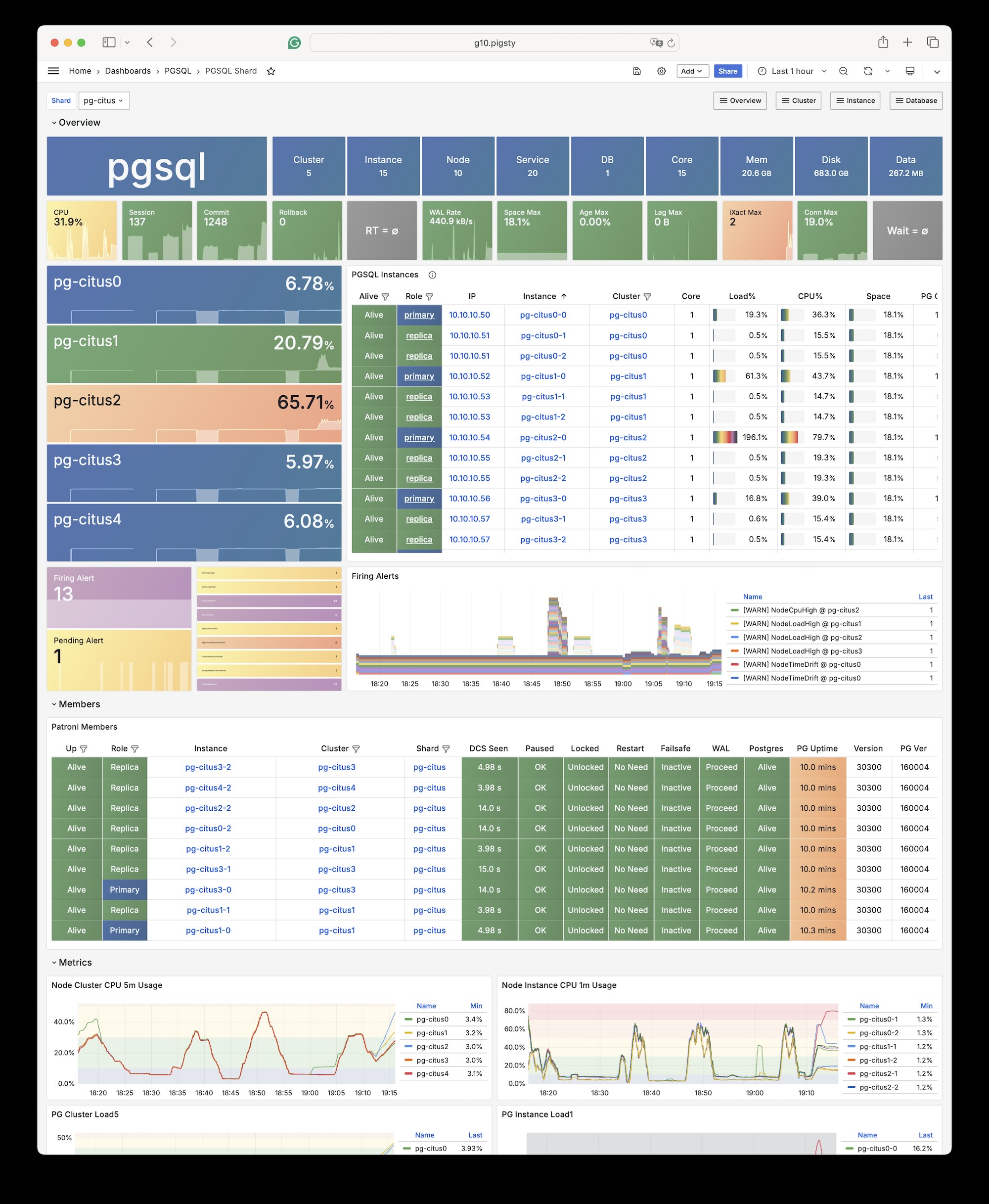
Connect to any node as you would connect to a regular cluster:
By default, changes to one shard affect only that cluster. These changes do not synchronize to other shards.
To distribute writes across all shards, use Citus API functions to mark tables as one of these types:
- Distributed tables (automatic partitioning, requires specifying partition key)
- Reference tables (full replication: does not require specifying partition key)
From Citus 11.2, any Citus database node can act as coordinator. Thus, any primary node can write:
After distributing the tables, you can also access them on other nodes:
For example, this full table scan shows a distributed execution plan:
You can initiate writes from several different primary nodes:
When a node fails, Patroni promotes the standby node. The standby automatically takes over through native high availability support.
12 - IvorySQL
IvorySQL is an open-source PostgreSQL kernel fork that aims to provide Oracle compatibility.
Overview
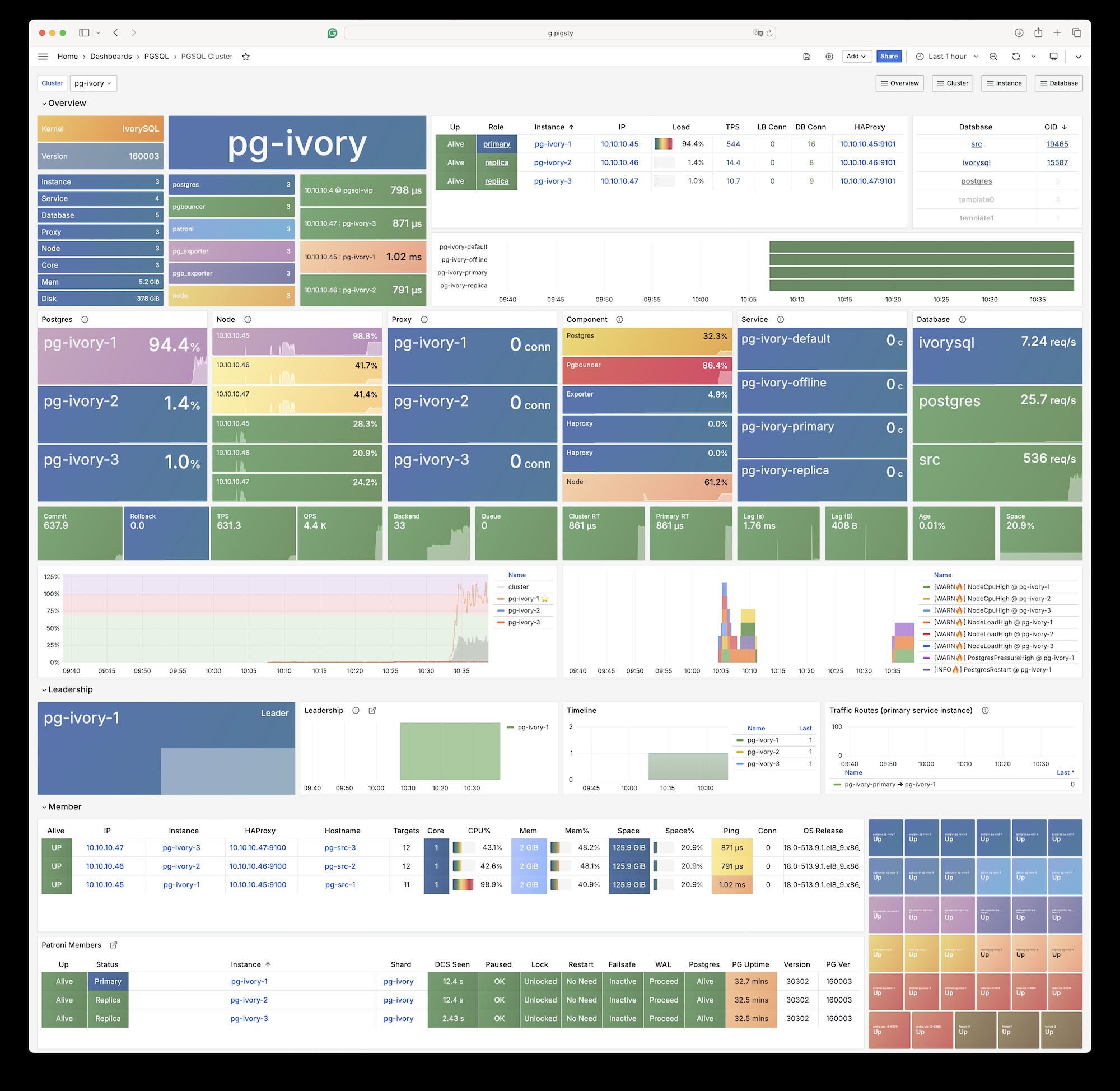
The Pigsty PGSQL repository provides IvorySQL 5.4 packages compatible with PostgreSQL 18.4.
Packages cover the currently supported EL, Debian, and Ubuntu platforms on both architectures.
Online installation uses Pigsty’s pgsql repository.
The Professional Edition also provides offline delivery for these platforms.
Pigsty’s ivorysql package alias points to IvorySQL 5, which is compatible with PostgreSQL 18.
Platform variables under roles/node_id/vars/ map the alias to package names.
For example, EL uses ivorysql5, and Debian/Ubuntu uses ivorysql-5.
IvorySQL 3.3 was the last version to support EL7. It corresponds to PostgreSQL 16.3. IvorySQL 4.4 is the last version based on PostgreSQL 17.
Installation
Install with Pigsty’s built-in ivory configuration template:
Configuration
Set these parameters for an IvorySQL database cluster:
For Oracle compatibility mode, dynamically load the
liboracle_parserextension plugin.
Client Access
IvorySQL 5 is equivalent to PostgreSQL 18. Any client tool that supports the PostgreSQL wire protocol can connect to IvorySQL clusters.
Available Extensions
The IvorySQL kernel has 95 available extensions. The following table lists the extra extensions, excluding bundled PG Contrib extensions:
| Extension | Version | Description |
|---|---|---|
| address_standardizer | 3.5.4 | Parses an address into its elements. Usually supports address normalization for geocoding. |
| address_standardizer_data_us | 3.5.4 | Address Standardizer US dataset example |
| age | 1.7.0 | AGE database extension |
| ddlx | 0.31 | DDL eXtractor functions |
| gb18030_2022 | 1.0 | support gb18030 2022 with extension |
| http | 1.7 | HTTP client for PostgreSQL, allows web page retrieval inside the database. |
| ivorysql_ora | 1.0 | Oracle Compatible extenison on Postgres Database |
| ora_btree_gin | 1.0 | support for indexing oracle datatypes in GIN |
| ora_btree_gist | 1.0 | support for oracle indexing common datatypes in GiST |
| pg_bigm | 1.2 | text similarity measurement and index searching based on bigrams |
| pg_cron | 1.6 | Job scheduler for PostgreSQL |
| pg_curl | 2.4 | PostgreSQL cURL allows most curl actions, including data transfer with URL syntax via HTTP, HTTPS, FTP, FTPS, GOPHER, TFTP, SCP, SFTP, SMB, TELNET, DICT, LDAP, LDAPS, FILE, IMAP, SMTP, POP3, RTSP and RTMP |
| pg_get_functiondef | 1.0 | Get function’s definition |
| pg_hint_plan | 1.8.0 | optimizer hints for PostgreSQL |
| pg_jieba | 1.1.1 | a parser for full-text search of Chinese |
| pg_partman | 5.3.1 | Extension to manage partitioned tables by time or ID |
| pg_show_plans | 2.1 | show query plans of all currently running SQL statements |
| pg_stat_monitor | 2.3 | Monitors PostgreSQL query performance. Based on the PostgreSQL contrib module pg_stat_statements. Provides aggregated statistics, client information, execution plans and plan details, and histogram information. |
| pg_textsearch | 0.1.0 | Full-text search with BM25 ranking |
| pgagent | 4.2 | A PostgreSQL job scheduler |
| pgaudit | 18.0 | provides auditing functionality |
| pgroonga | 4.0.4 | Super fast and all languages supported full text search index based on Groonga |
| pgroonga_database | 4.0.4 | PGroonga database management module |
| pgrouting | 3.8.0 | pgRouting Extension |
| plisql | 1.0 | PL/iSQL procedural language |
| plpgsql_check | 2.8 | extended check for plpgsql functions |
| postgis | 3.5.4 | PostGIS geometry and geography spatial types and functions |
| postgis_raster | 3.5.4 | PostGIS raster types and functions |
| postgis_sfcgal | 3.5.4 | PostGIS SFCGAL functions |
| postgis_tiger_geocoder | 3.5.4 | PostGIS tiger geocoder and reverse geocoder |
| postgis_topology | 3.5.4 | PostGIS topology spatial types and functions |
| redis_fdw | 1.0 | Foreign data wrapper for querying a Redis server |
| system_stats | 3.0 | EnterpriseDB system statistics for PostgreSQL |
| vector | 0.8.1 | vector data type and ivfflat and hnsw access methods |
| zhparser | 2.3 | a parser for full-text search of Chinese |
Pigsty does not assume any warranty responsibility for use of the IvorySQL kernel. Contact the original vendor about issues or requirements for this kernel.
13 - PolarDB PG
Overview
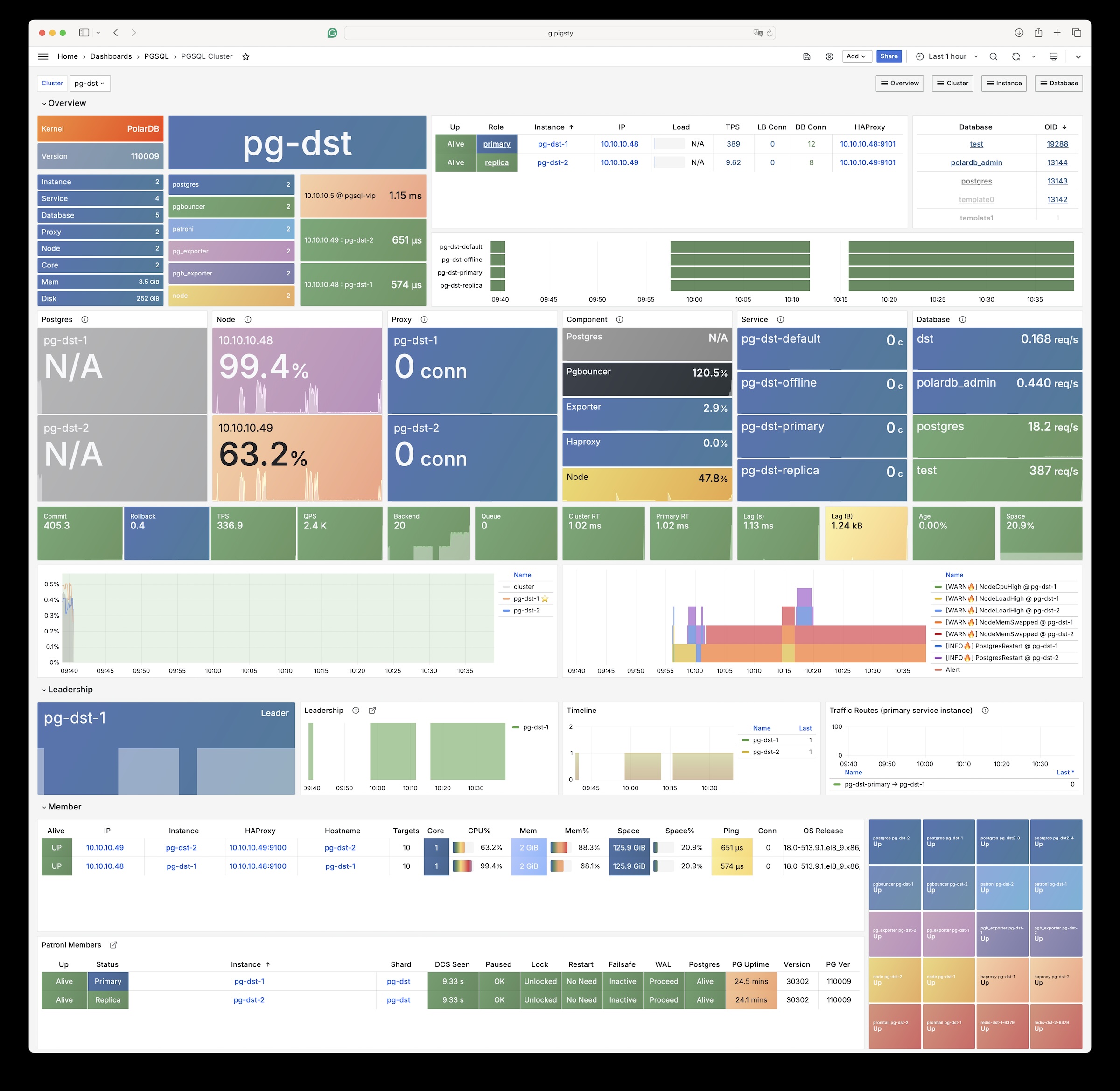
Use Pigsty and PolarDB to create PostgreSQL clusters with “domestic innovation qualification” credentials.
PolarDB for PostgreSQL now uses PostgreSQL 17 as its base.
The Pigsty polar template, default path, and extension notes now use PG17.
Any client tool that supports the PostgreSQL wire protocol can connect to PolarDB clusters.
Pigsty’s PGSQL repository provides PolarDB PG open-source installation packages. Pigsty does not download these packages to the local software repository during installation.
Installation
Use the built-in Pigsty template:
Change Summary
From Pigsty v4.4, the PolarDB PG kernel uses packages that Pigsty builds and maintains. The main changes are:
| Item | Old docs / old default | Current |
|---|---|---|
| Kernel baseline | PostgreSQL 15 | PostgreSQL 17 |
| Default PolarDB path | /u01/polardb_pg | /usr/polar-17 |
| Supported architectures | x86_64 | x86_64, aarch64 |
| Available extensions | Old docs said 61 | pg_available_extensions returns 93; 34 remain after filtering contrib |
| Replication user requirement | replicator must be SUPERUSER | unchanged |
Configuration
Set these parameters for PolarDB database clusters:
The default installation directory for the polar kernel is now /usr/polar-17.
PolarDB PG still requires the replicator replication user to be SUPERUSER.
Native PostgreSQL does not have this requirement.
Available Extensions
The PolarDB PG kernel has 93 available extensions. The following table lists the extra extensions, excluding bundled PG Contrib extensions:
| Extension | Version | Description |
|---|---|---|
| hll | 2.18 | type for storing hyperloglog data |
| ip4r | 2.4 | |
| log_fdw | 1.4 | foreign-data wrapper for Postgres log file access |
| pase | 0.0.1 | ant ai similarity search |
| pg_bigm | 1.2 | text similarity measurement and index searching based on bigrams |
| pg_cron | 1.5 | Job scheduler for PostgreSQL |
| pg_cron_preload | 1.0 | polardb pg extend catalog |
| pg_hint_plan | 1.7.0 | optimizer hints for PostgreSQL |
| pg_jieba | 1.1.0 | a parser for full-text search of Chinese |
| pg_partman | 5.2.4 | Extension to manage partitioned tables by time or ID |
| pg_profile | 4.10 | PostgreSQL load profile repository and report builder |
| pg_repack | 1.5.1-1 | Reorganize tables in PostgreSQL databases with minimal locks |
| pg_similarity | 1.0 | support similarity queries |
| pg_squeeze | 1.9 | A tool to remove unused space from a relation. |
| pg_stat_kcache | 2.3.0 | Kernel statistics gathering |
| pgaudit | 17.1 | provides auditing functionality |
| pgtap | 1.3.3 | Unit testing for PostgreSQL |
| pldbgapi | 1.1 | server-side support for debugging PL/pgSQL functions |
| polar_advisor | 1.1 | polar_advisor |
| polar_feature_utils | 1.0 | PolarDB feature utilization |
| polar_io_stat | 1.0 | polar io stat in multi dimension |
| polar_monitor | 1.3 | monitor functions for PolarDB |
| polar_monitor_preload | 1.0 | examine the polardb information |
| polar_parameter_manager | 1.2 | Extension to select parameters for manger. |
| polar_proxy_utils | 1.0 | Extension to provide operations about proxy. |
| polar_resource_manager | 1.0 | a background process that forcibly frees user session process memory |
| polar_smgrperf | 1.0 | smgr perf test extension |
| polar_tde_utils | 1.0 | Internal extension for TDE |
| polar_vfs | 1.0 | polar virtual file system for different storage |
| polar_worker | 1.1 | polar_worker |
| prefix | 1.2.0 | Prefix Range module for PostgreSQL |
| roaringbitmap | 0.5 | support for Roaring Bitmaps |
| sequential_uuids | 1.0.3 | generator of sequential UUIDs |
| varbitx | 1.1 | varbit functions pack |
14 - PolarDB Oracle
Use Pigsty to create PolarDB for Oracle clusters with “domestic innovation qualification” credentials.
The Security and Reliability Evaluation Results Announcement (No. 1, 2023) lists PolarDB v2.0 in Appendix 3, Centralized Database. It identifies PolarDB v2.0 as an autonomous, controllable, secure, and reliable domestic innovation database.
PolarDB for Oracle is an Oracle-compatible version based on PolarDB for PostgreSQL.
Both use the same kernel.
The --compatibility-mode parameter selects the mode.
We work with the Alibaba Cloud kernel team to provide a complete database solution with the PolarDB v2.0 kernel and Pigsty. For inquiries, contact sales. You can also purchase it on Alibaba Cloud Marketplace.
The PolarDB for Oracle kernel is currently only available on EL7 (CentOS 7) systems.
Extensions
The PolarDB 2.0 kernel in Oracle compatibility mode currently includes these 188 extension plugins:
| name | default_version | comment |
|---|---|---|
| cube | 1.5 | data type for multidimensional cubes |
| ip4r | 2.4 | NULL |
| adminpack | 2.1 | administrative functions for PostgreSQL |
| dict_xsyn | 1.0 | text search dictionary template for extended synonym processing |
| amcheck | 1.4 | functions for verifying relation integrity |
| autoinc | 1.0 | functions for autoincrementing fields |
| hstore | 1.8 | data type for storing sets of (key, value) pairs |
| bloom | 1.0 | bloom access method - signature file based index |
| earthdistance | 1.1 | calculate great-circle distances on the surface of the Earth |
| hstore_plperl | 1.0 | transform between hstore and plperl |
| bool_plperl | 1.0 | transform between bool and plperl |
| file_fdw | 1.0 | foreign-data wrapper for flat file access |
| bool_plperlu | 1.0 | transform between bool and plperlu |
| fuzzystrmatch | 1.1 | determine similarities and distance between strings |
| hstore_plperlu | 1.0 | transform between hstore and plperlu |
| btree_gin | 1.3 | support for indexing common datatypes in GIN |
| hstore_plpython2u | 1.0 | transform between hstore and plpython2u |
| btree_gist | 1.6 | support for indexing common datatypes in GiST |
| hll | 2.17 | type for storing hyperloglog data |
| hstore_plpython3u | 1.0 | transform between hstore and plpython3u |
| citext | 1.6 | data type for case-insensitive character strings |
| hstore_plpythonu | 1.0 | transform between hstore and plpythonu |
| hypopg | 1.3.1 | Hypothetical indexes for PostgreSQL |
| insert_username | 1.0 | functions for tracking who changed a table |
| dblink | 1.2 | connect to other PostgreSQL databases from within a database |
| decoderbufs | 0.1.0 | Logical decoding plugin that delivers WAL stream changes using a Protocol Buffer format |
| intagg | 1.1 | integer aggregator and enumerator (obsolete) |
| dict_int | 1.0 | text search dictionary template for integers |
| intarray | 1.5 | functions, operators, and index support for 1-D arrays of integers |
| isn | 1.2 | data types for international product numbering standards |
| jsonb_plperl | 1.0 | transform between jsonb and plperl |
| jsonb_plperlu | 1.0 | transform between jsonb and plperlu |
| jsonb_plpython2u | 1.0 | transform between jsonb and plpython2u |
| jsonb_plpython3u | 1.0 | transform between jsonb and plpython3u |
| jsonb_plpythonu | 1.0 | transform between jsonb and plpythonu |
| lo | 1.1 | Large Object maintenance |
| log_fdw | 1.0 | foreign-data wrapper for csvlog |
| ltree | 1.2 | data type for hierarchical tree-like structures |
| ltree_plpython2u | 1.0 | transform between ltree and plpython2u |
| ltree_plpython3u | 1.0 | transform between ltree and plpython3u |
| ltree_plpythonu | 1.0 | transform between ltree and plpythonu |
| moddatetime | 1.0 | functions for tracking last modification time |
| old_snapshot | 1.0 | utilities in support of old_snapshot_threshold |
| oracle_fdw | 1.2 | foreign data wrapper for Oracle access |
| oss_fdw | 1.1 | foreign-data wrapper for OSS access |
| pageinspect | 2.1 | inspect the contents of database pages at a low level |
| pase | 0.0.1 | ant ai similarity search |
| pg_bigm | 1.2 | text similarity measurement and index searching based on bigrams |
| pg_freespacemap | 1.2 | examine the free space map (FSM) |
| pg_hint_plan | 1.4 | controls execution plan with hinting phrases in comment of special form |
| pg_buffercache | 1.5 | examine the shared buffer cache |
| pg_prewarm | 1.2 | prewarm relation data |
| pg_repack | 1.4.8-1 | Reorganize tables in PostgreSQL databases with minimal locks |
| pg_sphere | 1.0 | spherical objects with useful functions, operators and index support |
| pg_cron | 1.5 | Job scheduler for PostgreSQL |
| pg_jieba | 1.1.0 | a parser for full-text search of Chinese |
| pg_stat_kcache | 2.2.1 | Kernel statistics gathering |
| pg_stat_statements | 1.9 | track planning and execution statistics of all SQL statements executed |
| pg_surgery | 1.0 | extension to perform surgery on a damaged relation |
| pg_trgm | 1.6 | text similarity measurement and index searching based on trigrams |
| pg_visibility | 1.2 | examine the visibility map (VM) and page-level visibility info |
| pg_wait_sampling | 1.1 | sampling based statistics of wait events |
| pgaudit | 1.6.2 | provides auditing functionality |
| pgcrypto | 1.3 | cryptographic functions |
| pgrowlocks | 1.2 | show row-level locking information |
| pgstattuple | 1.5 | show tuple-level statistics |
| pgtap | 1.2.0 | Unit testing for PostgreSQL |
| pldbgapi | 1.1 | server-side support for debugging PL/pgSQL functions |
| plperl | 1.0 | PL/Perl procedural language |
| plperlu | 1.0 | PL/PerlU untrusted procedural language |
| plpgsql | 1.0 | PL/pgSQL procedural language |
| plpython2u | 1.0 | PL/Python2U untrusted procedural language |
| plpythonu | 1.0 | PL/PythonU untrusted procedural language |
| plsql | 1.0 | Oracle compatible PL/SQL procedural language |
| pltcl | 1.0 | PL/Tcl procedural language |
| pltclu | 1.0 | PL/TclU untrusted procedural language |
| polar_bfile | 1.0 | The BFILE data type enables access to binary file LOBs that are stored in file systems outside Database |
| polar_bpe | 1.0 | polar_bpe |
| polar_builtin_cast | 1.1 | Internal extension for builtin casts |
| polar_builtin_funcs | 2.0 | implement polar builtin functions |
| polar_builtin_type | 1.5 | polar_builtin_type for PolarDB |
| polar_builtin_view | 1.5 | polar_builtin_view |
| polar_catalog | 1.2 | polardb pg extend catalog |
| polar_channel | 1.0 | polar_channel |
| polar_constraint | 1.0 | polar_constraint |
| polar_csn | 1.0 | polar_csn |
| polar_dba_views | 1.0 | polar_dba_views |
| polar_dbms_alert | 1.2 | implement polar_dbms_alert - supports asynchronous notification of database events. |
| polar_dbms_application_info | 1.0 | implement polar_dbms_application_info - record names of executing modules or transactions in the database. |
| polar_dbms_pipe | 1.1 | implements polar_dbms_pipe - package lets two or more sessions in the same instance communicate. |
| polar_dbms_aq | 1.2 | implement dbms_aq - provides an interface to Advanced Queuing. |
| polar_dbms_lob | 1.3 | implement dbms_lob - provides subprograms to operate on BLOBs, CLOBs, and NCLOBs. |
| polar_dbms_output | 1.2 | implement polar_dbms_output - enables you to send messages from stored procedures. |
| polar_dbms_lock | 1.0 | implement polar_dbms_lock - provides an interface to Oracle Lock Management services. |
| polar_dbms_aqadm | 1.3 | polar_dbms_aqadm - procedures to manage Advanced Queuing configuration and administration information. |
| polar_dbms_assert | 1.0 | implement polar_dbms_assert - provide an interface to validate properties of the input value. |
| polar_dbms_metadata | 1.0 | implement polar_dbms_metadata - provides a way for you to retrieve metadata from the database dictionary. |
| polar_dbms_random | 1.0 | implement polar_dbms_random - a built-in random number generator, not intended for cryptography |
| polar_dbms_crypto | 1.1 | implement dbms_crypto - provides an interface to encrypt and decrypt stored data. |
| polar_dbms_redact | 1.0 | implement polar_dbms_redact - provides an interface to mask data from queries by an application. |
| polar_dbms_debug | 1.1 | server-side support for debugging PL/SQL functions |
| polar_dbms_job | 1.0 | polar_dbms_job |
| polar_dbms_mview | 1.1 | implement polar_dbms_mview - enables to refresh materialized views. |
| polar_dbms_job_preload | 1.0 | polar_dbms_job_preload |
| polar_dbms_obfuscation_toolkit | 1.1 | implement polar_dbms_obfuscation_toolkit - enables an application to get data md5. |
| polar_dbms_rls | 1.1 | implement polar_dbms_rls - a fine-grained access control administrative built-in package |
| polar_multi_toast_utils | 1.0 | polar_multi_toast_utils |
| polar_dbms_session | 1.2 | implement polar_dbms_session - support to set preferences and security levels. |
| polar_odciconst | 1.0 | implement ODCIConst - Provide some built-in constants in Oracle. |
| polar_dbms_sql | 1.2 | implement polar_dbms_sql - provides an interface to execute dynamic SQL. |
| polar_osfs_toolkit | 1.0 | osfs library tools and functions extension |
| polar_dbms_stats | 14.0 | stabilize plans by fixing statistics |
| polar_monitor | 1.5 | monitor functions for PolarDB |
| polar_osfs_utils | 1.0 | osfs library utils extension |
| polar_dbms_utility | 1.3 | implement polar_dbms_utility - provides various utility subprograms. |
| polar_parameter_check | 1.0 | kernel extension for parameter validation |
| polar_dbms_xmldom | 1.0 | implement dbms_xmldom and dbms_xmlparser - support standard DOM interface and xml parser object |
| polar_parameter_manager | 1.1 | Extension to select parameters for manager. |
| polar_faults | 1.0.0 | simulate some database faults for end user or testing system. |
| polar_monitor_preload | 1.1 | examine the polardb information |
| polar_proxy_utils | 1.0 | Extension to provide operations about proxy. |
| polar_feature_utils | 1.2 | PolarDB feature utilization |
| polar_global_awr | 1.0 | PolarDB Global AWR Report |
| polar_publication | 1.0 | support polardb pg logical replication |
| polar_global_cache | 1.0 | polar_global_cache |
| polar_px | 1.0 | Parallel Execution extension |
| polar_serverless | 1.0 | polar serverless extension |
| polar_resource_manager | 1.0 | a background process that forcibly frees user session process memory |
| polar_sys_context | 1.1 | implement polar_sys_context - returns the value of parameter associated with the context namespace at the current instant. |
| polar_gpc | 1.3 | polar_gpc |
| polar_tde_utils | 1.0 | Internal extension for TDE |
| polar_gtt | 1.1 | polar_gtt |
| polar_utl_encode | 1.2 | implement polar_utl_encode - provides functions that encode RAW data into a standard encoded format |
| polar_htap | 1.1 | extension for PolarDB HTAP |
| polar_htap_db | 1.0 | extension for PolarDB HTAP database level operation |
| polar_io_stat | 1.0 | polar io stat in multi dimension |
| polar_utl_file | 1.0 | implement utl_file - support PL/SQL programs can read and write operating system text files |
| polar_ivm | 1.0 | polar_ivm |
| polar_sql_mapping | 1.2 | Record error sqls and mapping them to correct one |
| polar_stat_sql | 1.0 | Kernel statistics gathering, and sql plan nodes information gathering |
| tds_fdw | 2.0.2 | Foreign data wrapper for querying a TDS database (Sybase or Microsoft SQL Server) |
| xml2 | 1.1 | XPath querying and XSLT |
| polar_upgrade_catalogs | 1.1 | Upgrade catalogs for old version instance |
| polar_utl_i18n | 1.1 | polar_utl_i18n |
| polar_utl_raw | 1.0 | implement utl_raw - provides SQL functions for manipulating RAW datatypes. |
| timescaledb | 2.9.2 | Enables scalable inserts and complex queries for time-series data |
| polar_vfs | 1.0 | polar virtual file system for different storage |
| polar_worker | 1.0 | polar_worker |
| postgres_fdw | 1.1 | foreign-data wrapper for remote PostgreSQL servers |
| refint | 1.0 | functions for implementing referential integrity (obsolete) |
| roaringbitmap | 0.5 | support for Roaring Bitmaps |
| tsm_system_time | 1.0 | TABLESAMPLE method which accepts time in milliseconds as a limit |
| vector | 0.5.0 | vector data type and ivfflat and hnsw access methods |
| rum | 1.3 | RUM index access method |
| unaccent | 1.1 | text search dictionary that removes accents |
| seg | 1.4 | data type for representing line segments or floating-point intervals |
| sequential_uuids | 1.0.2 | generator of sequential UUIDs |
| uuid-ossp | 1.1 | generate universally unique identifiers (UUIDs) |
| smlar | 1.0 | compute similarity of any one-dimensional arrays |
| varbitx | 1.1 | varbit functions pack |
| sslinfo | 1.2 | information about SSL certificates |
| tablefunc | 1.0 | functions that manipulate whole tables, including crosstab |
| tcn | 1.0 | Triggered change notifications |
| zhparser | 1.0 | a parser for full-text search of Chinese |
| address_standardizer | 3.3.2 | Ganos PostGIS address standardizer |
| address_standardizer_data_us | 3.3.2 | Ganos PostGIS address standardizer data us |
| ganos_fdw | 6.0 | Ganos Spatial FDW extension for POLARDB |
| ganos_geometry | 6.0 | Ganos geometry lite extension for POLARDB |
| ganos_geometry_pyramid | 6.0 | Ganos Geometry Pyramid extension for POLARDB |
| ganos_geometry_sfcgal | 6.0 | Ganos geometry lite sfcgal extension for POLARDB |
| ganos_geomgrid | 6.0 | Ganos geometry grid extension for POLARDB |
| ganos_importer | 6.0 | Ganos Spatial importer extension for POLARDB |
| ganos_networking | 6.0 | Ganos networking |
| ganos_pointcloud | 6.0 | Ganos pointcloud extension For POLARDB |
| ganos_pointcloud_geometry | 6.0 | Ganos_pointcloud LIDAR data and ganos_geometry data for POLARDB |
| ganos_raster | 6.0 | Ganos raster extension for POLARDB |
| ganos_scene | 6.0 | Ganos scene extension for POLARDB |
| ganos_sfmesh | 6.0 | Ganos surface mesh extension for POLARDB |
| ganos_spatialref | 6.0 | Ganos spatial reference extension for POLARDB |
| ganos_trajectory | 6.0 | Ganos trajectory extension for POLARDB |
| ganos_vomesh | 6.0 | Ganos volume mesh extension for POLARDB |
| postgis_tiger_geocoder | 3.3.2 | Ganos PostGIS tiger geocoder |
| postgis_topology | 3.3.2 | Ganos PostGIS topology |
15 - PostgresML
PostgresML is a PostgreSQL extension that supports the latest large language models (LLM), vector operations, and classical machine learning. It also supports traditional Postgres application workloads.
PostgresML (pgml) is written in Rust. You can run standalone Docker images. This page is reference documentation and does not describe a docker-compose template.
PostgresML officially supports Ubuntu 22.04. We also maintain RPM versions for EL 8/9, for use without CUDA and NVIDIA-related features.
You need internet access on database nodes to download Python dependencies from PyPI and models from HuggingFace.
The company that developed PostgresML has ceased operations.
Configuration
PostgresML is an extension written in Rust. Pigsty maintains prebuilt packages for PG14-17 on EL8/EL9 and Debian/Ubuntu platforms.
Creating a New Cluster
PostgresML 2.10.0 is available for PostgreSQL 14-17.
The following example uses PG17.
For PG14-16, set pg_version to the applicable major version.
Pigsty maps the pgml package alias to pgml_$v on EL and postgresql-$v-pgml on Debian/Ubuntu.
You must also add pgml to pg_libs.
Enabling on an Existing Cluster
To enable pgml on an existing cluster, you can install it using Ansible’s package module:
Python Dependencies
You must also install PostgresML’s Python dependencies on the cluster nodes. See the official tutorial: Installation Guide
Install Python and PIP
Ensure python3, pip, and venv are installed:
For EL 8 / EL9 and compatible distributions, you can use python3.11:
For users in mainland China, we recommend using Tsinghua University’s PyPI mirror.
Install Dependencies
Create a Python virtual environment.
Use pip to install dependencies from requirements.txt and requirements-xformers.txt.
If you’re using EL 8/9, replace
python3withpython3.11in the following commands.
Enable PostgresML
Install the pgml extension and Python dependencies on all cluster nodes first.
Then enable pgml on the PostgreSQL cluster.
Use patronictl to configure the cluster.
Add pgml to shared_preload_libraries.
Set pgml.venv to your virtual environment directory:
Then restart the database cluster and create the extension using SQL commands:
If these commands succeed, the output should be similar to this:
For more details, see the official PostgresML documentation: https://postgresml.org/docs/guides/use-cases/
16 - Greenplum
Pigsty supports deployment of Greenplum clusters and the derivative distribution YMatrixDB. You can also add existing Greenplum deployments to Pigsty monitoring.
Overview
Only the professional/enterprise editions provide Greenplum / YMatrix cluster deployment. This capability is not currently open source.
Installation
Pigsty provides installation packages for Greenplum 6 (@el7) and Greenplum 7 (@el8). Open-source users can install and configure them manually.
Configuration
To define a Greenplum cluster, set pg_mode = gpsql.
Also set the identity parameters pg_shard and gp_role.
PG Exporter also requires extra connection parameters to collect metrics from Greenplum Segment instances.
17 - Neon
Neon separates storage from compute. It provides automatic scaling, scale-to-zero operation, and database branching.
Neon official website: https://neon.tech/
Neon binaries are currently too large for the open-source package set. This support remains in the pilot stage. If you need it, contact Pigsty sales.