This is the multi-page printable view of this section. .
Module: VAULT
- 1: Configuration
- 2: Parameters
- 3: Playbooks
- 4: Administration
- 5: Usage
- 6: Monitoring
- 7: Metrics
- 8: FAQ
OpenBao is an open-source key and secrets management system (MPL-2.0), forked by the community after HashiCorp Vault adopted the BSL license and hosted by the Linux Foundation. Its API is largely compatible with Vault.
Pigsty’s VAULT module deploys an OpenBao cluster in the fixed vault group as the deployment’s KMS (key management service) and secrets store. Pigsty manages TLS, auto-unseal, the HA endpoint, backups, monitoring, and lifecycle.
VAULT is in Beta. Deployment, repeated execution, rolling restarts, standby read forwarding, VIP access, and snapshot backup/recovery have been validated on a three-member Ubuntu 24.04 cluster. Grafana display, alert behavior, and other operating systems still need validation.
Automatic integration is not yet implemented for PGSQL pg_tde or MINIO KES; manual configuration is required. Test thoroughly in your own environment before production use, especially snapshot recovery.
VAULT follows the naming convention of the MINIO module and Silo engine: Pigsty uses the module name (vault group, vault_* parameters, vault.yml playbook, and files/pki/vault/ directory), while the OS uses the engine name (openbao.service, /etc/openbao/, and the bao CLI).
Capabilities
The VAULT module currently provides:
- Topology determines mode: one member for labs, three for production, with no separate mode parameter. OpenBao’s built-in Raft storage requires neither ETCD nor an external database.
- Auto-unseal: a 32-byte static seal key is generated on the admin node and distributed to members. Nodes unseal automatically after a restart, without manual key-share entry.
- Safe initialization: only the member with the lowest
vault_seqrunsbao operator init, once, after probing every member. Scaling or rebuilding a member cannot accidentally bootstrap a second empty cluster. - TLS throughout: Pigsty CA signs server certificates, with TLS 1.3 as the minimum. Clients use
https://vault.pigsty:8200. - HA endpoint: NODE’s L2 VIP and HAProxy provide TLS passthrough to the active member, switching automatically on failure.
- Ready to use:
secret/(KV v2),transit/(encryption as a service), andapproleauthentication are enabled by default. - Rolling updates: changes to configuration, certificates, the seal key, or the systemd unit restart members one at a time, waiting for each to rejoin before proceeding.
- Daily snapshots: each member retrieves a Raft snapshot from the active member daily and retains seven locally. An initial snapshot is taken immediately after initialization and retrieved to the admin node.
- Observability: Prometheus metrics over HTTPS, 14 recording rules, six alerts, and a Vault Overview dashboard. Service and backup logs go to VictoriaLogs.
- Removal safeguards:
vault_safeguardis enabled by default, like MYSQL’smysql_safeguard: true. Removal never touches key material on the admin node.
Architecture
VAULT depends on NODE for node management, repositories, the shared CA, and L2 VIP, and on INFRA for VictoriaMetrics, VictoriaLogs, Grafana, and Alertmanager.
It does not depend on ETCD or PGSQL. PGSQL (pg_tde transparent encryption) and MINIO (KES server-side encryption) are planned consumers.
flowchart LR
    subgraph CONSUMER [Consumers]
        app[Applications]
        tde["PGSQL pg_tde<br>(planned)"]
        kes["MINIO KES<br>(planned)"]
    end

    subgraph VAULT [VAULT]
        entry["vault.pigsty:8200<br>VIP + HAProxy"]
        bao["OpenBao × 3<br>Raft consensus"]
    end

    subgraph NODE [NODE]
        node["Repositories / CA / VIP"]
    end

    CONSUMER -->|HTTPS| VAULT -->|depends on| NODE
    entry --> bao

    style CONSUMER fill:#3E668F,stroke:#2d4a66,color:#fff
    style VAULT fill:#5B9CD5,stroke:#4178a8,color:#fff
    style NODE fill:#FCDB72,stroke:#d4b85e,color:#333

    style app fill:#2d4a66,stroke:#1e3347,color:#fff
    style tde fill:#2d4a66,stroke:#1e3347,color:#fff,stroke-dasharray: 5 5
    style kes fill:#2d4a66,stroke:#1e3347,color:#fff,stroke-dasharray: 5 5
    style entry fill:#4178a8,stroke:#2d5a7a,color:#fff
    style bao fill:#4178a8,stroke:#2d5a7a,color:#fff
    style node fill:#d4b85e,stroke:#b89a4a,color:#333
A Pigsty deployment needs only one VAULT cluster. Consumers access it through the same domain, with separate mounts, policies, and credentials for isolation.
The trust roots reside on the admin node: the seal key, root token, and recovery keys are stored in files/pki/vault/, alongside the Pigsty CA private key at files/pki/ca/ca.key.
This follows Pigsty’s existing security model: backing up files/pki preserves all trust roots.
Components and Ports
| Component | Purpose | Endpoint |
|---|---|---|
| OpenBao API | Client access, inter-member forwarding, Prometheus metrics | <node-IP>:8200, 127.0.0.1:8200 |
| OpenBao Raft | Raft replication and elections | <node-IP>:8201 |
| HAProxy endpoint | HA access on the VIP, with TLS passthrough to the active member (VIP enabled only) | <VIP>:8200 |
vault-backup | Daily Raft snapshot script scheduled by cron | /usr/local/bin/vault-backup |
bao | OpenBao CLI; environment set by /etc/profile.d/bao.sh | Local node |
OpenBao listens only on the node IP and loopback, not 0.0.0.0, leaving <VIP>:8200 for HAProxy. The client port is therefore always 8200 in both lab and production deployments.
Limitations
VAULT deliberately provides a small, fixed platform. Review these current limitations before use:
- No automatic consumer integration yet: mounts, policies, and credentials for PGSQL
pg_tdeand MINIO KES require manual configuration. The prefixestde/<pg_cluster>andkes/<minio_cluster>are reserved for them. - Static seal security boundary: the auto-unseal key resides on member nodes and cannot protect against a compromised VAULT or admin node. It protects leaked data disks, backups, and snapshots; see the FAQ.
- Long-lived credentials: the root token remains on the admin node. Backup tokens last ten years, comparable to Pigsty certificates; no agent or renewal component is introduced.
- No declarative application objects: there is no
vault_appsparameter. Create application policies and AppRoles manually withbao. - Routine snapshots remain local: each member retains seven. The initial snapshot and the final snapshot before whole-cluster removal are retrieved automatically to the admin node. Other off-site replication is an operator responsibility, and recovery is manual.
- No external Vault management: existing HashiCorp Vault deployments and managed KMS services are not adopted.
Platform Support
The Pigsty Infra repository provides openbao (currently 2.7.2, official native builds). It is included in the default infra-package alias and covers all supported platforms:
| Architecture | Supported Systems |
|---|---|
x86_64 | EL 8/9/10、Debian 12/13、Ubuntu 22/24/26 |
aarch64 | EL 8/9/10、Debian 12/13、Ubuntu 22/24/26 |
Documentation
| Document | Description |
|---|---|
| Configuration | Single-node and three-node topologies, VIP, DNS, key material, and filesystem layout |
| Parameters | Eight public parameters and fixed conventions |
| Playbooks | Tasks, tags, and commands for vault.yml and vault-rm.yml |
| Administration | Create, scale, rebuild members, renew certificates, back up, restore, and remove |
| Usage | KV, Transit, and AppRole through bao and the HTTP API |
| Monitoring | Dashboards, scraping, logs, and alerts |
| Metrics | Recording rules and common raw metrics |
| FAQ | Cluster sizing, auto-unseal, initialization guards, and troubleshooting |
Quick Start
Define the vault group in the inventory, and resolve vault.pigsty to its member:
After provisioning NODE, run vault.yml:
deploy.yml automatically deploys a predefined vault group, so a separate vault.yml run is unnecessary.
After deployment, check cluster status as root on a member:
The root token is stored on the admin node in files/pki/vault/init.json. See Usage to get started; open Vault Overview in Grafana to inspect the cluster.
1 - Configuration
Before deploying VAULT, define a group named vault in the inventory. There is no profile or mode parameter: the mode is derived entirely from the number of members in vault.
- Single node: no HA; suitable for development, testing, demos, and sandboxes.
- Three nodes: tolerates one member failure and provides HA access with an L2 VIP; suitable for production.
- Two nodes: functional but has no fault tolerance; treat it as a single-node setup.
| Members | Quorum | Tolerated Failures | Mode | Service Endpoint |
|---|---|---|---|---|
| 1 | 1 | 0 | Lab | vault.pigsty points to the member |
| 2 | 2 | 0 | Warning | Any member failure loses quorum |
| 3 | 2 | 1 | Production | vault.pigsty points to the VIP; HAProxy forwards to the active member |
VAULT uses OpenBao’s built-in Raft storage. Only one active member handles writes at a time; the remaining standby members forward requests to it.
Single Node
A single-node VAULT instance needs only one line of configuration:
Besides the IP address, the only required parameter is vault_seq. It determines the instance name vault-<seq> and which member performs initial cluster initialization: the one with the lowest vault_seq.
Single-node VAULT usually shares a machine with INFRA, ETCD, and PGSQL, so keys and data are not separated. Obtaining its disk exposes both encrypted data and the key. This is suitable for development and demos, but should not supply transparent-encryption keys in production.
Three Nodes
Three members tolerate one failure. Enable NODE’s L2 VIP on the vault group in production so the service endpoint is also highly available:
The resulting topology is:
When vip_enabled is true and there is more than one member, vault.yml generates /etc/haproxy/conf.d/vault.cfg on every member:
- Binds
<VIP>:8200in TCP mode with TLS passthrough. Clients and OpenBao still perform certificate validation. - Checks
GET /v1/sys/health: active returns200, standby429, sealed503, and uninitialized501. Only a member returning200receives traffic. - Health checks also use HTTPS and validate member certificates with
/etc/pki/ca.crt. - Members without the VIP must also bind
<VIP>:8200, requiringnet.ipv4.ip_nonlocal_bind=1. NODE’s tuned profiles set this. Withnode_tune: none, set it yourself or the playbook stops here.
With the VIP enabled, server certificate SANs include its address. Members must share the same node_cluster; otherwise NODE derives different VRRP authentication values and VIP failover does not work.
A three-member cluster can run without a VIP. Resolve vault.pigsty to one member; a standby forwards requests to the active member.
The cluster still tolerates one member failure, but the member named in DNS becomes a single point of failure for access.
Rerunning node.yml with haproxy_clean=true on vault nodes clears /etc/haproxy/conf.d/. Run ./vault.yml -l vault -t vault_haproxy to regenerate the VAULT endpoint.
Two Nodes
A two-member Raft cluster requires a quorum of two and tolerates no failures. Either member failing makes the whole cluster unavailable, potentially reducing availability below that of a single node.
VAULT permits two-member deployments but prints a warning. Treat this as a temporary state during scaling, not a permanent topology.
Raft supports larger clusters, but VAULT is designed and validated for one or three members.
Service Domain
All clients should use vault_domain, defaulting to vault.pigsty. The full address is:
Consumers such as pg_tde persist the KMS endpoint in their metadata. Using a domain allows migration from one to three members, or a change of VIP, by updating /etc/hosts without changing every consumer’s configuration.
NODE’s node_etc_hosts writes the mapping to each node’s /etc/hosts, without depending on INFRA DNS. Databases can therefore locate KMS at startup even if INFRA is unavailable.
Pigsty CA signs the server certificates. Every managed node has /etc/pki/ca.crt, which clients can use to verify VAULT’s identity.
Placement
In production, deploy VAULT on dedicated nodes or alongside control components such as ETCD and INFRA. Do not co-locate it with PostgreSQL or Silo data nodes that use its keys. Transparent encryption depends on separating keys from data: a leaked data disk, database backup, or object store should not expose its key in the same place.
VAULT needs few resources. Low disk latency matters most because each Raft log commit must be persisted.
Key Material
All VAULT trust roots are stored on the admin node in files/pki/vault/, alongside Pigsty CA. files/pki/ is ignored by Git by default:
| File | Contents | Notes |
|---|---|---|
unseal.key | 32-byte static seal key | Generated on first deployment and never overwritten; used by every member for auto-unseal |
init.json | Root token and five recovery shares, threshold three | Output of bao operator init; the root of administrative access |
backup.token | Token with read-only snapshot access | Used by vault-backup; valid for ten years |
backup/*.snap | Initial snapshot after initialization and final snapshot before whole-cluster removal | Mode 0600 |
vault-<seq>.crt / .key | Member server certificates and private keys | Signed by Pigsty CA; validity set by cert_validity |
A Raft snapshot and its matching unseal.key can recover the encrypted store. The root token and recovery keys in init.json are needed to regain administrative access afterward.
Losing unseal.key makes all snapshots unreadable. Keep files/pki/ and snapshots safely off-site.
Each member holds a copy of unseal.key. Before distributing it, Pigsty compares checksums. If an existing member key differs from the admin node’s key, the playbook stops immediately to avoid wrapping data with the wrong key.
Filesystem Layout
VAULT creates the following files and directories on each member:
| Path | Purpose | Permissions |
|---|---|---|
/etc/openbao/ | Configuration directory | 0750, root:openbao |
/etc/openbao/openbao.hcl | Main OpenBao configuration | 0640, root:openbao |
/etc/openbao/tls/ | CA certificate, server certificate, and private key | Directory 0750, files 0640, root:openbao |
/etc/openbao/unseal.key | Local copy of the static seal key | 0640, root:openbao |
/etc/openbao/backup.token | Local copy of the backup token | 0600, root:root |
/data/vault/raft/ | Raft data directory (configurable) | 0700, openbao:openbao |
/data/vault/backup/ | Seven local snapshots and the .backup.lock concurrency lock | 0700, root:root |
/var/log/openbao/ | audit.log, rotated daily with seven retained files | 0750, openbao:openbao |
/etc/systemd/system/openbao.service | systemd service definition | 0644, root:root |
/etc/profile.d/bao.sh | bao client environment variables | 0644, root:root |
/etc/logrotate.d/openbao | Audit log rotation | 0644, root:root |
/usr/local/bin/vault-backup | Snapshot script | 0755, root:root |
/etc/cron.d/vault-backup | Daily snapshot schedule | 0644, root:root |
/var/lib/node_exporter/textfile/vault.prom | Latest successful snapshot timestamp and size | Collected by node_exporter |
/etc/haproxy/conf.d/vault.cfg | HAProxy VIP endpoint (VIP enabled only) | 0644, root:root |
On INFRA nodes, /infra/targets/vault/<vault_cluster>-<vault_seq>.yml defines the member’s monitoring scrape target.
2 - Parameters
VAULT provides eight parameters in two groups:
VAULT: five parameters for deployment and configuration.VAULT_REMOVE: three parameters controlling cluster removal.
VAULT deliberately exposes few settings. Member count determines cluster mode, HA access reuses NODE’s VIP parameters, and other ports, directories, engines, and backup policies follow fixed conventions.
Parameter Overview
The VAULT group configures instance identity, cluster name, data directory, port, and service domain.
| Parameter | Type | Level | Description |
|---|---|---|---|
vault_seq | int | I | Required VAULT instance identifier |
vault_cluster | string | C | Cluster name, default vault |
vault_data | path | C | Data directory, default /data/vault |
vault_port | port | G | API port, default 8200 |
vault_domain | string | G | Service domain, default vault.pigsty |
The VAULT_REMOVE group controls removal safeguards, data cleanup, and package removal.
| Parameter | Type | Level | Description |
|---|---|---|---|
vault_safeguard | bool | G/C/A | Removal safeguard, default true, blocks removal |
vault_rm_data | bool | G/C/A | Delete VAULT data during removal? Default true |
vault_rm_pkg | bool | G/C/A | Uninstall openbao during removal? Default false |
VAULT
This section lists parameters for the vault role,
used by the vault.yml playbook.
They are defined in roles/vault/defaults/main.yml.
vault_seq
Name: vault_seq, type: int, level: I
Required VAULT instance number. Assign every member a nonnegative integer unique within the group.
The instance name is <vault_cluster>-<vault_seq>, for example vault-1. It is also the Raft node ID, server certificate CN, and monitoring label ins.
The member with the lowest vault_seq performs initial cluster initialization. Keep instance numbers immutable once assigned; do not reuse them for other nodes.
The playbook verifies that every vault_seq is a nonnegative integer unique in the vault group, stopping immediately on failure.
vault_cluster
Name: vault_cluster, type: string, level: C
VAULT cluster name, default vault.
Used as the instance name prefix, OpenBao cluster_name, and monitoring label cls, and in generating the seal key ID.
The Ansible group name is hardcoded as vault, independently of vault_cluster. Each Pigsty deployment has one VAULT cluster; this parameter usually needs no change.
vault_data
Name: vault_data, type: path, level: C
VAULT data directory, default /data/vault.
Contains raft/ for Raft storage and backup/ for local snapshots.
Use a dedicated absolute path at least two levels deep, such as /data/vault, with no .. components. Removal deletes the entire directory; never point it at a shared parent such as /var/lib.
vault_port
Name: vault_port, type: port, level: G
VAULT API port, default 8200.
The Raft cluster port is fixed at vault_port + 1, default 8201. This follows OpenBao’s convention and has no separate parameter.
Clients, HAProxy, and monitoring all use this port. Do not change it after creating the cluster.
vault_domain
Name: vault_domain, type: string, level: G
VAULT service domain, default vault.pigsty.
Included in every member’s server certificate SAN. All clients should use https://<vault_domain>:<vault_port>.
Pigsty does not resolve this name automatically. Use node_etc_hosts to point it to the single member or the three-member cluster’s VIP; see Service Domain.
VAULT_REMOVE
This section lists parameters for the vault_remove role,
used by the vault-rm.yml playbook.
They are defined in roles/vault_remove/defaults/main.yml.
vault_safeguard
Name: vault_safeguard, type: bool, level: G/C/A
VAULT removal safeguard, default true. When enabled, vault-rm.yml aborts before taking any action.
Like MYSQL’s mysql_safeguard, this safeguard is enabled by default. Deleting VAULT destroys all keys it stores: databases, objects, and all their backups encrypted with those keys become permanently unreadable.
To remove it, explicitly override the parameter on the command line:
vault_rm_data
Name: vault_rm_data, type: bool, level: G/C/A
Delete VAULT data and configuration during removal? Default true.
Deletes /etc/openbao on members, including local copies of TLS certificates, the seal key, and backup token; the vault_data directory, including local snapshots; the systemd unit, client environment, log rotation configuration, and vault-backup script.
When removing the whole cluster with this enabled, the playbook first takes a final snapshot and retrieves it to files/pki/vault/backup/ on the admin node. Failure aborts removal.
Regardless of this setting, files/pki/vault/ on the admin node and /var/log/openbao/ audit logs on members are never deleted.
vault_rm_pkg
Name: vault_rm_pkg, type: bool, level: G/C/A
Uninstall openbao during removal? Default false.
Related Parameters
VAULT reuses existing parameters for HA access and domain resolution:
| Parameter | Module | Role in VAULT |
|---|---|---|
vip_enabled | NODE | Enable an L2 VIP, HAProxy endpoint, and VIP certificate SAN for the vault cluster |
vip_address | NODE | VIP address to which vault.pigsty should resolve |
vip_vrid | NODE | VRRP router ID, unique on the L2 network |
node_cluster | NODE | Use the same node cluster name for consistent VRRP authentication |
node_etc_hosts | NODE | Write vault_domain into /etc/hosts on all nodes |
haproxy_enabled | NODE | When false, no VAULT HAProxy endpoint is generated |
cert_validity | INFRA | Server certificate validity, default 20 years |
Fixed Conventions
The following conventions have no configurable parameters:
| Item | Convention |
|---|---|
| Group / instance name | Fixed group vault; instance <vault_cluster>-<vault_seq> |
| Cluster mode | Derived from member count: one for labs, three for production |
| Ports | API vault_port (8200), Raft vault_port + 1 (8201) |
| Service / user / CLI | openbao.service / openbao / bao, all from the upstream package |
| Version | Determined by openbao in the Pigsty Infra repository |
| Seal method | Static seal; key at files/pki/vault/unseal.key on the admin node |
| Initialization | Five recovery shares, threshold three |
| Default engines | secret/ (KV v2), transit/, auth/approle |
| Tokens | Maximum lease for token/ auth: ten years (87600h); backup token validity: ten years |
| Audit | File device at /var/log/openbao/audit.log; daily rotation, seven retained files |
| Backup | Daily at 03:00 with minute (vault_seq × 10) % 60 to stagger jobs; seven local snapshots |
| TLS | Pigsty CA certificates, TLS 1.3 minimum |
| Telemetry | Unauthenticated /v1/sys/metrics on the node IP listener; disabled on loopback |
3 - Playbooks
VAULT provides two playbooks: vault.yml creates, updates, and scales clusters, while vault-rm.yml removes members or the whole cluster.
The helper scripts bin/vault-add and bin/vault-rm wrap these playbooks.
vault.yml
Source: vault.yml
Installs, configures, and starts OpenBao in the hardcoded vault group. It is idempotent: repeated runs reconcile configuration changes without reinitializing the cluster.
vault.yml provides these task subsets:
id: derive node identity and variables throughnode_id.vault_assert: validate member IDs, data paths, ports, and VIP configuration; derive instance names and members (always runs).vault_install: installopenbaoand ensure theopenbaosystem user exists.vault_dir: create configuration, data, snapshot, and audit log directories.vault_config: generate VAULT configuration.vault_cert: issue and distribute TLS certificates.vault_cert_issue: issue server certificates with Pigsty CA on the admin node.vault_cert_copy: copy the CA certificate, server certificate, and private key to members.
vault_seal: generate and distribute the static seal key; abort if an existing member key differs from the admin node’s key.vault_conf: renderopenbao.hcl, the systemd unit,baoclient environment, and log rotation configuration.
vault_launch: start stopped members. Members already running before execution restart one at a time only if their certificates, seal key, configuration, or unit changed, waiting for each to rejoin. Newly started members skip a second restart to avoid startup races.vault_init: initialize once on the member with the lowestvault_seq, then wait for all members to unseal and complete Raft election (leader_addressnonempty).vault_provision: enablesecret/,transit/, andapprole; issue the backup token, reissuing it automatically if an existing token is invalid, for example from an old cluster.vault_haproxy: generate the<VIP>:8200HAProxy endpoint on members when VIP is enabled; otherwise remove it.vault_backup: installvault-backup, its daily schedule, and take the first snapshot.vault_register(aliasesregister,add_metrics): register members with VictoriaMetrics.
vault_init runs bao operator init only when all these conditions hold:
- The current member has the lowest
vault_seqinvault. - Every member is reachable and reports that it is uninitialized.
files/pki/vault/init.jsondoes not exist on the admin node.
Using -l <ip> to add or rebuild a member therefore cannot bootstrap a second empty cluster. The new member joins through Raft retry_join and unseals with the same key.
The playbook aborts if an unreachable member prevents determining initialization state. It also aborts if all members are uninitialized but init.json exists, indicating a previously initialized cluster whose data was lost. See Restore a Snapshot.
The generated root token and recovery keys are saved to files/pki/vault/init.json on the admin node. If saving fails, they remain temporarily in /root/vault-init.json on the member and the playbook stops; move them to the admin node manually.
vault-rm.yml
Source: vault-rm.yml
Removes members or the whole cluster. vault-rm.yml provides these task subsets:
vault_safeguard: check the removal safeguard, enabled by default; abort if enabled.vault_consumer: before whole-cluster removal, listtde/*andkes/*consumers whose data will become unreadable.vault_pause: pause five seconds to allow cancellation with Ctrl-C.vault_snapshot: before whole-cluster removal, take a final snapshot and retrieve it tofiles/pki/vault/backup/on the admin node; abort on failure without deleting data.vault_leave: for partial removal, runbao operator raft remove-peeron a surviving member; abort on failure without deleting data.vault_deregister(aliasesderegister,rm_metrics): remove members from VictoriaMetrics targets.vault_svc: remove the backup cron job and metrics, stop and disableopenbao, and remove the HAProxy endpoint.vault_data: delete data, configuration, local TLS certificates, seal key and backup token copies, and local snapshots; disable withvault_rm_data=false.vault_pkg: uninstallopenbao; explicitly enable withvault_rm_pkg=true.
The playbook uses vault_remove and supports:
vault_safeguard: block removal whentrue; defaulttrue.vault_rm_data: delete VAULT data; defaulttrue.vault_rm_pkg: uninstallopenbao; defaultfalse.
If the run targets every member of vault, it is treated as whole-cluster removal. Otherwise, it is partial removal and the selected members must first leave Raft.
Every selected member must be reachable before removal begins; an unreachable member aborts the playbook.
Peer removal uses the root token in the admin node’s init.json, so members being removed must remain in the inventory’s vault group during execution.
Removing the whole VAULT cluster destroys all its keys. Databases, objects, and all their backups encrypted with them become permanently unreadable unless VAULT can be restored from a snapshot and files/pki/vault/unseal.key.
vault_rm_data defaults to true, so local snapshots are deleted with member data. The playbook first retrieves a final snapshot to the admin node. Verify that files/pki/vault/ is intact before proceeding.
A broken or never-initialized cluster cannot produce a snapshot; removing it requires --skip-tags vault_snapshot.
The admin node’s files/pki/vault/ (seal key, initialization material, initial and final snapshots) and members’ /var/log/openbao/ audit logs are never deleted.
Command Reference
Installation and configuration:
Removal and cleanup:
Helper Scripts
Both scripts accept only full IPv4 addresses, provide a countdown, and suggest follow-up actions. For example, after adding or removing members, they prompt you to refresh the remaining members’ configuration and HAProxy endpoints:
Safeguards
VAULT includes safeguards for deployment and removal:
| Safeguard | Purpose |
|---|---|
| Initialization guard | Initialize only if all members are reachable and uninitialized and init.json is absent; prevent a second empty cluster |
| Seal key validation | Abort if a member’s existing key differs from the admin node’s key |
| Sequential restart | With a leader present, wait for each member to rejoin before the next; without a leader, start the other members first |
| Removal safeguard | vault_safeguard defaults to true; requires an explicit command-line override |
| Consumer warning | List tde/* and kes/* consumers before whole-cluster removal |
| Abort on peer removal failure | Stop if raft remove-peer fails, preventing stale members from silently reducing fault tolerance |
| Preserve trust roots | Never delete files/pki/vault/ on the admin node; retrieve the final snapshot there |
Regardless of safeguard settings, recheck bao status, Raft membership, and fault tolerance after a real run. Playbook success does not replace runtime validation.
4 - Administration
Common VAULT administration procedures:
- Create a Cluster: initialize VAULT.
- Check Status: inspect cluster, member, and Raft state.
- Administrator Credentials: use the root token safely.
- Add Members: add members or scale from one to three nodes.
- Remove Members: retire existing members.
- Rebuild a Member: recover from damaged data or replace hardware.
- Update Configuration: refresh configuration and certificates.
- Backups: create snapshots manually and keep off-site copies.
- Restore a Snapshot: roll back data or rebuild after total data loss.
- Upgrade OpenBao: update the software package.
- Destroy a Cluster: remove and recreate VAULT.
See the VAULT FAQ for other questions.
Create a Cluster
Define the vault group in the inventory, and resolve its service domain with node_etc_hosts. See Configuration for details:
Provision the nodes through NODE, including the VIP, then run vault.yml:
The playbook creates the seal key, initialization material, backup token, and initial snapshot in files/pki/vault/ on the admin node. Immediately back up the entire files/pki/ directory to a secure location.
Check Status
/etc/profile.d/bao.sh sets the bao environment: BAO_ADDR points to local https://127.0.0.1:8200, and BAO_CACERT to /etc/openbao/tls/ca.crt.
Only root and the openbao group can read the TLS directory, so run bao as root on a member:
A healthy standby member produces output similar to:
To run as a regular user, use the globally readable Pigsty CA: export BAO_CACERT=/etc/pki/ca.crt.
Raft membership and Autopilot health checks require an administrator token; see Administrator Credentials:
Health endpoints require no token and can be accessed by service domain from any managed node:
Grafana’s Vault Overview shows members, roles, seal status, Raft replication lag, and snapshot times. See Monitoring.
Administrator Credentials
The root token and recovery keys generated during initialization are stored in files/pki/vault/init.json on the admin node:
On a member, enter the root token interactively into an environment variable to keep it out of command arguments and shell history:
The root token has full privileges; use it briefly for administrative tasks only. Give applications policies and AppRoles with the minimum required privileges; see Usage.
In auto-unseal mode, the five recovery shares (threshold three) cannot unseal the service. They authorize quorum operations such as bao operator generate-root, for example to replace a lost root token.
Add Members
Recommended: Helper Script
The script runs ./vault.yml -l 10.10.10.14: it issues certificates, distributes the seal key, joins the existing cluster through Raft retry_join, unseals automatically, and registers monitoring.
The new member does not have the lowest vault_seq, so it never initializes the cluster.
Then refresh existing members’ configuration, certificates, HAProxy endpoints, and backup scripts:
If configuration or certificates change, vault_launch restarts existing members one at a time to apply the updates.
Scale from One to Three Nodes
When scaling to three production members, the service domain changes from pointing to one member to pointing to a VIP. Existing certificates must include the VIP:
Add two members and configure
node_cluster,vip_enabled,vip_vrid, andvip_addresson thevaultgroup.Provision nodes and the VIP with
./node.yml -l vault. Already managed nodes need only./node.yml -l vault -t node_vip.Add members:
bin/vault-add 10.10.10.12 10.10.10.13.Refresh the original member’s certificate, configuration, and endpoint. Certificate changes trigger its restart:
Point
vault.pigstyat the VIP innode_etc_hosts, then run./node.yml -t node_hoststo update all nodes.Verify that
bao operator raft list-peersshows three voters and/v1/sys/healthreturns200through the VIP.
Check whether a certificate includes the VIP with openssl x509 -in /etc/openbao/tls/server.crt -noout -ext subjectAltName as root on the member.
If it does not, delete the corresponding files/pki/vault/vault-<seq>.crt on the admin node and repeat step 4.
Remove Members
Recommended: Helper Script
The script runs ./vault-rm.yml -l 10.10.10.13 -e vault_safeguard=false: it executes bao operator raft remove-peer vault-3 on a survivor, deregisters monitoring, stops services, and deletes local data and configuration.
Keep the member in the inventory’s vault group during execution. The playbook needs the inventory to locate a surviving member for peer removal. If removal fails, for example due to an invalid administrator token, it aborts without deleting data.
After success, remove the member from the inventory and refresh the survivors’ configuration and HAProxy endpoints:
Removing a member from a three-node cluster leaves two members with no fault tolerance. Add a replacement promptly. In production, it is safer to add the replacement first, temporarily forming four members, then retire the old member.
Manual Steps
To preserve local data and snapshots on the removed member:
Rebuild a Member
For damaged data or hardware replacement at the same address, remove the member, then add it again. Keep it in the inventory throughout:
This applies only to multi-member clusters. Running bin/vault-rm against the sole member destroys the entire cluster; use Restore a Snapshot instead.
The rebuilt member synchronizes all data from the active member. Even if it has the lowest vault_seq, the playbook does not initialize again because the other members are already initialized.
If the host is completely unavailable and cannot run vault-rm.yml, remove it manually from a survivor using an administrator token, then add its replacement:
Update Configuration
The playbook generates VAULT configuration. Edit the inventory and rerun it instead of manually changing /etc/openbao/openbao.hcl.
vault_launch first starts selected stopped services, then restarts previously running members whose certificates, seal key, configuration, or systemd unit changed. Newly started members already loaded the latest configuration and skip a second restart to avoid cold-start and initialization races. With a leader present, it waits for each member to rejoin before proceeding; without one, startup continues to allow quorum recovery. Check cluster health before updating. If an earlier run stopped after writing configuration, manually restart members that have not loaded it, one at a time.
Renew certificates: server certificates default to 20 years. To reissue them, for example after changing the VIP or domain, delete the corresponding certificates on the admin node and run:
Refresh HAProxy after enabling/disabling the VIP, changing membership, or running node.yml with haproxy_clean=true:
Backups
Daily snapshots: each member runs vault-backup at 03:00, staggered by vault_seq, retrieving a Raft snapshot from the active member into /data/vault/backup/ and retaining the latest seven.
Thus every member of a three-node cluster holds complete snapshot copies.
The backup token can only read sys/storage/raft/snapshot. The script uses flock on ${BACKUP_DIR}/.backup.lock to serialize concurrent local jobs, such as scheduled and manual backups. Successful jobs write completion time and size into node_exporter’s textfile directory. No successful snapshot for 26 hours triggers VaultBackupStale.
Initial and final snapshots: immediately after initialization, the playbook takes a snapshot and retrieves it to files/pki/vault/backup/ on the admin node. It also retrieves a final snapshot before destroying the cluster. Operators may copy other snapshots there; these files are not cleaned automatically.
If initial deployment stops before retrieval, a rerun detects the missing admin-node snapshot, takes one, and retrieves it.
Off-site copies: scheduled snapshots stay on members; operators are responsible for off-site replication. Snapshots are encrypted by OpenBao’s barrier key and cannot be opened without unseal.key, so they may be copied to other storage. Store files/pki/vault/ separately from snapshots.
For example, retrieve a member’s latest snapshot from the admin node:
If object storage uses KES encryption and its keys reside in VAULT, do not keep VAULT’s only snapshots there: recovery would depend on the service being recovered.
Restore a Snapshot
Recovery requires a snapshot, its matching files/pki/vault/unseal.key, and the original files/pki/vault/init.json. The original root token and recovery keys become valid again after restoration.
Snapshot recovery is destructive: keys, tokens, and leases created after the snapshot are lost. Rehearse in an isolated environment and take a fresh snapshot of the current state before proceeding.
Roll Back a Working Cluster
To roll a healthy cluster back to a snapshot, for example after accidental key deletion, run as root on the active member:
Raft replicates the restored state to the other members. Check bao status and application keys afterward.
Rebuild After Total Data Loss
If all members lose their data, vault.yml refuses to initialize: all members report uninitialized, but init.json on the admin node identifies a previously initialized cluster.
Bootstrap a temporary empty cluster, then overwrite it with the snapshot:
Prepare the snapshot and verify that
files/pki/vault/unseal.keyon the admin node is the key used when it was created.Archive the original initialization material; otherwise the playbook refuses initialization:
Bootstrap the temporary cluster, generating a new
init.json. Its oldbackup.tokenis invalid, so the playbook reissues it and backs up the old file asbackup.token.*~:Copy the snapshot to the temporary cluster’s active member (
HA Mode: activeinbao status), for example/tmp/restore.snap. Use the temporary cluster’s root token to force restoration;-forcepermits a snapshot from another cluster:Wait for members to become healthy. In OpenBao 2.7.2 testing, a standby sometimes continued reporting
decryption failed: cipher: message authentication failedafter a forced cross-cluster restore. Verify itsunseal.keymatches the admin node, then restart only that member and wait for normalbao statusbefore continuing. Do not restart all members together:After restoration, the original root token works again and temporary cluster credentials are invalid. Restore the original
init.json, then run token provisioning and backup tasks. The playbook detects the invalid backup token and reissues/distributes it:Use the original root token to check
bao operator raft list-peersand application keys. Runvault-backupmanually on every member to verify backups work again.
Snapshots also preserve audit device configuration. After unsealing, OpenBao writes to /var/log/openbao/audit.log. An unwritable path causes post-unseal initialization to fail; check directory permissions. Do not disable auditing to bypass this problem.
If VAULT holds other components’ keys, restore in dependency order: VAULT → KES → Silo → pgBackRest → PostgreSQL.
Upgrade OpenBao
The Pigsty Infra repository provides openbao. Upgrades are manual; refresh the local repository and take a snapshot first:
- Run
vault-backupon a member and copy the snapshot to a secure location. - Upgrade standby members one at a time: update the package, run
systemctl restart openbao, wait forbao statusto show unsealed and Autopilot to report the member healthy, then proceed. - Upgrade the active member last. Its restart triggers a new active election and the VIP endpoint switches accordingly.
Before a major upgrade, read the OpenBao release notes and upgrade guide.
Destroy a Cluster
Use vault-rm.yml or bin/vault-rm to destroy the whole cluster.
Destroying VAULT destroys all its keys. Databases, objects, and all their backups encrypted with those keys become permanently unreadable.
Confirm that no consumers still use VAULT and that the admin node’s files/pki/vault/ is intact. Local snapshots are deleted with member data; the playbook retrieves a final snapshot first.
Whole-cluster removal lists tde/* and kes/* consumers, pauses five seconds, takes a final snapshot on a member, and retrieves it to the admin node’s files/pki/vault/backup/ before deregistering monitoring, stopping services, and deleting data. It does not run raft remove-peer or delete the admin node’s files/pki/vault/ or members’ audit logs.
If the final snapshot fails, removal aborts before deleting anything. A broken or never-initialized cluster cannot produce a snapshot, so explicitly skip this step if necessary:
Create a new empty cluster: after removal, archive the old initialization material before creating a fresh empty cluster instead of restoring a snapshot; otherwise vault.yml refuses initialization:
The old backup.token is invalid in the new cluster. The playbook reissues it and backs up the old file as backup.token.*~.
You may retain and reuse unseal.key. Old snapshots still require that key, so do not delete it.
5 - Usage
After configuring and deploying VAULT, use this page to get started. The following engines and authentication methods are enabled by default:
| Path | Type | Purpose |
|---|---|---|
secret/ | KV v2 secrets engine | Versioned static secrets such as passwords, API keys, and certificates |
transit/ | Transit secrets engine | Encryption as a service; applications send data for encryption/decryption while keys remain in VAULT |
auth/approle/ | AppRole authentication | Machine credentials for applications and automation |
auth/token/ | Token authentication | Built-in; maximum lease adjusted to ten years |
OpenBao’s API is largely compatible with HashiCorp Vault, so common Vault client libraries and tools generally work directly. See the OpenBao documentation for full usage.
Endpoint
All clients should use the service domain over HTTPS and validate the server certificate with Pigsty CA:
| Item | Value |
|---|---|
| Address | https://vault.pigsty:8200 |
| CA certificate | /etc/pki/ca.crt on managed nodes; files/pki/ca/ca.crt on the admin node |
| TLS version | TLS 1.3 minimum |
In a three-member cluster, vault.pigsty points to the VIP and HAProxy forwards to the active member. Direct standby access also works; the standby forwards requests to the active member.
bao is installed with openbao on VAULT members. Other nodes can use curl with the HTTP API, or install openbao to obtain bao.
Administrator Login
Run these examples as root on a VAULT member with the root token. See Administrator Credentials:
Use the root token only for administration. Issue credentials with minimal privileges to applications.
KV Secrets
secret/ uses KV v2, which saves a new version on every write:
KV v2 policies and HTTP APIs use secret/data/<path> for secret reads/writes and secret/metadata/<path> for metadata.
Transit Encryption
transit/ provides encryption as a service. Applications send data for encryption or decryption without handling keys, suitable for encrypting sensitive database fields in the application layer.
Base64-encode plaintext first. After rotation, new data uses the new key version, while older ciphertext remains decryptable. Use transit/rewrap/app to rewrap old ciphertext with the new version.
Issue Application Credentials
Create a policy with only the permissions each application needs, then issue machine credentials through AppRole:
role_id acts as a username and secret_id as a password. Applications exchange them for a short-lived token, then use that token to access secrets:
Deliver secret_id through a secure channel. Restrict credentials further with secret_id_ttl, secret_id_num_uses, and token_bound_cidrs as needed.
Through the VIP, HAProxy forwards in TCP mode, so OpenBao sees the VAULT member’s address rather than the original client. Audit logs record that member address, and token_bound_cidrs set to client networks will reject these requests.
HTTP API
Clients without bao can call the HTTP API directly. For example, log in with AppRole and read a secret:
Unauthenticated endpoints support health checks and monitoring:
Reserved Paths
These paths and names are used by Pigsty or reserved for future features; do not use them for applications:
| Path / Name | Purpose |
|---|---|
tde/<pg_cluster> | Reserved for PGSQL pg_tde keys, KV v2, one per PG cluster |
kes/<minio_cluster> | Reserved for MINIO KES keys, KV v2, one per object-storage cluster |
tde-*, kes-* policies | Reserved for those consumers |
vault-backup policy | Backup token; read-only access to sys/storage/raft/snapshot |
Before whole-cluster removal, vault-rm.yml lists existing tde/* and kes/* mounts to identify consumers that will permanently lose keys.
6 - Monitoring
VAULT reuses Pigsty’s observability stack. OpenBao metrics flow over HTTPS to VictoriaMetrics; service and backup logs flow through Journald / Vector to VictoriaLogs. vmalert loads 14 recording rules and six alerts, and Grafana provides the Vault Overview dashboard.
Dashboard
VAULT provides one dashboard: Vault Overview.
Vault Overview Dashboard
Vault Overview is available at /ui/d/vault-overview. Use the Cluster variable at the top to select a cluster.
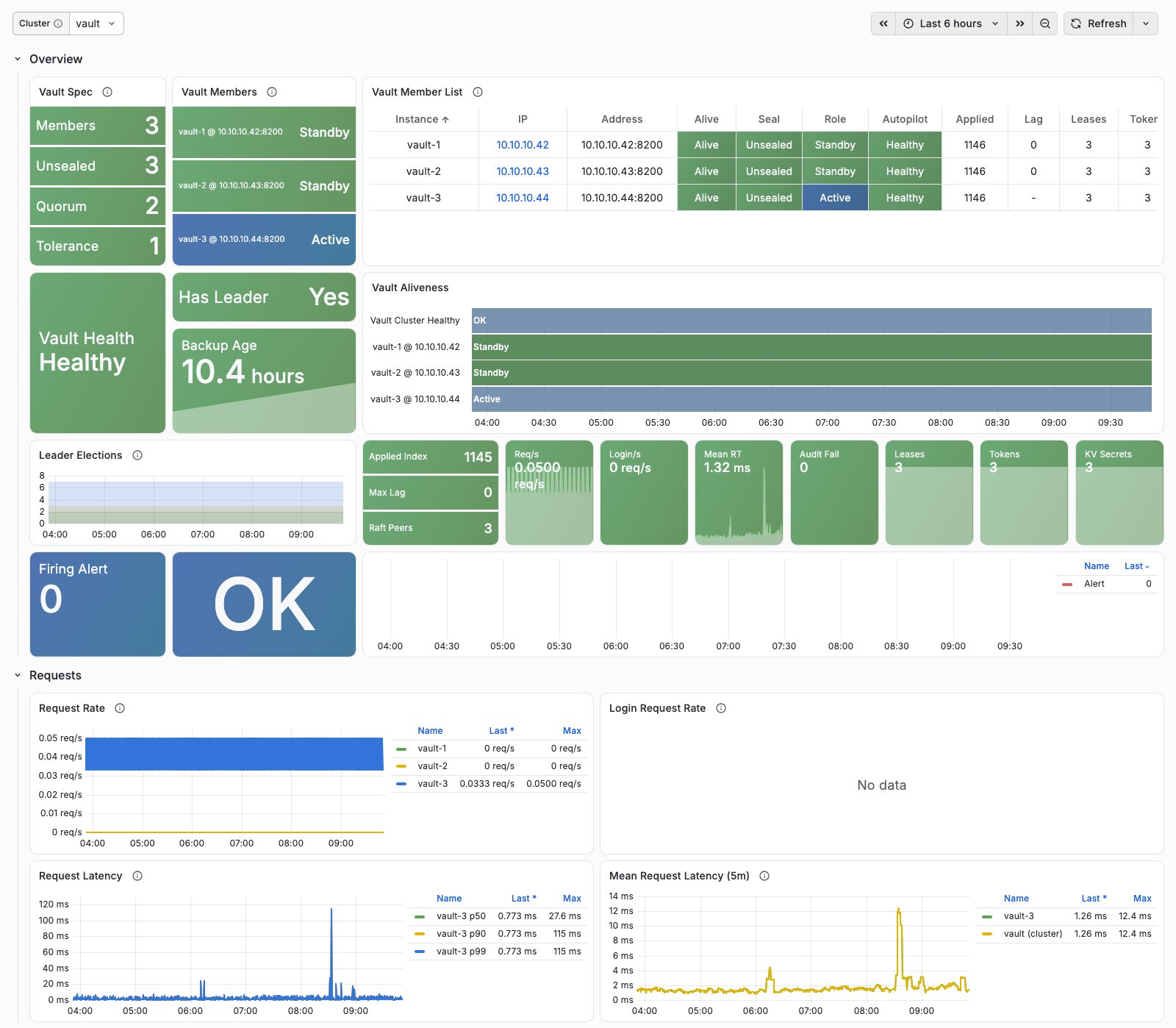
The initial Overview section shows:
- Vault Spec: members, unsealed members, quorum, and fault tolerance. Vault Members: each member’s current role (Active / Standby / Sealed / Down).
- Vault Member List: availability, seal state, role, Autopilot health, Raft applied index, replication lag, lease/token counts, and time since the last snapshot.
- Vault Health: Autopilot cluster health. Has Leader: whether exactly one member is active. Backup Age: age of the oldest of the members’ latest successful snapshots.
- Vault Aliveness: the main timeline. Its top band shows whether exactly one member is active; member bands use Active / Standby / Sealed colors, with red for unavailable members.
- Leader Elections, Raft statistics, request rate, average latency, audit failures, lease/secret counts, and active alerts.
Expand other groups for details:
| Group | Contents |
|---|---|
| Requests | Request/login rates, latency quantiles, and request-weighted mean latency |
| Raft Storage | Commit/applied indexes, FSM backlog, follower lag and heartbeats, commit latency, BoltDB size, fault tolerance, and peers |
| Secrets & Leases | Leases, tokens, token/lease operations, KV secrets, and identity entities |
| Audit | Audit write rates and failures |
| Runtime | Goroutines, memory, GC pauses, and heap objects |
| HA Forwarding | Standby-to-active forwarding rates and errors |
| Backup | Member snapshot times, sizes, and backup logs |
| Logs | OpenBao service log rates by level and log details |
Metric Collection
Monitoring registration creates a file-discovery target on INFRA nodes for each member. VictoriaMetrics’ vault scrape job consumes this directory:
The job accesses https://<ip>:8200/v1/sys/metrics?format=prometheus directly and validates member certificates with Pigsty CA. Metrics share the API port and require no separate exporter:
unauthenticated_metrics_accessis enabled only on the node IP listener, so scraping requires no token. The loopback listener does not allow unauthenticated metrics.- Scraping uses HTTPS. OpenBao’s listeners provide TLS only; a separate plaintext metrics port is unnecessary.
- Sealed members remain scrapeable.
vault_upindicates process/network reachability, whilevault_core_unsealedindicates seal state.
After each successful snapshot, vault-backup writes two metrics to /var/lib/node_exporter/textfile/vault.prom. node_exporter collects them, and rules associate them with VAULT instances by ip.
VAULT metrics carry job="vault", cls, ins, ip, and instance. See Metrics for details.
Logs
OpenBao runs under systemd and logs to Journald. Vector collects those logs into VictoriaLogs. Scheduled vault-backup output uses logger -t vault-backup and follows the same path.
Use these LogsQL queries in Grafana:
Audit logs remain in /var/log/openbao/audit.log on members, rotated daily with seven files retained. They are not collected into VictoriaLogs. They include request paths and client information; configure centralized collection to meet your requirements.
If an audit device cannot write, for example because the disk is full, OpenBao rejects all requests. VaultAuditFailure covers this condition.
Alert Rules
VAULT provides six alerts in files/victoria/rules/vault.yml:
| Alert | Severity | Condition | Description |
|---|---|---|---|
VaultDown | CRIT | vault_up < 1 for 1 minute | Member metrics cannot be scraped: process stopped or network unreachable |
VaultSealed | WARN | vault_core_unsealed < 1 for 1 minute | Sealed member cannot serve keys; a sealed single-member cluster also triggers CRIT VaultNoLeader |
VaultNoLeader | CRIT | vault:cls:active != 1 for 30 seconds | No active member, or more than one |
VaultAuditFailure | CRIT | Audit write failures over 5 minutes exceed zero, for 1 minute | OpenBao rejects requests when audit writes fail; check disk |
VaultNoFailureTolerance | WARN | Fault tolerance below one in a cluster of at least three members, for 2 minutes | One more member failure would lose quorum |
VaultBackupStale | WARN | No successful member snapshot in 26 hours, or ever, for 5 minutes | Check journalctl -t vault-backup and node_exporter |
INFRA’s generic AgentDown alert excludes the vault job to avoid duplicating VaultDown.
The following excerpt reproduces the current rule source:
7 - Metrics
This page distinguishes raw OpenBao telemetry from recording metrics evaluated by vmalert. files/victoria/rules/vault.yml defines 14 recording rules. Their results are not available from /v1/sys/metrics.
Raw metrics vary with OpenBao version, member role, and runtime state. The metrics below are those used by Vault Overview and its rules, not the full telemetry output. See OpenBao telemetry metrics for the complete list.
Labels
VAULT metrics use these labels:
| Label | Meaning | Example |
|---|---|---|
job | Scrape job | vault |
cls | Cluster name, vault_cluster | vault |
ins | Instance name, <vault_cluster>-<vault_seq> | vault-1 |
ip | Member address | 10.10.10.11 |
instance | Scrape address | 10.10.10.11:8200 |
Recording rules use vault:ins:* for instances and vault:cls:* for clusters.
Raw Metric Behavior
OpenBao retains Vault’s vault_ prefix and exports Prometheus metrics through go-metrics. Note:
- Counters lack a
_totalsuffix, for examplevault_raft_applyandvault_token_creation. - Summaries use milliseconds: quantiles and
_sumforvault_core_handle_requestare in milliseconds. Recording rules divide average latency by 1,000 to convert it to seconds. - Some counters appear only after their first event, such as
vault_audit_log_request_failure. Rules useincrease_pureto count increases from zero. - Only the leader reports Autopilot and follower metrics. They persist for 24 hours after it steps down (
prometheus_retention_time). Rules use only the current active member’s values and mapnode_id/peer_idback toins. - Usage gauges (tokens, KV secrets, identity entities) are computed every ten minutes (
usage_gauge_period).
Recording Rules
Expressions preserve source semantics. ins and cls indicate instance and cluster aggregation; actual retained labels follow the by and vector-matching clauses.
| Recording Metric | Description | Expression |
|---|---|---|
vault:ins:req_rps | Non-login requests per second per instance | rate(vault_core_handle_request_count{job="vault"}[1m]) |
vault:ins:login_rps | Login requests per second per instance | rate(vault_core_handle_login_request_count{job="vault"}[1m]) |
vault:ins:req_rt_avg_5m | Five-minute mean instance request latency, in seconds | rate(vault_core_handle_request_sum{job="vault"}[5m]) / rate(vault_core_handle_request_count{job="vault"}[5m]) / 1000 |
vault:cls:req_rt_avg_5m | Five-minute mean cluster request latency, weighted by request volume, in seconds | sum by (job,cls) (rate(vault_core_handle_request_sum{job="vault"}[5m])) / sum by (job,cls) (rate(vault_core_handle_request_count{job="vault"}[5m])) / 1000 |
vault:cls:unsealed | Number of unsealed cluster members | sum by (job,cls) (vault_core_unsealed{job="vault"}) or (0 * count by (job,cls) (up{job="vault"})) |
vault:cls:active | Number of active cluster members; normally exactly one | sum by (job,cls) (vault_core_active{job="vault"}) or (0 * count by (job,cls) (up{job="vault"})) |
vault:cls:autopilot_healthy | Cluster health as reported by the active member | max by (job,cls) (vault_autopilot_healthy{job="vault"} and on(ins) (vault_core_active{job="vault"} == 1)) |
vault:cls:failure_tolerance | Cluster fault tolerance as reported by the active member | max by (job,cls) (vault_autopilot_failure_tolerance{job="vault"} and on(ins) (vault_core_active{job="vault"} == 1)) |
vault:ins:autopilot_healthy | Member health as reported by the active member | max by (job,cls,ins) (label_replace(vault_autopilot_node_healthy{job="vault"} and on(ins) (vault_core_active{job="vault"} == 1), "ins", "$1", "node_id", "(.+)")) |
vault:ins:raft_lag | Number of log entries by which a follower’s applied index trails the leader | max by (job,cls,ins) (label_replace(vault_raft_storage_follower_applied_index_delta{job="vault"} and on(ins) (vault_core_active{job="vault"} == 1), "ins", "$1", "peer_id", "(.+)")) |
vault:ins:raft_heartbeat_ms | Milliseconds since the follower’s last heartbeat | max by (job,cls,ins) (label_replace(vault_raft_storage_follower_last_heartbeat_ms{job="vault"} and on(ins) (vault_core_active{job="vault"} == 1), "ins", "$1", "peer_id", "(.+)")) |
vault:ins:audit_failure_5m | Audit write failures per instance over five minutes | sum by (job,cls,ins,ip,instance) (increase_pure({__name__=~"vault_audit_log_(request|response)_failure",job="vault"}[5m])) |
vault:ins:backup_time | Unix timestamp of the instance’s latest successful snapshot | max by (ip) (vault_backup_last_success_timestamp_seconds) + on(ip) group_right() vault_up * 0 |
vault:ins:backup_size | Size of the instance’s latest successful snapshot, in bytes | max by (ip) (vault_backup_size_bytes) + on(ip) group_right() vault_up * 0 |
With no requests in a time window, average latency is 0/0 = NaN, which is discarded and appears as no data.
vault_up comes from INFRA’s shared aliveness rules, based on up{job="vault"}. It is not counted among the module’s rules. It indicates scrape success, not whether a member is unsealed or serving requests.
Common Raw Metrics
State and requests
| Metric | Type | Description |
|---|---|---|
vault_core_unsealed | Gauge | Whether the member is unsealed; 1 means unsealed |
vault_core_active | Gauge | Whether the member is active; 1 means active |
vault_core_handle_request | Summary (ms) | Non-login request duration, including quantiles, _sum, and _count |
vault_core_handle_login_request | Summary (ms) | Login request duration |
vault_ha_rpc_client_forward_count / _errors | Summary / Counter | Standby-to-active request forwarding count and errors |
vault_ha_rpc_client_echo_count / _errors | Summary / Counter | Standby-to-active heartbeat count and errors |
Raft and Autopilot
| Metric | Type | Description |
|---|---|---|
vault_raft_storage_stats_commit_index | Gauge | Member Raft commit index |
vault_raft_storage_stats_applied_index | Gauge | Member Raft applied index |
vault_raft_storage_stats_fsm_pending | Gauge | Log entries pending application to the state machine |
vault_raft_storage_follower_applied_index_delta | Gauge | Follower lag in log entries; reported only by the leader, with peer_id |
vault_raft_storage_follower_last_heartbeat_ms | Gauge | Milliseconds since follower heartbeat; leader only, with peer_id |
vault_raft_state_leader | Counter | Times this member became leader; used to observe elections |
vault_raft_peers | Gauge | Number of Raft peers |
vault_raft_apply | Counter | Raft log writes |
vault_raft_commitTime | Summary (ms) | Raft log commit duration |
vault_raft_leader_lastContact | Summary (ms) | Time since the leader last contacted a follower |
vault_raft_storage_bolt_page_bytes_allocated | Gauge | Allocated BoltDB page bytes |
vault_raft_storage_bolt_freelist_used_bytes | Gauge | BoltDB freelist bytes |
vault_autopilot_healthy | Gauge | Cluster health; leader only |
vault_autopilot_failure_tolerance | Gauge | Cluster fault tolerance; leader only |
vault_autopilot_node_healthy | Gauge | Member health; leader only, with node_id |
Secrets, tokens, and audit
| Metric | Type | Description |
|---|---|---|
vault_expire_num_leases | Gauge | Current lease count |
vault_expire_renew_count / vault_expire_revoke_count | Summary | Lease renewals and revocations |
vault_token_count | Gauge | Token count (usage gauge) |
vault_token_creation | Counter | Token creations |
vault_secret_kv_count | Gauge | KV secret count (usage gauge) |
vault_identity_num_entities | Gauge | Identity entity count |
vault_audit_log_request_count / vault_audit_log_response_count | Summary | Requests and responses recorded by audit devices |
vault_audit_log_request_failure / vault_audit_log_response_failure | Counter | Audit write failures; appears only after the first failure |
Runtime
| Metric | Type | Description |
|---|---|---|
vault_runtime_num_goroutines | Gauge | Goroutine count |
vault_runtime_alloc_bytes / vault_runtime_sys_bytes | Gauge | Allocated heap memory and memory requested from the OS |
vault_runtime_heap_objects | Gauge | Heap object count |
vault_runtime_total_gc_pause_ns / vault_runtime_total_gc_runs | Gauge | Cumulative GC pause time and number of GC runs |
Snapshot backups (from node_exporter’s textfile collector, under the node scrape job)
| Metric | Type | Description |
|---|---|---|
vault_backup_last_success_timestamp_seconds | Gauge | Unix timestamp of the latest successful local snapshot |
vault_backup_size_bytes | Gauge | Size of the latest successful local snapshot, in bytes |
vault-backup writes these two metrics to /var/lib/node_exporter/textfile/vault.prom only after success. The file is deleted when a member is removed.
8 - FAQ
What Does VAULT Do?
VAULT supplies KMS (key management) and secrets storage for a Pigsty deployment, covering three main uses:
- Transparent data encryption: store PGSQL
pg_tdemaster keys so leaked database disks and backups cannot be decrypted without VAULT keys. - Object storage encryption: store keys for MINIO (Silo) KES server-side encryption.
- Application secrets: use KV, Transit, and AppRole to store/access passwords and API keys or call encryption services.
The first two integrations currently require manual configuration; automatic integration is still being developed. Applications can use the third immediately after deployment; see Usage.
Why OpenBao Instead of HashiCorp Vault?
HashiCorp changed Vault’s license to BSL in 2023. Later versions are no longer open-source software and are not packaged for distribution by Pigsty. OpenBao is a community fork from before that license change, hosted by the Linux Foundation under MPL-2.0. Its API is largely compatible; Vault libraries, tools, and most documentation remain useful references.
VAULT names the secrets-vault capability rather than a specific engine, following the same convention as the MINIO module using Silo.
How Many Members Should a Cluster Have?
Use one member for development, testing, and demos. Use three with an L2 VIP for production HA; see Configuration.
Raft requires a majority. If half or more of the members are unavailable, the cluster cannot serve requests. Three members tolerate one failure. Two members tolerate no failures and offer lower availability than one. The playbook warns about this topology; use it only temporarily during scaling.
What Happens When VAULT Is Unavailable?
The impact depends on how consumers use keys:
- Running consumers that have cached keys in memory can usually continue.
- Operations that must retrieve keys fail, such as restarting PostgreSQL encrypted with
pg_tdeor KES fetching a new data key. - Application secret reads and encryption/decryption requests fail.
In production, VAULT should be at least as available as the databases that depend on it. VaultDown and VaultNoLeader are CRIT alerts.
Is Auto-Unseal Secure?
VAULT uses OpenBao static seal: a 32-byte key in files/pki/vault/unseal.key on the admin node is distributed to /etc/openbao/unseal.key on each member. Members unseal automatically after restart without manual key-share entry.
| Scenario | Protection |
|---|---|
| Leaked database disks, database backups, or object-storage disks | Yes: decryption requires VAULT keys; this is the purpose of separating keys from data |
| Leaked VAULT snapshot | Yes: it cannot be opened without unseal.key |
| Compromised VAULT member | No: the auto-unseal key resides there; without an HSM this applies to any automatic unseal scheme |
| Compromised admin node | No: Pigsty already keeps the CA private key and passwords on the admin node |
| Root or superuser access to a running database | No: transparent encryption protects data at rest |
This balances operations and security: database restarts do not wait for manual unsealing. For stricter requirements, switch to manual unsealing or an external KMS seal after deployment; that is outside the current module’s automation.
Which Files Must Be Backed Up?
Back up the admin node’s entire files/pki/ directory and copy VAULT snapshots off-site:
files/pki/vault/unseal.key: without it, all snapshots are unreadable.files/pki/vault/init.json: root token and recovery keys for administrative access after restoration.files/pki/ca/: Pigsty CA, which signs VAULT server certificates.- A recent Raft snapshot from members’
/data/vault/backup/or the admin node’sfiles/pki/vault/backup/.
Snapshots are encrypted and can be copied to other storage, but keep them separate from unseal.key. See Backups and Restore a Snapshot.
Why Does bao status Return Permission Denied?
BAO_CACERT points to /etc/openbao/tls/ca.crt, readable only by root and the openbao group. Regular users see:
Run as root (sudo -i), or use the globally readable CA: export BAO_CACERT=/etc/pki/ca.crt.
Why Does vault.yml Refuse to Initialize?
vault.yml initializes only when all required conditions hold. Common reasons for refusal:
- An unreachable member: the playbook cannot determine whether the cluster is initialized and aborts to prevent creating a second cluster. Restore network/service access to every member and rerun.
- All members are uninitialized, but
files/pki/vault/init.jsonexists: the cluster was initialized before and has lost its data. To recover, see Rebuild After Total Data Loss. To create a new empty cluster, archiveinit.jsonfirst; see Destroy a Cluster.
Why Does vault-rm.yml Abort by Default?
vault_safeguard defaults to true, like MYSQL’s mysql_safeguard. Deleting VAULT deletes all its keys, making encrypted data and all backups permanently unreadable. The impact extends beyond any one database cluster.
After verifying the target and snapshot, explicitly override it with ./vault-rm.yml -l <exact-target> -e vault_safeguard=false, or use bin/vault-rm.
Why Are Metrics Token-Free and Served over HTTPS?
OpenBao normally requires a token for /v1/sys/metrics. VAULT enables unauthenticated_metrics_access on the node IP listener so monitoring needs no VAULT credentials. The loopback listener does not allow unauthenticated access.
Metrics contain counts and state, not secrets.
OpenBao provides TLS only, with metrics and business APIs sharing port 8200. A separate plaintext port would increase exposure without benefit, so VictoriaMetrics scrapes over HTTPS using Pigsty CA.
Why Does VaultBackupStale Fire?
Each member runs vault-backup daily. The alert fires if a member has no successful snapshot for 26 hours, or has never succeeded. Common causes:
- Scheduled job failure: inspect
journalctl -t vault-backupfor an invalid token, missing active member, or full disk. - node_exporter’s textfile collector is disabled: newer NODE versions configure its directory. Refresh older nodes with
./node.yml -l vault -t node_exporter. - An invalid backup token, for example after snapshot restoration: run
./vault.yml -l vault -t vault_provision,vault_backup. The playbook checks the token and reissues/distributes it if necessary.
After fixing the issue, run vault-backup manually. The alert clears at the next evaluation.
What Causes Frequent Leader Changes?
Raft leaders maintain their term through heartbeats. Timeouts cause elections, commonly due to network jitter, high disk latency, or host load that prevents timely scheduling, especially on oversubscribed VMs.
Inspect Leader Elections, Follower Last Heartbeat, and Raft Commit Time in Vault Overview, then correlate with node CPU, disk, and network metrics. Occasional leader changes do not affect data consistency. HAProxy switches to the new active member automatically.
Where Are Audit Logs?
Each member enables a file audit device at /var/log/openbao/audit.log, rotated daily with seven files retained. OpenBao applies HMAC to sensitive fields.
Standbys forward requests to the active member, which records them. A member that has never been active may have no audit.log; this does not indicate broken audit configuration.
Audit logs are not collected into VictoriaLogs or deleted on VAULT removal. If audit writes fail, OpenBao rejects requests and VaultAuditFailure fires; check disk space first.
Can I Use an Existing External Vault?
Currently no. The module manages only OpenBao clusters deployed by Pigsty, not external or managed HashiCorp Vault, OpenBao, or cloud KMS services.
Applications may still access your existing Vault directly, but Pigsty deployment, monitoring, and future automatic consumer integration do not manage it.