AWS & Aliyun Server Pricing
Analyze compute and storage pricing on Aliyun / AWS (ECS/ESSD)
Overview
GitHub Repository: https://github.com/pgsty/pigsty-app/tree/master/cloud
Online Demo: https://demo.pigsty.io/d/ecs
Article: Analyzing Computing Costs: Has Aliyun Really Reduced Prices?
Data Source
Aliyun ECS pricing can be obtained as raw CSV data from Price Calculator - Pricing Details - Price Download.
Schema
Download Aliyun pricing details and import for analysis
CREATE EXTENSION file_fdw;
CREATE SERVER fs FOREIGN DATA WRAPPER file_fdw;

DROP FOREIGN TABLE IF EXISTS aliyun_ecs CASCADE;
CREATE FOREIGN TABLE aliyun_ecs
    (
        "region" text,
        "system" text,
        "network" text,
        "isIO" bool,
        "instanceId" text,
        "hourlyPrice" numeric,
        "weeklyPrice" numeric,
        "standard" numeric,
        "monthlyPrice" numeric,
        "yearlyPrice" numeric,
        "2yearPrice" numeric,
        "3yearPrice" numeric,
        "4yearPrice" numeric,
        "5yearPrice" numeric,
        "id" text,
        "instanceLabel" text,
        "familyId" text,
        "serverType" text,
        "cpu" text,
        "localStorage" text,
        "NvmeSupport" text,
        "InstanceFamilyLevel" text,
        "EniTrunkSupported" text,
        "InstancePpsRx" text,
        "GPUSpec" text,
        "CpuTurboFrequency" text,
        "InstancePpsTx" text,
        "InstanceTypeId" text,
        "GPUAmount" text,
        "InstanceTypeFamily" text,
        "SecondaryEniQueueNumber" text,
        "EniQuantity" text,
        "EniPrivateIpAddressQuantity" text,
        "DiskQuantity" text,
        "EniIpv6AddressQuantity" text,
        "InstanceCategory" text,
        "CpuArchitecture" text,
        "EriQuantity" text,
        "MemorySize" numeric,
        "EniTotalQuantity" numeric,
        "PhysicalProcessorModel" text,
        "InstanceBandwidthRx" numeric,
        "CpuCoreCount" numeric,
        "Generation" text,
        "CpuSpeedFrequency" numeric,
        "PrimaryEniQueueNumber" text,
        "LocalStorageCategory" text,
        "InstanceBandwidthTx" text,
        "TotalEniQueueQuantity" text
        ) SERVER fs OPTIONS ( filename '/tmp/aliyun-ecs.csv', format 'csv',header 'true');
Similarly for AWS EC2, you can download the price list from Vantage:
DROP FOREIGN TABLE IF EXISTS aws_ec2 CASCADE;
CREATE FOREIGN TABLE aws_ec2
    (
        "name" TEXT,
        "id" TEXT,
        "Memory" TEXT,
        "vCPUs" TEXT,
        "GPUs" TEXT,
        "ClockSpeed" TEXT,
        "InstanceStorage" TEXT,
        "NetworkPerformance" TEXT,
        "ondemand" TEXT,
        "reserve" TEXT,
        "spot" TEXT
        ) SERVER fs OPTIONS ( filename '/tmp/aws-ec2.csv', format 'csv',header 'true');


DROP VIEW IF EXISTS ecs;
CREATE VIEW ecs AS
SELECT "region"                                       AS region,
       "id"                                           AS id,
       "instanceLabel"                                AS name,
       "familyId"                                     AS family,
       "CpuCoreCount"                                 AS cpu,
       "MemorySize"                                   AS mem,
       round("5yearPrice" / "CpuCoreCount" / 60, 2)   AS ycm5, -- ¥ / (core·month)
       round("4yearPrice" / "CpuCoreCount" / 48, 2)   AS ycm4, -- ¥ / (core·month)
       round("3yearPrice" / "CpuCoreCount" / 36, 2)   AS ycm3, -- ¥ / (core·month)
       round("2yearPrice" / "CpuCoreCount" / 24, 2)   AS ycm2, -- ¥ / (core·month)
       round("yearlyPrice" / "CpuCoreCount" / 12, 2)  AS ycm1, -- ¥ / (core·month)
       round("standard" / "CpuCoreCount", 2)          AS ycmm, -- ¥ / (core·month)
       round("hourlyPrice" / "CpuCoreCount" * 720, 2) AS ycmh, -- ¥ / (core·month)
       "CpuSpeedFrequency"::NUMERIC                   AS freq,
       "CpuTurboFrequency"::NUMERIC                   AS freq_turbo,
       "Generation"                                   AS generation
FROM aliyun_ecs
WHERE system = 'linux';

DROP VIEW IF EXISTS ec2;
CREATE VIEW ec2 AS
SELECT id,
       name,
       split_part(id, '.', 1)                                                               as family,
       split_part(id, '.', 2)                                                               as spec,
       (regexp_match(split_part(id, '.', 1), '^[a-zA-Z]+(\d)[a-z0-9]*'))[1]                 as gen,
       regexp_substr("vCPUs", '^[0-9]+')::int                                               as cpu,
       regexp_substr("Memory", '^[0-9]+')::int                                              as mem,
       CASE spot
           WHEN 'unavailable' THEN NULL
           ELSE round((regexp_substr("spot", '([0-9]+.[0-9]+)')::NUMERIC * 7.2), 2) END     AS spot,
       CASE ondemand
           WHEN 'unavailable' THEN NULL
           ELSE round((regexp_substr("ondemand", '([0-9]+.[0-9]+)')::NUMERIC * 7.2), 2) END AS ondemand,
       CASE reserve
           WHEN 'unavailable' THEN NULL
           ELSE round((regexp_substr("reserve", '([0-9]+.[0-9]+)')::NUMERIC * 7.2), 2) END  AS reserve,
       "ClockSpeed"                                                                         AS freq
FROM aws_ec2;
Visualization
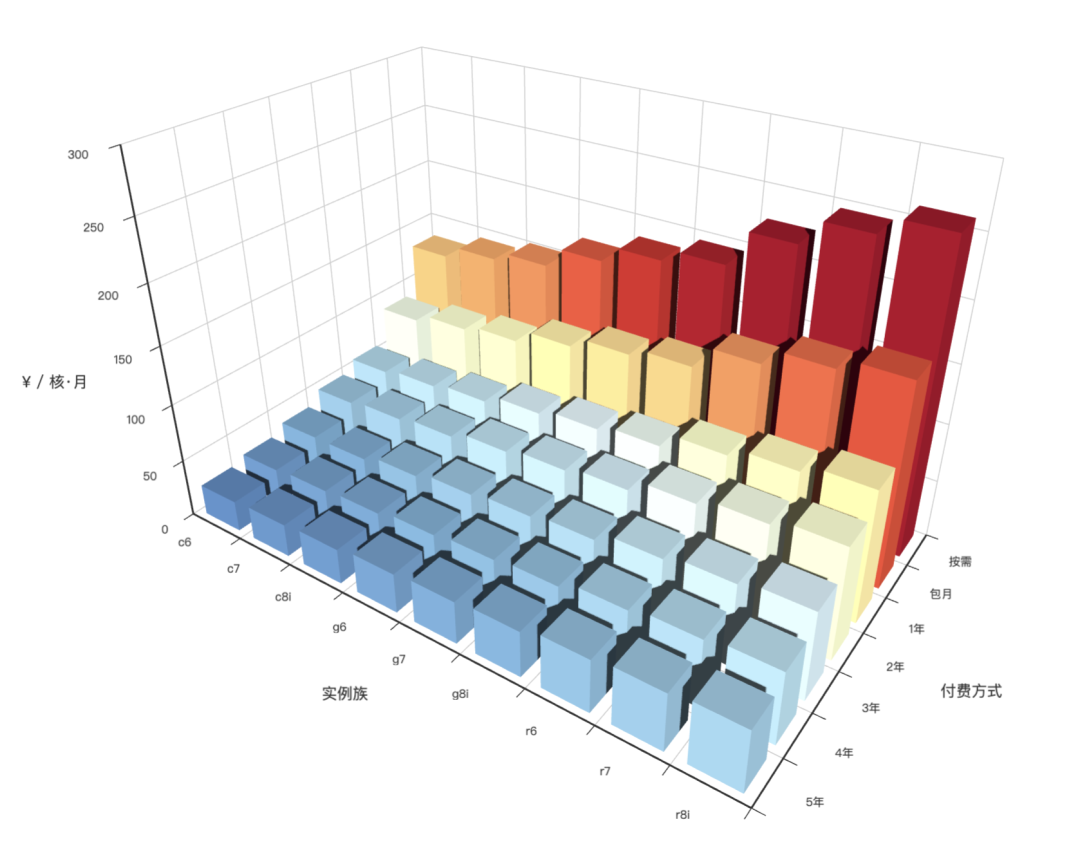
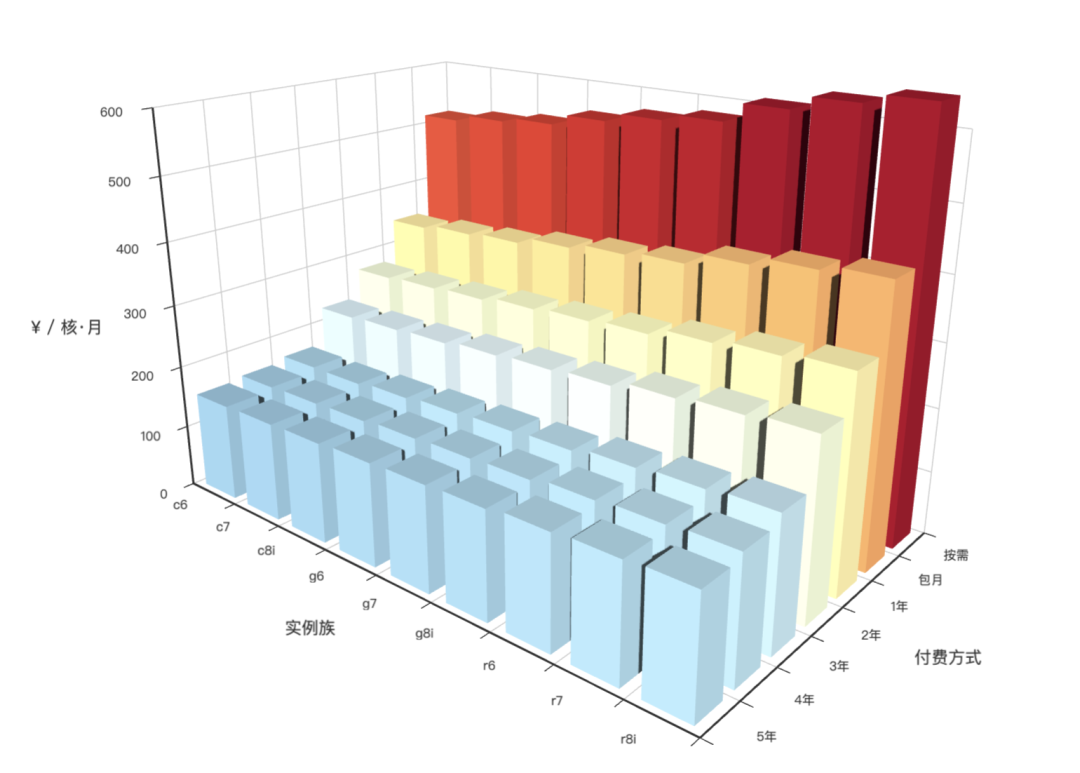
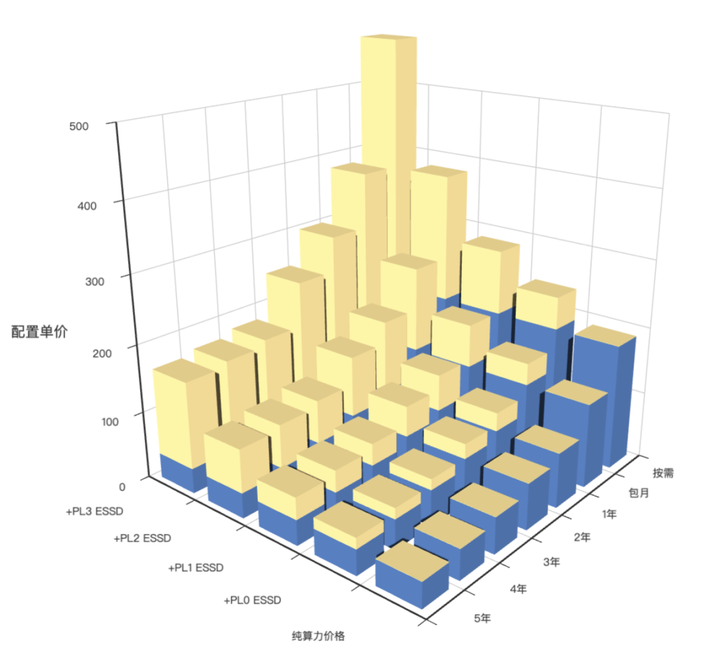
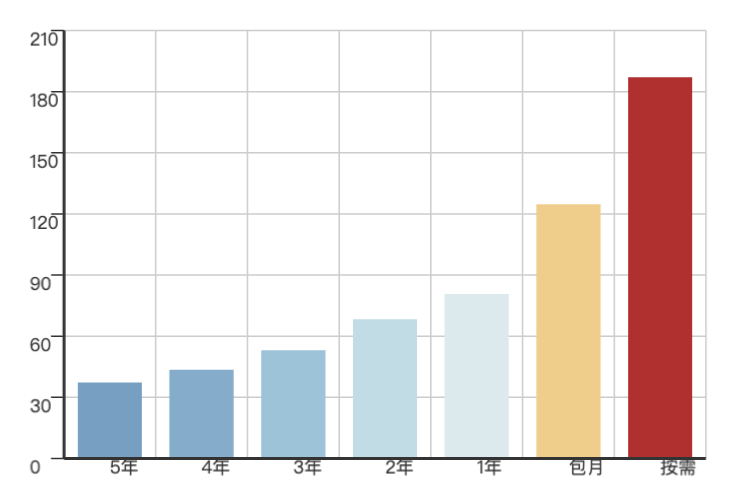
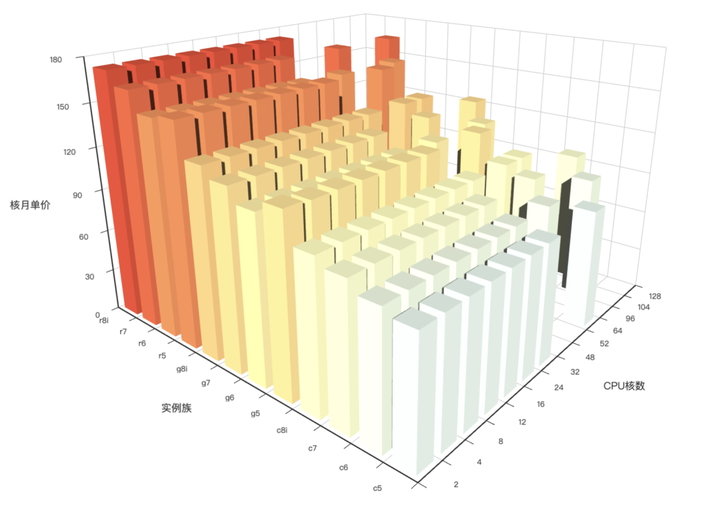
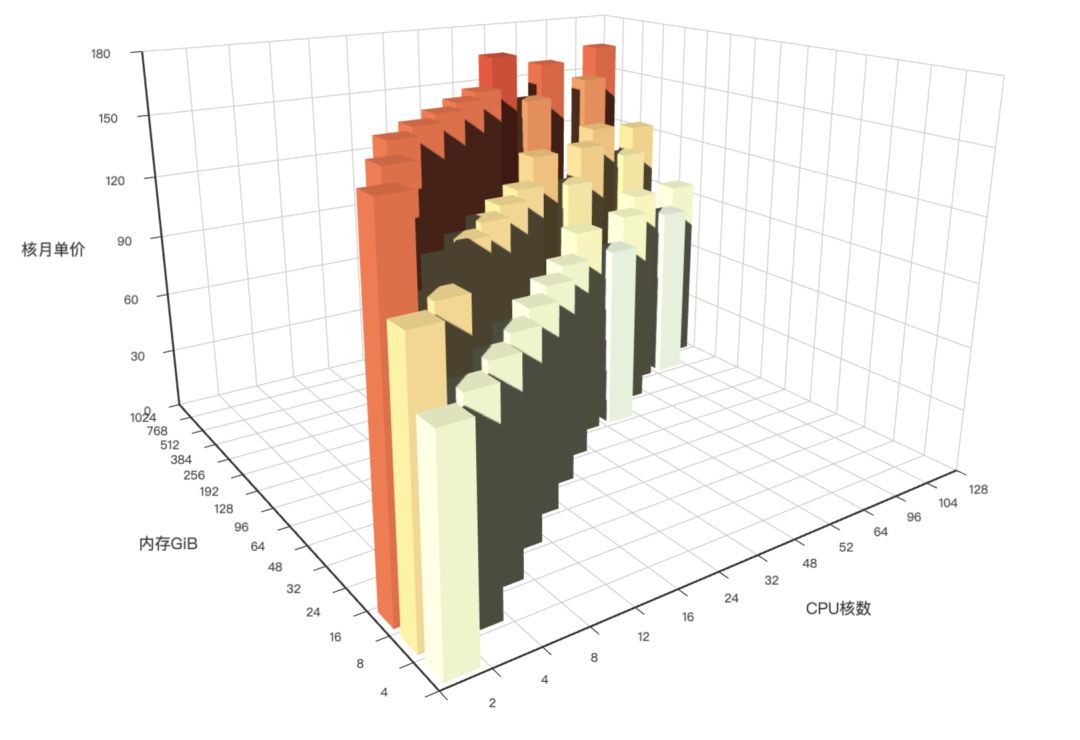
Feedback
Was this page helpful?
Thanks for the feedback! Please let us know how we can improve.
Sorry to hear that. Please let us know how we can improve.