NOAA ISD Global Weather Station Historical Data Query
If you have a database and don’t know what to do with it, why not try this open-source project: Vonng/isd
You can directly reuse the monitoring system Grafana to interactively browse sub-hourly meteorological data from nearly 30,000 surface weather stations over the past 120 years.
This is a fully functional data application that can query meteorological observation records from 30,000 global surface weather stations since 1901.
Project URL: https://github.com/Vonng/isd
Online Demo: https://demo.pigsty.io/d/isd-overview
Quick Start
Clone this repository
git clone https://github.com/Vonng/isd.git; cd isd;
Prepare a PostgreSQL instance
The PostgreSQL instance should have the PostGIS extension enabled. Use the PGURL environment variable to pass database connection information:
# Pigsty uses dbuser_dba as the default admin account with password DBUser.DBA
export PGURL=postgres://dbuser_dba:[email protected]:5432/meta?sslmode=disable
psql "${PGURL}" -c 'SELECT 1'  # Check if connection is available
Fetch and import ISD weather station metadata
This is a daily-updated weather station metadata file containing station longitude/latitude, elevation, name, country, province, and other information. Use the following command to download and import:
make reload-station # Equivalent to downloading the latest station data then loading: get-station + load-station
Fetch and import the latest isd.daily data
isd.daily is a daily-updated dataset containing daily observation data summaries from global weather stations. Use the following command to download and import.
Note that raw data downloaded directly from the NOAA website needs to be parsed before it can be loaded into the database, so you need to download or build an ISD data parser.
make get-parser       # Download the parser binary from Github, or you can build directly with go using make build
make reload-daily     # Download and import the latest isd.daily data for this year into the database
Load pre-parsed CSV dataset
The ISD Daily dataset has some dirty data and duplicate data. If you don’t want to manually parse and clean it, a stable pre-parsed CSV dataset is also provided here.
This dataset contains isd.daily data up to 2023-06-24. You can download and import it directly into PostgreSQL without needing a parser.
make get-stable       # Get the stable isd.daily historical dataset from Github
make load-stable      # Load the downloaded stable historical dataset into the PostgreSQL database
More Data
Two parts of the ISD dataset are updated daily: weather station metadata and the latest year’s isd.daily (e.g., the 2023 tarball).
You can use the following command to download and refresh these two parts. If the dataset hasn’t been updated, these commands won’t re-download the same data package:
make reload # Actually: reload-station + reload-daily
You can also use the following commands to download and load isd.daily data for a specific year:
bin/get-daily  2022                   # Get daily weather observation summary for 2022 (1900-2023)
bin/load-daily "${PGURL}" 2022        # Load daily weather observation summary for 2022 (1900-2023)
In addition to the daily summary isd.daily, ISD also provides more detailed sub-hourly raw observation records isd.hourly. The download and load methods are similar:
bin/get-hourly  2022                  # Download hourly observation records for a specific year (e.g., 2022, options 1900-2023)
bin/load-hourly "${PGURL}" 2022       # Load hourly observation records for a specific year
Data
Dataset Overview
ISD provides four datasets: sub-hourly raw observation data, daily statistical summary data, monthly statistical summary, and yearly statistical summary
| Dataset | Notes |
|---|---|
| ISD Hourly | Sub-hourly observation records |
| ISD Daily | Daily statistical summary |
| ISD Monthly | Not used, can be calculated from isd.daily |
| ISD Yearly | Not used, can be calculated from isd.daily |
Daily Summary Dataset
- Compressed package size 2.8GB (as of 2023-06-24)
- Table size 24GB, index size 6GB, total size approximately 30GB in PostgreSQL
- If timescaledb compression is enabled, total size can be compressed to 4.5 GB
Sub-hourly Observation Data
- Total compressed package size 117GB
- After loading into database: table size 1TB+, index size 600GB+, total size 1.6TB
Database Schema
Weather Station Metadata Table
CREATE TABLE isd.station
(
    station    VARCHAR(12) PRIMARY KEY,
    usaf       VARCHAR(6) GENERATED ALWAYS AS (substring(station, 1, 6)) STORED,
    wban       VARCHAR(5) GENERATED ALWAYS AS (substring(station, 7, 5)) STORED,
    name       VARCHAR(32),
    country    VARCHAR(2),
    province   VARCHAR(2),
    icao       VARCHAR(4),
    location   GEOMETRY(POINT),
    longitude  NUMERIC GENERATED ALWAYS AS (Round(ST_X(location)::NUMERIC, 6)) STORED,
    latitude   NUMERIC GENERATED ALWAYS AS (Round(ST_Y(location)::NUMERIC, 6)) STORED,
    elevation  NUMERIC,
    period     daterange,
    begin_date DATE GENERATED ALWAYS AS (lower(period)) STORED,
    end_date   DATE GENERATED ALWAYS AS (upper(period)) STORED
);
Daily Summary Table
CREATE TABLE IF NOT EXISTS isd.daily
(
    station     VARCHAR(12) NOT NULL, -- station number 6USAF+5WBAN
    ts          DATE        NOT NULL, -- observation date
    -- Temperature & Dew Point
    temp_mean   NUMERIC(3, 1),        -- mean temperature ℃
    temp_min    NUMERIC(3, 1),        -- min temperature ℃
    temp_max    NUMERIC(3, 1),        -- max temperature ℃
    dewp_mean   NUMERIC(3, 1),        -- mean dew point ℃
    -- Air Pressure
    slp_mean    NUMERIC(5, 1),        -- sea level pressure (hPa)
    stp_mean    NUMERIC(5, 1),        -- station pressure (hPa)
    -- Visibility
    vis_mean    NUMERIC(6),           -- visible distance (m)
    -- Wind Speed
    wdsp_mean   NUMERIC(4, 1),        -- average wind speed (m/s)
    wdsp_max    NUMERIC(4, 1),        -- max wind speed (m/s)
    gust        NUMERIC(4, 1),        -- max wind gust (m/s)
    -- Precipitation / Snow Depth
    prcp_mean   NUMERIC(5, 1),        -- precipitation (mm)
    prcp        NUMERIC(5, 1),        -- rectified precipitation (mm)
    sndp        NuMERIC(5, 1),        -- snow depth (mm)
    -- FRSHTT (Fog/Rain/Snow/Hail/Thunder/Tornado)
    is_foggy    BOOLEAN,              -- (F)og
    is_rainy    BOOLEAN,              -- (R)ain or Drizzle
    is_snowy    BOOLEAN,              -- (S)now or pellets
    is_hail     BOOLEAN,              -- (H)ail
    is_thunder  BOOLEAN,              -- (T)hunder
    is_tornado  BOOLEAN,              -- (T)ornado or Funnel Cloud
    -- Record counts used for statistical aggregation
    temp_count  SMALLINT,             -- record count for temp
    dewp_count  SMALLINT,             -- record count for dew point
    slp_count   SMALLINT,             -- record count for sea level pressure
    stp_count   SMALLINT,             -- record count for station pressure
    wdsp_count  SMALLINT,             -- record count for wind speed
    visib_count SMALLINT,             -- record count for visible distance
    -- Temperature flags
    temp_min_f  BOOLEAN,              -- aggregate min temperature
    temp_max_f  BOOLEAN,              -- aggregate max temperature
    prcp_flag   CHAR,                 -- precipitation flag: ABCDEFGHI
    PRIMARY KEY (station, ts)
); -- PARTITION BY RANGE (ts);
Sub-hourly Raw Observation Data Table
ISD Hourly
CREATE TABLE IF NOT EXISTS isd.hourly
(
    station    VARCHAR(12) NOT NULL, -- station id
    ts         TIMESTAMP   NOT NULL, -- timestamp
    -- air
    temp       NUMERIC(3, 1),        -- [-93.2,+61.8]
    dewp       NUMERIC(3, 1),        -- [-98.2,+36.8]
    slp        NUMERIC(5, 1),        -- [8600,10900]
    stp        NUMERIC(5, 1),        -- [4500,10900]
    vis        NUMERIC(6),           -- [0,160000]
    -- wind
    wd_angle   NUMERIC(3),           -- [1,360]
    wd_speed   NUMERIC(4, 1),        -- [0,90]
    wd_gust    NUMERIC(4, 1),        -- [0,110]
    wd_code    VARCHAR(1),           -- code that denotes the character of the WIND-OBSERVATION.
    -- cloud
    cld_height NUMERIC(5),           -- [0,22000]
    cld_code   VARCHAR(2),           -- cloud code
    -- water
    sndp       NUMERIC(5, 1),        -- mm snow
    prcp       NUMERIC(5, 1),        -- mm precipitation
    prcp_hour  NUMERIC(2),           -- precipitation duration in hour
    prcp_code  VARCHAR(1),           -- precipitation type code
    -- sky
    mw_code    VARCHAR(2),           -- manual weather observation code
    aw_code    VARCHAR(2),           -- auto weather observation code
    pw_code    VARCHAR(1),           -- weather code of past period of time
    pw_hour    NUMERIC(2),           -- duration of pw_code period
    -- misc
    -- remark     TEXT,
    -- eqd        TEXT,
    data       JSONB                 -- extra data
) PARTITION BY RANGE (ts);
Parser
The raw data provided by NOAA ISD is in a highly compressed proprietary format that needs to be processed through a parser before it can be converted into database table format.
For the Daily and Hourly datasets, two parsers are provided here: isdd and isdh.
Both parsers take annual data compressed packages as input, produce CSV results as output, and work in pipeline mode as shown below:
NAME
        isd -- Intergrated Surface Dataset Parser

SYNOPSIS
        isd daily   [-i <input|stdin>] [-o <output|stout>] [-v]
        isd hourly  [-i <input|stdin>] [-o <output|stout>] [-v] [-d raw|ts-first|hour-first]

DESCRIPTION
        The isd program takes noaa isd daily/hourly raw tarball data as input.
        and generate parsed data in csv format as output. Works in pipe mode

        cat data/daily/2023.tar.gz | bin/isd daily -v | psql ${PGURL} -AXtwqc "COPY isd.daily FROM STDIN CSV;"

        isd daily  -v -i data/daily/2023.tar.gz  | psql ${PGURL} -AXtwqc "COPY isd.daily FROM STDIN CSV;"
        isd hourly -v -i data/hourly/2023.tar.gz | psql ${PGURL} -AXtwqc "COPY isd.hourly FROM STDIN CSV;"

OPTIONS
        -i  <input>     input file, stdin by default
        -o  <output>    output file, stdout by default
        -p  <profpath>  pprof file path, enable if specified
        -d              de-duplicate rows for hourly dataset (raw, ts-first, hour-first)
        -v              verbose mode
        -h              print help
User Interface
Several dashboards made with Grafana are provided here for exploring the ISD dataset and querying weather stations and historical meteorological data.
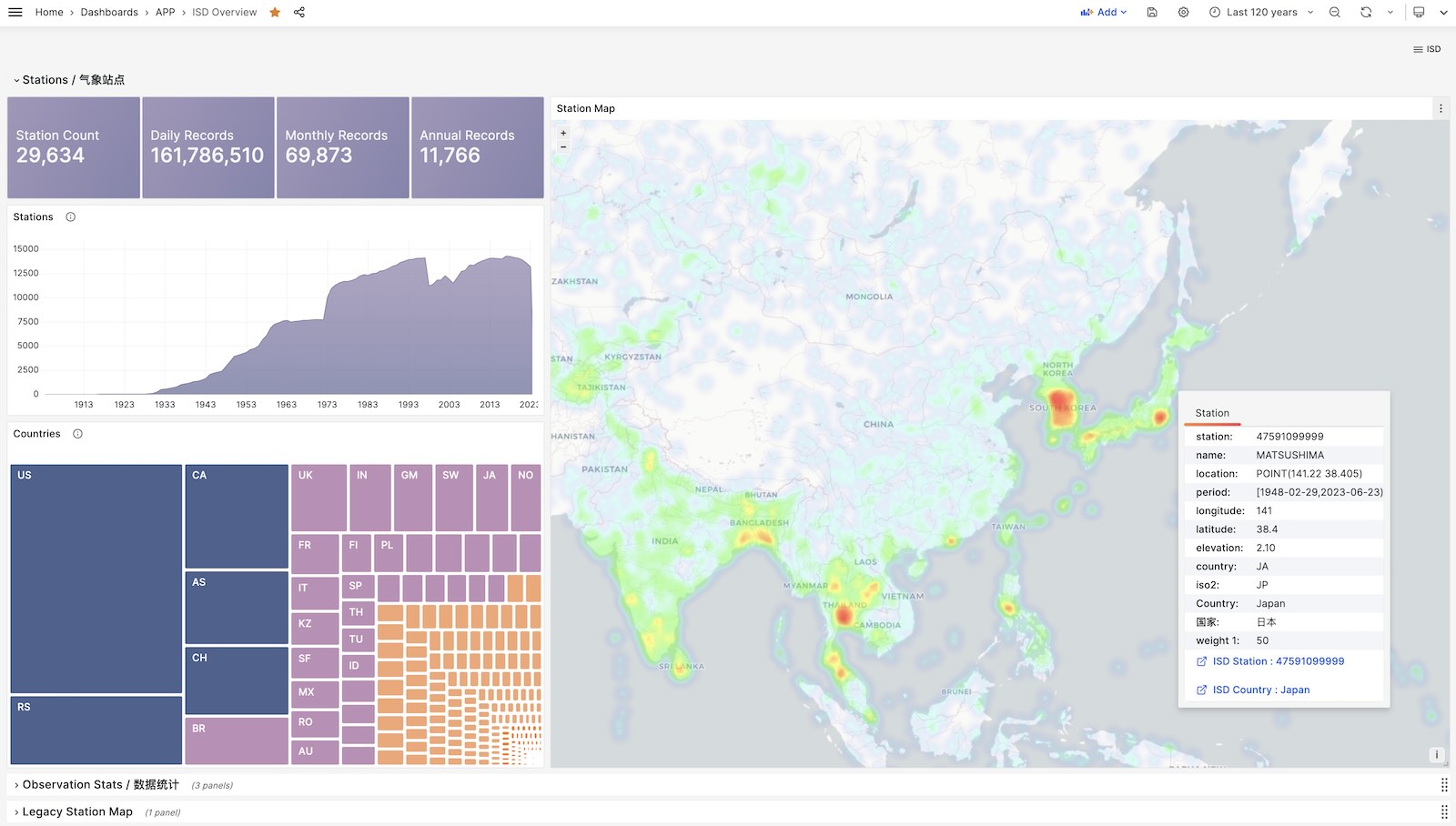
ISD Overview
Global overview with overall metrics and weather station navigation.
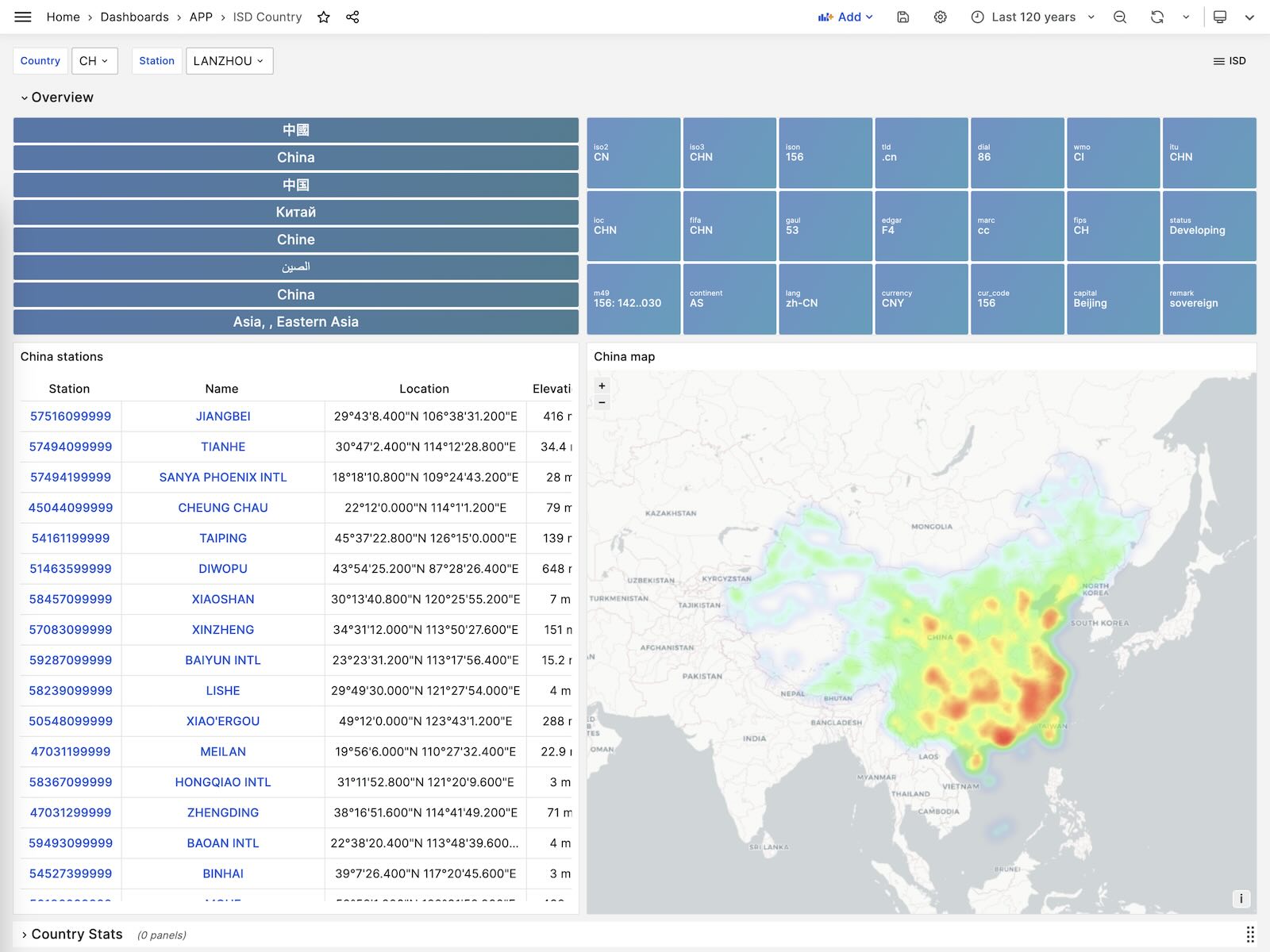
ISD Country
Display all weather stations within a single country/region.
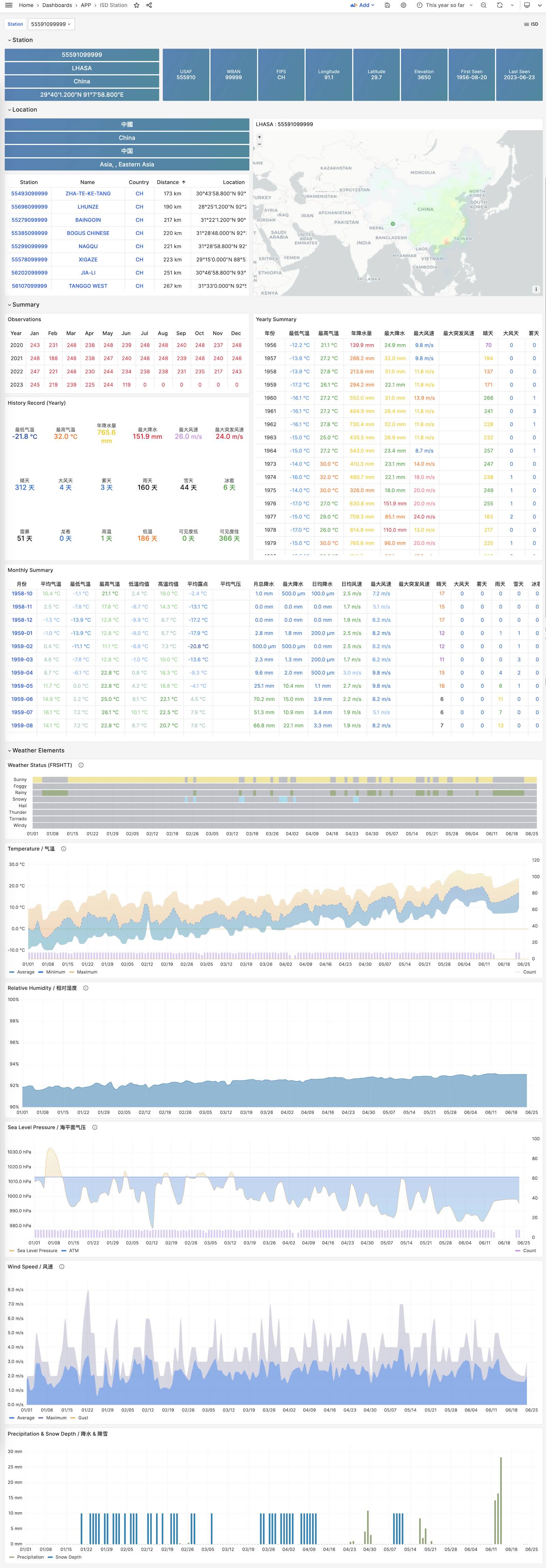
ISD Station
Display detailed information for a single weather station, including metadata and daily/monthly/yearly summary metrics.
ISD Station Dashboard
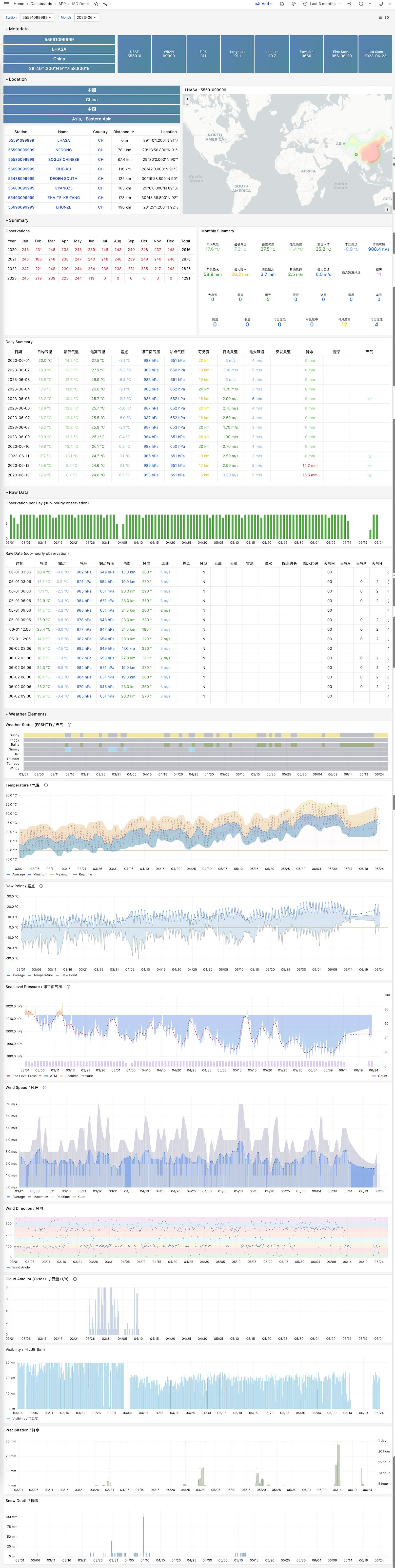
ISD Detail
Display raw sub-hourly observation metric data for a weather station, requires the isd.hourly dataset.
ISD Station Dashboard
Feedback
Was this page helpful?
Thanks for the feedback! Please let us know how we can improve.
Sorry to hear that. Please let us know how we can improve.