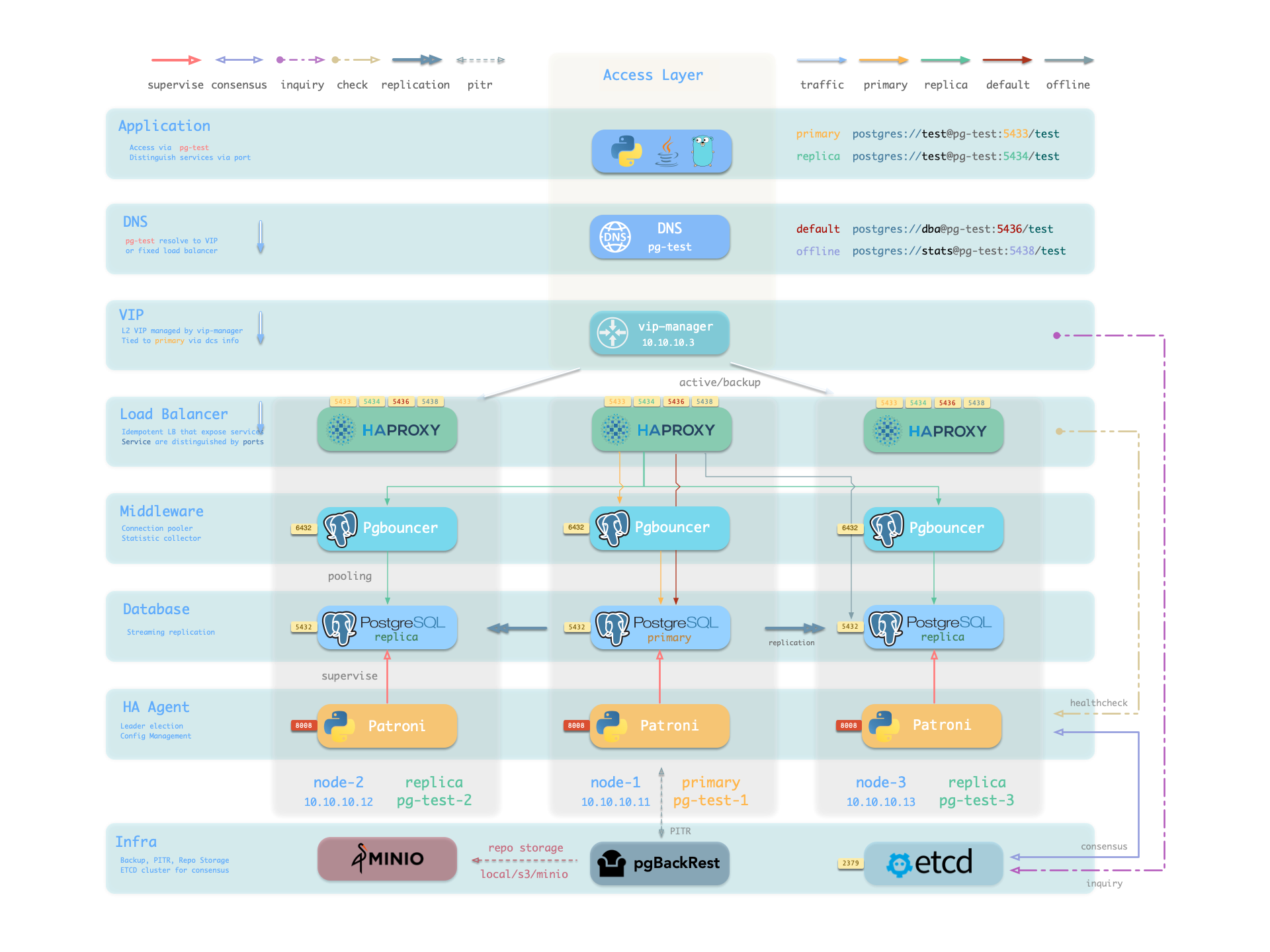
Pigsty’s PostgreSQL clusters come with out-of-the-box high availability, powered by Patroni, Etcd, and HAProxy.
When your PostgreSQL cluster has two or more instances, you automatically have self-healing database high availability without any additional configuration — as long as any instance in the cluster survives, the cluster can provide complete service. Clients only need to connect to any node in the cluster to get full service without worrying about primary-replica topology changes.
With default configuration, the primary failure Recovery Time Objective (RTO) ≈ 45s, and Recovery Point Objective (RPO) < 1MB; for replica failures, RPO = 0 and RTO ≈ 0 (brief interruption). In consistency-first mode, failover can guarantee zero data loss: RPO = 0. All these metrics can be configured as needed based on your actual hardware conditions and reliability requirements.
Pigsty includes built-in HAProxy load balancers for automatic traffic switching, providing DNS/VIP/LVS and other access methods for clients. Failover and switchover are almost transparent to the business side except for brief interruptions - applications don’t need to modify connection strings or restart.
The minimal maintenance window requirements bring great flexibility and convenience: you can perform rolling maintenance and upgrades on the entire cluster without application coordination. The feature that hardware failures can wait until the next day to handle lets developers, operations, and DBAs sleep well during incidents.
Many large organizations and core institutions have been using Pigsty in production for extended periods. The largest deployment has 25K CPU cores and 220+ PostgreSQL ultra-large instances (64c / 512g / 3TB NVMe SSD). In this deployment case, dozens of hardware failures and various incidents occurred over five years, yet overall availability of over 99.999% was maintained.
What problems does High Availability solve?
Elevates data security C/IA availability to a new level: RPO ≈ 0, RTO < 45s.
Gains seamless rolling maintenance capability, minimizing maintenance window requirements and bringing great convenience.
Hardware failures can self-heal immediately without human intervention, allowing operations and DBAs to sleep well.
Replicas can handle read-only requests, offloading primary load and fully utilizing resources.
What are the costs of High Availability?
Infrastructure dependency: HA requires DCS (etcd/zk/consul) for consensus.
Higher starting threshold: A meaningful HA deployment requires at least three nodes.
Extra resource consumption: Each new replica consumes additional resources, though this is usually not a major concern.
Since replication happens in real-time, all changes are immediately applied to replicas. Therefore, streaming replication-based HA solutions cannot handle data deletion or modification caused by human errors and software defects. (e.g., DROP TABLE or DELETE data)
Such failures require using delayed clusters or performing point-in-time recovery using previous base backups and WAL archives.
Configuration Strategy
RTO
RPO
Standalone + Nothing
Data permanently lost, unrecoverable
All data lost
Standalone + Base Backup
Depends on backup size and bandwidth (hours)
Lose data since last backup (hours to days)
Standalone + Base Backup + WAL Archive
Depends on backup size and bandwidth (hours)
Lose unarchived data (tens of MB)
Primary-Replica + Manual Failover
~10 minutes
Lose data in replication lag (~100KB)
Primary-Replica + Auto Failover
Within 1 minute
Lose data in replication lag (~100KB)
Primary-Replica + Auto Failover + Sync Commit
Within 1 minute
No data loss
How It Works
In Pigsty, the high availability architecture works as follows:
PostgreSQL uses standard streaming replication to build physical replicas; replicas take over when the primary fails.
Patroni manages PostgreSQL server processes and handles high availability matters.
Etcd provides distributed configuration storage (DCS) capability and is used for leader election after failures.
Patroni relies on Etcd to reach cluster leader consensus and provides health check interfaces externally.
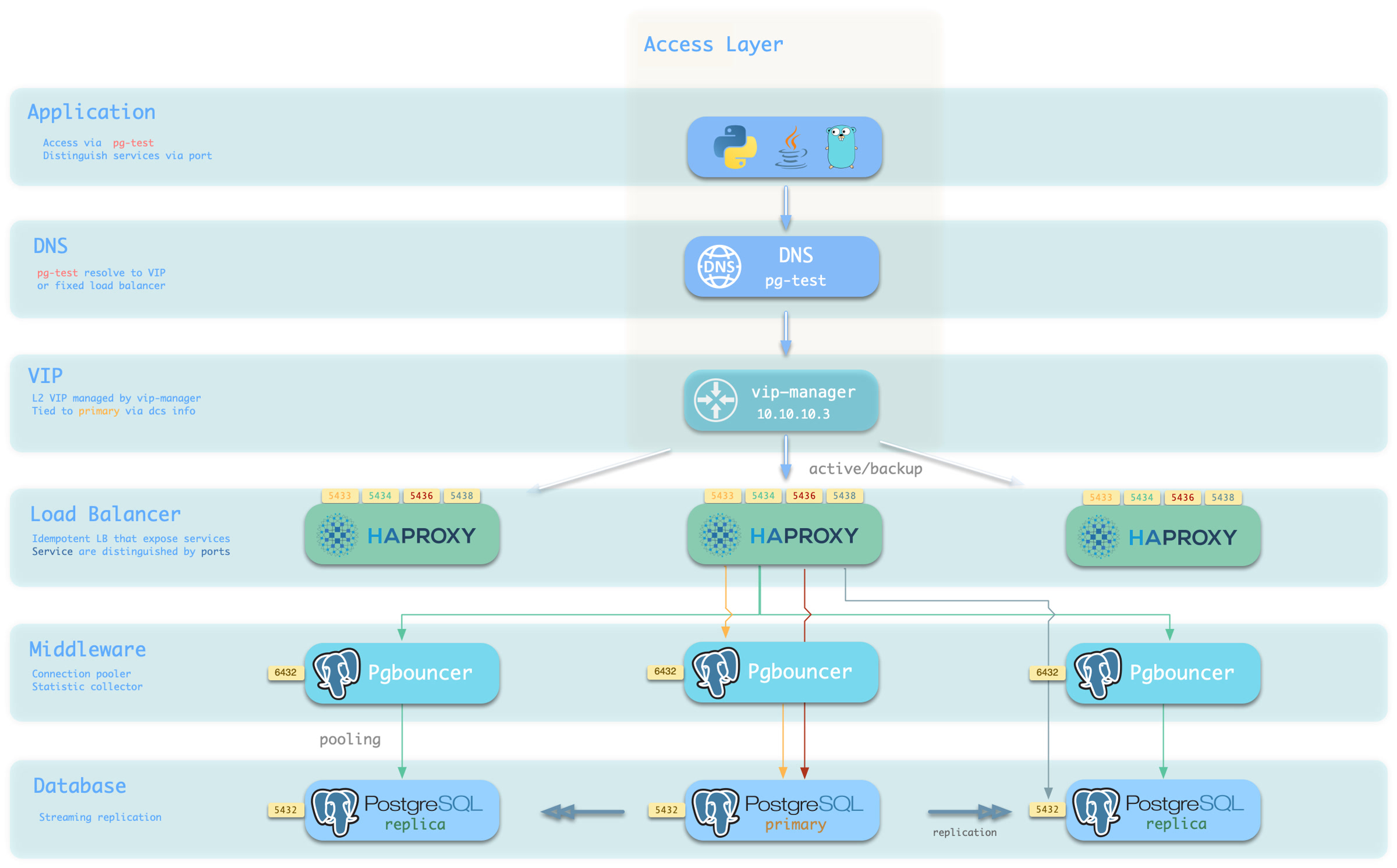
HAProxy exposes cluster services externally and uses Patroni health check interfaces to automatically distribute traffic to healthy nodes.
vip-manager provides an optional Layer 2 VIP, retrieves leader information from Etcd, and binds the VIP to the node where the cluster primary resides.
When the primary fails, a new round of leader election is triggered. The healthiest replica in the cluster (highest LSN position, minimum data loss) wins and is promoted to the new primary. After the winning replica is promoted, read-write traffic is immediately routed to the new primary.
The impact of primary failure is brief write service unavailability: write requests will be blocked or fail directly from primary failure until new primary promotion, with unavailability typically lasting 15 to 30 seconds, usually not exceeding 1 minute.
When a replica fails, read-only traffic is routed to other replicas. Only when all replicas fail will read-only traffic ultimately be handled by the primary.
The impact of replica failure is partial read-only query interruption: queries currently running on that replica will abort due to connection reset and be immediately taken over by other available replicas.
Failure detection is performed jointly by Patroni and Etcd. The cluster leader holds a lease; if the cluster leader fails to renew the lease in time (10s) due to failure, the lease is released, triggering a Failover and new cluster election.
Even without any failures, you can proactively change the cluster primary through Switchover.
In this case, write queries on the primary will experience a brief interruption and be immediately routed to the new primary. This operation is typically used for rolling maintenance/upgrades of database servers.
1 - RPO Trade-offs
Trade-off analysis for RPO (Recovery Point Objective), finding the optimal balance between availability and data loss.
RPO (Recovery Point Objective) defines the maximum amount of data loss allowed when the primary fails.
For scenarios where data integrity is critical, such as financial transactions, RPO = 0 is typically required, meaning no data loss is allowed.
However, stricter RPO targets come at a cost: higher write latency, reduced system throughput, and the risk that replica failures may cause primary unavailability.
For typical scenarios, some data loss is acceptable (e.g., up to 1MB) in exchange for higher availability and performance.
Trade-offs
In asynchronous replication scenarios, there is typically some replication lag between replicas and the primary (depending on network and throughput, normally in the range of 10KB-100KB / 100µs-10ms).
This means when the primary fails, replicas may not have fully synchronized with the latest data. If a failover occurs, the new primary may lose some unreplicated data.
The upper limit of potential data loss is controlled by the pg_rpo parameter, which defaults to 1048576 (1MB), meaning up to 1MiB of data loss can be tolerated during failover.
When the cluster primary fails, if any replica has replication lag within this threshold, Pigsty will automatically promote that replica to be the new primary.
However, when all replicas exceed this threshold, Pigsty will refuse [automatic failover] to prevent data loss.
Manual intervention is then required to decide whether to wait for the primary to recover (which may never happen) or accept the data loss and force-promote a replica.
You need to configure this value based on your business requirements, making a trade-off between availability and consistency.
Increasing this value improves the success rate of automatic failover but also increases the upper limit of potential data loss.
When you set pg_rpo = 0, Pigsty enables synchronous replication, ensuring the primary only returns write success after at least one replica has persisted the data.
This configuration ensures zero replication lag but introduces significant write latency and reduces overall throughput.
flowchart LR
    A([Primary Failure]) --> B{Synchronous<br/>Replication?}

    B -->|No| C{Lag < RPO?}
    B -->|Yes| D{Sync Replica<br/>Available?}

    C -->|Yes| E[Lossy Auto Failover<br/>RPO < 1MB]
    C -->|No| F[Refuse Auto Failover<br/>Wait for Primary Recovery<br/>or Manual Intervention]

    D -->|Yes| G[Lossless Auto Failover<br/>RPO = 0]
    D -->|No| H{Strict Mode?}

    H -->|No| C
    H -->|Yes| F

    style A fill:#dc3545,stroke:#b02a37,color:#fff
    style E fill:#F0AD4E,stroke:#146c43,color:#fff
    style G fill:#198754,stroke:#146c43,color:#fff
    style F fill:#BE002F,stroke:#565e64,color:#fff
Protection Modes
Pigsty provides three protection modes to help users make trade-offs under different RPO requirements, similar to Oracle Data Guard protection modes.
Maximum Performance
Default mode, asynchronous replication, transactions commit with only local WAL persistence, no waiting for replicas, replica failures are completely transparent to the primary
Primary failure may lose unsent/unreceived WAL (typically < 1MB, normally 10ms/100ms, 10KB/100KB range under normal network conditions)
Optimized for performance, suitable for typical business scenarios that tolerate minor data loss during failures
Under normal conditions, waits for at least one replica confirmation, achieving zero data loss. When all sync replicas fail, automatically degrades to async mode to continue service
Balances data safety and service availability, recommended configuration for production critical business
When all sync replicas fail, primary refuses writes to prevent data loss, transactions must be persisted on at least one replica before returning success
Suitable for financial transactions, medical records, and other scenarios with extremely high data integrity requirements
Typically, you only need to set the pg_rpo parameter to 0 to enable the synchronous_mode switch, activating Maximum Availability mode.
If you use pg_conf = crit.yml template, it additionally enables the synchronous_mode_strict strict mode switch, activating Maximum Protection mode.
Additionally, you can enable watchdog to fence the primary directly during node/Patroni freeze scenarios instead of degrading, achieving behavior equivalent to Oracle Maximum Protection mode.
You can also directly configure these Patroni parameters as needed. Refer to Patroni and PostgreSQL documentation to achieve stronger data protection, such as:
Specify the synchronous replica list, configure more sync replicas to improve disaster tolerance, use quorum synchronous commit, or even require all replicas to perform synchronous commit.
Configuresynchronous_commit: 'remote_apply' to strictly ensure primary-replica read-write consistency. (Oracle Maximum Protection mode is equivalent to remote_write)
Recommendations
Maximum Performance mode (asynchronous replication) is the default mode used by Pigsty and is sufficient for the vast majority of workloads.
Tolerating minor data loss during failures (typically in the range of a few KB to hundreds of KB) in exchange for higher throughput and availability is the recommended configuration for typical business scenarios.
In this case, you can adjust the maximum allowed data loss through the pg_rpo parameter to suit different business needs.
Maximum Availability mode (synchronous replication) is suitable for scenarios with high data integrity requirements that cannot tolerate data loss.
In this mode, a minimum of two-node PostgreSQL cluster (one primary, one replica) is required.
Set pg_rpo to 0 to enable this mode.
Maximum Protection mode (strict synchronous replication) is suitable for financial transactions, medical records, and other scenarios with extremely high data integrity requirements. We recommend using at least a three-node cluster (one primary, two replicas),
because with only two nodes, if the replica fails, the primary will stop writes, causing service unavailability, which reduces overall system reliability. With three nodes, if only one replica fails, the primary can continue to serve.
2 - Failure Model
Detailed analysis of worst-case, best-case, and average RTO calculation logic and results across three classic failure detection/recovery paths
Patroni failures can be classified into 10 categories by failure target, and further consolidated into five categories based on detection path, which are detailed in this section.
#
Failure Scenario
Description
Final Path
1
PG process crash
crash, OOM killed
Active Detection
2
PG connection refused
max_connections
Active Detection
3
PG zombie
Process alive but unresponsive
Active Detection (timeout)
4
Patroni process crash
kill -9, OOM
Passive Detection
5
Patroni zombie
Process alive but stuck
Watchdog
6
Node down
Power outage, hardware failure
Passive Detection
7
Node zombie
IO hang, CPU starvation
Watchdog
8
Primary ↔ DCS network failure
Firewall, switch failure
Network Partition
9
Storage failure
Disk failure, disk full, mount failure
Active Detection or Watchdog
10
Manual switchover
Switchover/Failover
Manual Trigger
However, for RTO calculation purposes, all failures ultimately converge to two paths. This section explores the upper bound, lower bound, and average RTO for these two scenarios.
flowchart LR
    A([Primary Failure]) --> B{Patroni<br/>Detected?}

    B -->|PG Crash| C[Attempt Local Restart]
    B -->|Node Down| D[Wait TTL Expiration]

    C -->|Success| E([Local Recovery])
    C -->|Fail/Timeout| F[Release Leader Lock]

    D --> F
    F --> G[Replica Election]
    G --> H[Execute Promote]
    H --> I[HAProxy Detects]
    I --> J([Service Restored])

    style A fill:#dc3545,stroke:#b02a37,color:#fff
    style E fill:#198754,stroke:#146c43,color:#fff
    style J fill:#198754,stroke:#146c43,color:#fff
2.1 - Model of Patroni Passive Failure
Failover path triggered by node crash causing leader lease expiration and cluster election
RTO Timeline
Failure Model
Phase
Best
Worst
Average
Description
Lease Expiration
ttl - loop
ttl
ttl - loop/2
Best: crash just before refresh Worst: crash right after refresh
Replica Detect
0
loop
loop / 2
Best: exactly at check point Worst: just missed check point
Election Promote
0
2
1
Best: direct lock and promote Worst: API timeout + Promote
HAProxy Check
(rise-1) × fastinter
(rise-1) × fastinter + inter
(rise-1) × fastinter + inter/2
Best: state change before check Worst: state change right after check
Key Difference Between Passive and Active Failover:
Scenario
Patroni Status
Lease Handling
Primary Wait Time
Active Failover (PG crash)
Alive, healthy
Actively tries to restart PG, releases lease on timeout
primary_start_timeout
Passive Failover (Node crash)
Dies with node
Cannot actively release, must wait for TTL expiration
ttl
In passive failover scenarios, Patroni dies along with the node and cannot actively release the Leader Key.
The lease in DCS can only trigger cluster election after TTL naturally expires.
Timeline Analysis
Phase 1: Lease Expiration
The Patroni primary refreshes the Leader Key every loop_wait cycle, resetting TTL to the configured value.
Timeline:
     t-loop        t          t+ttl-loop    t+ttl
       |           |              |           |
    Last Refresh  Failure      Best Case   Worst Case
       |←── loop ──→|              |           |
       |←──────────── ttl ─────────────────────→|
Best case: Failure occurs just before lease refresh (elapsed loop since last refresh), remaining TTL = ttl - loop
Worst case: Failure occurs right after lease refresh, must wait full ttl
Best case: Replica happens to wake when lease expires, wait 0
Worst case: Replica just entered sleep when lease expires, wait loop
Average case: loop/2
Tdetect=⎩⎨⎧0loop/2loopBestAverageWorst
Phase 3: Lock Contest & Promote
When replicas detect Leader Key expiration, they start the election process. The replica that acquires the Leader Key executes pg_ctl promote to become the new primary.
Via REST API, parallel queries to check each replica’s replication position, typically 10ms, hardcoded 2s timeout.
Compare WAL positions to determine the best candidate, replicas attempt to create Leader Key (CAS atomic operation)
Execute pg_ctl promote to become primary (very fast, typically negligible)
Four Mode Calculation Results (unit: seconds, format: min / avg / max)
Phase
fast
norm
safe
wide
Lease Expiration
15 / 17 / 20
25 / 27 / 30
50 / 55 / 60
100 / 110 / 120
Replica Detection
0 / 3 / 5
0 / 3 / 5
0 / 5 / 10
0 / 10 / 20
Lock Contest & Promote
0 / 1 / 2
0 / 1 / 2
0 / 1 / 2
0 / 1 / 2
Health Check
1 / 2 / 2
2 / 3 / 4
3 / 5 / 6
4 / 6 / 8
Total
16 / 23 / 29
27 / 34 / 41
53 / 66 / 78
104 / 127 / 150
2.2 - Model of Patroni Active Failure
PostgreSQL primary process crashes while Patroni stays alive and attempts restart, triggering failover after timeout
RTO Timeline
Failure Model
Item
Best
Worst
Average
Description
Crash Found
0
loop
loop/2
Best: PG crashes right before check Worst: PG crashes right after check
Restart Timeout
0
start
start
Best: PG recovers instantly Worst: Wait full start timeout before releasing lease
Replica Detect
0
loop
loop/2
Best: Right at check point Worst: Just missed check point
Elect Promote
0
2
1
Best: Acquire lock and promote directly Worst: API timeout + Promote
HAProxy Check
(rise-1) × fastinter
(rise-1) × fastinter + inter
(rise-1) × fastinter + inter/2
Best: State changes before check Worst: State changes right after check
Key Difference Between Active and Passive Failure:
Scenario
Patroni Status
Lease Handling
Main Wait Time
Active Failure (PG crash)
Alive, healthy
Actively tries to restart PG, releases lease after timeout
primary_start_timeout
Passive Failure (node down)
Dies with node
Cannot actively release, must wait for TTL expiry
ttl
In active failure scenarios, Patroni remains alive and can actively detect PG crash and attempt restart.
If restart succeeds, service self-heals; if timeout expires without recovery, Patroni actively releases the Leader Key, triggering cluster election.
Timing Analysis
Phase 1: Failure Detection
Patroni checks PostgreSQL status every loop_wait cycle (via pg_isready or process check).
Timeline:
    Last check      PG crash      Next check
       |              |              |
       |←── 0~loop ──→|              |
Best case: PG crashes right before Patroni check, detected immediately, wait 0
Worst case: PG crashes right after check, wait for next cycle, wait loop
Average case: loop/2
Tdetect=⎩⎨⎧0loop/2loopBestAverageWorst
Phase 2: Restart Timeout
After Patroni detects PG crash, it attempts to restart PostgreSQL. This phase has two possible outcomes:
Note: Average case assumes failover is required. If PG can quickly self-heal, overall RTO will be significantly lower.
Phase 3: Standby Detection
Standbys wake up on loop_wait cycle and check Leader Key status in DCS. When primary Patroni releases the Leader Key, standbys discover this and begin election.
Timeline:
    Lease released    Standby wakes
       |                  |
       |←── 0~loop ──────→|
Best case: Standby wakes right when lease is released, wait 0
Worst case: Standby just went to sleep when lease released, wait loop
Average case: loop/2
Tstandby=⎩⎨⎧0loop/2loopBestAverageWorst
Phase 4: Lock & Promote
After standbys discover Leader Key vacancy, election begins. The standby that acquires the Leader Key executes pg_ctl promote to become the new primary.
Via REST API, parallel queries to check each standby’s replication position, typically 10ms, hardcoded 2s timeout.
Compare WAL positions to determine best candidate, standbys attempt to create Leader Key (CAS atomic operation)
Execute pg_ctl promote to become primary (very fast, typically negligible)
Calculation Results for Four Modes (unit: seconds, format: min / avg / max)
Phase
fast
norm
safe
wide
Failure Detection
0 / 3 / 5
0 / 3 / 5
0 / 5 / 10
0 / 10 / 20
Restart Timeout
0 / 15 / 15
0 / 25 / 25
0 / 45 / 45
0 / 95 / 95
Standby Detection
0 / 3 / 5
0 / 3 / 5
0 / 5 / 10
0 / 10 / 20
Lock & Promote
0 / 1 / 2
0 / 1 / 2
0 / 1 / 2
0 / 1 / 2
Health Check
1 / 2 / 2
2 / 3 / 4
3 / 5 / 6
4 / 6 / 8
Total
1 / 24 / 29
2 / 35 / 41
3 / 61 / 73
4 / 122 / 145
Comparison with Passive Failure
Phase
Active Failure (PG crash)
Passive Failure (node down)
Description
Detection Mechanism
Patroni active detection
TTL passive expiry
Active detection discovers failure faster
Core Wait
start
ttl
start is usually less than ttl, but requires additional failure detection time
Lease Handling
Active release
Passive expiry
Active release is more timely
Self-healing Possible
Yes
No
Active detection can attempt local recovery
RTO Comparison (Average case):
Mode
Active Failure (PG crash)
Passive Failure (node down)
Difference
fast
24s
23s
+1s
norm
35s
34s
+1s
safe
61s
66s
-5s
wide
122s
127s
-5s
Analysis: In fast and norm modes, active failure RTO is slightly higher than passive failure because it waits for primary_start_timeout (start);
but in safe and wide modes, since start < ttl - loop, active failure is actually faster.
However, active failure has the possibility of self-healing, with potentially extremely short RTO in best case scenarios.
3 - RTO Trade-offs
Trade-off analysis for RTO (Recovery Time Objective), finding the optimal balance between recovery speed and false failover risk.
RTO (Recovery Time Objective) defines the maximum time required for the system to restore write capability when the primary fails.
For critical transaction systems where availability is paramount, the shortest possible RTO is typically required, such as under one minute.
However, shorter RTO comes at a cost: increased false failover risk. Network jitter may be misinterpreted as a failure, leading to unnecessary failovers.
For cross-datacenter/cross-region deployments, RTO requirements are typically relaxed (e.g., 1-2 minutes) to reduce false failover risk.
Trade-offs
The upper limit of unavailability during failover is controlled by the pg_rto parameter. Pigsty provides four preset RTO modes:
fast, norm, safe, wide, each optimized for different network conditions and deployment scenarios. The default is norm mode (~45 seconds).
You can also specify the RTO upper limit directly in seconds, and the system will automatically map to the closest mode.
When the primary fails, the entire recovery process involves multiple phases: Patroni detects the failure, DCS lock expires, new primary election, promote execution, HAProxy detects the new primary.
Reducing RTO means shortening the timeout for each phase, which makes the cluster more sensitive to network jitter, thereby increasing false failover risk.
You need to choose the appropriate mode based on actual network conditions, balancing recovery speed and false failover risk.
The worse the network quality, the more conservative mode you should choose; the better the network quality, the more aggressive mode you can choose.
flowchart LR
    A([Primary Failure]) --> B{Patroni<br/>Detected?}

    B -->|PG Crash| C[Attempt Local Restart]
    B -->|Node Down| D[Wait TTL Expiration]

    C -->|Success| E([Local Recovery])
    C -->|Fail/Timeout| F[Release Leader Lock]

    D --> F
    F --> G[Replica Election]
    G --> H[Execute Promote]
    H --> I[HAProxy Detects]
    I --> J([Service Restored])

    style A fill:#dc3545,stroke:#b02a37,color:#fff
    style E fill:#198754,stroke:#146c43,color:#fff
    style J fill:#198754,stroke:#146c43,color:#fff
Four Modes
Pigsty provides four RTO modes to help users make trade-offs under different network conditions.
Name
fast
norm
safe
wide
Use Case
Same rack
Same datacenter (default)
Same region, cross-DC
Cross-region/continent
Network
< 1ms, very stable
1-5ms, normal
10-50ms, cross-DC
100-200ms, public network
Target RTO
30s
45s
90s
150s
False Failover Risk
Higher
Medium
Lower
Very Low
Configuration
pg_rto: fast
pg_rto: norm
pg_rto: safe
pg_rto: wide
fast: Same Rack/Switch
Suitable for scenarios with extremely low network latency (< 1ms) and very stable networks, such as same-rack or same-switch deployments
Average RTO: 14s, worst case: 29s, TTL only 20s, check interval 5s
Highest network quality requirements, any jitter may trigger failover, higher false failover risk
norm: Same Datacenter (Default)
Default mode, suitable for same-datacenter deployment, network latency 1-5ms, normal quality, reasonable packet loss rate
Average RTO: 21s, worst case: 43s, TTL is 30s, provides reasonable tolerance window
Balances recovery speed and stability, suitable for most production environments
safe: Same Region, Cross-Datacenter
Suitable for same-region/same-area cross-datacenter deployment, network latency 10-50ms, occasional jitter possible
Average RTO: 43s, worst case: 91s, TTL is 60s, longer tolerance window
Primary restart wait time is longer (60s), gives more local recovery opportunities, lower false failover risk
wide: Cross-Region/Continent
Suitable for cross-region or even cross-continent deployment, network latency 100-200ms, possible public-network-level packet loss
Average RTO: 92s, worst case: 207s, TTL is 120s, very wide tolerance window
Sacrifices recovery speed for extremely low false failover rate, suitable for geo-disaster recovery scenarios
RTO Timeline
Patroni / PG HA has two key failure paths: active failure detection (Patroni detects a PG crash and attempts restart) and passive lease expiration (node down waits for TTL expiration to trigger election).
Implementation
The four RTO modes differ in how the following 10 Patroni and HAProxy HA-related parameters are configured.
Component
Parameter
fast
norm
safe
wide
Description
patroni
ttl
20
30
60
120
Leader lock TTL (seconds)
loop_wait
5
5
10
20
HA loop check interval (seconds)
retry_timeout
5
10
20
30
DCS operation retry timeout (seconds)
primary_start_timeout
15
25
45
95
Primary restart wait time (seconds)
safety_margin
5
5
10
15
Watchdog safety margin (seconds)
haproxy
inter
1s
2s
3s
4s
Normal state check interval
fastinter
0.5s
1s
1.5s
2s
State transition check interval
downinter
1s
2s
3s
4s
DOWN state check interval
rise
3
3
3
3
Consecutive successes to mark UP
fall
3
3
3
3
Consecutive failures to mark DOWN
Patroni Parameters
ttl: Leader lock TTL. Primary must renew within this time, otherwise lock expires and triggers election. Directly determines passive failure detection delay.
loop_wait: Patroni main loop interval. Each loop performs one health check and state sync, affects failure discovery timeliness.
retry_timeout: DCS operation retry timeout. During network partition, Patroni retries continuously within this period; after timeout, primary actively demotes to prevent split-brain.
primary_start_timeout: Wait time for Patroni to attempt local restart after PG crash. After timeout, releases Leader lock and triggers failover.
safety_margin: Watchdog safety margin. Ensures sufficient time to trigger system restart during failures, avoiding split-brain.
HAProxy Parameters
inter: Health check interval in normal state, used when service status is stable.
fastinter: Check interval during state transition, uses shorter interval to accelerate confirmation when state change detected.
downinter: Check interval in DOWN state, uses this interval to probe recovery after service marked DOWN.
rise: Consecutive successes required to mark UP. After new primary comes online, must pass rise consecutive checks before receiving traffic.
fall: Consecutive failures required to mark DOWN. Service must fail fall consecutive times before being marked DOWN.
Key Constraint
Patroni core constraint: Ensures primary can complete demotion before TTL expires, preventing split-brain.
loop_wait+2×retry_timeout≤ttl
Data Summary
Recommendations
fast mode is suitable for scenarios with extremely high RTO requirements, but requires sufficiently good network quality (latency < 1ms, very low packet loss).
Recommended only for same-rack or same-switch deployments, and should be thoroughly tested in production before enabling.
norm mode (default) is Pigsty’s default configuration, sufficient for the vast majority of same-datacenter deployments.
An average recovery time of 21 seconds is within acceptable range while providing a reasonable tolerance window to avoid false failovers from network jitter.
safe mode is suitable for same-city cross-datacenter deployments with higher network latency or occasional jitter.
The longer tolerance window effectively prevents false failovers from network jitter, making it the recommended configuration for cross-datacenter disaster recovery.
wide mode is suitable for cross-region or even cross-continent deployments with high network latency and possible public-network-level packet loss.
In such scenarios, stability is more important than recovery speed, so an extremely wide tolerance window ensures very low false failover rate.
Mode
Target RTO
Passive RTO
Active RTO
Scenario
fast
30
16 / 23 / 29
1 / 24 / 29
Same switch, high-quality network
norm
45
27 / 34 / 41
2 / 35 / 41
Default, same DC, standard network
safe
90
53 / 66 / 78
3 / 61 / 73
Same-city active-active / cross-DC DR
wide
150
104 / 127 / 150
4 / 122 / 145
Geo-DR / cross-country
default
326
22 / 34 / 46
2 / 314 / 326
Patroni default params
Typically you only need to set pg_rto to the mode name, and Pigsty will automatically configure Patroni and HAProxy parameters.
For backward compatibility, Pigsty still supports configuring RTO directly in seconds, but the effect is equivalent to specifying norm mode.
The mode configuration actually loads the corresponding parameter set from pg_rto_plan. You can modify or override this configuration to implement custom RTO strategies.
Pigsty uses HAProxy to provide service access, with optional pgBouncer for connection pooling, and optional L2 VIP and DNS access.
Split read and write operations, route traffic correctly, and deliver PostgreSQL cluster capabilities reliably.
Service is an abstraction: it represents the form in which database clusters expose their capabilities externally, encapsulating underlying cluster details.
Services are crucial for stable access in production environments, showing their value during automatic failover in high availability clusters. Personal users typically don’t need to worry about this concept.
Personal Users
The concept of “service” is for production environments. Personal users with single-node clusters can skip the complexity and directly use instance names or IP addresses to access the database.
For example, Pigsty’s default single-node pg-meta.meta database can be connected directly using three different users:
psql postgres://dbuser_dba:[email protected]/meta # Connect directly with DBA superuserpsql postgres://dbuser_meta:[email protected]/meta # Connect with default business admin userpsql postgres://dbuser_view:DBUser.View@pg-meta/meta # Connect with default read-only user via instance domain name
Service Overview
In real-world production environments, we use primary-replica database clusters based on replication. Within a cluster, one and only one instance serves as the leader (primary) that can accept writes.
Other instances (replicas) continuously fetch change logs from the cluster leader to stay synchronized. Replicas can also handle read-only requests, significantly offloading the primary in read-heavy, write-light scenarios.
Therefore, distinguishing write requests from read-only requests is a common practice.
Additionally, for production environments with high-frequency, short-lived connections, we pool requests through connection pool middleware (Pgbouncer) to reduce connection and backend process creation overhead. However, for scenarios like ETL and change execution, we need to bypass the connection pool and directly access the database.
Meanwhile, high-availability clusters may undergo failover during failures, causing cluster leadership changes. Therefore, high-availability database solutions require write traffic to automatically adapt to cluster leadership changes.
These varying access needs (read-write separation, pooled vs. direct connections, failover auto-adaptation) ultimately lead to the abstraction of the Service concept.
Typically, database clusters must provide this most basic service:
Read-write service (primary): Can read from and write to the database
For production database clusters, at least these two services should be provided:
Read-write service (primary): Write data: Can only be served by the primary.
Read-only service (replica): Read data: Can be served by replicas; falls back to primary when no replicas are available
Additionally, depending on specific business scenarios, there may be other services, such as:
Default direct service (default): Allows (admin) users to bypass the connection pool and directly access the database
Offline replica service (offline): Dedicated replica not serving online read traffic, used for ETL and analytical queries
Sync replica service (standby): Read-only service with no replication delay, handled by synchronous standby/primary for read queries
Delayed replica service (delayed): Access data from the same cluster as it was some time ago, handled by delayed replicas
Access Services
Pigsty’s service delivery boundary stops at the cluster’s HAProxy. Users can access these load balancers through various means.
The typical approach is to use DNS or VIP access, binding them to all or any number of load balancers in the cluster.
You can use different host & port combinations, which provide PostgreSQL service in different ways.
Host
Type
Sample
Description
Cluster Domain Name
pg-test
Access via cluster domain name (resolved by dnsmasq @ infra nodes)
Cluster VIP Address
10.10.10.3
Access via L2 VIP address managed by vip-manager, bound to primary node
Instance Hostname
pg-test-1
Access via any instance hostname (resolved by dnsmasq @ infra nodes)
Instance IP Address
10.10.10.11
Access any instance’s IP address
Port
Pigsty uses different ports to distinguish pg services
Port
Service
Type
Description
5432
postgres
Database
Direct access to postgres server
6432
pgbouncer
Middleware
Access postgres through connection pool middleware
5433
primary
Service
Access primary pgbouncer (or postgres)
5434
replica
Service
Access replica pgbouncer (or postgres)
5436
default
Service
Access primary postgres
5438
offline
Service
Access offline postgres
Combinations
# Access via cluster domainpostgres://test@pg-test:5432/test # DNS -> L2 VIP -> primary direct connectionpostgres://test@pg-test:6432/test # DNS -> L2 VIP -> primary connection pool -> primarypostgres://test@pg-test:5433/test # DNS -> L2 VIP -> HAProxy -> primary connection pool -> primarypostgres://test@pg-test:5434/test # DNS -> L2 VIP -> HAProxy -> replica connection pool -> replicapostgres://dbuser_dba@pg-test:5436/test # DNS -> L2 VIP -> HAProxy -> primary direct connection (for admin)postgres://dbuser_stats@pg-test:5438/test # DNS -> L2 VIP -> HAProxy -> offline direct connection (for ETL/personal queries)# Access via cluster VIP directlypostgres://[email protected]:5432/test # L2 VIP -> primary direct accesspostgres://[email protected]:6432/test # L2 VIP -> primary connection pool -> primarypostgres://[email protected]:5433/test # L2 VIP -> HAProxy -> primary connection pool -> primarypostgres://[email protected]:5434/test # L2 VIP -> HAProxy -> replica connection pool -> replicapostgres://[email protected]:5436/test # L2 VIP -> HAProxy -> primary direct connection (for admin)postgres://[email protected]::5438/test # L2 VIP -> HAProxy -> offline direct connection (for ETL/personal queries)# Directly specify any cluster instance namepostgres://test@pg-test-1:5432/test # DNS -> database instance direct connection (singleton access)postgres://test@pg-test-1:6432/test # DNS -> connection pool -> databasepostgres://test@pg-test-1:5433/test # DNS -> HAProxy -> connection pool -> database read/writepostgres://test@pg-test-1:5434/test # DNS -> HAProxy -> connection pool -> database read-onlypostgres://dbuser_dba@pg-test-1:5436/test # DNS -> HAProxy -> database direct connectionpostgres://dbuser_stats@pg-test-1:5438/test # DNS -> HAProxy -> database offline read/write# Directly specify any cluster instance IP accesspostgres://[email protected]:5432/test # Database instance direct connection (directly specify instance, no automatic traffic distribution)postgres://[email protected]:6432/test # Connection pool -> databasepostgres://[email protected]:5433/test # HAProxy -> connection pool -> database read/writepostgres://[email protected]:5434/test # HAProxy -> connection pool -> database read-onlypostgres://[email protected]:5436/test # HAProxy -> database direct connectionpostgres://[email protected]:5438/test # HAProxy -> database offline read-write# Smart client: read/write separation via URLpostgres://[email protected]:6432,10.10.10.12:6432,10.10.10.13:6432/test?target_session_attrs=primary
postgres://[email protected]:6432,10.10.10.12:6432,10.10.10.13:6432/test?target_session_attrs=prefer-standby