Service Access
Split read and write operations, route traffic correctly, and deliver PostgreSQL cluster capabilities reliably.
Service is an abstraction: it represents the form in which database clusters expose their capabilities externally, encapsulating underlying cluster details.
Services are crucial for stable access in production environments, showing their value during automatic failover in high availability clusters. Personal users typically don’t need to worry about this concept.
Personal Users
The concept of “service” is for production environments. Personal users with single-node clusters can skip the complexity and directly use instance names or IP addresses to access the database.
For example, Pigsty’s default single-node pg-meta.meta database can be connected directly using three different users:
psql postgres://dbuser_dba:[email protected]/meta     # Connect directly with DBA superuser
psql postgres://dbuser_meta:[email protected]/meta   # Connect with default business admin user
psql postgres://dbuser_view:DBUser.View@pg-meta/meta       # Connect with default read-only user via instance domain name
Service Overview
In real-world production environments, we use primary-replica database clusters based on replication. Within a cluster, one and only one instance serves as the leader (primary) that can accept writes. Other instances (replicas) continuously fetch change logs from the cluster leader to stay synchronized. Replicas can also handle read-only requests, significantly offloading the primary in read-heavy, write-light scenarios. Therefore, distinguishing write requests from read-only requests is a common practice.
Additionally, for production environments with high-frequency, short-lived connections, we pool requests through connection pool middleware (Pgbouncer) to reduce connection and backend process creation overhead. However, for scenarios like ETL and change execution, we need to bypass the connection pool and directly access the database. Meanwhile, high-availability clusters may undergo failover during failures, causing cluster leadership changes. Therefore, high-availability database solutions require write traffic to automatically adapt to cluster leadership changes. These varying access needs (read-write separation, pooled vs. direct connections, failover auto-adaptation) ultimately lead to the abstraction of the Service concept.
Typically, database clusters must provide this most basic service:
- Read-write service (primary): Can read from and write to the database
For production database clusters, at least these two services should be provided:
- Read-write service (primary): Write data: Can only be served by the primary.
- Read-only service (replica): Read data: Can be served by replicas; falls back to primary when no replicas are available
Additionally, depending on specific business scenarios, there may be other services, such as:
- Default direct service (default): Allows (admin) users to bypass the connection pool and directly access the database
- Offline replica service (offline): Dedicated replica not serving online read traffic, used for ETL and analytical queries
- Sync replica service (standby): Read-only service with no replication delay, handled by synchronous standby/primary for read queries
- Delayed replica service (delayed): Access data from the same cluster as it was some time ago, handled by delayed replicas
Access Services
Pigsty’s service delivery boundary stops at the cluster’s HAProxy. Users can access these load balancers through various means.
The typical approach is to use DNS or VIP access, binding them to all or any number of load balancers in the cluster.
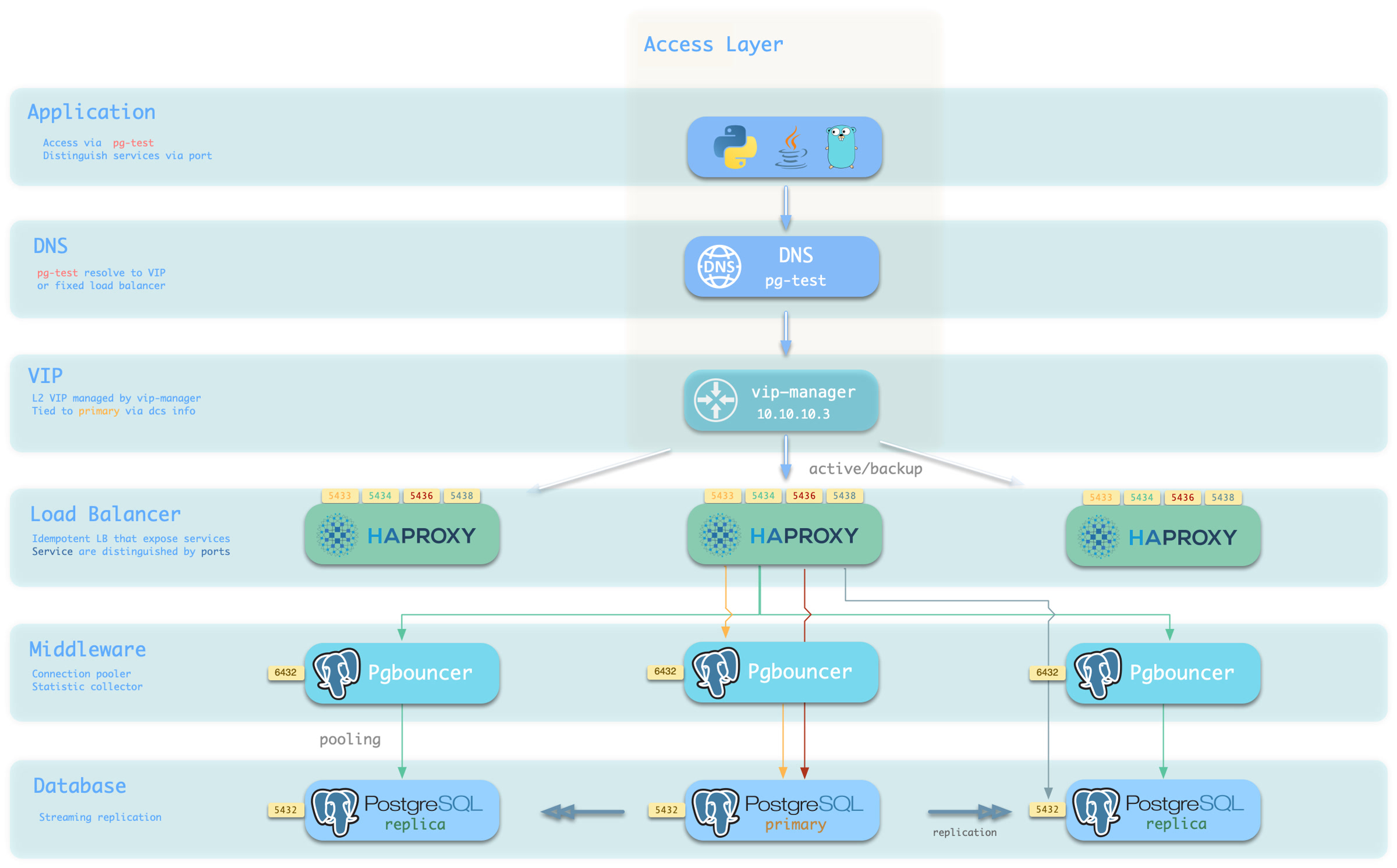
You can use different host & port combinations, which provide PostgreSQL service in different ways.
Host
| Type | Sample | Description |
|---|---|---|
| Cluster Domain Name | pg-test | Access via cluster domain name (resolved by dnsmasq @ infra nodes) |
| Cluster VIP Address | 10.10.10.3 | Access via L2 VIP address managed by vip-manager, bound to primary node |
| Instance Hostname | pg-test-1 | Access via any instance hostname (resolved by dnsmasq @ infra nodes) |
| Instance IP Address | 10.10.10.11 | Access any instance’s IP address |
Port
Pigsty uses different ports to distinguish pg services
| Port | Service | Type | Description |
|---|---|---|---|
| 5432 | postgres | Database | Direct access to postgres server |
| 6432 | pgbouncer | Middleware | Access postgres through connection pool middleware |
| 5433 | primary | Service | Access primary pgbouncer (or postgres) |
| 5434 | replica | Service | Access replica pgbouncer (or postgres) |
| 5436 | default | Service | Access primary postgres |
| 5438 | offline | Service | Access offline postgres |
Combinations
# Access via cluster domain
postgres://test@pg-test:5432/test # DNS -> L2 VIP -> primary direct connection
postgres://test@pg-test:6432/test # DNS -> L2 VIP -> primary connection pool -> primary
postgres://test@pg-test:5433/test # DNS -> L2 VIP -> HAProxy -> primary connection pool -> primary
postgres://test@pg-test:5434/test # DNS -> L2 VIP -> HAProxy -> replica connection pool -> replica
postgres://dbuser_dba@pg-test:5436/test # DNS -> L2 VIP -> HAProxy -> primary direct connection (for admin)
postgres://dbuser_stats@pg-test:5438/test # DNS -> L2 VIP -> HAProxy -> offline direct connection (for ETL/personal queries)

# Access via cluster VIP directly
postgres://[email protected]:5432/test # L2 VIP -> primary direct access
postgres://[email protected]:6432/test # L2 VIP -> primary connection pool -> primary
postgres://[email protected]:5433/test # L2 VIP -> HAProxy -> primary connection pool -> primary
postgres://[email protected]:5434/test # L2 VIP -> HAProxy -> replica connection pool -> replica
postgres://[email protected]:5436/test # L2 VIP -> HAProxy -> primary direct connection (for admin)
postgres://[email protected]::5438/test # L2 VIP -> HAProxy -> offline direct connection (for ETL/personal queries)

# Directly specify any cluster instance name
postgres://test@pg-test-1:5432/test # DNS -> database instance direct connection (singleton access)
postgres://test@pg-test-1:6432/test # DNS -> connection pool -> database
postgres://test@pg-test-1:5433/test # DNS -> HAProxy -> connection pool -> database read/write
postgres://test@pg-test-1:5434/test # DNS -> HAProxy -> connection pool -> database read-only
postgres://dbuser_dba@pg-test-1:5436/test # DNS -> HAProxy -> database direct connection
postgres://dbuser_stats@pg-test-1:5438/test # DNS -> HAProxy -> database offline read/write

# Directly specify any cluster instance IP access
postgres://[email protected]:5432/test # Database instance direct connection (directly specify instance, no automatic traffic distribution)
postgres://[email protected]:6432/test # Connection pool -> database
postgres://[email protected]:5433/test # HAProxy -> connection pool -> database read/write
postgres://[email protected]:5434/test # HAProxy -> connection pool -> database read-only
postgres://[email protected]:5436/test # HAProxy -> database direct connection
postgres://[email protected]:5438/test # HAProxy -> database offline read-write

# Smart client: read/write separation via URL
postgres://[email protected]:6432,10.10.10.12:6432,10.10.10.13:6432/test?target_session_attrs=primary
postgres://[email protected]:6432,10.10.10.12:6432,10.10.10.13:6432/test?target_session_attrs=prefer-standby
Feedback
Was this page helpful?
Thanks for the feedback! Please let us know how we can improve.
Sorry to hear that. Please let us know how we can improve.