This is the multi-page printable view of this section. Click here to print.

Return to the regular view of this page.

Point-in-Time Recovery

Pigsty uses pgBackRest to implement PostgreSQL point-in-time recovery, allowing users to roll back to any point in time within the backup policy window.

When you accidentally delete data, tables, or even the entire database, PITR lets you return to any point in time and avoid data loss from software defects and human error.

— This “magic” once reserved for senior DBAs is now available out of the box to everyone.


Overview

Pigsty’s PostgreSQL clusters come with auto-configured Point-in-Time Recovery (PITR) capability, powered by the backup component pgBackRest and optional object storage repository MinIO.

High availability solutions can address hardware failures but are powerless against data deletion/overwriting/database drops caused by software defects and human errors. For such situations, Pigsty provides out-of-the-box Point-in-Time Recovery (PITR) capability, enabled by default without additional configuration.

Pigsty provides default configurations for base backups and WAL archiving. You can use local directories and disks, or dedicated MinIO clusters or S3 object storage services to store backups and achieve geo-redundant disaster recovery. When using local disks, the default capability to recover to any point within the past day is retained. When using MinIO or S3, the default capability to recover to any point within the past week is retained. As long as storage space permits, you can retain any arbitrarily long recoverable time window, as your budget allows.


What Problems Does PITR Solve?

  • Enhanced disaster recovery: RPO drops from ∞ to tens of MB, RTO drops from ∞ to hours/minutes.
  • Ensures data security: Data integrity in C/I/A: avoids data consistency issues caused by accidental deletion.
  • Ensures data security: Data availability in C/I/A: provides fallback for “permanently unavailable” disaster scenarios
Standalone Configuration StrategyEventRTORPO
NothingCrash Permanently lost All lost
Base BackupCrash Depends on backup size and bandwidth (hours) Lose data since last backup (hours to days)
Base Backup + WAL ArchiveCrash Depends on backup size and bandwidth (hours) Lose unarchived data (tens of MB)

What Are the Costs of PITR?

  • Reduces C in data security: Confidentiality, creates additional leak points, requires additional backup protection.
  • Extra resource consumption: Local storage or network traffic/bandwidth overhead, usually not a concern.
  • Increased complexity: Users need to pay backup management costs.

Limitations of PITR

If only PITR is used for failure recovery, RTO and RPO metrics are inferior compared to high availability solutions, and typically both should be used together.

  • RTO: With only standalone + PITR, recovery time depends on backup size and network/disk bandwidth, ranging from tens of minutes to hours or days.
  • RPO: With only standalone + PITR, some data may be lost during crashes - one or several WAL segment files may not yet be archived, losing 16 MB to tens of MB of data.

Besides PITR, you can also use delayed clusters in Pigsty to address data deletion/modification caused by human errors or software defects.


How It Works

Point-in-time recovery allows you to restore and roll back your cluster to “any point” in the past, avoiding data loss caused by software defects and human errors. To achieve this, two preparations are needed: Base Backup and WAL Archiving. Having a base backup allows users to restore the database to its state at backup time, while having WAL archives starting from a base backup allows users to restore the database to any point after the base backup time.

For detailed mechanisms, see Base Backup and Point-in-Time Recovery; for specific operations, refer to PGSQL Admin: Backup and Recovery.

Base Backup

Pigsty uses pgBackRest to manage PostgreSQL backups. pgBackRest initializes empty repositories on all cluster instances but only actually uses the repository on the cluster primary.

pgBackRest supports three backup modes: full backup, incremental backup, and differential backup, with the first two being most commonly used. Full backup takes a complete physical snapshot of the database cluster at the current moment; incremental backup records the differences between the current database cluster and the previous full backup.

Pigsty provides a wrapper command for backups: /pg/bin/pg-backup [full|incr]. You can schedule regular base backups as needed through Crontab or any other task scheduling system.

WAL Archiving

Pigsty enables WAL archiving on the cluster primary by default and uses the pgbackrest command-line tool to continuously push WAL segment files to the backup repository.

pgBackRest automatically manages required WAL files and timely cleans up expired backups and their corresponding WAL archive files based on the backup retention policy.

If you don’t need PITR functionality, you can disable WAL archiving by configuring the cluster: archive_mode: off and remove node_crontab to stop scheduled backup tasks.


Implementation

By default, Pigsty provides two preset backup strategies: The default uses local filesystem backup repository, performing one full backup daily to ensure users can roll back to any point within the past day. The alternative strategy uses dedicated MinIO clusters or S3 storage for backups, with weekly full backups, daily incremental backups, and two weeks of backup and WAL archive retention by default.

Pigsty uses pgBackRest to manage backups, receive WAL archives, and perform PITR. Backup repositories can be flexibly configured (pgbackrest_repo): defaults to primary’s local filesystem (local), but can also use other disk paths, or the included optional MinIO service (minio) and cloud S3 services.

pgbackrest_enabled: true          # enable pgBackRest on pgsql host?
pgbackrest_clean: true            # remove pg backup data during init?
pgbackrest_log_dir: /pg/log/pgbackrest # pgbackrest log dir, `/pg/log/pgbackrest` by default
pgbackrest_method: local          # pgbackrest repo method: local, minio, [user-defined...]
pgbackrest_repo:                  # pgbackrest repo: https://pgbackrest.org/configuration.html#section-repository
  local:                          # default pgbackrest repo with local posix fs
    path: /pg/backup              # local backup directory, `/pg/backup` by default
    retention_full_type: count    # retention full backup by count
    retention_full: 2             # keep at most 3 full backup, at least 2, when using local fs repo
  minio:                          # optional minio repo for pgbackrest
    type: s3                      # minio is s3-compatible, so use s3
    s3_endpoint: sss.pigsty       # minio endpoint domain name, `sss.pigsty` by default
    s3_region: us-east-1          # minio region, us-east-1 by default, not used for minio
    s3_bucket: pgsql              # minio bucket name, `pgsql` by default
    s3_key: pgbackrest            # minio user access key for pgbackrest
    s3_key_secret: S3User.Backup  # minio user secret key for pgbackrest
    s3_uri_style: path            # use path style uri for minio rather than host style
    path: /pgbackrest             # minio backup path, `/pgbackrest` by default
    storage_port: 9000            # minio port, 9000 by default
    storage_ca_file: /etc/pki/ca.crt  # minio ca file path, `/etc/pki/ca.crt` by default
    bundle: y                     # bundle small files into a single file
    cipher_type: aes-256-cbc      # enable AES encryption for remote backup repo
    cipher_pass: pgBackRest       # AES encryption password, default is 'pgBackRest'
    retention_full_type: time     # retention full backup by time on minio repo
    retention_full: 14            # keep full backup for last 14 days
  # You can also add other optional backup repos, such as S3, for geo-redundant disaster recovery

Pigsty parameter pgbackrest_repo target repositories are converted to repository definitions in the /etc/pgbackrest/pgbackrest.conf configuration file. For example, if you define a US West S3 repository for storing cold backups, you can use the following reference configuration.

s3:    # ------> /etc/pgbackrest/pgbackrest.conf
  repo1-type: s3                                   # ----> repo1-type=s3
  repo1-s3-region: us-west-1                       # ----> repo1-s3-region=us-west-1
  repo1-s3-endpoint: s3-us-west-1.amazonaws.com    # ----> repo1-s3-endpoint=s3-us-west-1.amazonaws.com
  repo1-s3-key: '<your_access_key>'                # ----> repo1-s3-key=<your_access_key>
  repo1-s3-key-secret: '<your_secret_key>'         # ----> repo1-s3-key-secret=<your_secret_key>
  repo1-s3-bucket: pgsql                           # ----> repo1-s3-bucket=pgsql
  repo1-s3-uri-style: host                         # ----> repo1-s3-uri-style=host
  repo1-path: /pgbackrest                          # ----> repo1-path=/pgbackrest
  repo1-bundle: y                                  # ----> repo1-bundle=y
  repo1-cipher-type: aes-256-cbc                   # ----> repo1-cipher-type=aes-256-cbc
  repo1-cipher-pass: pgBackRest                    # ----> repo1-cipher-pass=pgBackRest
  repo1-retention-full-type: time                  # ----> repo1-retention-full-type=time
  repo1-retention-full: 90                         # ----> repo1-retention-full=90

Recovery

You can directly use the following wrapper commands for PostgreSQL database cluster point-in-time recovery.

Pigsty uses incremental differential parallel recovery by default, allowing you to recover to a specified point in time at maximum speed.

pg-pitr                                 # Restore to the end of WAL archive stream (e.g., for entire datacenter failure)
pg-pitr -i                              # Restore to the most recent backup completion time (rarely used)
pg-pitr --time="2022-12-30 14:44:44+08" # Restore to a specified point in time (for database or table drops)
pg-pitr --name="my-restore-point"       # Restore to a named restore point created with pg_create_restore_point
pg-pitr --lsn="0/7C82CB8" -X            # Restore to immediately before the LSN
pg-pitr --xid="1234567" -X -P           # Restore to immediately before the specified transaction ID, then promote cluster to primary
pg-pitr --backup=latest                 # Restore to the latest backup set
pg-pitr --backup=20221108-105325        # Restore to a specific backup set, backup sets can be listed with pgbackrest info

pg-pitr                                 # pgbackrest --stanza=pg-meta restore
pg-pitr -i                              # pgbackrest --stanza=pg-meta --type=immediate restore
pg-pitr -t "2022-12-30 14:44:44+08"     # pgbackrest --stanza=pg-meta --type=time --target="2022-12-30 14:44:44+08" restore
pg-pitr -n "my-restore-point"           # pgbackrest --stanza=pg-meta --type=name --target=my-restore-point restore
pg-pitr -b 20221108-105325F             # pgbackrest --stanza=pg-meta --type=name --set=20221230-120101F restore
pg-pitr -l "0/7C82CB8" -X               # pgbackrest --stanza=pg-meta --type=lsn --target="0/7C82CB8" --target-exclusive restore
pg-pitr -x 1234567 -X -P                # pgbackrest --stanza=pg-meta --type=xid --target="0/7C82CB8" --target-exclusive --target-action=promote restore

When performing PITR, you can use Pigsty’s monitoring system to observe the cluster LSN position status and determine whether recovery to the specified point in time, transaction point, LSN position, or other point was successful.
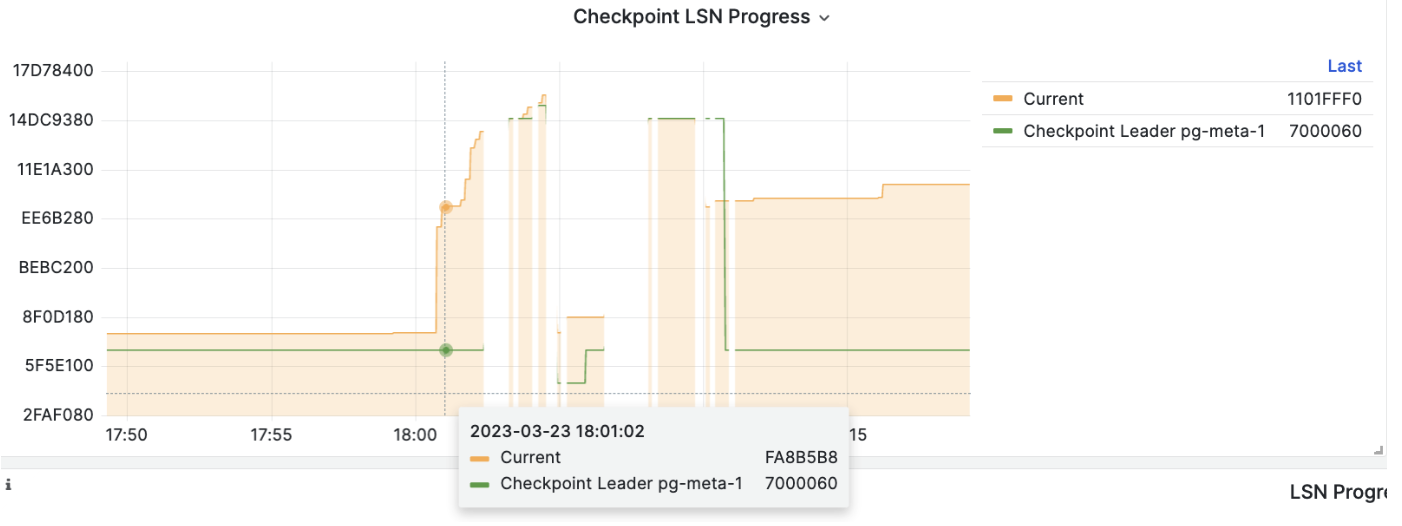
pitr

1 - How PITR Works

PITR mechanism: base backup, WAL archive, recovery window, and transaction boundaries

The core principle of PITR is: base backup + WAL archiving = recover to any point in time. In Pigsty, this is implemented by pgBackRest, running scheduled backups + WAL archiving automatically.


Three Elements

ElementPurposePigsty Implementation
Base BackupProvides a consistent physical snapshot, recovery starting pointpg-backup + pgbackrest + pg_crontab
WAL ArchivingRecords all changes after backup, defines recovery patharchive_mode=on + archive_command=pgbackrest ... archive-push
Recovery TargetSpecifies where to stop recoverypg_pitr params / pg-pitr script / pgbackrest restore

Base Backup

Base backup is a physical snapshot at a point in time, the starting point of PITR. Pigsty uses pgBackRest and provides pg-backup wrapper for common ops.

Backup Types

TypeDescriptionRestore Cost
FullCopies all data filesFastest restore, largest space
DifferentialChanges since latest fullRestore needs full + diff
IncrementalChanges since latest any backupSmallest space, restore needs full chain

Pigsty Defaults

  • pg-backup defaults to incremental, and auto-runs a full if none exists.
  • Backup jobs are configured via pg_crontab and written to postgres crontab.
  • Script detects role; only primary runs, replicas exit.

Higher backup frequency means less WAL to replay and faster recovery. See Backup Mechanism and Backup Policy.


WAL Archiving

WAL (Write-Ahead Log) records every database change. PITR relies on continuous WAL archiving to replay to the target time.

Pigsty Archiving Pipeline

Pigsty enables WAL archiving by default, using pgBackRest:

  • archive_mode = on
  • archive_command = pgbackrest --stanza=<cluster> archive-push %p

pgBackRest continuously receives WAL segments and cleans expired archives per retention policy. During recovery, pgBackRest uses archive-get to pull needed WAL.

Key Impacts

  • Archive delay shortens the right boundary of recovery window.
  • Repo unavailability interrupts archiving, directly impacting PITR.

See Backup Mechanism and Backup Repository.


Recovery Targets and Transaction Boundaries

PITR targets are defined by PostgreSQL recovery_target_* parameters, wrapped by pg_pitr / pg-pitr in Pigsty.

Target Types

TargetParamDescriptionTypical Scenario
latestN/ARecover to end of WAL streamDisaster, latest restore
timetimeRecover to specific timestampAccidental deletion
xidxidRecover to specific transaction IDBad transaction rollback
lsnlsnRecover to specific LSNPrecise rollback
namenameRecover to named restore pointPlanned checkpoint
immediatetype: immediateStop at first consistent pointFastest restore

Inclusive vs Exclusive

Recovery targets are inclusive by default. To roll back before the target, set exclusive: true in pg_pitr, mapping to recovery_target_inclusive = false.

Transaction Boundaries

PITR keeps committed transactions before the target, and rolls back uncommitted ones.

gantt
    title Transaction Boundaries and Recovery Target
    dateFormat X
    axisFormat %s
    section Transaction A
    BEGIN → COMMIT (committed) :done, a1, 0, 2
    section Transaction B
    BEGIN → uncommitted :active, b1, 1, 4
    section Recovery
    Recovery target :milestone, m1, 2, 0

See Restore Operations.


Recovery Window

The recovery window is defined by two boundaries:

  • Left boundary: earliest available base backup
  • Right boundary: latest archived WAL

pitr-scope

Window length depends on backup frequency, backup retention, and WAL retention:

  • local repo keeps 2 full backups by default, window is 24–48 hours.
  • minio repo keeps 14 days by time, window is 1–2 weeks.

See Backup Policy and Backup Repository.


Timeline

Timeline distinguishes historical branches. New timelines are created by:

  1. PITR restore
  2. Replica promote
  3. Failover
gitGraph
    commit id: "Initial"
    commit id: "Write data"
    commit id: "More writes"
    branch Timeline-2
    checkout Timeline-2
    commit id: "PITR point 1"
    commit id: "New writes"
    branch Timeline-3
    checkout Timeline-3
    commit id: "PITR point 2"
    commit id: "Continue"
    checkout main
    commit id: "Original continues"

When multiple timelines exist, you can specify timeline; Pigsty defaults to latest. See Restore Operations.

2 - PITR Architecture

Pigsty PITR architecture: pgBackRest, repositories, and execution flow

Pigsty uses pgBackRest as the PostgreSQL backup and recovery engine, providing out-of-the-box Point-in-Time Recovery (PITR).

This page explains the architecture: who runs backups, where data flows, how repositories are organized, and how continuity is kept after failover.


Overview

PITR architecture has three main pipelines: backup execution, WAL archiving, restore execution.

PipelineEntryEngineDestination
Backuppg-backup + pg_crontabpgbackrest backuprepo backup/
WAL ArchivePostgreSQL archive_commandpgbackrest archive-pushrepo archive/
Restorepg_pitr / pg-pitr / pgsql-pitr.ymlpgbackrest restoretarget data directory

See Backup Mechanism and Restore Operations for details.


Components and Responsibilities

ComponentRoleDescription
PostgreSQLData sourceGenerates data files and WAL archive stream
pgBackRestBackup engineRuns backups, receives WAL, performs restore
pg-backupBackup entryPigsty wrapper for pgbackrest backup
pg_pitr / pg-pitrRestore entryPigsty params/script for pgbackrest restore
Backup repositoryStorage backendStores backup/ and archive/, supports local / minio / s3
pgbackrest_exporterMetrics outputExports backup status metrics, default port 9854

Data Flow

flowchart TB
    subgraph cluster["PostgreSQL Cluster"]
        direction TB
        primary["Primary<br/>PostgreSQL"]
        pb["pgBackRest"]
        cron["pg-backup / pg_crontab"]
    end
    repo["Backup Repo<br/>local / minio / s3"]
    restore["Restore Target Data Dir"]

    cron --> pb
    primary -->|base backup| pb
    primary -->|WAL archive| pb
    pb -->|backup/archive| repo
    repo -->|restore/archive-get| pb
    pb -->|restore| restore

Key points:

  • Backup is triggered by pg-backup, executing pgbackrest backup to write base backups.
  • Archiving is triggered by PostgreSQL archive_command, pushing WAL segments to repo.
  • Restore reads backup and WAL from repo, rebuilding data dir via pgbackrest restore.

Deployment and Roles

pgBackRest is installed on all PostgreSQL nodes, but only the primary executes backups:

  • pg-backup detects node role; replicas exit directly.
  • After failover, the new primary takes over backup/archiving automatically.

This decouples backup pipeline from HA topology and avoids interruptions on switchover.


Repository and Isolation

Stanza (Cluster Identity)

pgBackRest uses stanza to isolate cluster backups, mapped to pg_cluster in Pigsty:

backup-repo
├── pg-meta/
│   ├── backup/
│   └── archive/
└── pg-test/
    ├── backup/
    └── archive/

Repository Types

Pigsty selects repo type via pgbackrest_method and config via pgbackrest_repo:

TypeCharacteristicsUse Cases
localLocal disk, fastest restoreDev/test, single node
minioObject storage, centralizedProduction, DR
s3Cloud object storageCloud, cross-region DR

Production should use remote repo (MinIO/S3) to avoid data and backups lost together on host failure. See Backup Repository.


Config Mapping

Pigsty renders pgbackrest_repo into /etc/pgbackrest/pgbackrest.conf. Backup logs are under /pg/log/pgbackrest/, restore generates temporary config and logs.

See Backup Mechanism for details.


Observability

pgbackrest_exporter exports backup status metrics (last backup time, type, size, etc), enabled by default on port 9854. You can control it with pgbackrest_exporter_enabled.


3 - PITR Tradeoffs

PITR strategy tradeoffs: repository choice, space planning, and recommendations

When designing a PITR strategy, the core tradeoffs are: backup repository location, recovery window length, and restore speed vs storage cost.

This page helps you make practical choices across these dimensions.


Local vs Remote

Repository location is the first decision in PITR strategy.

Local Repository

Store backups on primary local disk (pgbackrest_method = local):

Pros

  • Simple, out-of-the-box
  • Fast restore (local I/O)
  • No external dependency

Cons

  • No geo-DR; backups may be lost with host
  • Limited by local disk capacity
  • Same failure domain as production data

Remote Repository

Store backups on MinIO / S3 (pgbackrest_method = minio|s3):

Pros

  • Geo-DR, backups independent from DB host
  • Near-unlimited capacity, shared by multiple clusters
  • Works with encryption, versioning, and other safety controls

Cons

  • Restore speed depends on network bandwidth
  • Depends on object storage availability
  • Higher deployment and ops cost

How to Choose

ScenarioRecommended RepoReason
Dev/TestlocalSimple and sufficient
Single-node prodminio / s3Recover even if host fails
Cluster prodlocal + minioBalance speed and DR
Critical businessmultiple remote reposMulti-site DR, maximum protection

See Backup Repository for details.


Space vs Window

Longer recovery window means more storage. Window length is defined by backup retention + WAL retention.

Factors

FactorImpact
Database sizeBaseline for full backup size
Change rateAffects incremental backups and WAL size
Backup frequencyHigher frequency = faster restore but more storage
RetentionLonger retention = longer window, more storage

Intuitive Examples

Assume DB is 100GB, daily change 10GB:

Daily full backups (keep 2)

pitr-space

  • Full backups: 100GB × 2 ≈ 200GB
  • WAL archive: 10GB × 2 ≈ 20GB
  • Total: ~2–3x DB size

Weekly full + daily incremental (keep 14 days)

pitr-space2

  • Full backups: 100GB × 2 ≈ 200GB
  • Incremental: ~10GB × 12 ≈ 120GB
  • WAL archive: 10GB × 14 ≈ 140GB
  • Total: ~4–5x DB size

Space vs window is a hard constraint: you cannot get a longer window with less storage.


Strategy Choices

Daily Full Backup

Simplest and most reliable, also the default for local repo:

  • Full backup once per day
  • Keep 2 full backups
  • Recovery window about 24–48 hours

Suitable when:

  • DB size is small to medium (< 500GB)
  • Backup window is sufficient
  • Storage cost is not a concern

Full + Incremental

Space-optimized strategy, for large DBs or longer windows:

  • Weekly full backup
  • Incremental on other days
  • Keep 14 days

Suitable when:

  • Large DB size
  • Using object storage
  • Need 1–2 week recovery window
flowchart TD
    A{"DB size<br/>< 100GB?"} -->|Yes| B["Daily full backup"]
    A -->|No| C{"DB size<br/>< 500GB?"}
    C -->|No| D["Full + incremental"]
    C -->|Yes| E{"Backup window<br/>sufficient?"}
    E -->|Yes| F["Daily full backup"]
    E -->|No| G["Full + incremental"]

Dev/Test

pg_crontab:
  - '00 01 * * * /pg/bin/pg-backup full'
pgbackrest_method: local
  • Window: 24–48 hours
  • Characteristics: simplest and lowest cost

Production Clusters

pg_crontab:
  - '00 01 * * 1 /pg/bin/pg-backup full'
  - '00 01 * * 2,3,4,5,6,7 /pg/bin/pg-backup'
pgbackrest_method: minio
  • Window: 7–14 days
  • Characteristics: remote DR, production-ready

Critical Business

Dual-repo strategy (local + remote):

pgbackrest_method: local
pgbackrest_repo:
  local: { path: /pg/backup, retention_full: 2 }
  minio: { type: s3, retention_full_type: time, retention_full: 14 }
  • Local repo for fast restore
  • Remote repo for DR

See Backup Policy and Backup Repository for details.

4 - PITR Scenarios

Typical PITR scenarios: data deletion, DDL drops, batch errors, branch restore, and site disasters

The value of PITR is not just “rolling back a database”, but turning irreversible human/software mistakes into recoverable problems. It covers cases from “drop one table” to “entire site down”, addressing logical errors and disaster recovery.


Overview

PITR addresses these scenarios:

Scenario TypeTypical ProblemRecommended StrategyRecovery Target
Accidental DMLDELETE/UPDATE without WHERE, script mistakeBranch restore firsttime / xid
DDL dropsDROP TABLE/DATABASE, bad migrationBranch restoretime / name
Batch errors / bad releaseBuggy release pollutes dataBranch restore + verifytime / xid
Audit / investigationNeed to inspect historical stateBranch restore (read-only)time / lsn
Site disaster / total lossHardware failure, ransomware, power outageIn-place or rebuildlatest / time

A Simple Rule of Thumb

  • If writes already caused business errors, consider PITR.
  • Need online verification or partial recovery → branch restore.
  • Need service restored ASAP → in-place restore (accept downtime).
flowchart TD
    A["Issue discovered"] --> B{"Downtime allowed?"}
    B -->|Yes| C["In-place restore<br/>shortest path"]
    B -->|No| D["Branch restore<br/>verify then switch"]
    C --> E["Rebuild backups after restore"]
    D --> F["Verify / export / cut traffic"]

Scenario Details

Accidental DML (Delete/Update)

Typical issues:

  • DELETE without WHERE
  • Bad UPDATE overwrites key fields
  • Batch script bugs spread bad data

Approach:

  1. Stop the bleeding: pause related apps or writes.
  2. Locate time point: use logs/metrics/business feedback.
  3. Choose strategy:
    • Downtime allowed: in-place restore before error
    • No downtime: branch restore, export correct data back

Recommended targets:

  • Known transaction: xid + exclusive: true
  • Time-based only: time + exclusive: true
pg_pitr: { xid: "250000", exclusive: true }
# or
pg_pitr: { time: "2025-01-15 14:30:00+08", exclusive: true }

DDL Drops (Table/DB)

Typical issues:

  • DROP TABLE / DROP DATABASE
  • Wrong migration scripts
  • Cleanup scripts deleted production objects

Why branch restore:

DDL is irreversible; in-place restore rolls back the whole cluster. Branch restore lets you export only the dropped objects back, minimizing impact.

Recommended flow:

  1. Create branch cluster and PITR to before drop
  2. Validate schema/data
  3. pg_dump target objects
  4. Import back to production
sequenceDiagram
    participant O as Original Cluster
    participant B as Branch Cluster
    O->>B: Create branch cluster
    Note over B: PITR to before drop
    B->>O: Dump and import objects
    Note over B: Destroy branch after verification

Batch Errors / Bad Releases

Typical issues:

  • Release writes incorrect data
  • ETL/batch jobs pollute large datasets
  • Fix scripts fail or scope unclear

Principles:

  • Prefer branch restore: verify before cutover
  • Compare data diff between original and branch

Suggested flow:

  1. Determine error window
  2. Branch restore to before error
  3. Validate key tables
  4. Export partial data or cut traffic

This scenario often needs business review, so branch restore is safer and controllable.


Audit / Investigation

Typical issues:

  • Need to inspect historical data state
  • Compare “correct history” with current data

Recommended: branch restore (read-only)

Benefits:

  • No production impact
  • Try multiple time points
  • Fits audit, verification, forensics
pg_pitr: { time: "2025-01-15 10:00:00+08" }  # create read-only branch

Site Disaster / Total Loss

This is the ultimate PITR fallback. When HA cannot help (primary + replicas down, power outage, ransomware), PITR is the last line of defense.

Key prerequisite:

Remote repo (MinIO/S3) is required.

Local repo is lost together with the host, so recovery is impossible.

Recovery flow:

  1. Prepare new hosts or new site
  2. Restore cluster config and point to remote repo
  3. Run PITR restore (usually latest)
  4. Validate data and restore service
./pgsql-pitr.yml -l pg-meta   # restore to end of WAL archive

In-place vs Branch Restore

DimensionIn-place RestoreBranch Restore
DowntimeRequiredNot required
RiskHigh (directly impacts prod)Low (verify before action)
ComplexityLowMedium (new cluster + export)
RecommendedDisaster recovery, fast restoreMis-ops, audit, complex cases

For most production scenarios, branch restore is the default recommendation. Only choose in-place restore when service must be restored ASAP.