Sandbox
Pigsty provides a standard 4-node sandbox environment for learning, testing, and feature demonstration.
The sandbox uses fixed IP addresses and predefined identity identifiers, making it easy to reproduce various demo use cases.
Description
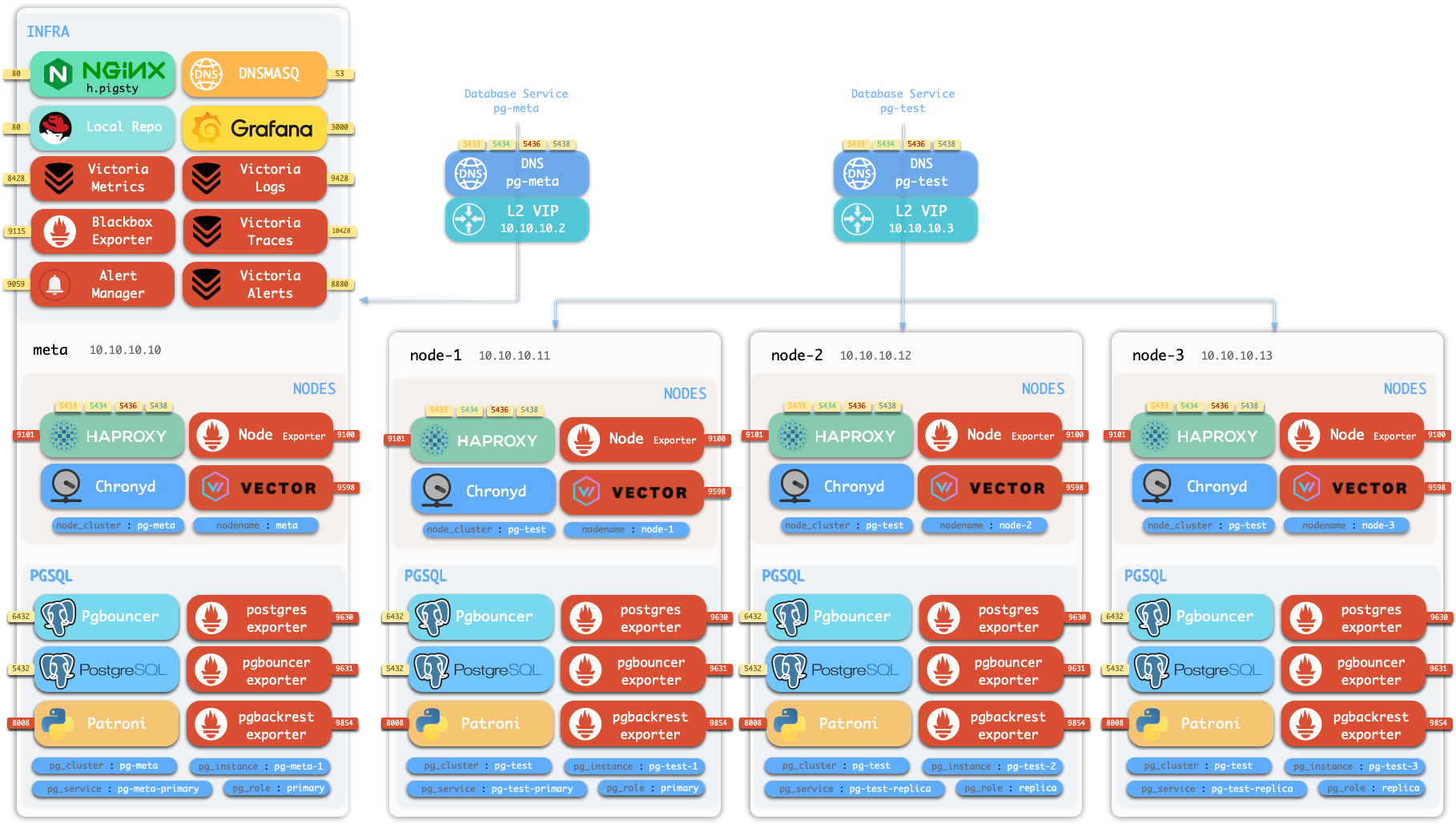
The default sandbox environment consists of 4 nodes, using the ha/full.yml configuration template.
| ID | IP Address | Node | PostgreSQL | INFRA | ETCD | MINIO |
|---|---|---|---|---|---|---|
| 1 | 10.10.10.10 | meta | pg-meta-1 | infra-1 | etcd-1 | minio-1 |
| 2 | 10.10.10.11 | node-1 | pg-test-1 | |||
| 3 | 10.10.10.12 | node-2 | pg-test-2 | |||
| 4 | 10.10.10.13 | node-3 | pg-test-3 |
The sandbox configuration can be summarized as the following config:
all:
  children:
    infra: { hosts: { 10.10.10.10: { infra_seq: 1 } } }
    etcd:  { hosts: { 10.10.10.10: { etcd_seq:  1 } }, vars: { etcd_cluster: etcd } }
    minio: { hosts: { 10.10.10.10: { minio_seq: 1 } }, vars: { minio_cluster: minio } }

    pg-meta:
      hosts: { 10.10.10.10: { pg_seq: 1, pg_role: primary } }
      vars:  { pg_cluster: pg-meta }

    pg-test:
      hosts:
        10.10.10.11: { pg_seq: 1, pg_role: primary }
        10.10.10.12: { pg_seq: 2, pg_role: replica }
        10.10.10.13: { pg_seq: 3, pg_role: replica }
      vars: { pg_cluster: pg-test }

  vars:
    version: v4.2.2
    admin_ip: 10.10.10.10
    region: default
    pg_version: 18
PostgreSQL Clusters
The sandbox comes with a single-instance PostgreSQL cluster pg-meta on the meta node:
10.10.10.10 meta pg-meta-1
10.10.10.2  pg-meta          # Optional L2 VIP
There’s also a 3-instance PostgreSQL HA cluster pg-test deployed on the other three nodes:
10.10.10.11 node-1 pg-test-1
10.10.10.12 node-2 pg-test-2
10.10.10.13 node-3 pg-test-3
10.10.10.3  pg-test          # Optional L2 VIP
Two optional L2 VIPs are bound to the primary instances of pg-meta and pg-test clusters respectively.
Infrastructure
The meta node also hosts:
- ETCD cluster: Single-node
etcdcluster providing DCS service for PostgreSQL HA - MinIO cluster: Single-node
miniocluster providing S3-compatible object storage
10.10.10.10 etcd-1
10.10.10.10 minio-1
Creating Sandbox
Pigsty provides out-of-the-box templates. You can use Vagrant to create a local sandbox, or use Terraform to create a cloud sandbox.
Local Sandbox (Vagrant)
Local sandbox uses VirtualBox/libvirt to create local virtual machines, running free on your Mac / PC.
To run the full 4-node sandbox, your machine should have at least 4 CPU cores and 8GB memory.
cd ~/pigsty
make full       # Create 4-node sandbox with default RockyLinux 9 image
make full9      # Create 4-node sandbox with RockyLinux 9
make full12     # Create 4-node sandbox with Debian 12
make full24     # Create 4-node sandbox with Ubuntu 24.04
For more details, please refer to Vagrant documentation.
Cloud Sandbox (Terraform)
Cloud sandbox uses public cloud API to create virtual machines. Easy to create and destroy, pay-as-you-go, ideal for quick testing.
Use spec/aliyun-full.tf template to create a 4-node sandbox on Alibaba Cloud:
cd ~/pigsty/terraform
cp spec/aliyun-full.tf terraform.tf
terraform init
terraform apply
For more details, please refer to Terraform documentation.
Other Specs
Besides the standard 4-node sandbox, Pigsty also provides other environment specs:
Single Node Devbox (meta)
The simplest 1-node environment for quick start, development, and testing:
make meta # Create single-node devbox
Two Node Environment (dual)
2-node environment for testing primary-replica replication:
make dual # Create 2-node environment
Three Node Environment (trio)
3-node environment for testing basic high availability:
make trio # Create 3-node environment
Production Simulation (simu)
20-node large simulation environment for full production environment testing:
make simu # Create 20-node production simulation environment
This environment includes:
- 3 infrastructure nodes (
meta1,meta2,meta3) - 2 HAProxy proxy nodes
- 4 MinIO nodes
- 5 ETCD nodes
- 6 PostgreSQL nodes (2 clusters, 3 nodes each)
Feedback
Was this page helpful?
Thanks for the feedback! Please let us know how we can improve.
Sorry to hear that. Please let us know how we can improve.