Point-in-Time Recovery
You can restore and roll back your cluster to any point in the past, avoiding data loss caused by software defects and human errors.
Pigsty’s PostgreSQL clusters come with automatically configured Point-in-Time Recovery (PITR) solution, provided by backup component pgBackRest and optional object storage repository MinIO.
The High Availability solution can solve hardware failures, but is powerless against data deletion/overwrite/database drops caused by software defects and human errors. For this situation, Pigsty provides out-of-the-box Point-in-Time Recovery (PITR) capability, enabled by default without additional configuration.
Pigsty provides default configuration for base backups and WAL archiving. You can use local directories and disks, or dedicated MinIO clusters or S3 object storage services to store backups and implement off-site disaster recovery. When using local disks, by default, the ability to recover to any point in time within the past day is retained. When using MinIO or S3, by default, the ability to recover to any point in time within the past week is retained. As long as storage space is sufficient, you can keep any length of recoverable time period, depending on your needs.
What problems does Point-in-Time Recovery (PITR) solve?
- Enhanced disaster recovery capability: RPO reduced from ∞ to tens of MB, RTO reduced from ∞ to several hours/quarters.
- Ensure data security: Data Integrity in C/I/A: avoid data consistency issues caused by accidental deletion.
- Ensure data security: Data Availability in C/I/A: provide fallback for “permanently unavailable” disaster situations
| Single Instance Configuration Strategy | Event | RTO | RPO |
|---|---|---|---|
| Do Nothing | Outage | Permanent Loss | Total Loss |
| Base Backup | Outage | Depends on backup size and bandwidth (hours) | Loss of data since last backup (hours to days) |
| Base Backup + WAL Archive | Outage | Depends on backup size and bandwidth (hours) | Loss of last unarchived data (tens of MB) |
What is the cost of Point-in-Time Recovery?
- Reduced confidentiality in data security: Confidentiality: creates additional leakage points, requires additional protection of backups.
- Additional resource consumption: local storage or network traffic/bandwidth overhead, usually not a problem.
- Increased complexity cost: users need to bear backup management costs.
Limitations of Point-in-Time Recovery
If only PITR is used for failure recovery, RTO and RPO metrics are inferior compared to the High Availability solution. Usually, both should be used in combination.
- RTO: If only single instance + PITR, recovery time depends on backup size and network/disk bandwidth, ranging from tens of minutes to hours or days.
- RPO: If only single instance + PITR, some data may be lost during outage, one or several WAL log segment files may not yet be archived, with data loss ranging from 16 MB to tens of MB.
In addition to PITR, you can also use Delayed Clusters in Pigsty to solve data misoperation or software defect-induced data deletion and modification problems.
Principles
Point-in-Time Recovery allows you to restore and roll back your cluster to any “moment” in the past, avoiding data loss caused by software defects and human errors. To do this, two preparatory tasks are required: Base Backup and WAL Archive. Having Base Backup allows users to restore the database to the state at the time of backup, while having WAL Archive starting from a base backup allows users to restore the database to any point in time after the base backup moment.
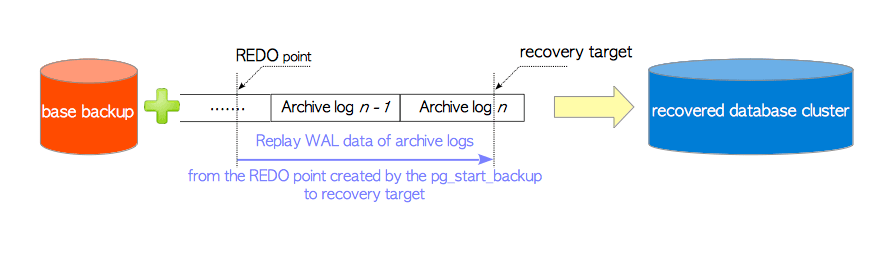
For detailed operations, refer to PGSQL Admin: Backup & Recovery.
Base Backup
Pigsty uses pgbackrest to manage PostgreSQL backups. pgBackRest initializes empty repositories on all cluster instances, but only actually uses the repository on the cluster primary.
pgBackRest supports three backup modes: Full Backup, Incremental Backup, and Differential Backup, with the first two being most commonly used. Full backup takes a complete physical snapshot of the database cluster at the current moment, while incremental backup records the difference between the current database cluster and the previous full backup.
Pigsty provides wrapper commands for backups: /pg/bin/pg-backup [full|incr]. You can schedule base backups as needed through Crontab or any other task scheduling system.
WAL Archive
Pigsty enables WAL archiving on the cluster primary by default, using the pgbackrest command-line tool to continuously push WAL segment files to the backup repository.
pgBackRest automatically manages required WAL files and timely cleans up expired backups and their corresponding WAL archive files according to the backup retention policy.
If you don’t need PITR functionality, you can disable WAL archiving through Cluster Configuration: archive_mode: off, and remove the node_crontab to stop scheduled backup tasks.
Implementation
By default, Pigsty provides two preset backup strategies: the default uses a local filesystem backup repository, where a full backup is performed daily to ensure users can roll back to any point in time within one day. The alternative strategy uses a dedicated MinIO cluster or S3 storage for backups, with weekly full backups and daily incremental backups, retaining two weeks of backups and WAL archives by default.
Pigsty uses pgBackRest to manage backups, receive WAL archives, and execute PITR. The backup repository can be flexibly configured (pgbackrest_repo): the default uses the primary’s local filesystem (local), but can also use other disk paths, or use the optional built-in MinIO service (minio) or cloud-based S3 services.
pgbackrest_enabled: true          # Enable pgBackRest on pgsql hosts?
pgbackrest_clean: true            # Remove pg backup data during init?
pgbackrest_log_dir: /pg/log/pgbackrest # pgbackrest log directory, default `/pg/log/pgbackrest`
pgbackrest_method: local          # pgbackrest repo method: local, minio, [user-defined...]
pgbackrest_repo:                  # pgbackrest repository: https://pgbackrest.org/configuration.html#section-repository
  local:                          # default pgbackrest repo using local posix fs
    path: /pg/backup              # local backup directory, default `/pg/backup`
    retention_full_type: count    # retain full backup by count
    retention_full: 2             # keep 3 full backups at most, 2 at least with local fs repo
  minio:                          # optional minio repo for pgbackrest
    type: s3                      # minio is s3-compatible, so use s3
    s3_endpoint: sss.pigsty       # minio endpoint domain name, default `sss.pigsty`
    s3_region: us-east-1          # minio region, default us-east-1, useless for minio
    s3_bucket: pgsql              # minio bucket name, default `pgsql`
    s3_key: pgbackrest            # minio user access key for pgbackrest
    s3_key_secret: S3User.Backup  # minio user secret key for pgbackrest
    s3_uri_style: path            # use path style uri for minio rather than host style
    path: /pgbackrest             # minio backup path, default `/pgbackrest`
    storage_port: 9000            # minio port, default 9000
    storage_ca_file: /etc/pki/ca.crt  # minio ca file path, default `/etc/pki/ca.crt`
    bundle: y                     # bundle small files into a single file
    cipher_type: aes-256-cbc      # enable AES encryption for remote backup repo
    cipher_pass: pgBackRest       # AES encryption password, default 'pgBackRest'
    retention_full_type: time     # retain full backup by time on minio repo
    retention_full: 14            # keep full backup in last 14 days
  # You can also add other optional backup repositories, such as S3, for off-site disaster recovery
Pigsty parameter pgbackrest_repo target repositories are converted to repository definitions in the /etc/pgbackrest/pgbackrest.conf configuration file.
For example, if you define an S3 repository in US West region for cold backup storage, you can use the following reference configuration.
s3:    # ------> /etc/pgbackrest/pgbackrest.conf
  repo1-type: s3                                   # ----> repo1-type=s3
  repo1-s3-region: us-west-1                       # ----> repo1-s3-region=us-west-1
  repo1-s3-endpoint: s3-us-west-1.amazonaws.com    # ----> repo1-s3-endpoint=s3-us-west-1.amazonaws.com
  repo1-s3-key: '<your_access_key>'                # ----> repo1-s3-key=<your_access_key>
  repo1-s3-key-secret: '<your_secret_key>'         # ----> repo1-s3-key-secret=<your_secret_key>
  repo1-s3-bucket: pgsql                           # ----> repo1-s3-bucket=pgsql
  repo1-s3-uri-style: host                         # ----> repo1-s3-uri-style=host
  repo1-path: /pgbackrest                          # ----> repo1-path=/pgbackrest
  repo1-bundle: y                                  # ----> repo1-bundle=y
  repo1-cipher-type: aes-256-cbc                   # ----> repo1-cipher-type=aes-256-cbc
  repo1-cipher-pass: pgBackRest                    # ----> repo1-cipher-pass=pgBackRest
  repo1-retention-full-type: time                  # ----> repo1-retention-full-type=time
  repo1-retention-full: 90                         # ----> repo1-retention-full=90
Recovery
You can directly use the following wrapper commands for Point-in-Time Recovery of PostgreSQL database clusters.
Pigsty uses incremental differential parallel recovery by default, allowing you to restore to a specified point in time at the fastest speed.
pg-pitr                                 # Restore to the end of WAL archive stream (use in case of entire data center failure)
pg-pitr -i                              # Restore to the time when the most recent backup completed (less common)
pg-pitr --time="2022-12-30 14:44:44+08" # Restore to specified point in time (use when database or table was dropped)
pg-pitr --name="my-restore-point"       # Restore to named restore point created with pg_create_restore_point
pg-pitr --lsn="0/7C82CB8" -X            # Restore immediately before LSN
pg-pitr --xid="1234567" -X -P           # Restore immediately before specified transaction ID, then promote cluster directly to primary

pg-pitr --backup=latest                 # Restore to latest backup set
pg-pitr --backup=20221108-105325        # Restore to specific backup set, backup sets can be listed using pgbackrest info

pg-pitr                                 # pgbackrest --stanza=pg-meta restore
pg-pitr -i                              # pgbackrest --stanza=pg-meta --type=immediate restore
pg-pitr -t "2022-12-30 14:44:44+08"     # pgbackrest --stanza=pg-meta --type=time --target="2022-12-30 14:44:44+08" restore
pg-pitr -n "my-restore-point"           # pgbackrest --stanza=pg-meta --type=name --target=my-restore-point restore
pg-pitr -b 20221108-105325F             # pgbackrest --stanza=pg-meta --type=name --set=20221230-120101F restore
pg-pitr -l "0/7C82CB8" -X               # pgbackrest --stanza=pg-meta --type=lsn --target="0/7C82CB8" --target-exclusive restore
pg-pitr -x 1234567 -X -P                # pgbackrest --stanza=pg-meta --type=xid --target="0/7C82CB8" --target-exclusive --target-action=promote restore
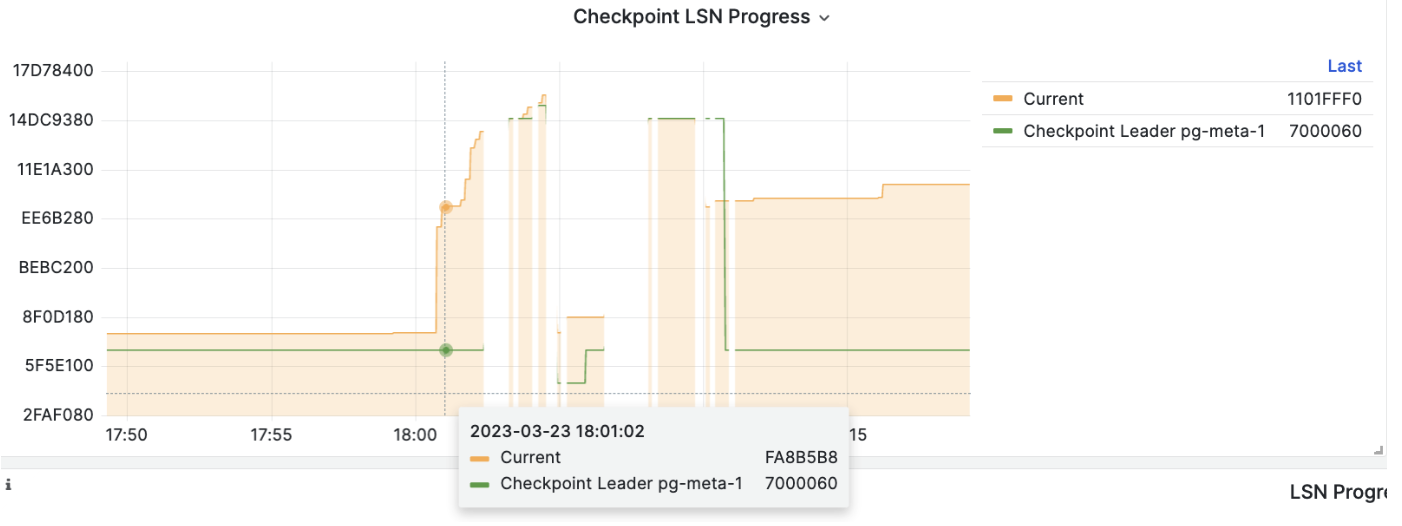
When executing PITR, you can use the Pigsty monitoring system to observe the cluster LSN position status to determine whether you have successfully restored to the specified point in time, transaction point, LSN position, or other points.
Feedback
Was this page helpful?
Thanks for the feedback! Please let us know how we can improve.
Sorry to hear that. Please let us know how we can improve.