1 - Service / Access
Separate read and write operations, route traffic correctly, and deliver PostgreSQL cluster capabilities reliably.
Service is an abstraction: it is the form in which database clusters provide capabilities to the outside world and encapsulates the details of the underlying cluster.
Services are critical for stable access in production environments and show their value when high availability clusters automatically fail over. Single-node users typically don’t need to worry about this concept.
Single-Node Users
The concept of “service” is for production environments. Personal users/single-node clusters can simply access the database directly using instance name/IP address.
For example, Pigsty’s default single-node pg-meta.meta database can be connected directly using three different users:
psql postgres://dbuser_dba:[email protected]/meta     # Connect directly with DBA superuser
psql postgres://dbuser_meta:[email protected]/meta   # Connect with default business admin user
psql postgres://dbuser_view:DBUser.View@pg-meta/meta       # Connect with default read-only user via instance domain name
Service Overview
In real-world production environments, we use replication-based primary-replica database clusters. In a cluster, there is one and only one instance as the leader (primary) that can accept writes. Other instances (replicas) continuously fetch change logs from the cluster leader and stay consistent with it. At the same time, replicas can also handle read-only requests, significantly reducing the load on the primary in read-heavy scenarios. Therefore, separating write requests and read-only requests to the cluster is a very common practice.
In addition, for production environments with high-frequency short connections, we also pool requests through a connection pool middleware (Pgbouncer) to reduce the overhead of creating connections and backend processes. But for scenarios such as ETL and change execution, we need to bypass the connection pool and access the database directly. At the same time, high-availability clusters will experience failover when failures occur, and failover will cause changes to the cluster’s leader. Therefore, high-availability database solutions require that write traffic can automatically adapt to changes in the cluster’s leader. These different access requirements (read-write separation, pooling and direct connection, automatic failover adaptation) ultimately abstract the concept of Service.
Typically, database clusters must provide this most basic service:
- Read-Write Service (primary): Can read and write to the database
For production database clusters, at least these two services should be provided:
- Read-Write Service (primary): Write data: can only be carried by the primary.
- Read-Only Service (replica): Read data: can be carried by replicas, or by the primary if there are no replicas
In addition, depending on specific business scenarios, there may be other services, such as:
- Default Direct Service (default): Allows (admin) users to access the database directly, bypassing the connection pool
- Offline Replica Service (offline): Dedicated replicas that do not handle online read-only traffic, used for ETL and analytical queries
- Standby Replica Service (standby): Read-only service without replication lag, handled by sync standby/primary for read-only queries
- Delayed Replica Service (delayed): Access old data from the same cluster at a previous point in time, handled by delayed replica
Default Services
Pigsty provides four different services by default for each PostgreSQL database cluster. Here are the default services and their definitions:
| Service | Port | Description |
|---|---|---|
| primary | 5433 | Production read-write, connects to primary connection pool (6432) |
| replica | 5434 | Production read-only, connects to replica connection pool (6432) |
| default | 5436 | Admin, ETL writes, direct access to primary (5432) |
| offline | 5438 | OLAP, ETL, personal users, interactive queries |
Taking the default pg-meta cluster as an example, it provides four default services:
psql postgres://dbuser_meta:DBUser.Meta@pg-meta:5433/meta   # pg-meta-primary : production read-write via primary pgbouncer(6432)
psql postgres://dbuser_meta:DBUser.Meta@pg-meta:5434/meta   # pg-meta-replica : production read-only via replica pgbouncer(6432)
psql postgres://dbuser_dba:DBUser.DBA@pg-meta:5436/meta     # pg-meta-default : direct connection via primary postgres(5432)
psql postgres://dbuser_stats:DBUser.Stats@pg-meta:5438/meta # pg-meta-offline : direct connection via offline postgres(5432)
You can see how these four services work from the sample cluster architecture diagram:
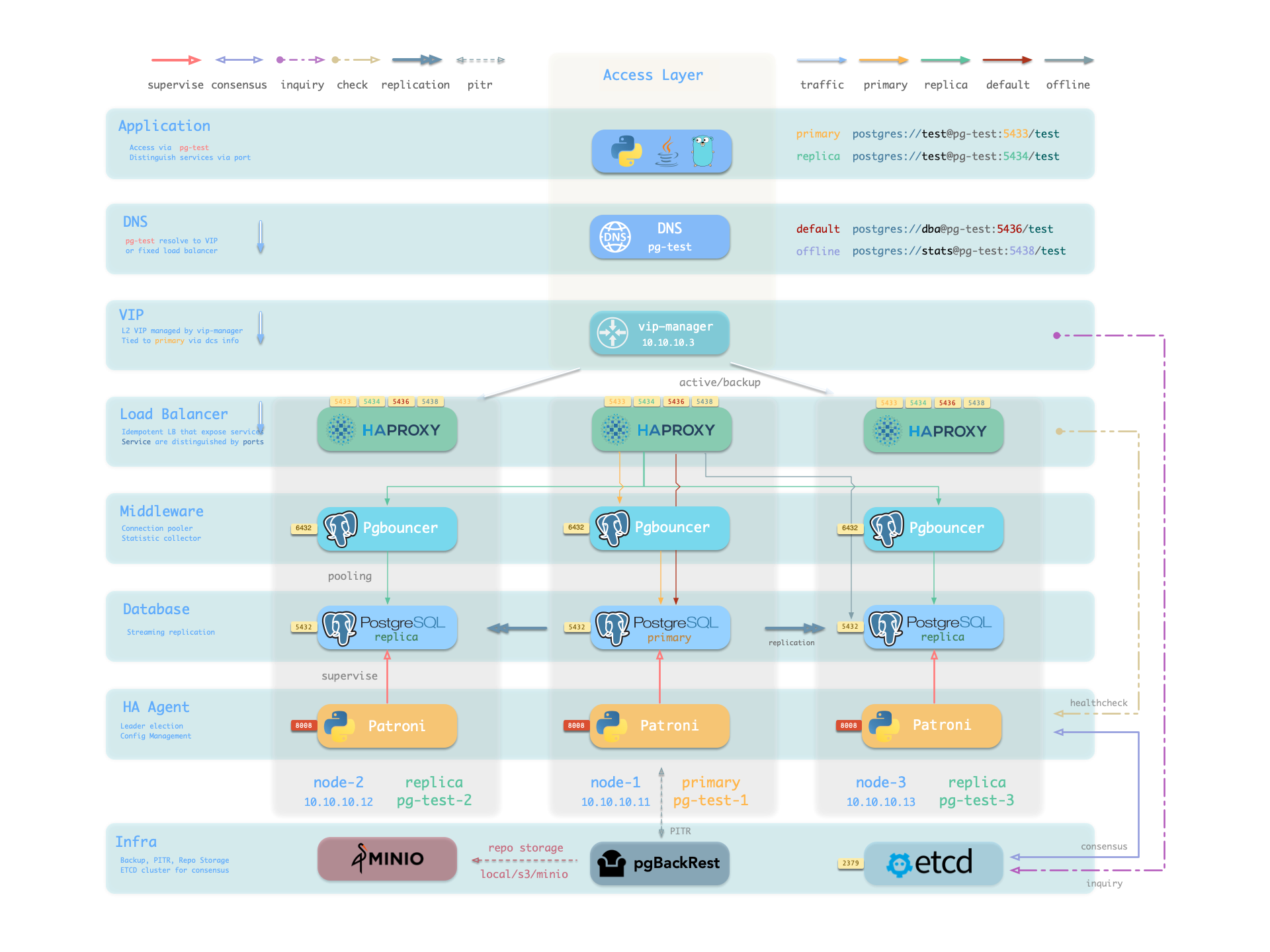
Note that the pg-meta domain name points to the cluster’s L2 VIP, which in turn points to the haproxy load balancer on the cluster primary, which routes traffic to different instances. See Accessing Services for details.
Service Implementation
In Pigsty, services are implemented using haproxy on nodes, differentiated by different ports on host nodes.
Haproxy is enabled by default on each node managed by Pigsty to expose services, and database nodes are no exception. Although nodes in a cluster have primary-replica distinctions from the database perspective, from the service perspective, each node is the same: This means that even if you access a replica node, as long as you use the correct service port, you can still use the primary’s read-write service. This design can hide complexity: so as long as you can access any instance on a PostgreSQL cluster, you can completely access all services.
This design is similar to NodePort services in Kubernetes. Similarly, in Pigsty, each service includes the following two core elements:
- Access endpoints exposed through NodePort (port number, where to access?)
- Target instances selected through Selectors (instance list, who carries the load?)
Pigsty’s service delivery boundary stops at the cluster’s HAProxy, and users can access these load balancers in various ways. See Accessing Services.
All services are declared through configuration files. For example, the PostgreSQL default services are defined by the pg_default_services parameter:
pg_default_services:
- { name: primary ,port: 5433 ,dest: default  ,check: /primary   ,selector: "[]" }
- { name: replica ,port: 5434 ,dest: default  ,check: /read-only ,selector: "[]" , backup: "[? pg_role == `primary` || pg_role == `offline` ]" }
- { name: default ,port: 5436 ,dest: postgres ,check: /primary   ,selector: "[]" }
- { name: offline ,port: 5438 ,dest: postgres ,check: /replica   ,selector: "[? pg_role == `offline` || pg_offline_query ]" , backup: "[? pg_role == `replica` && !pg_offline_query]"}
You can also define additional services in pg_services. Both pg_default_services and pg_services are arrays of service definition objects.
Defining Services
Pigsty allows you to define your own services:
pg_default_services: Services uniformly exposed by all PostgreSQL clusters, four by default.pg_services: Additional PostgreSQL services, can be defined at global or cluster level as needed.haproxy_services: Directly customize HAProxy service content, can be used for accessing other components
For PostgreSQL clusters, you typically only need to focus on the first two.
Each service definition generates a new configuration file in the configuration directory of all related HAProxy instances: /etc/haproxy/<svcname>.cfg
Here’s a custom service example standby: when you want to provide a read-only service without replication lag, you can add this record to pg_services:
- name: standby                   # Required, service name, final svc name uses `pg_cluster` as prefix, e.g.: pg-meta-standby
  port: 5435                      # Required, exposed service port (as kubernetes service node port mode)
  ip: "*"                         # Optional, IP address the service binds to, all IP addresses by default
  selector: "[]"                  # Required, service member selector, uses JMESPath to filter configuration manifest
  backup: "[? pg_role == `primary`]"  # Optional, service member selector (backup), instances selected here only carry the service when all default selector instances are down
  dest: default                   # Optional, target port, default|postgres|pgbouncer|<port_number>, defaults to 'default', Default means using pg_default_service_dest value to ultimately decide
  check: /sync                    # Optional, health check URL path, defaults to /, here uses Patroni API: /sync, only sync standby and primary return 200 healthy status code
  maxconn: 5000                   # Optional, maximum number of allowed frontend connections, defaults to 5000
  balance: roundrobin             # Optional, haproxy load balancing algorithm (defaults to roundrobin, other options: leastconn)
  options: 'inter 3s fastinter 1s downinter 5s rise 3 fall 3 on-marked-down shutdown-sessions slowstart 30s maxconn 3000 maxqueue 128 weight 100'
The above service definition will be converted to haproxy configuration file /etc/haproxy/pg-test-standby.conf on the sample three-node pg-test:
#---------------------------------------------------------------------
# service: pg-test-standby @ 10.10.10.11:5435
#---------------------------------------------------------------------
# service instances 10.10.10.11, 10.10.10.13, 10.10.10.12
# service backups   10.10.10.11
listen pg-test-standby
    bind *:5435            # <--- Binds port 5435 on all IP addresses
    mode tcp               # <--- Load balancer works on TCP protocol
    maxconn 5000           # <--- Maximum connections 5000, can be increased as needed
    balance roundrobin     # <--- Load balancing algorithm is rr round-robin, can also use leastconn
    option httpchk         # <--- Enable HTTP health check
    option http-keep-alive # <--- Keep HTTP connection
    http-check send meth OPTIONS uri /sync   # <---- Here uses /sync, Patroni health check API, only sync standby and primary return 200 healthy status code
    http-check expect status 200             # <---- Health check return code 200 means normal
    default-server inter 3s fastinter 1s downinter 5s rise 3 fall 3 on-marked-down shutdown-sessions slowstart 30s maxconn 3000 maxqueue 128 weight 100
    # servers: # All three instances of pg-test cluster are selected by selector: "[]", since there are no filter conditions, they all become backend servers for pg-test-replica service. But due to /sync health check, only primary and sync standby can actually handle requests
    server pg-test-1 10.10.10.11:6432 check port 8008 weight 100 backup  # <----- Only primary satisfies condition pg_role == `primary`, selected by backup selector
    server pg-test-3 10.10.10.13:6432 check port 8008 weight 100         #        Therefore serves as service fallback instance: normally doesn't handle requests, only handles read-only requests when all other replicas fail, thus maximally avoiding read-write service being affected by read-only service
    server pg-test-2 10.10.10.12:6432 check port 8008 weight 100         #
Here, all three instances of the pg-test cluster are selected by selector: "[]", rendered into the backend server list of the pg-test-replica service. But due to the /sync health check, Patroni Rest API only returns healthy HTTP 200 status code on the primary and sync standby, so only the primary and sync standby can actually handle requests.
Additionally, the primary satisfies the condition pg_role == primary, is selected by the backup selector, and is marked as a backup server, only used when no other instances (i.e., sync standby) can meet the demand.
Primary Service
The Primary service is perhaps the most critical service in production environments. It provides read-write capability to the database cluster on port 5433. The service definition is as follows:
- { name: primary ,port: 5433 ,dest: default ,check: /primary ,selector: "[]" }
- The selector parameter
selector: "[]"means all cluster members will be included in the Primary service - But only the primary can pass the health check (
check: /primary) and actually carry Primary service traffic. - The destination parameter
dest: defaultmeans the Primary service destination is affected by thepg_default_service_destparameter - The default value
defaultofdestwill be replaced by the value ofpg_default_service_dest, which defaults topgbouncer. - By default, the Primary service destination is the connection pool on the primary, which is the port specified by
pgbouncer_port, defaulting to 6432
If the value of pg_default_service_dest is postgres, then the primary service destination will bypass the connection pool and use the PostgreSQL database port directly (pg_port, default 5432). This parameter is very useful for scenarios that don’t want to use a connection pool.
Example: haproxy configuration for pg-test-primary
listen pg-test-primary
    bind *:5433         # <--- primary service defaults to port 5433
    mode tcp
    maxconn 5000
    balance roundrobin
    option httpchk
    option http-keep-alive
    http-check send meth OPTIONS uri /primary # <--- primary service defaults to Patroni RestAPI /primary health check
    http-check expect status 200
    default-server inter 3s fastinter 1s downinter 5s rise 3 fall 3 on-marked-down shutdown-sessions slowstart 30s maxconn 3000 maxqueue 128 weight 100
    # servers
    server pg-test-1 10.10.10.11:6432 check port 8008 weight 100
    server pg-test-3 10.10.10.13:6432 check port 8008 weight 100
    server pg-test-2 10.10.10.12:6432 check port 8008 weight 100
Patroni’s high availability mechanism ensures that at most one instance’s /primary health check is true at any time, so the Primary service will always route traffic to the primary instance.
One benefit of using the Primary service instead of direct database connection is that if the cluster has a split-brain situation for some reason (e.g., kill -9 killing the primary Patroni without watchdog), Haproxy can still avoid split-brain in this case, because it will only distribute traffic when Patroni is alive and returns primary status.
Replica Service
The Replica service is second only to the Primary service in importance in production environments. It provides read-only capability to the database cluster on port 5434. The service definition is as follows:
- { name: replica ,port: 5434 ,dest: default ,check: /read-only ,selector: "[]" , backup: "[? pg_role == `primary` || pg_role == `offline` ]" }
- The selector parameter
selector: "[]"means all cluster members will be included in the Replica service - All instances can pass the health check (
check: /read-only) and carry Replica service traffic. - Backup selector:
[? pg_role == 'primary' || pg_role == 'offline' ]marks the primary and offline replicas as backup servers. - Only when all normal replicas are down will the Replica service be carried by the primary or offline replicas.
- The destination parameter
dest: defaultmeans the Replica service destination is also affected by thepg_default_service_destparameter - The default value
defaultofdestwill be replaced by the value ofpg_default_service_dest, which defaults topgbouncer, same as the Primary service - By default, the Replica service destination is the connection pool on the replicas, which is the port specified by
pgbouncer_port, defaulting to 6432
Example: haproxy configuration for pg-test-replica
listen pg-test-replica
    bind *:5434
    mode tcp
    maxconn 5000
    balance roundrobin
    option httpchk
    option http-keep-alive
    http-check send meth OPTIONS uri /read-only
    http-check expect status 200
    default-server inter 3s fastinter 1s downinter 5s rise 3 fall 3 on-marked-down shutdown-sessions slowstart 30s maxconn 3000 maxqueue 128 weight 100
    # servers
    server pg-test-1 10.10.10.11:6432 check port 8008 weight 100 backup
    server pg-test-3 10.10.10.13:6432 check port 8008 weight 100
    server pg-test-2 10.10.10.12:6432 check port 8008 weight 100
The Replica service is very flexible: if there are surviving dedicated Replica instances, it will prioritize using these instances to handle read-only requests. Only when all replica instances are down will the primary handle read-only requests. For the common one-primary-one-replica two-node cluster, this means: use the replica as long as it’s alive, use the primary when the replica is down.
Additionally, unless all dedicated read-only instances are down, the Replica service will not use dedicated Offline instances, thus avoiding mixing online fast queries and offline slow queries together, interfering with each other.
Default Service
The Default service provides services on port 5436. It is a variant of the Primary service.
The Default service always bypasses the connection pool and connects directly to PostgreSQL on the primary. This is useful for admin connections, ETL writes, CDC data change capture, etc.
- { name: default ,port: 5436 ,dest: postgres ,check: /primary ,selector: "[]" }
If pg_default_service_dest is changed to postgres, then the Default service is completely equivalent to the Primary service except for port and name. In this case, you can consider removing Default from default services.
Example: haproxy configuration for pg-test-default
listen pg-test-default
    bind *:5436         # <--- Except for listening port/target port and service name, other configurations are exactly the same as primary service
    mode tcp
    maxconn 5000
    balance roundrobin
    option httpchk
    option http-keep-alive
    http-check send meth OPTIONS uri /primary
    http-check expect status 200
    default-server inter 3s fastinter 1s downinter 5s rise 3 fall 3 on-marked-down shutdown-sessions slowstart 30s maxconn 3000 maxqueue 128 weight 100
    # servers
    server pg-test-1 10.10.10.11:5432 check port 8008 weight 100
    server pg-test-3 10.10.10.13:5432 check port 8008 weight 100
    server pg-test-2 10.10.10.12:5432 check port 8008 weight 100
Offline Service
The Offline service provides services on port 5438. It also bypasses the connection pool to directly access the PostgreSQL database, typically used for slow queries/analytical queries/ETL reads/personal user interactive queries. Its service definition is as follows:
- { name: offline ,port: 5438 ,dest: postgres ,check: /replica ,selector: "[? pg_role == `offline` || pg_offline_query ]" , backup: "[? pg_role == `replica` && !pg_offline_query]"}
The Offline service routes traffic directly to dedicated offline replicas, or normal read-only instances with the pg_offline_query flag.
- The selector parameter filters two types of instances from the cluster: offline replicas with
pg_role=offline, or normal read-only instances withpg_offline_query=true - The main difference between dedicated offline replicas and flagged normal replicas is: the former does not handle Replica service requests by default, avoiding mixing fast and slow requests together, while the latter does by default.
- The backup selector parameter filters one type of instance from the cluster: normal replicas without offline flag. This means if offline instances or flagged normal replicas fail, other normal replicas can be used to carry the Offline service.
- The health check
/replicaonly returns 200 for replicas, the primary returns an error, so the Offline service will never distribute traffic to the primary instance, even if only this primary is left in the cluster. - At the same time, the primary instance is neither selected by the selector nor by the backup selector, so it will never carry the Offline service. Therefore, the Offline service can always avoid user access to the primary, thus avoiding impact on the primary.
Example: haproxy configuration for pg-test-offline
listen pg-test-offline
    bind *:5438
    mode tcp
    maxconn 5000
    balance roundrobin
    option httpchk
    option http-keep-alive
    http-check send meth OPTIONS uri /replica
    http-check expect status 200
    default-server inter 3s fastinter 1s downinter 5s rise 3 fall 3 on-marked-down shutdown-sessions slowstart 30s maxconn 3000 maxqueue 128 weight 100
    # servers
    server pg-test-3 10.10.10.13:5432 check port 8008 weight 100
    server pg-test-2 10.10.10.12:5432 check port 8008 weight 100 backup
The Offline service provides limited read-only service, typically used for two types of queries: interactive queries (personal users), slow queries and long transactions (analytics/ETL).
The Offline service requires extra maintenance care: when the cluster experiences primary-replica switchover or automatic failover, the cluster’s instance roles change, but Haproxy’s configuration does not automatically change. For clusters with multiple replicas, this is usually not a problem. However, for simplified small clusters with one primary and one replica running Offline queries, primary-replica switchover means the replica becomes the primary (health check fails), and the original primary becomes a replica (not in the Offline backend list), so no instance can carry the Offline service. Therefore, you need to manually reload services to make the changes effective.
If your business model is relatively simple, you can consider removing the Default service and Offline service, and use the Primary service and Replica service to connect directly to the database.
Reload Services
When cluster members change, such as adding/removing replicas, primary-replica switchover, or adjusting relative weights, you need to reload services to make the changes effective.
bin/pgsql-svc <cls> [ip...]         # Reload services for lb cluster or lb instance
# ./pgsql.yml -t pg_service         # Actual ansible task for reloading services
Accessing Services
Pigsty’s service delivery boundary stops at the cluster’s HAProxy. Users can access these load balancers in various ways.
The typical approach is to use DNS or VIP access, binding them to all or any number of load balancers in the cluster.
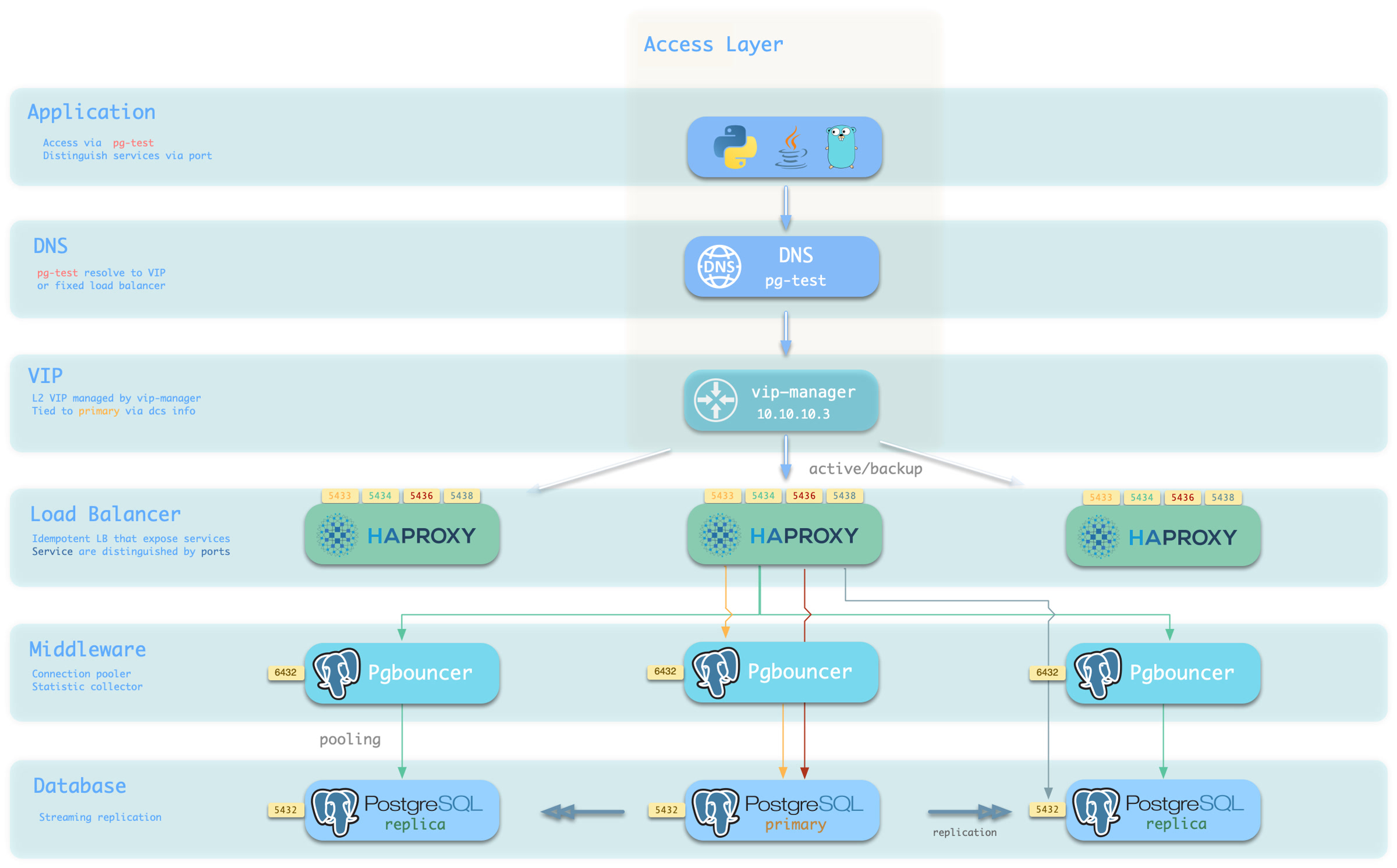
You can use different host & port combinations, which provide PostgreSQL services in different ways.
Host
| Type | Example | Description |
|---|---|---|
| Cluster Domain | pg-test | Access via cluster domain name (resolved by dnsmasq @ infra node) |
| Cluster VIP Address | 10.10.10.3 | Access via L2 VIP address managed by vip-manager, bound to primary node |
| Instance Hostname | pg-test-1 | Access via any instance hostname (resolved by dnsmasq @ infra node) |
| Instance IP Address | 10.10.10.11 | Access any instance’s IP address |
Port
Pigsty uses different ports to distinguish pg services
| Port | Service | Type | Description |
|---|---|---|---|
| 5432 | postgres | Database | Direct access to postgres server |
| 6432 | pgbouncer | Middleware | Access postgres via connection pool middleware |
| 5433 | primary | Service | Access primary pgbouncer (or postgres) |
| 5434 | replica | Service | Access replica pgbouncer (or postgres) |
| 5436 | default | Service | Access primary postgres |
| 5438 | offline | Service | Access offline postgres |
Combinations
# Access via cluster domain name
postgres://test@pg-test:5432/test # DNS -> L2 VIP -> Primary direct connection
postgres://test@pg-test:6432/test # DNS -> L2 VIP -> Primary connection pool -> Primary
postgres://test@pg-test:5433/test # DNS -> L2 VIP -> HAProxy -> Primary connection pool -> Primary
postgres://test@pg-test:5434/test # DNS -> L2 VIP -> HAProxy -> Replica connection pool -> Replica
postgres://dbuser_dba@pg-test:5436/test # DNS -> L2 VIP -> HAProxy -> Primary direct connection (for admin)
postgres://dbuser_stats@pg-test:5438/test # DNS -> L2 VIP -> HAProxy -> Offline direct connection (for ETL/personal queries)

# Direct access via cluster VIP
postgres://[email protected]:5432/test # L2 VIP -> Primary direct access
postgres://[email protected]:6432/test # L2 VIP -> Primary connection pool -> Primary
postgres://[email protected]:5433/test # L2 VIP -> HAProxy -> Primary connection pool -> Primary
postgres://[email protected]:5434/test # L2 VIP -> HAProxy -> Replica connection pool -> Replica
postgres://[email protected]:5436/test # L2 VIP -> HAProxy -> Primary direct connection (for admin)
postgres://[email protected]::5438/test # L2 VIP -> HAProxy -> Offline direct connection (for ETL/personal queries)

# Specify any cluster instance name directly
postgres://test@pg-test-1:5432/test # DNS -> Database instance direct connection (single instance access)
postgres://test@pg-test-1:6432/test # DNS -> Connection pool -> Database
postgres://test@pg-test-1:5433/test # DNS -> HAProxy -> Connection pool -> Database read/write
postgres://test@pg-test-1:5434/test # DNS -> HAProxy -> Connection pool -> Database read-only
postgres://dbuser_dba@pg-test-1:5436/test # DNS -> HAProxy -> Database direct connection
postgres://dbuser_stats@pg-test-1:5438/test # DNS -> HAProxy -> Database offline read/write

# Specify any cluster instance IP directly
postgres://[email protected]:5432/test # Database instance direct connection (direct instance specification, no automatic traffic distribution)
postgres://[email protected]:6432/test # Connection pool -> Database
postgres://[email protected]:5433/test # HAProxy -> Connection pool -> Database read/write
postgres://[email protected]:5434/test # HAProxy -> Connection pool -> Database read-only
postgres://[email protected]:5436/test # HAProxy -> Database direct connection
postgres://[email protected]:5438/test # HAProxy -> Database offline read-write

# Smart client: automatic read-write separation
postgres://[email protected]:6432,10.10.10.12:6432,10.10.10.13:6432/test?target_session_attrs=primary
postgres://[email protected]:6432,10.10.10.12:6432,10.10.10.13:6432/test?target_session_attrs=prefer-standby
Overriding Services
You can override default service configuration in multiple ways. A common requirement is to have Primary service and Replica service bypass the Pgbouncer connection pool and access the PostgreSQL database directly.
To achieve this, you can change pg_default_service_dest to postgres, so all services with svc.dest='default' in their service definitions will use postgres instead of the default pgbouncer as the target.
If you have already pointed Primary service to PostgreSQL, then default service becomes redundant and can be considered for removal.
If you don’t need to distinguish between personal interactive queries and analytical/ETL slow queries, you can consider removing Offline service from the default service list pg_default_services.
If you don’t need read-only replicas to share online read-only traffic, you can also remove Replica service from the default service list.
Delegating Services
Pigsty exposes PostgreSQL services through haproxy on nodes. All haproxy instances in the entire cluster are configured with the same service definitions.
However, you can delegate pg services to specific node groups (e.g., dedicated haproxy load balancer cluster) instead of haproxy on PostgreSQL cluster members.
To do this, you need to override the default service definitions using pg_default_services and set pg_service_provider to the proxy group name.
For example, this configuration will expose the pg cluster’s primary service on the proxy haproxy node group on port 10013.
pg_service_provider: proxy       # Use load balancer from `proxy` group on port 10013
pg_default_services:  [{ name: primary ,port: 10013 ,dest: postgres  ,check: /primary   ,selector: "[]" }]
Users need to ensure that the port for each delegated service is unique in the proxy cluster.
An example of using a dedicated load balancer cluster is provided in the 43-node production environment simulation sandbox: prod.yml
2 - User / Role
CREATE USER/ROLE.In this context, users refer to logical objects within a database cluster created using the SQL commands
CREATE USER/ROLE.
In PostgreSQL, users belong directly to the database cluster rather than to a specific database. Therefore, when creating business databases and business users, you should follow the principle of “users first, then databases.”
Defining Users
Pigsty defines roles and users in database clusters through two configuration parameters:
pg_default_roles: Defines globally unified roles and userspg_users: Defines business users and roles at the database cluster level
The former defines roles and users shared across the entire environment, while the latter defines business roles and users specific to individual clusters. Both have the same format and are arrays of user definition objects.
You can define multiple users/roles, and they will be created sequentially—first global, then cluster-level, and finally in array order—so later users can belong to roles defined earlier.
Here is the business user definition for the default cluster pg-meta in the Pigsty demo environment:
pg-meta:
  hosts: { 10.10.10.10: { pg_seq: 1, pg_role: primary } }
  vars:
    pg_cluster: pg-meta
    pg_users:
      - {name: dbuser_meta     ,password: DBUser.Meta     ,pgbouncer: true ,roles: [dbrole_admin]    ,comment: pigsty admin user }
      - {name: dbuser_view     ,password: DBUser.Viewer   ,pgbouncer: true ,roles: [dbrole_readonly] ,comment: read-only viewer for meta database }
      - {name: dbuser_grafana  ,password: DBUser.Grafana  ,pgbouncer: true ,roles: [dbrole_admin]    ,comment: admin user for grafana database    }
      - {name: dbuser_bytebase ,password: DBUser.Bytebase ,pgbouncer: true ,roles: [dbrole_admin]    ,comment: admin user for bytebase database   }
      - {name: dbuser_kong     ,password: DBUser.Kong     ,pgbouncer: true ,roles: [dbrole_admin]    ,comment: admin user for kong api gateway    }
      - {name: dbuser_gitea    ,password: DBUser.Gitea    ,pgbouncer: true ,roles: [dbrole_admin]    ,comment: admin user for gitea service       }
      - {name: dbuser_wiki     ,password: DBUser.Wiki     ,pgbouncer: true ,roles: [dbrole_admin]    ,comment: admin user for wiki.js service     }
      - {name: dbuser_noco     ,password: DBUser.Noco     ,pgbouncer: true ,roles: [dbrole_admin]    ,comment: admin user for nocodb service      }
Each user/role definition is an object that may include the following fields. Using dbuser_meta as an example:
- name: dbuser_meta               # Required, `name` is the only mandatory field in user definition
  password: DBUser.Meta           # Optional, password can be scram-sha-256 hash string or plaintext
  login: true                     # Optional, can login by default
  superuser: false                # Optional, default is false, is this a superuser?
  createdb: false                 # Optional, default is false, can create databases?
  createrole: false               # Optional, default is false, can create roles?
  inherit: true                   # Optional, by default this role can use inherited privileges?
  replication: false              # Optional, default is false, can this role perform replication?
  bypassrls: false                # Optional, default is false, can this role bypass row-level security?
  pgbouncer: true                 # Optional, default is false, add this user to pgbouncer user list? (production users using connection pool should explicitly set to true)
  connlimit: -1                   # Optional, user connection limit, default -1 disables limit
  expire_in: 3650                 # Optional, this role expires: calculated from creation + n days (higher priority than expire_at)
  expire_at: '2030-12-31'         # Optional, when this role expires, use YYYY-MM-DD format string to specify a date (lower priority than expire_in)
  comment: pigsty admin user      # Optional, description and comment string for this user/role
  roles: [dbrole_admin]           # Optional, default roles are: dbrole_{admin,readonly,readwrite,offline}
  parameters: {}                  # Optional, use `ALTER ROLE SET` to configure role-level database parameters for this role
  pool_mode: transaction          # Optional, pgbouncer pool mode defaulting to transaction, user level
  pool_connlimit: -1              # Optional, user-level maximum database connections, default -1 disables limit
  search_path: public             # Optional, key-value configuration parameters per postgresql documentation (e.g., use pigsty as default search_path)
- The only required field is
name, which should be a valid and unique username in the PostgreSQL cluster. - Roles don’t need a
password, but for loginable business users, a password is usually required. passwordcan be plaintext or scram-sha-256 / md5 hash string; please avoid using plaintext passwords.- Users/roles are created one by one in array order, so ensure roles/groups are defined before their members.
login,superuser,createdb,createrole,inherit,replication,bypassrlsare boolean flags.pgbounceris disabled by default: to add business users to the pgbouncer user list, you should explicitly set it totrue.
ACL System
Pigsty has a built-in, out-of-the-box access control / ACL system. You can easily use it by simply assigning the following four default roles to business users:
dbrole_readwrite: Role with global read-write access (production accounts primarily used by business should have database read-write privileges)dbrole_readonly: Role with global read-only access (if other businesses need read-only access, use this role)dbrole_admin: Role with DDL privileges (business administrators, scenarios requiring table creation in applications)dbrole_offline: Restricted read-only access role (can only access offline instances, typically for individual users)
If you want to redesign your own ACL system, consider customizing the following parameters and templates:
pg_default_roles: System-wide roles and global userspg_default_privileges: Default privileges for newly created objectsroles/pgsql/templates/pg-init-role.sql: Role creation SQL templateroles/pgsql/templates/pg-init-template.sql: Privilege SQL template
Creating Users
Users and roles defined in pg_default_roles and pg_users are automatically created one by one during the cluster initialization PROVISION phase.
If you want to create users on an existing cluster, you can use the bin/pgsql-user tool.
Add the new user/role definition to all.children.<cls>.pg_users and use the following method to create the user:
bin/pgsql-user <cls> <username> # pgsql-user.yml -l <cls> -e username=<username>
Unlike databases, the user creation playbook is always idempotent. When the target user already exists, Pigsty will modify the target user’s attributes to match the configuration. So running it repeatedly on existing clusters is usually not a problem.
We don’t recommend manually creating new business users, especially when you want the user to use the default pgbouncer connection pool: unless you’re willing to manually maintain the user list in Pgbouncer and keep it consistent with PostgreSQL.
When creating new users with bin/pgsql-user tool or pgsql-user.yml playbook, the user will also be added to the Pgbouncer Users list.
Modifying Users
The method for modifying PostgreSQL user attributes is the same as Creating Users.
First, adjust your user definition, modify the attributes that need adjustment, then execute the following command to apply:
bin/pgsql-user <cls> <username> # pgsql-user.yml -l <cls> -e username=<username>
Note that modifying users will not delete users, but modify user attributes through the ALTER USER command; it also won’t revoke user privileges and groups, and will use the GRANT command to grant new roles.
Pgbouncer Users
Pgbouncer is enabled by default and serves as a connection pool middleware, with its users managed by default.
Pigsty adds all users in pg_users that explicitly have the pgbouncer: true flag to the pgbouncer user list.
Users in the Pgbouncer connection pool are listed in /etc/pgbouncer/userlist.txt:
"postgres" ""
"dbuser_wiki" "SCRAM-SHA-256$4096:+77dyhrPeFDT/TptHs7/7Q==$KeatuohpKIYzHPCt/tqBu85vI11o9mar/by0hHYM2W8=:X9gig4JtjoS8Y/o1vQsIX/gY1Fns8ynTXkbWOjUfbRQ="
"dbuser_view" "SCRAM-SHA-256$4096:DFoZHU/DXsHL8MJ8regdEw==$gx9sUGgpVpdSM4o6A2R9PKAUkAsRPLhLoBDLBUYtKS0=:MujSgKe6rxcIUMv4GnyXJmV0YNbf39uFRZv724+X1FE="
"dbuser_monitor" "SCRAM-SHA-256$4096:fwU97ZMO/KR0ScHO5+UuBg==$CrNsmGrx1DkIGrtrD1Wjexb/aygzqQdirTO1oBZROPY=:L8+dJ+fqlMQh7y4PmVR/gbAOvYWOr+KINjeMZ8LlFww="
"dbuser_meta" "SCRAM-SHA-256$4096:leB2RQPcw1OIiRnPnOMUEg==$eyC+NIMKeoTxshJu314+BmbMFpCcspzI3UFZ1RYfNyU=:fJgXcykVPvOfro2MWNkl5q38oz21nSl1dTtM65uYR1Q="
"dbuser_kong" "SCRAM-SHA-256$4096:bK8sLXIieMwFDz67/0dqXQ==$P/tCRgyKx9MC9LH3ErnKsnlOqgNd/nn2RyvThyiK6e4=:CDM8QZNHBdPf97ztusgnE7olaKDNHBN0WeAbP/nzu5A="
"dbuser_grafana" "SCRAM-SHA-256$4096:HjLdGaGmeIAGdWyn2gDt/Q==$jgoyOB8ugoce+Wqjr0EwFf8NaIEMtiTuQTg1iEJs9BM=:ed4HUFqLyB4YpRr+y25FBT7KnlFDnan6JPVT9imxzA4="
"dbuser_gitea" "SCRAM-SHA-256$4096:l1DBGCc4dtircZ8O8Fbzkw==$tpmGwgLuWPDog8IEKdsaDGtiPAxD16z09slvu+rHE74=:pYuFOSDuWSofpD9OZhG7oWvyAR0PQjJBffgHZLpLHds="
"dbuser_dba" "SCRAM-SHA-256$4096:zH8niABU7xmtblVUo2QFew==$Zj7/pq+ICZx7fDcXikiN7GLqkKFA+X5NsvAX6CMshF0=:pqevR2WpizjRecPIQjMZOm+Ap+x0kgPL2Iv5zHZs0+g="
"dbuser_bytebase" "SCRAM-SHA-256$4096:OMoTM9Zf8QcCCMD0svK5gg==$kMchqbf4iLK1U67pVOfGrERa/fY818AwqfBPhsTShNQ=:6HqWteN+AadrUnrgC0byr5A72noqnPugItQjOLFw0Wk="
User-level connection pool parameters are maintained in a separate file: /etc/pgbouncer/useropts.txt, for example:
dbuser_dba                  = pool_mode=session max_user_connections=16
dbuser_monitor              = pool_mode=session max_user_connections=8
When you create a database, the Pgbouncer database list definition file will be refreshed and take effect through online configuration reload, without affecting existing connections.
Pgbouncer runs with the same dbsu as PostgreSQL, which defaults to the postgres operating system user. You can use the pgb alias to access pgbouncer management functions using the dbsu.
Pigsty also provides a utility function pgb-route that can quickly switch pgbouncer database traffic to other nodes in the cluster, useful for zero-downtime migration:
The connection pool user configuration files userlist.txt and useropts.txt are automatically refreshed when you create users, and take effect through online configuration reload, normally without affecting existing connections.
Note that the pgbouncer_auth_query parameter allows you to use dynamic queries to complete connection pool user authentication—this is a compromise when you don’t want to manage users in the connection pool.
3 - Database
CREATE DATABASE within a database cluster.In this context, Database refers to the logical object created using the SQL command
CREATE DATABASEwithin a database cluster.
A PostgreSQL server can serve multiple databases simultaneously. In Pigsty, you can define the required databases in the cluster configuration.
Pigsty will modify and customize the default template database template1, creating default schemas, installing default extensions, and configuring default privileges. Newly created databases will inherit these settings from template1 by default.
By default, all business databases will be added to the Pgbouncer connection pool in a 1:1 manner; pg_exporter will use an auto-discovery mechanism to find all business databases and monitor objects within them.
Define Database
Business databases are defined in the database cluster parameter pg_databases, which is an array of database definition objects.
Databases in the array are created sequentially according to the definition order, so later defined databases can use previously defined databases as templates.
Below is the database definition for the default pg-meta cluster in the Pigsty demo environment:
pg-meta:
  hosts: { 10.10.10.10: { pg_seq: 1, pg_role: primary } }
  vars:
    pg_cluster: pg-meta
    pg_databases:
      - { name: meta ,baseline: cmdb.sql ,comment: pigsty meta database ,schemas: [pigsty] ,extensions: [{name: postgis, schema: public}, {name: timescaledb}]}
      - { name: grafana  ,owner: dbuser_grafana  ,revokeconn: true ,comment: grafana primary database }
      - { name: bytebase ,owner: dbuser_bytebase ,revokeconn: true ,comment: bytebase primary database }
      - { name: kong     ,owner: dbuser_kong     ,revokeconn: true ,comment: kong the api gateway database }
      - { name: gitea    ,owner: dbuser_gitea    ,revokeconn: true ,comment: gitea meta database }
      - { name: wiki     ,owner: dbuser_wiki     ,revokeconn: true ,comment: wiki meta database }
      - { name: noco     ,owner: dbuser_noco     ,revokeconn: true ,comment: nocodb database }
Each database definition is an object that may include the following fields, using the meta database as an example:
- name: meta                      # REQUIRED, `name` is the only mandatory field of a database definition
  baseline: cmdb.sql              # optional, database sql baseline path (relative path among ansible search path, e.g. files/)
  pgbouncer: true                 # optional, add this database to pgbouncer database list? true by default
  schemas: [pigsty]               # optional, additional schemas to be created, array of schema names
  extensions:                     # optional, additional extensions to be installed: array of extension objects
    - { name: postgis , schema: public }  # can specify which schema to install the extension in, or leave it unspecified (will install in the first schema of search_path)
    - { name: timescaledb }               # for example, some extensions create and use fixed schemas, so no schema specification is needed.
  comment: pigsty meta database   # optional, comment string for this database
  owner: postgres                 # optional, database owner, postgres by default
  template: template1             # optional, which template to use, template1 by default, target must be a template database
  encoding: UTF8                  # optional, database encoding, UTF8 by default (MUST same as template database)
  locale: C                       # optional, database locale, C by default (MUST same as template database)
  lc_collate: C                   # optional, database collate, C by default (MUST same as template database), no reason not to recommend changing.
  lc_ctype: C                     # optional, database ctype, C by default (MUST same as template database)
  tablespace: pg_default          # optional, default tablespace, 'pg_default' by default
  allowconn: true                 # optional, allow connection, true by default. false will disable connect at all
  revokeconn: false               # optional, revoke public connection privilege. false by default, when set to true, CONNECT privilege will be revoked from users other than owner and admin
  register_datasource: true       # optional, register this database to grafana datasources? true by default, explicitly set to false to skip registration
  connlimit: -1                   # optional, database connection limit, default -1 disable limit, set to positive integer will limit connections
  pool_auth_user: dbuser_meta     # optional, all connections to this pgbouncer database will be authenticated using this user (only useful when pgbouncer_auth_query is enabled)
  pool_mode: transaction          # optional, pgbouncer pool mode at database level, default transaction
  pool_size: 64                   # optional, pgbouncer pool size at database level, default 64
  pool_reserve: 32                # optional, pgbouncer pool size reserve at database level, default 32, when default pool is insufficient, can request at most this many burst connections
  pool_size_min: 0                # optional, pgbouncer pool size min at database level, default 0
  pool_connlimit: 100             # optional, max database connections at database level, default 100
The only required field is name, which should be a valid and unique database name in the current PostgreSQL cluster, other parameters have reasonable defaults.
name: Database name, required.baseline: SQL file path (Ansible search path, usually infiles), used to initialize database content.owner: Database owner, default ispostgrestemplate: Template used when creating the database, default istemplate1encoding: Database default character encoding, default isUTF8, default is consistent with the instance. It is recommended not to configure and modify.locale: Database default locale, default isC, it is recommended not to configure, keep consistent with the instance.lc_collate: Database default locale string collation, default is same as instance setting, it is recommended not to modify, must be consistent with template database. It is strongly recommended not to configure, or configure toC.lc_ctype: Database default LOCALE, default is same as instance setting, it is recommended not to modify or set, must be consistent with template database. It is recommended to configure to C oren_US.UTF8.allowconn: Whether to allow connection to the database, default istrue, not recommended to modify.revokeconn: Whether to revoke connection privilege to the database? Default isfalse. Iftrue,PUBLIC CONNECTprivilege on the database will be revoked. Only default users (dbsu|monitor|admin|replicator|owner) can connect. In addition,admin|ownerwill have GRANT OPTION, can grant connection privileges to other users.tablespace: Tablespace associated with the database, default ispg_default.connlimit: Database connection limit, default is-1, meaning no limit.extensions: Object array, each object defines an extension in the database, and the schema in which it is installed.parameters: KV object, each KV defines a parameter that needs to be modified for the database throughALTER DATABASE.pgbouncer: Boolean option, whether to add this database to Pgbouncer. All databases will be added to Pgbouncer list unless explicitly specified aspgbouncer: false.comment: Database comment information.pool_auth_user: Whenpgbouncer_auth_queryis enabled, all connections to this pgbouncer database will use the user specified here to execute authentication queries. You need to use a user with access to thepg_shadowtable.pool_mode: Database level pgbouncer pool mode, default is transaction, i.e., transaction pooling. If left empty, will usepgbouncer_poolmodeparameter as default value.pool_size: Database level pgbouncer default pool size, default is 64pool_reserve: Database level pgbouncer pool size reserve, default is 32, when default pool is insufficient, can request at most this many burst connections.pool_size_min: Database level pgbouncer pool size min, default is 0pool_connlimit: Database level pgbouncer connection pool max database connections, default is 100
Newly created databases are forked from the template1 database by default. This template database will be customized during the PG_PROVISION phase:
configured with extensions, schemas, and default privileges, so newly created databases will also inherit these configurations unless you explicitly use another database as a template.
For database access privileges, refer to ACL: Database Privilege section.
Create Database
Databases defined in pg_databases will be automatically created during cluster initialization.
If you wish to create database on an existing cluster, you can use the bin/pgsql-db wrapper script.
Add new database definition to all.children.<cls>.pg_databases, and create that database with the following command:
bin/pgsql-db <cls> <dbname> # pgsql-db.yml -l <cls> -e dbname=<dbname>
Here are some considerations when creating a new database:
The create database playbook is idempotent by default, however when you use baseline scripts, it may not be: in this case, it’s usually not recommended to re-run this on existing databases unless you’re sure the provided baseline SQL is also idempotent.
We don’t recommend manually creating new databases, especially when you’re using the default pgbouncer connection pool: unless you’re willing to manually maintain the Pgbouncer database list and keep it consistent with PostgreSQL.
When creating new databases using the pgsql-db tool or pgsql-db.yml playbook, this database will also be added to the Pgbouncer Database list.
If your database definition has a non-trivial owner (default is dbsu postgres), make sure the owner user exists before creating the database.
Best practice is always to create users before creating databases.
Pgbouncer Database
Pigsty will configure and enable a Pgbouncer connection pool for PostgreSQL instances in a 1:1 manner by default, communicating via /var/run/postgresql Unix Socket.
Connection pools can optimize short connection performance, reduce concurrency contention, avoid overwhelming the database with too many connections, and provide additional flexibility during database migration.
Pigsty adds all databases in pg_databases to pgbouncer’s database list by default.
You can disable pgbouncer connection pool support for a specific database by explicitly setting pgbouncer: false in the database definition.
The Pgbouncer database list is defined in /etc/pgbouncer/database.txt, and connection pool parameters from the database definition are reflected here:
meta                        = host=/var/run/postgresql mode=session
grafana                     = host=/var/run/postgresql mode=transaction
bytebase                    = host=/var/run/postgresql auth_user=dbuser_meta
kong                        = host=/var/run/postgresql pool_size=32 reserve_pool=64
gitea                       = host=/var/run/postgresql min_pool_size=10
wiki                        = host=/var/run/postgresql
noco                        = host=/var/run/postgresql
mongo                       = host=/var/run/postgresql
When you create databases, the Pgbouncer database list definition file will be refreshed and take effect through online configuration reload, normally without affecting existing connections.
Pgbouncer runs with the same dbsu as PostgreSQL, defaulting to the postgres os user. You can use the pgb alias to access pgbouncer management functions using dbsu.
Pigsty also provides a utility function pgb-route, which can quickly switch pgbouncer database traffic to other nodes in the cluster for zero-downtime migration:
# route pgbouncer traffic to another cluster member
function pgb-route(){
  local ip=${1-'\/var\/run\/postgresql'}
  sed -ie "s/host=[^[:space:]]\+/host=${ip}/g" /etc/pgbouncer/pgbouncer.ini
  cat /etc/pgbouncer/pgbouncer.ini
}
4 - Authentication / HBA
Detailed explanation of Host-Based Authentication (HBA) in Pigsty.
Authentication is the foundation of Access Control and the Privilege System. PostgreSQL has multiple authentication methods.
Here we mainly introduce HBA: Host Based Authentication. HBA rules define which users can access which databases from which locations and in which ways.
Client Authentication
To connect to a PostgreSQL database, users must first be authenticated (password is used by default).
You can provide the password in the connection string (not secure), or pass it using the PGPASSWORD environment variable or .pgpass file. Refer to the psql documentation and PostgreSQL Connection Strings for more details.
psql 'host=<host> port=<port> dbname=<dbname> user=<username> password=<password>'
psql postgres://<username>:<password>@<host>:<port>/<dbname>
PGPASSWORD=<password>; psql -U <username> -h <host> -p <port> -d <dbname>
For example, to connect to Pigsty’s default meta database, you can use the following connection strings:
psql 'host=10.10.10.10 port=5432 dbname=meta user=dbuser_dba password=DBUser.DBA'
psql postgres://dbuser_dba:[email protected]:5432/meta
PGPASSWORD=DBUser.DBA; psql -U dbuser_dba -h 10.10.10.10 -p 5432 -d meta
By default, Pigsty enables server-side SSL encryption but does not verify client SSL certificates. To connect using client SSL certificates, you can provide client parameters using the PGSSLCERT and PGSSLKEY environment variables or sslkey and sslcert parameters.
psql 'postgres://dbuser_dba:[email protected]:5432/meta?sslkey=/path/to/dbuser_dba.key&sslcert=/path/to/dbuser_dba.crt'
Client certificates (CN = username) can be signed using the local CA with the cert.yml playbook.
Defining HBA
In Pigsty, there are four parameters related to HBA rules:
pg_hba_rules: postgres HBA rulespg_default_hba_rules: postgres global default HBA rulespgb_hba_rules: pgbouncer HBA rulespgb_default_hba_rules: pgbouncer global default HBA rules
These are all arrays of HBA rule objects. Each HBA rule is an object in one of the following two forms:
1. Raw Form
The raw form of HBA is almost identical to the PostgreSQL pg_hba.conf format:
- title: allow intranet password access
  role: common
  rules:
    - host   all  all  10.0.0.0/8      md5
    - host   all  all  172.16.0.0/12   md5
    - host   all  all  192.168.0.0/16  md5
In this form, the rules field is an array of strings, where each line is a raw HBA rule. The title field is rendered as a comment explaining what the rules below do.
The role field specifies which instance roles the rule applies to. When an instance’s pg_role matches the role, the HBA rule will be added to that instance’s HBA.
- HBA rules with
role: commonwill be added to all instances. - HBA rules with
role: primarywill only be added to primary instances. - HBA rules with
role: replicawill only be added to replica instances. - HBA rules with
role: offlinewill be added to offline instances (pg_role=offlineorpg_offline_query=true)
2. Alias Form
The alias form allows you to maintain HBA rules in a simpler, clearer, and more convenient way: it replaces the rules field with addr, auth, user, and db fields. The title and role fields still apply.
- addr: 'intra'    # world|intra|infra|admin|local|localhost|cluster|<cidr>
  auth: 'pwd'      # trust|pwd|ssl|cert|deny|<official auth method>
  user: 'all'      # all|${dbsu}|${repl}|${admin}|${monitor}|<user>|<group>
  db: 'all'        # all|replication|....
  rules: []        # raw hba string precedence over above all
  title: allow intranet password access
addr: where - Which IP address ranges are affected by this rule?world: All IP addressesintra: All intranet IP address ranges:'10.0.0.0/8', '172.16.0.0/12', '192.168.0.0/16'infra: IP addresses of Infra nodesadmin: IP addresses ofadmin_ipmanagement nodeslocal: Local Unix Socketlocalhost: Local Unix Socket and TCP 127.0.0.1/32 loopback addresscluster: IP addresses of all members in the same PostgreSQL cluster<cidr>: A specific CIDR address block or IP address
auth: how - What authentication method does this rule specify?deny: Deny accesstrust: Trust directly, no authentication requiredpwd: Password authentication, usesmd5orscram-sha-256authentication based on thepg_pwd_encparametersha/scram-sha-256: Force use ofscram-sha-256password authentication.md5:md5password authentication, but can also be compatible withscram-sha-256authentication, not recommended.ssl: On top of password authenticationpwd, require SSL to be enabledssl-md5: On top of password authenticationmd5, require SSL to be enabledssl-sha: On top of password authenticationsha, require SSL to be enabledos/ident: Useidentauthentication with the operating system user identitypeer: Usepeerauthentication method, similar toos identcert: Use client SSL certificate-based authentication, certificate CN is the username
user: who: Which users are affected by this rule?all: All users${dbsu}: Default database superuserpg_dbsu${repl}: Default database replication userpg_replication_username${admin}: Default database admin userpg_admin_username${monitor}: Default database monitor userpg_monitor_username- Other specific users or roles
db: which: Which databases are affected by this rule?all: All databasesreplication: Allow replication connections (not specifying a specific database)- A specific database
3. Definition Location
Typically, global HBA is defined in all.vars. If you want to modify the global default HBA rules, you can copy one from the full.yml template to all.vars and modify it.
pg_default_hba_rules: postgres global default HBA rulespgb_default_hba_rules: pgbouncer global default HBA rules
Cluster-specific HBA rules are defined in the database cluster-level configuration:
pg_hba_rules: postgres HBA rulespgb_hba_rules: pgbouncer HBA rules
Here are some examples of cluster HBA rule definitions:
pg-meta:
  hosts: { 10.10.10.10: { pg_seq: 1, pg_role: primary } }
  vars:
    pg_cluster: pg-meta
    pg_hba_rules:
      - { user: dbuser_view ,db: all    ,addr: infra        ,auth: pwd  ,title: 'Allow dbuser_view password access to all databases from infrastructure nodes'}
      - { user: all         ,db: all    ,addr: 100.0.0.0/8  ,auth: pwd  ,title: 'Allow all users password access to all databases from K8S network'          }
      - { user: '${admin}'  ,db: world  ,addr: 0.0.0.0/0    ,auth: cert ,title: 'Allow admin user to login from anywhere with client certificate'       }
Reloading HBA
HBA is a static rule configuration file that needs to be reloaded to take effect after modification. The default HBA rule set typically doesn’t need to be reloaded because it doesn’t involve Role or cluster members.
If your HBA design uses specific instance role restrictions or cluster member restrictions, then when cluster instance members change (add/remove/failover), some HBA rules’ effective conditions/scope change, and you typically also need to reload HBA to reflect the latest changes.
To reload postgres/pgbouncer hba rules:
bin/pgsql-hba <cls>                 # Reload hba rules for cluster `<cls>`
bin/pgsql-hba <cls> ip1 ip2...      # Reload hba rules for specific instances
The underlying Ansible playbook commands actually executed are:
./pgsql.yml -l <cls> -e pg_reload=true -t pg_hba,pg_reload
./pgsql.yml -l <cls> -e pg_reload=true -t pgbouncer_hba,pgbouncer_reload
Default HBA
Pigsty has a default set of HBA rules that are secure enough for most scenarios. These rules use the alias form, so they are basically self-explanatory.
pg_default_hba_rules:             # postgres global default HBA rules
  - {user: '${dbsu}'    ,db: all         ,addr: local     ,auth: ident ,title: 'dbsu access via local os user ident'  }
  - {user: '${dbsu}'    ,db: replication ,addr: local     ,auth: ident ,title: 'dbsu replication from local os ident' }
  - {user: '${repl}'    ,db: replication ,addr: localhost ,auth: pwd   ,title: 'replicator replication from localhost'}
  - {user: '${repl}'    ,db: replication ,addr: intra     ,auth: pwd   ,title: 'replicator replication from intranet' }
  - {user: '${repl}'    ,db: postgres    ,addr: intra     ,auth: pwd   ,title: 'replicator postgres db from intranet' }
  - {user: '${monitor}' ,db: all         ,addr: localhost ,auth: pwd   ,title: 'monitor from localhost with password' }
  - {user: '${monitor}' ,db: all         ,addr: infra     ,auth: pwd   ,title: 'monitor from infra host with password'}
  - {user: '${admin}'   ,db: all         ,addr: infra     ,auth: ssl   ,title: 'admin @ infra nodes with pwd & ssl'   }
  - {user: '${admin}'   ,db: all         ,addr: world     ,auth: ssl   ,title: 'admin @ everywhere with ssl & pwd'   }
  - {user: '+dbrole_readonly',db: all    ,addr: localhost ,auth: pwd   ,title: 'pgbouncer read/write via local socket'}
  - {user: '+dbrole_readonly',db: all    ,addr: intra     ,auth: pwd   ,title: 'read/write biz user via password'     }
  - {user: '+dbrole_offline' ,db: all    ,addr: intra     ,auth: pwd   ,title: 'allow etl offline tasks from intranet'}
pgb_default_hba_rules:            # pgbouncer global default HBA rules
  - {user: '${dbsu}'    ,db: pgbouncer   ,addr: local     ,auth: peer  ,title: 'dbsu local admin access with os ident'}
  - {user: 'all'        ,db: all         ,addr: localhost ,auth: pwd   ,title: 'allow all user local access with pwd' }
  - {user: '${monitor}' ,db: pgbouncer   ,addr: intra     ,auth: pwd   ,title: 'monitor access via intranet with pwd' }
  - {user: '${monitor}' ,db: all         ,addr: world     ,auth: deny  ,title: 'reject all other monitor access addr' }
  - {user: '${admin}'   ,db: all         ,addr: intra     ,auth: pwd   ,title: 'admin access via intranet with pwd'   }
  - {user: '${admin}'   ,db: all         ,addr: world     ,auth: deny  ,title: 'reject all other admin access addr'   }
  - {user: 'all'        ,db: all         ,addr: intra     ,auth: pwd   ,title: 'allow all user intra access with pwd' }
Example: Rendered pg_hba.conf
#==============================================================#
# File      :   pg_hba.conf
# Desc      :   Postgres HBA Rules for pg-meta-1 [primary]
# Time      :   2023-01-11 15:19
# Host      :   pg-meta-1 @ 10.10.10.10:5432
# Path      :   /pg/data/pg_hba.conf
# Note      :   ANSIBLE MANAGED, DO NOT CHANGE!
# Author    :   Ruohang Feng ([email protected])
# License   :   Apache-2.0
#==============================================================#

# addr alias
# local     : /var/run/postgresql
# admin     : 10.10.10.10
# infra     : 10.10.10.10
# intra     : 10.0.0.0/8, 172.16.0.0/12, 192.168.0.0/16

# user alias
# dbsu    :  postgres
# repl    :  replicator
# monitor :  dbuser_monitor
# admin   :  dbuser_dba

# dbsu access via local os user ident [default]
local    all                postgres                              ident

# dbsu replication from local os ident [default]
local    replication        postgres                              ident

# replicator replication from localhost [default]
local    replication        replicator                            scram-sha-256
host     replication        replicator         127.0.0.1/32       scram-sha-256

# replicator replication from intranet [default]
host     replication        replicator         10.0.0.0/8         scram-sha-256
host     replication        replicator         172.16.0.0/12      scram-sha-256
host     replication        replicator         192.168.0.0/16     scram-sha-256

# replicator postgres db from intranet [default]
host     postgres           replicator         10.0.0.0/8         scram-sha-256
host     postgres           replicator         172.16.0.0/12      scram-sha-256
host     postgres           replicator         192.168.0.0/16     scram-sha-256

# monitor from localhost with password [default]
local    all                dbuser_monitor                        scram-sha-256
host     all                dbuser_monitor     127.0.0.1/32       scram-sha-256

# monitor from infra host with password [default]
host     all                dbuser_monitor     10.10.10.10/32     scram-sha-256

# admin @ infra nodes with pwd & ssl [default]
hostssl  all                dbuser_dba         10.10.10.10/32     scram-sha-256

# admin @ everywhere with ssl & pwd [default]
hostssl  all                dbuser_dba         0.0.0.0/0          scram-sha-256

# pgbouncer read/write via local socket [default]
local    all                +dbrole_readonly                      scram-sha-256
host     all                +dbrole_readonly   127.0.0.1/32       scram-sha-256

# read/write biz user via password [default]
host     all                +dbrole_readonly   10.0.0.0/8         scram-sha-256
host     all                +dbrole_readonly   172.16.0.0/12      scram-sha-256
host     all                +dbrole_readonly   192.168.0.0/16     scram-sha-256

# allow etl offline tasks from intranet [default]
host     all                +dbrole_offline    10.0.0.0/8         scram-sha-256
host     all                +dbrole_offline    172.16.0.0/12      scram-sha-256
host     all                +dbrole_offline    192.168.0.0/16     scram-sha-256

# allow application database intranet access [common] [DISABLED]
#host    kong            dbuser_kong         10.0.0.0/8          md5
#host    bytebase        dbuser_bytebase     10.0.0.0/8          md5
#host    grafana         dbuser_grafana      10.0.0.0/8          md5
Example: Rendered pgb_hba.conf
#==============================================================#
# File      :   pgb_hba.conf
# Desc      :   Pgbouncer HBA Rules for pg-meta-1 [primary]
# Time      :   2023-01-11 15:28
# Host      :   pg-meta-1 @ 10.10.10.10:5432
# Path      :   /etc/pgbouncer/pgb_hba.conf
# Note      :   ANSIBLE MANAGED, DO NOT CHANGE!
# Author    :   Ruohang Feng ([email protected])
# License   :   Apache-2.0
#==============================================================#

# PGBOUNCER HBA RULES FOR pg-meta-1 @ 10.10.10.10:6432
# ansible managed: 2023-01-11 14:30:58

# addr alias
# local     : /var/run/postgresql
# admin     : 10.10.10.10
# infra     : 10.10.10.10
# intra     : 10.0.0.0/8, 172.16.0.0/12, 192.168.0.0/16

# user alias
# dbsu    :  postgres
# repl    :  replicator
# monitor :  dbuser_monitor
# admin   :  dbuser_dba

# dbsu local admin access with os ident [default]
local    pgbouncer          postgres                              peer

# allow all user local access with pwd [default]
local    all                all                                   scram-sha-256
host     all                all                127.0.0.1/32       scram-sha-256

# monitor access via intranet with pwd [default]
host     pgbouncer          dbuser_monitor     10.0.0.0/8         scram-sha-256
host     pgbouncer          dbuser_monitor     172.16.0.0/12      scram-sha-256
host     pgbouncer          dbuser_monitor     192.168.0.0/16     scram-sha-256

# reject all other monitor access addr [default]
host     all                dbuser_monitor     0.0.0.0/0          reject

# admin access via intranet with pwd [default]
host     all                dbuser_dba         10.0.0.0/8         scram-sha-256
host     all                dbuser_dba         172.16.0.0/12      scram-sha-256
host     all                dbuser_dba         192.168.0.0/16     scram-sha-256

# reject all other admin access addr [default]
host     all                dbuser_dba         0.0.0.0/0          reject

# allow all user intra access with pwd [default]
host     all                all                10.0.0.0/8         scram-sha-256
host     all                all                172.16.0.0/12      scram-sha-256
host     all                all                192.168.0.0/16     scram-sha-256
Security Hardening
For scenarios requiring higher security, we provide a security hardening configuration template security.yml, which uses the following default HBA rule set:
pg_default_hba_rules:             # postgres host-based auth rules by default
  - {user: '${dbsu}'    ,db: all         ,addr: local     ,auth: ident ,title: 'dbsu access via local os user ident'  }
  - {user: '${dbsu}'    ,db: replication ,addr: local     ,auth: ident ,title: 'dbsu replication from local os ident' }
  - {user: '${repl}'    ,db: replication ,addr: localhost ,auth: ssl   ,title: 'replicator replication from localhost'}
  - {user: '${repl}'    ,db: replication ,addr: intra     ,auth: ssl   ,title: 'replicator replication from intranet' }
  - {user: '${repl}'    ,db: postgres    ,addr: intra     ,auth: ssl   ,title: 'replicator postgres db from intranet' }
  - {user: '${monitor}' ,db: all         ,addr: localhost ,auth: pwd   ,title: 'monitor from localhost with password' }
  - {user: '${monitor}' ,db: all         ,addr: infra     ,auth: ssl   ,title: 'monitor from infra host with password'}
  - {user: '${admin}'   ,db: all         ,addr: infra     ,auth: ssl   ,title: 'admin @ infra nodes with pwd & ssl'   }
  - {user: '${admin}'   ,db: all         ,addr: world     ,auth: cert  ,title: 'admin @ everywhere with ssl & cert'   }
  - {user: '+dbrole_readonly',db: all    ,addr: localhost ,auth: ssl   ,title: 'pgbouncer read/write via local socket'}
  - {user: '+dbrole_readonly',db: all    ,addr: intra     ,auth: ssl   ,title: 'read/write biz user via password'     }
  - {user: '+dbrole_offline' ,db: all    ,addr: intra     ,auth: ssl   ,title: 'allow etl offline tasks from intranet'}
pgb_default_hba_rules:            # pgbouncer host-based authentication rules
  - {user: '${dbsu}'    ,db: pgbouncer   ,addr: local     ,auth: peer  ,title: 'dbsu local admin access with os ident'}
  - {user: 'all'        ,db: all         ,addr: localhost ,auth: pwd   ,title: 'allow all user local access with pwd' }
  - {user: '${monitor}' ,db: pgbouncer   ,addr: intra     ,auth: ssl   ,title: 'monitor access via intranet with pwd' }
  - {user: '${monitor}' ,db: all         ,addr: world     ,auth: deny  ,title: 'reject all other monitor access addr' }
  - {user: '${admin}'   ,db: all         ,addr: intra     ,auth: ssl   ,title: 'admin access via intranet with pwd'   }
  - {user: '${admin}'   ,db: all         ,addr: world     ,auth: deny  ,title: 'reject all other admin access addr'   }
  - {user: 'all'        ,db: all         ,addr: intra     ,auth: ssl   ,title: 'allow all user intra access with pwd' }
For more information, refer to the Security Hardening section.
5 - Access Control
Pigsty provides a battery-included access control model based on a role system and privilege system.
Access control is important, but many users don’t do it well. Therefore, Pigsty provides a simplified, ready-to-use access control model to provide a security baseline for your cluster.
Role System
Pigsty’s default role system includes four default roles and four default users:
| Role Name | Attributes | Member of | Description |
|---|---|---|---|
dbrole_readonly | NOLOGIN | role for global read-only access | |
dbrole_readwrite | NOLOGIN | dbrole_readonly | role for global read-write access |
dbrole_admin | NOLOGIN | pg_monitor,dbrole_readwrite | role for object creation |
dbrole_offline | NOLOGIN | role for restricted read-only access | |
postgres | SUPERUSER | system superuser | |
replicator | REPLICATION | pg_monitor,dbrole_readonly | system replicator |
dbuser_dba | SUPERUSER | dbrole_admin | pgsql admin user |
dbuser_monitor | pg_monitor | pgsql monitor user |
The detailed definitions of these roles and users are as follows:
pg_default_roles:                 # default roles and users in postgres cluster
  - { name: dbrole_readonly  ,login: false ,comment: role for global read-only access     }
  - { name: dbrole_offline   ,login: false ,comment: role for restricted read-only access }
  - { name: dbrole_readwrite ,login: false ,roles: [dbrole_readonly] ,comment: role for global read-write access }
  - { name: dbrole_admin     ,login: false ,roles: [pg_monitor, dbrole_readwrite] ,comment: role for object creation }
  - { name: postgres     ,superuser: true  ,comment: system superuser }
  - { name: replicator ,replication: true  ,roles: [pg_monitor, dbrole_readonly] ,comment: system replicator }
  - { name: dbuser_dba   ,superuser: true  ,roles: [dbrole_admin]  ,pgbouncer: true ,pool_mode: session, pool_connlimit: 16 ,comment: pgsql admin user }
  - { name: dbuser_monitor ,roles: [pg_monitor] ,pgbouncer: true ,parameters: {log_min_duration_statement: 1000 } ,pool_mode: session ,pool_connlimit: 8 ,comment: pgsql monitor user }
Default Roles
There are four default roles in Pigsty:
- Business Read-Only (
dbrole_readonly): Role for global read-only access. If other businesses need read-only access to this database, they can use this role. - Business Read-Write (
dbrole_readwrite): Role for global read-write access. Production accounts used by primary business should have database read-write privileges. - Business Admin (
dbrole_admin): Role with DDL permissions, typically used for business administrators or scenarios requiring table creation in applications (such as various business software). - Offline Read-Only (
dbrole_offline): Restricted read-only access role (can only access offline instances, typically for personal users and ETL tool accounts).
Default roles are defined in pg_default_roles. Unless you really know what you’re doing, it’s recommended not to change the default role names.
- { name: dbrole_readonly  , login: false , comment: role for global read-only access  }                            # production read-only role
- { name: dbrole_offline ,   login: false , comment: role for restricted read-only access (offline instance) }      # restricted-read-only role
- { name: dbrole_readwrite , login: false , roles: [dbrole_readonly], comment: role for global read-write access }  # production read-write role
- { name: dbrole_admin , login: false , roles: [pg_monitor, dbrole_readwrite] , comment: role for object creation } # production DDL change role
Default Users
Pigsty also has four default users (system users):
- Superuser (
postgres), the owner and creator of the cluster, same as the OS dbsu. - Replication user (
replicator), the system user used for primary-replica replication. - Monitor user (
dbuser_monitor), a user used to monitor database and connection pool metrics. - Admin user (
dbuser_dba), the admin user who performs daily operations and database changes.
These four default users’ username/password are defined with four pairs of dedicated parameters, referenced in many places:
pg_dbsu: os dbsu name, postgres by default, better not change itpg_dbsu_password: dbsu password, empty string by default means no password is set for dbsu, best not to set it.pg_replication_username: postgres replication username,replicatorby defaultpg_replication_password: postgres replication password,DBUser.Replicatorby defaultpg_admin_username: postgres admin username,dbuser_dbaby defaultpg_admin_password: postgres admin password in plain text,DBUser.DBAby defaultpg_monitor_username: postgres monitor username,dbuser_monitorby defaultpg_monitor_password: postgres monitor password,DBUser.Monitorby default
Remember to change these passwords in production deployment! Don’t use default values!
pg_dbsu: postgres                             # database superuser name, it's recommended not to modify this username.
pg_dbsu_password: ''                          # database superuser password, it's recommended to leave this empty! Prohibit dbsu password login.
pg_replication_username: replicator           # system replication username
pg_replication_password: DBUser.Replicator    # system replication password, be sure to modify this password!
pg_monitor_username: dbuser_monitor           # system monitor username
pg_monitor_password: DBUser.Monitor           # system monitor password, be sure to modify this password!
pg_admin_username: dbuser_dba                 # system admin username
pg_admin_password: DBUser.DBA                 # system admin password, be sure to modify this password!
If you modify the default user parameters, update the corresponding role definition in pg_default_roles:
- { name: postgres     ,superuser: true                                          ,comment: system superuser }
- { name: replicator ,replication: true  ,roles: [pg_monitor, dbrole_readonly]   ,comment: system replicator }
- { name: dbuser_dba   ,superuser: true  ,roles: [dbrole_admin]  ,pgbouncer: true ,pool_mode: session, pool_connlimit: 16 , comment: pgsql admin user }
- { name: dbuser_monitor   ,roles: [pg_monitor, dbrole_readonly] ,pgbouncer: true ,parameters: {log_min_duration_statement: 1000 } ,pool_mode: session ,pool_connlimit: 8 ,comment: pgsql monitor user }
Privilege System
Pigsty has a battery-included privilege model that works with default roles.
- All users have access to all schemas.
- Read-Only users (
dbrole_readonly) can read from all tables. (SELECT, EXECUTE) - Read-Write users (
dbrole_readwrite) can write to all tables and run DML. (INSERT, UPDATE, DELETE). - Admin users (
dbrole_admin) can create objects and run DDL (CREATE, USAGE, TRUNCATE, REFERENCES, TRIGGER). - Offline users (
dbrole_offline) are like Read-Only users, but with limited access, only allowed to access offline instances (pg_role = 'offline'orpg_offline_query = true) - Objects created by admin users will have correct privileges.
- Default privileges are installed on all databases, including template databases.
- Database connect privilege is covered by database definition.
CREATEprivileges of database & public schema are revoked fromPUBLICby default.
Object Privilege
Default object privileges for newly created objects in the database are controlled by the pg_default_privileges parameter:
- GRANT USAGE      ON SCHEMAS   TO dbrole_readonly
- GRANT SELECT     ON TABLES    TO dbrole_readonly
- GRANT SELECT     ON SEQUENCES TO dbrole_readonly
- GRANT EXECUTE    ON FUNCTIONS TO dbrole_readonly
- GRANT USAGE      ON SCHEMAS   TO dbrole_offline
- GRANT SELECT     ON TABLES    TO dbrole_offline
- GRANT SELECT     ON SEQUENCES TO dbrole_offline
- GRANT EXECUTE    ON FUNCTIONS TO dbrole_offline
- GRANT INSERT     ON TABLES    TO dbrole_readwrite
- GRANT UPDATE     ON TABLES    TO dbrole_readwrite
- GRANT DELETE     ON TABLES    TO dbrole_readwrite
- GRANT USAGE      ON SEQUENCES TO dbrole_readwrite
- GRANT UPDATE     ON SEQUENCES TO dbrole_readwrite
- GRANT TRUNCATE   ON TABLES    TO dbrole_admin
- GRANT REFERENCES ON TABLES    TO dbrole_admin
- GRANT TRIGGER    ON TABLES    TO dbrole_admin
- GRANT CREATE     ON SCHEMAS   TO dbrole_admin
Newly created objects by admin users will have these privileges by default. Use \ddp+ to view these default privileges:
| Type | Access privileges |
|---|---|
| function | =X |
| dbrole_readonly=X | |
| dbrole_offline=X | |
| dbrole_admin=X | |
| schema | dbrole_readonly=U |
| dbrole_offline=U | |
| dbrole_admin=UC | |
| sequence | dbrole_readonly=r |
| dbrole_offline=r | |
| dbrole_readwrite=wU | |
| dbrole_admin=rwU | |
| table | dbrole_readonly=r |
| dbrole_offline=r | |
| dbrole_readwrite=awd | |
| dbrole_admin=arwdDxt |
Default Privilege
ALTER DEFAULT PRIVILEGES allows you to set the privileges that will be applied to objects created in the future. It does not affect privileges assigned to already-existing objects, nor does it affect objects created by non-admin users.
In Pigsty, default privileges are defined for three roles:
{% for priv in pg_default_privileges %}
ALTER DEFAULT PRIVILEGES FOR ROLE {{ pg_dbsu }} {{ priv }};
{% endfor %}

{% for priv in pg_default_privileges %}
ALTER DEFAULT PRIVILEGES FOR ROLE {{ pg_admin_username }} {{ priv }};
{% endfor %}

-- for additional business admin, they should SET ROLE dbrole_admin before executing DDL to use the corresponding default privilege configuration.
{% for priv in pg_default_privileges %}
ALTER DEFAULT PRIVILEGES FOR ROLE "dbrole_admin" {{ priv }};
{% endfor %}
This content will be used by the PG cluster initialization template pg-init-template.sql, rendered during cluster initialization and output to /pg/tmp/pg-init-template.sql.
These commands will be executed on template1 and postgres databases, and newly created databases will inherit these default privilege configurations from template1.
That is to say, to maintain correct object privileges, you must execute DDL with admin users, which could be:
{{ pg_dbsu }},postgresby default{{ pg_admin_username }},dbuser_dbaby default- Business admin users granted with
dbrole_adminrole (by switching todbrole_adminidentity usingSET ROLE)
It’s wise to use postgres as the global object owner. If you wish to create objects as business admin user, you MUST USE SET ROLE dbrole_admin before running that DDL to maintain the correct privileges.
You can also explicitly grant default privileges to business admin users in the database through ALTER DEFAULT PRIVILEGE FOR ROLE <some_biz_admin> XXX.
Database Privilege
In Pigsty, database-level privileges are covered in the database definition.
There are three database level privileges: CONNECT, CREATE, TEMP, and a special ‘privilege’: OWNERSHIP.
- name: meta         # required, `name` is the only mandatory field of a database definition
  owner: postgres    # optional, specify a database owner, postgres by default
  allowconn: true    # optional, allow connection, true by default. false will disable connect at all
  revokeconn: false  # optional, revoke public connection privilege. false by default. when set to true, CONNECT privilege will be revoked from users other than owner and admin
- If
ownerexists, it will be used as the database owner instead of default{{ pg_dbsu }}(which is usuallypostgres) - If
revokeconnisfalse, all users have theCONNECTprivilege of the database, this is the default behavior. - If
revokeconnis explicitly set totrue:CONNECTprivilege of the database will be revoked fromPUBLIC: regular users cannot connect to this databaseCONNECTprivilege will be explicitly granted to{{ pg_replication_username }},{{ pg_monitor_username }}and{{ pg_admin_username }}CONNECTprivilege will be granted to the database owner withGRANT OPTION, the database owner can then grant connection privileges to other users.
revokeconnflag can be used for database access isolation. You can create different business users as owners for each database and set therevokeconnoption for them.
Example: Database Isolation
pg-infra:
  hosts:
    10.10.10.40: { pg_seq: 1, pg_role: primary }
    10.10.10.41: { pg_seq: 2, pg_role: replica , pg_offline_query: true }
  vars:
    pg_cluster: pg-infra
    pg_users:
      - { name: dbuser_confluence, password: mc2iohos , pgbouncer: true, roles: [ dbrole_admin ] }
      - { name: dbuser_gitlab, password: sdf23g22sfdd , pgbouncer: true, roles: [ dbrole_readwrite ] }
      - { name: dbuser_jira, password: sdpijfsfdsfdfs , pgbouncer: true, roles: [ dbrole_admin ] }
    pg_databases:
      - { name: confluence , revokeconn: true, owner: dbuser_confluence , connlimit: 100 }
      - { name: gitlab , revokeconn: true, owner: dbuser_gitlab, connlimit: 100 }
      - { name: jira , revokeconn: true, owner: dbuser_jira , connlimit: 100 }
CREATE Privilege
For security reasons, Pigsty revokes the CREATE privilege on databases from PUBLIC by default, which is also the default behavior since PostgreSQL 15.
The database owner has the full ability to adjust CREATE privileges as they see fit.