Service / Access
Separate read and write operations, route traffic correctly, and deliver PostgreSQL cluster capabilities reliably.
Service is an abstraction: it is the form in which database clusters provide capabilities to the outside world and encapsulates the details of the underlying cluster.
Services are critical for stable access in production environments and show their value when high availability clusters automatically fail over. Single-node users typically don’t need to worry about this concept.
Single-Node Users
The concept of “service” is for production environments. Personal users/single-node clusters can simply access the database directly using instance name/IP address.
For example, Pigsty’s default single-node pg-meta.meta database can be connected directly using three different users:
psql postgres://dbuser_dba:[email protected]/meta     # Connect directly with DBA superuser
psql postgres://dbuser_meta:[email protected]/meta   # Connect with default business admin user
psql postgres://dbuser_view:DBUser.View@pg-meta/meta       # Connect with default read-only user via instance domain name
Service Overview
In real-world production environments, we use replication-based primary-replica database clusters. In a cluster, there is one and only one instance as the leader (primary) that can accept writes. Other instances (replicas) continuously fetch change logs from the cluster leader and stay consistent with it. At the same time, replicas can also handle read-only requests, significantly reducing the load on the primary in read-heavy scenarios. Therefore, separating write requests and read-only requests to the cluster is a very common practice.
In addition, for production environments with high-frequency short connections, we also pool requests through a connection pool middleware (Pgbouncer) to reduce the overhead of creating connections and backend processes. But for scenarios such as ETL and change execution, we need to bypass the connection pool and access the database directly. At the same time, high-availability clusters will experience failover when failures occur, and failover will cause changes to the cluster’s leader. Therefore, high-availability database solutions require that write traffic can automatically adapt to changes in the cluster’s leader. These different access requirements (read-write separation, pooling and direct connection, automatic failover adaptation) ultimately abstract the concept of Service.
Typically, database clusters must provide this most basic service:
- Read-Write Service (primary): Can read and write to the database
For production database clusters, at least these two services should be provided:
- Read-Write Service (primary): Write data: can only be carried by the primary.
- Read-Only Service (replica): Read data: can be carried by replicas, or by the primary if there are no replicas
In addition, depending on specific business scenarios, there may be other services, such as:
- Default Direct Service (default): Allows (admin) users to access the database directly, bypassing the connection pool
- Offline Replica Service (offline): Dedicated replicas that do not handle online read-only traffic, used for ETL and analytical queries
- Standby Replica Service (standby): Read-only service without replication lag, handled by sync standby/primary for read-only queries
- Delayed Replica Service (delayed): Access old data from the same cluster at a previous point in time, handled by delayed replica
Default Services
Pigsty provides four different services by default for each PostgreSQL database cluster. Here are the default services and their definitions:
| Service | Port | Description |
|---|---|---|
| primary | 5433 | Production read-write, connects to primary connection pool (6432) |
| replica | 5434 | Production read-only, connects to replica connection pool (6432) |
| default | 5436 | Admin, ETL writes, direct access to primary (5432) |
| offline | 5438 | OLAP, ETL, personal users, interactive queries |
Taking the default pg-meta cluster as an example, it provides four default services:
psql postgres://dbuser_meta:DBUser.Meta@pg-meta:5433/meta   # pg-meta-primary : production read-write via primary pgbouncer(6432)
psql postgres://dbuser_meta:DBUser.Meta@pg-meta:5434/meta   # pg-meta-replica : production read-only via replica pgbouncer(6432)
psql postgres://dbuser_dba:DBUser.DBA@pg-meta:5436/meta     # pg-meta-default : direct connection via primary postgres(5432)
psql postgres://dbuser_stats:DBUser.Stats@pg-meta:5438/meta # pg-meta-offline : direct connection via offline postgres(5432)
You can see how these four services work from the sample cluster architecture diagram:
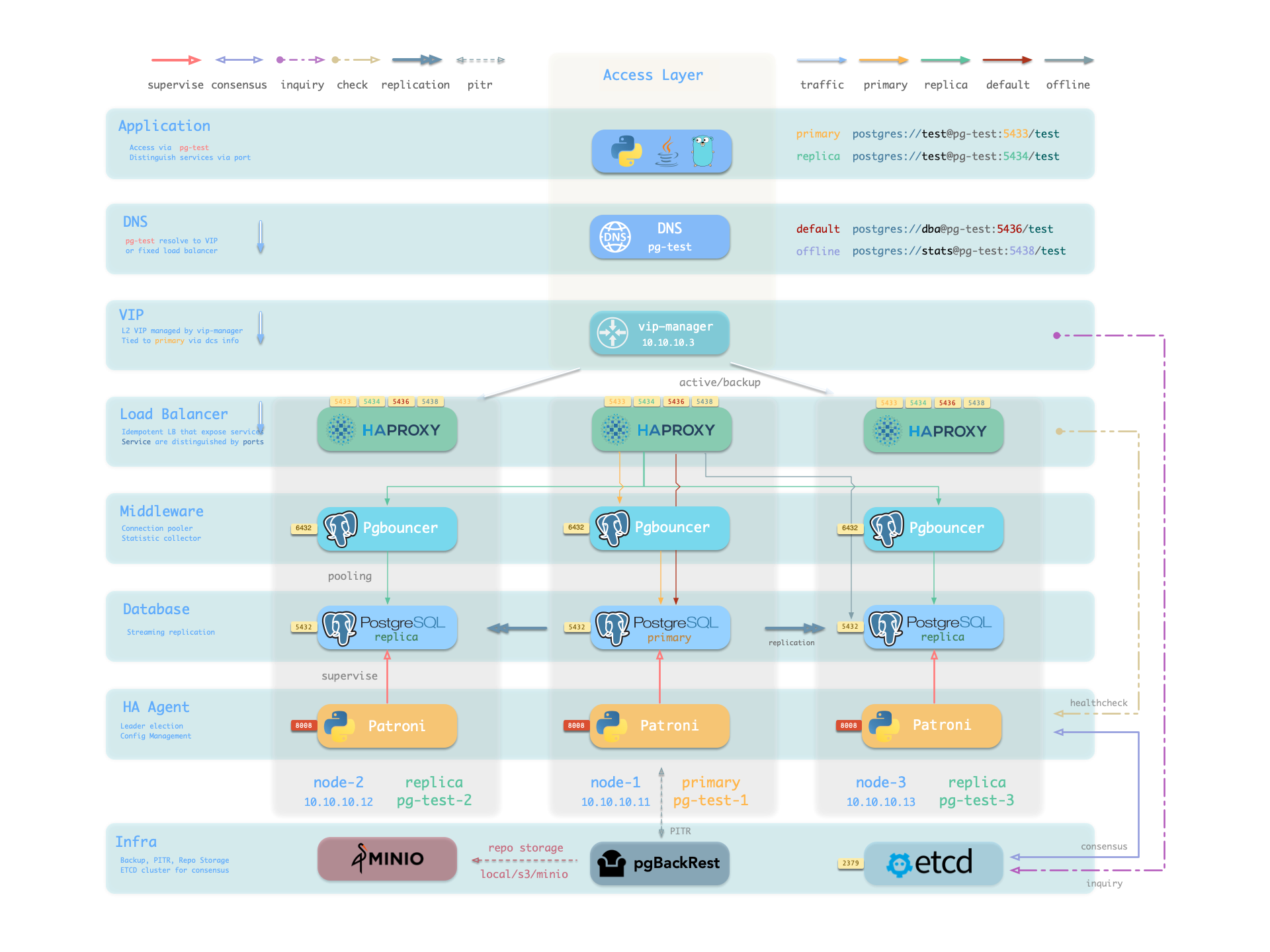
Note that the pg-meta domain name points to the cluster’s L2 VIP, which in turn points to the haproxy load balancer on the cluster primary, which routes traffic to different instances. See Accessing Services for details.
Service Implementation
In Pigsty, services are implemented using haproxy on nodes, differentiated by different ports on host nodes.
Haproxy is enabled by default on each node managed by Pigsty to expose services, and database nodes are no exception. Although nodes in a cluster have primary-replica distinctions from the database perspective, from the service perspective, each node is the same: This means that even if you access a replica node, as long as you use the correct service port, you can still use the primary’s read-write service. This design can hide complexity: so as long as you can access any instance on a PostgreSQL cluster, you can completely access all services.
This design is similar to NodePort services in Kubernetes. Similarly, in Pigsty, each service includes the following two core elements:
- Access endpoints exposed through NodePort (port number, where to access?)
- Target instances selected through Selectors (instance list, who carries the load?)
Pigsty’s service delivery boundary stops at the cluster’s HAProxy, and users can access these load balancers in various ways. See Accessing Services.
All services are declared through configuration files. For example, the PostgreSQL default services are defined by the pg_default_services parameter:
pg_default_services:
- { name: primary ,port: 5433 ,dest: default  ,check: /primary   ,selector: "[]" }
- { name: replica ,port: 5434 ,dest: default  ,check: /read-only ,selector: "[]" , backup: "[? pg_role == `primary` || pg_role == `offline` ]" }
- { name: default ,port: 5436 ,dest: postgres ,check: /primary   ,selector: "[]" }
- { name: offline ,port: 5438 ,dest: postgres ,check: /replica   ,selector: "[? pg_role == `offline` || pg_offline_query ]" , backup: "[? pg_role == `replica` && !pg_offline_query]"}
You can also define additional services in pg_services. Both pg_default_services and pg_services are arrays of service definition objects.
Defining Services
Pigsty allows you to define your own services:
pg_default_services: Services uniformly exposed by all PostgreSQL clusters, four by default.pg_services: Additional PostgreSQL services, can be defined at global or cluster level as needed.haproxy_services: Directly customize HAProxy service content, can be used for accessing other components
For PostgreSQL clusters, you typically only need to focus on the first two.
Each service definition generates a new configuration file in the configuration directory of all related HAProxy instances: /etc/haproxy/<svcname>.cfg
Here’s a custom service example standby: when you want to provide a read-only service without replication lag, you can add this record to pg_services:
- name: standby                   # Required, service name, final svc name uses `pg_cluster` as prefix, e.g.: pg-meta-standby
  port: 5435                      # Required, exposed service port (as kubernetes service node port mode)
  ip: "*"                         # Optional, IP address the service binds to, all IP addresses by default
  selector: "[]"                  # Required, service member selector, uses JMESPath to filter configuration manifest
  backup: "[? pg_role == `primary`]"  # Optional, service member selector (backup), instances selected here only carry the service when all default selector instances are down
  dest: default                   # Optional, target port, default|postgres|pgbouncer|<port_number>, defaults to 'default', Default means using pg_default_service_dest value to ultimately decide
  check: /sync                    # Optional, health check URL path, defaults to /, here uses Patroni API: /sync, only sync standby and primary return 200 healthy status code
  maxconn: 5000                   # Optional, maximum number of allowed frontend connections, defaults to 5000
  balance: roundrobin             # Optional, haproxy load balancing algorithm (defaults to roundrobin, other options: leastconn)
  options: 'inter 3s fastinter 1s downinter 5s rise 3 fall 3 on-marked-down shutdown-sessions slowstart 30s maxconn 3000 maxqueue 128 weight 100'
The above service definition will be converted to haproxy configuration file /etc/haproxy/pg-test-standby.conf on the sample three-node pg-test:
#---------------------------------------------------------------------
# service: pg-test-standby @ 10.10.10.11:5435
#---------------------------------------------------------------------
# service instances 10.10.10.11, 10.10.10.13, 10.10.10.12
# service backups   10.10.10.11
listen pg-test-standby
    bind *:5435            # <--- Binds port 5435 on all IP addresses
    mode tcp               # <--- Load balancer works on TCP protocol
    maxconn 5000           # <--- Maximum connections 5000, can be increased as needed
    balance roundrobin     # <--- Load balancing algorithm is rr round-robin, can also use leastconn
    option httpchk         # <--- Enable HTTP health check
    option http-keep-alive # <--- Keep HTTP connection
    http-check send meth OPTIONS uri /sync   # <---- Here uses /sync, Patroni health check API, only sync standby and primary return 200 healthy status code
    http-check expect status 200             # <---- Health check return code 200 means normal
    default-server inter 3s fastinter 1s downinter 5s rise 3 fall 3 on-marked-down shutdown-sessions slowstart 30s maxconn 3000 maxqueue 128 weight 100
    # servers: # All three instances of pg-test cluster are selected by selector: "[]", since there are no filter conditions, they all become backend servers for pg-test-replica service. But due to /sync health check, only primary and sync standby can actually handle requests
    server pg-test-1 10.10.10.11:6432 check port 8008 weight 100 backup  # <----- Only primary satisfies condition pg_role == `primary`, selected by backup selector
    server pg-test-3 10.10.10.13:6432 check port 8008 weight 100         #        Therefore serves as service fallback instance: normally doesn't handle requests, only handles read-only requests when all other replicas fail, thus maximally avoiding read-write service being affected by read-only service
    server pg-test-2 10.10.10.12:6432 check port 8008 weight 100         #
Here, all three instances of the pg-test cluster are selected by selector: "[]", rendered into the backend server list of the pg-test-replica service. But due to the /sync health check, Patroni Rest API only returns healthy HTTP 200 status code on the primary and sync standby, so only the primary and sync standby can actually handle requests.
Additionally, the primary satisfies the condition pg_role == primary, is selected by the backup selector, and is marked as a backup server, only used when no other instances (i.e., sync standby) can meet the demand.
Primary Service
The Primary service is perhaps the most critical service in production environments. It provides read-write capability to the database cluster on port 5433. The service definition is as follows:
- { name: primary ,port: 5433 ,dest: default ,check: /primary ,selector: "[]" }
- The selector parameter
selector: "[]"means all cluster members will be included in the Primary service - But only the primary can pass the health check (
check: /primary) and actually carry Primary service traffic. - The destination parameter
dest: defaultmeans the Primary service destination is affected by thepg_default_service_destparameter - The default value
defaultofdestwill be replaced by the value ofpg_default_service_dest, which defaults topgbouncer. - By default, the Primary service destination is the connection pool on the primary, which is the port specified by
pgbouncer_port, defaulting to 6432
If the value of pg_default_service_dest is postgres, then the primary service destination will bypass the connection pool and use the PostgreSQL database port directly (pg_port, default 5432). This parameter is very useful for scenarios that don’t want to use a connection pool.
Example: haproxy configuration for pg-test-primary
listen pg-test-primary
    bind *:5433         # <--- primary service defaults to port 5433
    mode tcp
    maxconn 5000
    balance roundrobin
    option httpchk
    option http-keep-alive
    http-check send meth OPTIONS uri /primary # <--- primary service defaults to Patroni RestAPI /primary health check
    http-check expect status 200
    default-server inter 3s fastinter 1s downinter 5s rise 3 fall 3 on-marked-down shutdown-sessions slowstart 30s maxconn 3000 maxqueue 128 weight 100
    # servers
    server pg-test-1 10.10.10.11:6432 check port 8008 weight 100
    server pg-test-3 10.10.10.13:6432 check port 8008 weight 100
    server pg-test-2 10.10.10.12:6432 check port 8008 weight 100
Patroni’s high availability mechanism ensures that at most one instance’s /primary health check is true at any time, so the Primary service will always route traffic to the primary instance.
One benefit of using the Primary service instead of direct database connection is that if the cluster has a split-brain situation for some reason (e.g., kill -9 killing the primary Patroni without watchdog), Haproxy can still avoid split-brain in this case, because it will only distribute traffic when Patroni is alive and returns primary status.
Replica Service
The Replica service is second only to the Primary service in importance in production environments. It provides read-only capability to the database cluster on port 5434. The service definition is as follows:
- { name: replica ,port: 5434 ,dest: default ,check: /read-only ,selector: "[]" , backup: "[? pg_role == `primary` || pg_role == `offline` ]" }
- The selector parameter
selector: "[]"means all cluster members will be included in the Replica service - All instances can pass the health check (
check: /read-only) and carry Replica service traffic. - Backup selector:
[? pg_role == 'primary' || pg_role == 'offline' ]marks the primary and offline replicas as backup servers. - Only when all normal replicas are down will the Replica service be carried by the primary or offline replicas.
- The destination parameter
dest: defaultmeans the Replica service destination is also affected by thepg_default_service_destparameter - The default value
defaultofdestwill be replaced by the value ofpg_default_service_dest, which defaults topgbouncer, same as the Primary service - By default, the Replica service destination is the connection pool on the replicas, which is the port specified by
pgbouncer_port, defaulting to 6432
Example: haproxy configuration for pg-test-replica
listen pg-test-replica
    bind *:5434
    mode tcp
    maxconn 5000
    balance roundrobin
    option httpchk
    option http-keep-alive
    http-check send meth OPTIONS uri /read-only
    http-check expect status 200
    default-server inter 3s fastinter 1s downinter 5s rise 3 fall 3 on-marked-down shutdown-sessions slowstart 30s maxconn 3000 maxqueue 128 weight 100
    # servers
    server pg-test-1 10.10.10.11:6432 check port 8008 weight 100 backup
    server pg-test-3 10.10.10.13:6432 check port 8008 weight 100
    server pg-test-2 10.10.10.12:6432 check port 8008 weight 100
The Replica service is very flexible: if there are surviving dedicated Replica instances, it will prioritize using these instances to handle read-only requests. Only when all replica instances are down will the primary handle read-only requests. For the common one-primary-one-replica two-node cluster, this means: use the replica as long as it’s alive, use the primary when the replica is down.
Additionally, unless all dedicated read-only instances are down, the Replica service will not use dedicated Offline instances, thus avoiding mixing online fast queries and offline slow queries together, interfering with each other.
Default Service
The Default service provides services on port 5436. It is a variant of the Primary service.
The Default service always bypasses the connection pool and connects directly to PostgreSQL on the primary. This is useful for admin connections, ETL writes, CDC data change capture, etc.
- { name: default ,port: 5436 ,dest: postgres ,check: /primary ,selector: "[]" }
If pg_default_service_dest is changed to postgres, then the Default service is completely equivalent to the Primary service except for port and name. In this case, you can consider removing Default from default services.
Example: haproxy configuration for pg-test-default
listen pg-test-default
    bind *:5436         # <--- Except for listening port/target port and service name, other configurations are exactly the same as primary service
    mode tcp
    maxconn 5000
    balance roundrobin
    option httpchk
    option http-keep-alive
    http-check send meth OPTIONS uri /primary
    http-check expect status 200
    default-server inter 3s fastinter 1s downinter 5s rise 3 fall 3 on-marked-down shutdown-sessions slowstart 30s maxconn 3000 maxqueue 128 weight 100
    # servers
    server pg-test-1 10.10.10.11:5432 check port 8008 weight 100
    server pg-test-3 10.10.10.13:5432 check port 8008 weight 100
    server pg-test-2 10.10.10.12:5432 check port 8008 weight 100
Offline Service
The Offline service provides services on port 5438. It also bypasses the connection pool to directly access the PostgreSQL database, typically used for slow queries/analytical queries/ETL reads/personal user interactive queries. Its service definition is as follows:
- { name: offline ,port: 5438 ,dest: postgres ,check: /replica ,selector: "[? pg_role == `offline` || pg_offline_query ]" , backup: "[? pg_role == `replica` && !pg_offline_query]"}
The Offline service routes traffic directly to dedicated offline replicas, or normal read-only instances with the pg_offline_query flag.
- The selector parameter filters two types of instances from the cluster: offline replicas with
pg_role=offline, or normal read-only instances withpg_offline_query=true - The main difference between dedicated offline replicas and flagged normal replicas is: the former does not handle Replica service requests by default, avoiding mixing fast and slow requests together, while the latter does by default.
- The backup selector parameter filters one type of instance from the cluster: normal replicas without offline flag. This means if offline instances or flagged normal replicas fail, other normal replicas can be used to carry the Offline service.
- The health check
/replicaonly returns 200 for replicas, the primary returns an error, so the Offline service will never distribute traffic to the primary instance, even if only this primary is left in the cluster. - At the same time, the primary instance is neither selected by the selector nor by the backup selector, so it will never carry the Offline service. Therefore, the Offline service can always avoid user access to the primary, thus avoiding impact on the primary.
Example: haproxy configuration for pg-test-offline
listen pg-test-offline
    bind *:5438
    mode tcp
    maxconn 5000
    balance roundrobin
    option httpchk
    option http-keep-alive
    http-check send meth OPTIONS uri /replica
    http-check expect status 200
    default-server inter 3s fastinter 1s downinter 5s rise 3 fall 3 on-marked-down shutdown-sessions slowstart 30s maxconn 3000 maxqueue 128 weight 100
    # servers
    server pg-test-3 10.10.10.13:5432 check port 8008 weight 100
    server pg-test-2 10.10.10.12:5432 check port 8008 weight 100 backup
The Offline service provides limited read-only service, typically used for two types of queries: interactive queries (personal users), slow queries and long transactions (analytics/ETL).
The Offline service requires extra maintenance care: when the cluster experiences primary-replica switchover or automatic failover, the cluster’s instance roles change, but Haproxy’s configuration does not automatically change. For clusters with multiple replicas, this is usually not a problem. However, for simplified small clusters with one primary and one replica running Offline queries, primary-replica switchover means the replica becomes the primary (health check fails), and the original primary becomes a replica (not in the Offline backend list), so no instance can carry the Offline service. Therefore, you need to manually reload services to make the changes effective.
If your business model is relatively simple, you can consider removing the Default service and Offline service, and use the Primary service and Replica service to connect directly to the database.
Reload Services
When cluster members change, such as adding/removing replicas, primary-replica switchover, or adjusting relative weights, you need to reload services to make the changes effective.
bin/pgsql-svc <cls> [ip...]         # Reload services for lb cluster or lb instance
# ./pgsql.yml -t pg_service         # Actual ansible task for reloading services
Accessing Services
Pigsty’s service delivery boundary stops at the cluster’s HAProxy. Users can access these load balancers in various ways.
The typical approach is to use DNS or VIP access, binding them to all or any number of load balancers in the cluster.
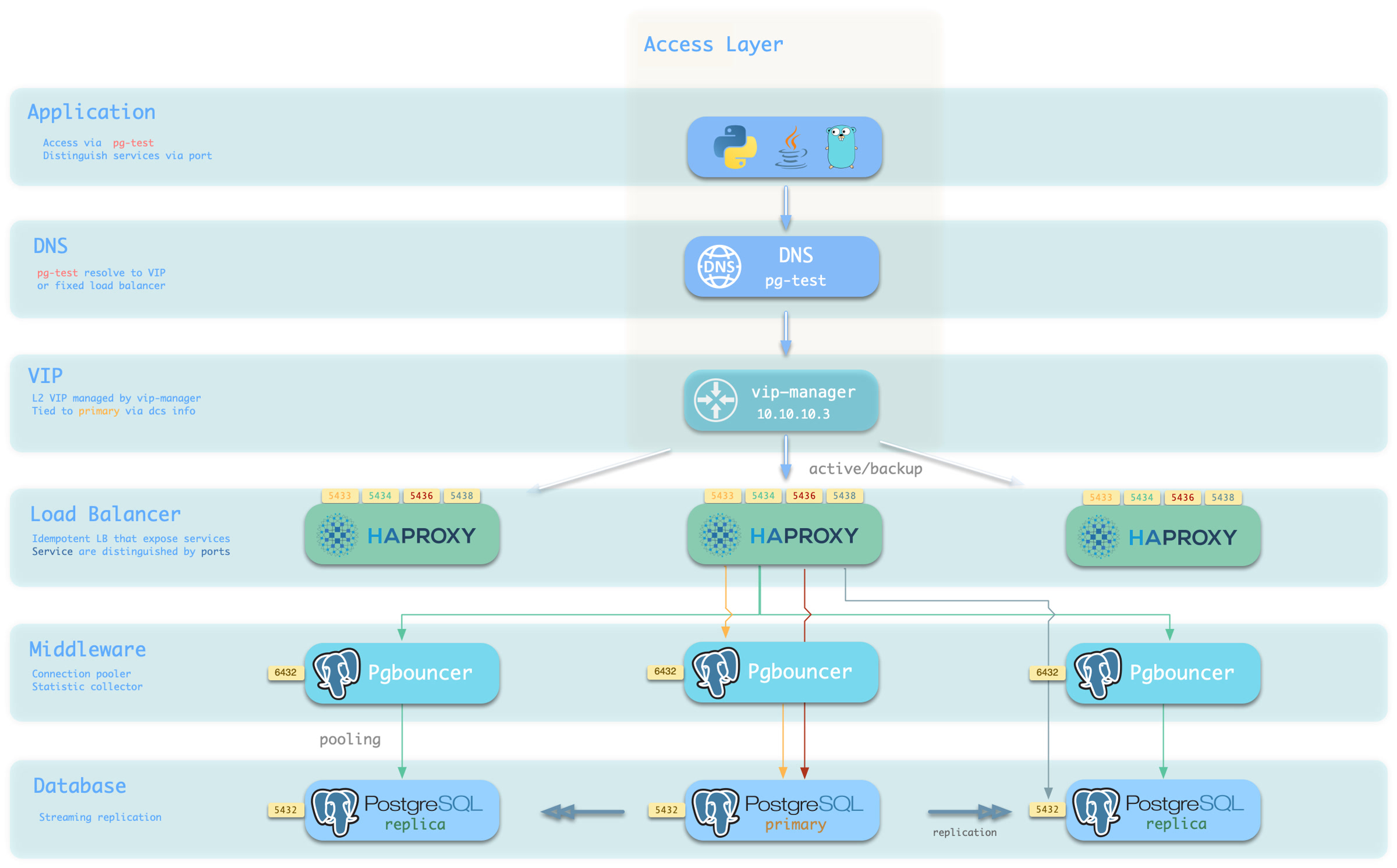
You can use different host & port combinations, which provide PostgreSQL services in different ways.
Host
| Type | Example | Description |
|---|---|---|
| Cluster Domain | pg-test | Access via cluster domain name (resolved by dnsmasq @ infra node) |
| Cluster VIP Address | 10.10.10.3 | Access via L2 VIP address managed by vip-manager, bound to primary node |
| Instance Hostname | pg-test-1 | Access via any instance hostname (resolved by dnsmasq @ infra node) |
| Instance IP Address | 10.10.10.11 | Access any instance’s IP address |
Port
Pigsty uses different ports to distinguish pg services
| Port | Service | Type | Description |
|---|---|---|---|
| 5432 | postgres | Database | Direct access to postgres server |
| 6432 | pgbouncer | Middleware | Access postgres via connection pool middleware |
| 5433 | primary | Service | Access primary pgbouncer (or postgres) |
| 5434 | replica | Service | Access replica pgbouncer (or postgres) |
| 5436 | default | Service | Access primary postgres |
| 5438 | offline | Service | Access offline postgres |
Combinations
# Access via cluster domain name
postgres://test@pg-test:5432/test # DNS -> L2 VIP -> Primary direct connection
postgres://test@pg-test:6432/test # DNS -> L2 VIP -> Primary connection pool -> Primary
postgres://test@pg-test:5433/test # DNS -> L2 VIP -> HAProxy -> Primary connection pool -> Primary
postgres://test@pg-test:5434/test # DNS -> L2 VIP -> HAProxy -> Replica connection pool -> Replica
postgres://dbuser_dba@pg-test:5436/test # DNS -> L2 VIP -> HAProxy -> Primary direct connection (for admin)
postgres://dbuser_stats@pg-test:5438/test # DNS -> L2 VIP -> HAProxy -> Offline direct connection (for ETL/personal queries)

# Direct access via cluster VIP
postgres://[email protected]:5432/test # L2 VIP -> Primary direct access
postgres://[email protected]:6432/test # L2 VIP -> Primary connection pool -> Primary
postgres://[email protected]:5433/test # L2 VIP -> HAProxy -> Primary connection pool -> Primary
postgres://[email protected]:5434/test # L2 VIP -> HAProxy -> Replica connection pool -> Replica
postgres://[email protected]:5436/test # L2 VIP -> HAProxy -> Primary direct connection (for admin)
postgres://[email protected]::5438/test # L2 VIP -> HAProxy -> Offline direct connection (for ETL/personal queries)

# Specify any cluster instance name directly
postgres://test@pg-test-1:5432/test # DNS -> Database instance direct connection (single instance access)
postgres://test@pg-test-1:6432/test # DNS -> Connection pool -> Database
postgres://test@pg-test-1:5433/test # DNS -> HAProxy -> Connection pool -> Database read/write
postgres://test@pg-test-1:5434/test # DNS -> HAProxy -> Connection pool -> Database read-only
postgres://dbuser_dba@pg-test-1:5436/test # DNS -> HAProxy -> Database direct connection
postgres://dbuser_stats@pg-test-1:5438/test # DNS -> HAProxy -> Database offline read/write

# Specify any cluster instance IP directly
postgres://[email protected]:5432/test # Database instance direct connection (direct instance specification, no automatic traffic distribution)
postgres://[email protected]:6432/test # Connection pool -> Database
postgres://[email protected]:5433/test # HAProxy -> Connection pool -> Database read/write
postgres://[email protected]:5434/test # HAProxy -> Connection pool -> Database read-only
postgres://[email protected]:5436/test # HAProxy -> Database direct connection
postgres://[email protected]:5438/test # HAProxy -> Database offline read-write

# Smart client: automatic read-write separation
postgres://[email protected]:6432,10.10.10.12:6432,10.10.10.13:6432/test?target_session_attrs=primary
postgres://[email protected]:6432,10.10.10.12:6432,10.10.10.13:6432/test?target_session_attrs=prefer-standby
Overriding Services
You can override default service configuration in multiple ways. A common requirement is to have Primary service and Replica service bypass the Pgbouncer connection pool and access the PostgreSQL database directly.
To achieve this, you can change pg_default_service_dest to postgres, so all services with svc.dest='default' in their service definitions will use postgres instead of the default pgbouncer as the target.
If you have already pointed Primary service to PostgreSQL, then default service becomes redundant and can be considered for removal.
If you don’t need to distinguish between personal interactive queries and analytical/ETL slow queries, you can consider removing Offline service from the default service list pg_default_services.
If you don’t need read-only replicas to share online read-only traffic, you can also remove Replica service from the default service list.
Delegating Services
Pigsty exposes PostgreSQL services through haproxy on nodes. All haproxy instances in the entire cluster are configured with the same service definitions.
However, you can delegate pg services to specific node groups (e.g., dedicated haproxy load balancer cluster) instead of haproxy on PostgreSQL cluster members.
To do this, you need to override the default service definitions using pg_default_services and set pg_service_provider to the proxy group name.
For example, this configuration will expose the pg cluster’s primary service on the proxy haproxy node group on port 10013.
pg_service_provider: proxy       # Use load balancer from `proxy` group on port 10013
pg_default_services:  [{ name: primary ,port: 10013 ,dest: postgres  ,check: /primary   ,selector: "[]" }]
Users need to ensure that the port for each delegated service is unique in the proxy cluster.
An example of using a dedicated load balancer cluster is provided in the 43-node production environment simulation sandbox: prod.yml
Feedback
Was this page helpful?
Thanks for the feedback! Please let us know how we can improve.
Sorry to hear that. Please let us know how we can improve.