Service/Access
Split read and write operations, route traffic correctly, and reliably deliver PostgreSQL cluster capabilities.
Service is an abstraction: it is the form in which database clusters provide capabilities externally, encapsulating the details of the underlying cluster.
Service is critical for stable access in production environments, showing its value during high availability cluster automatic failovers. Personal users typically don’t need to worry about this concept.
Personal User
The concept of “service” is for production environments. Personal users/single-machine clusters can skip the complexity and directly access the database using instance names/IP addresses.
For example, Pigsty’s default single-node pg-meta.meta database can be directly connected using three different users:
Service Overview
In real-world production environments, we use primary-replica database clusters based on replication. Within the cluster, there is one and only one instance as the leader (primary) that can accept writes. Other instances (replicas) continuously fetch change logs from the cluster leader to stay synchronized. Additionally, replicas can handle read-only requests, significantly offloading the primary in read-heavy, write-light scenarios. Therefore, distinguishing between write requests and read-only requests to the cluster is a very common practice.
Moreover, for production environments with high-frequency short connections, we pool requests through connection pooling middleware (Pgbouncer) to reduce the overhead of connection and backend process creation. But for scenarios like ETL and change execution, we need to bypass the connection pool and directly access the database. At the same time, high-availability clusters may experience failover during failures, which causes a change in the cluster leader. Therefore, high-availability database solutions require write traffic to automatically adapt to cluster leader changes. These different access requirements (read-write separation, pooling vs. direct connection, automatic adaptation to failovers) ultimately abstract the concept of Service.
Typically, database clusters must provide this most basic service:
- Read-write service (primary): Can read and write to the database
For production database clusters, at least these two services should be provided:
- Read-write service (primary): Write data: Only carried by the primary.
- Read-only service (replica): Read data: Can be carried by replicas, but can also be carried by the primary if no replicas are available
Additionally, depending on specific business scenarios, there might be other services, such as:
- Default direct access service (default): Service that allows (admin) users to bypass the connection pool and directly access the database
- Offline replica service (offline): Dedicated replica that doesn’t handle online read-only traffic, used for ETL and analytical queries
- Synchronous replica service (standby): Read-only service with no replication delay, handled by synchronous standby/primary for read-only queries
- Delayed replica service (delayed): Access older data from the same cluster from a certain time ago, handled by delayed replicas
Default Service
Pigsty provides four different services by default for each PostgreSQL database cluster. Here are the default services and their definitions:
| Service | Port | Description |
|---|---|---|
| primary | 5433 | Production read-write, connect to primary pool (6432) |
| replica | 5434 | Production read-only, connect to replica pool (6432) |
| default | 5436 | Admin, ETL writes, direct access to primary (5432) |
| offline | 5438 | OLAP, ETL, personal users, interactive queries |
Taking the default pg-meta cluster as an example, it provides four default services:
From the sample cluster architecture diagram, you can see how these four services work:
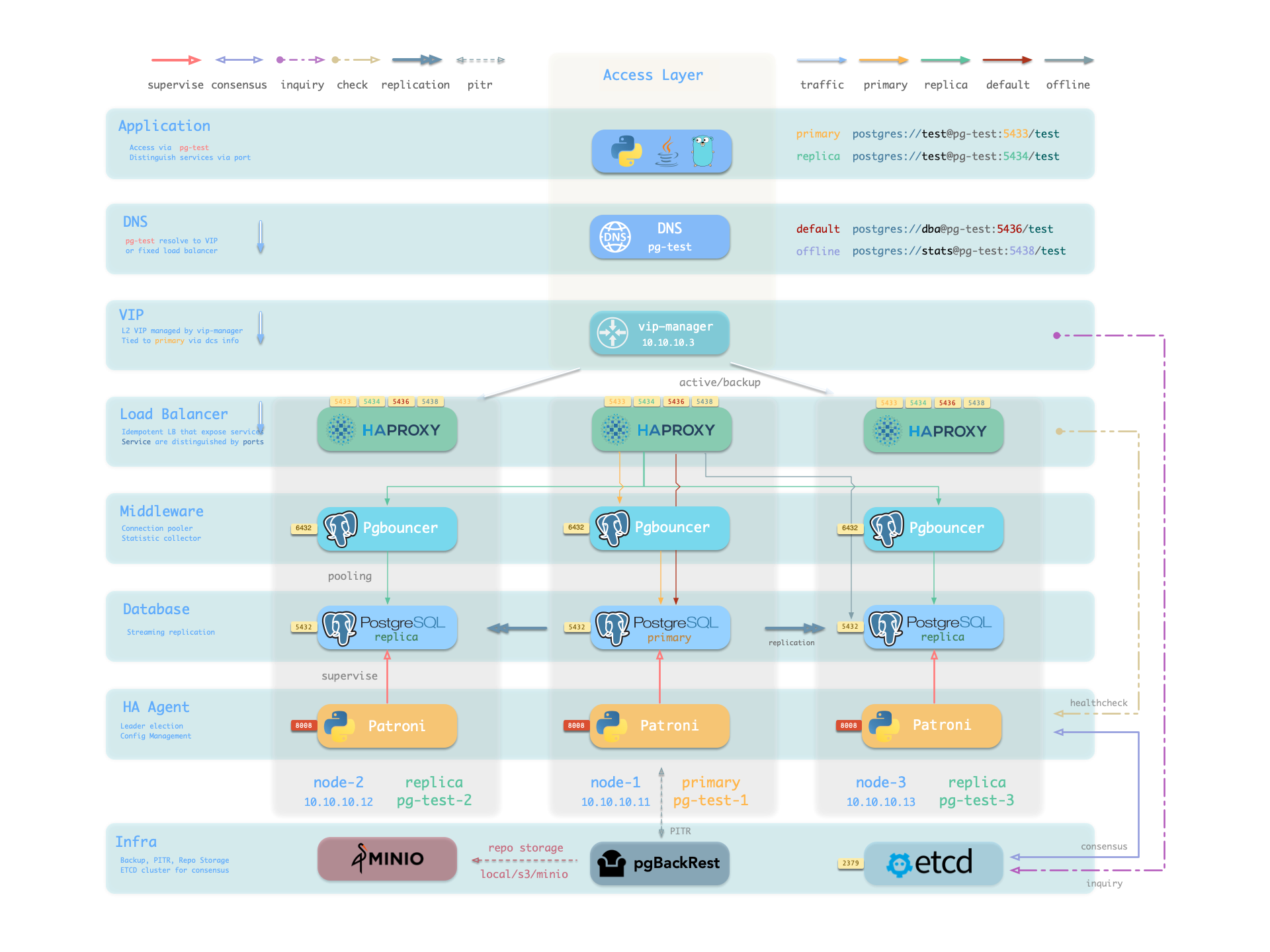
The actual DNS target of pg-meta is controlled by pg_dns_target. The default auto points to the L2 VIP when VIP is enabled; otherwise it points to the inventory primary’s IP. VIP is not enabled by default. See Access Service.
Service Implementation
In Pigsty, services are implemented using haproxy on nodes, differentiated by different ports on the host node.
Haproxy is enabled by default on every node managed by Pigsty to expose services, and database nodes are no exception. Although nodes in the cluster have primary-replica distinctions from the database perspective, from the service perspective, all nodes are the same: This means even if you access a replica node, as long as you use the correct service port, you can still use the primary’s read-write service. This design seals the complexity: as long as you can access any instance on the PostgreSQL cluster, you can fully access all services.
This design is similar to the NodePort service in Kubernetes. Similarly, in Pigsty, every service includes these two core elements:
- Access endpoints exposed via NodePort (port number, from where to access?)
- Target instances chosen through Selectors (list of instances, who will handle it?)
The boundary of Pigsty’s service delivery stops at the cluster’s HAProxy. Users can access these load balancers in various ways. Please refer to Access Service.
All services are declared through configuration files. For instance, the default PostgreSQL service is defined by the pg_default_services parameter:
You can also define additional services in pg_services. Both pg_default_services and pg_services are arrays of Service Definition objects.
Define Service
Pigsty allows you to define your own services:
pg_default_services: Services uniformly exposed by all PostgreSQL clusters, with four by default.pg_services: Additional PostgreSQL services, can be defined at global or cluster level as needed.haproxy_services: Directly customize HAProxy service content, can be used for other component access
For PostgreSQL clusters, you typically only need to focus on the first two.
Each service definition generates a new configuration file in the configuration directory of all related HAProxy instances: /etc/haproxy/conf.d/<pg_cluster>-<service>.cfg
Here’s a custom service example standby: When you want to provide a read-only service with no replication delay, you can add this record in pg_services:
The service definition above is rendered as /etc/haproxy/conf.d/pg-test-standby.cfg on the sample three-node pg-test cluster:
Here, all three instances of the pg-test cluster are selected by selector: "[]" and rendered into the backend list of the pg-test-standby service. Because of the /sync health check, the Patroni REST API returns HTTP 200 only on the primary and synchronous standby, so only those members can actually serve requests.
Additionally, the primary satisfies the condition pg_role == primary and is selected by the backup selector, marked as a backup server, and will only be used when no other instances (i.e., sync standby) can satisfy the requirement.
Primary Service
The Primary service is probably the most critical service in production environments. It provides read-write capability to the database cluster on port 5433, with the service definition as follows:
- The selector parameter
selector: "[]"means all cluster members will be included in the Primary service - But only the primary can pass the health check (
check: /primary), actually serving Primary service traffic. - The destination parameter
dest: defaultmeans the Primary service destination is affected by thepg_default_service_destparameter - The default value of
destisdefaultwhich will be replaced with the value ofpg_default_service_dest, defaulting topgbouncer. - By default, the Primary service destination is the connection pool on the primary, i.e., the port specified by
pgbouncer_port, defaulting to 6432
If the value of pg_default_service_dest is postgres, then the primary service destination will bypass the connection pool and directly use the PostgreSQL database port (pg_port, default value 5432), which is very useful for scenarios where you don’t want to use a connection pool.
Example: pg-test-primary haproxy configuration
Patroni’s high availability mechanism ensures that at most one instance’s /primary health check is true at any time, so the Primary service will always route traffic to the primary instance.
One benefit of using the Primary service instead of directly connecting to the database is that if the cluster experiences a split-brain situation (for example, killing the primary Patroni with kill -9 without watchdog), Haproxy can still avoid split-brain in this situation, because it only distributes traffic when Patroni is alive and returns primary status.
Replica Service
The Replica service is second only to the Primary service in importance in production environments. It provides read-only capability to the database cluster on port 5434, with the service definition as follows:
- The selector parameter
selector: "[]"means all cluster members will be included in the Replica service - All instances can pass the health check (
check: /read-only), serving Replica service traffic. - Backup selector:
[? pg_role == 'primary' || pg_role == 'offline' ]marks the primary and offline replicas as backup servers. - Only when all regular replicas are down will the Replica service be served by the primary or offline replicas.
- The destination parameter
dest: defaultmeans the Replica service destination is also affected by thepg_default_service_destparameter - The default value of
destisdefaultwhich will be replaced with the value ofpg_default_service_dest, defaulting topgbouncer, same as the Primary service - By default, the Replica service destination is the connection pool on replicas, i.e., the port specified by
pgbouncer_port, defaulting to 6432
Example: pg-test-replica haproxy configuration
The Replica service is very flexible: If there are living dedicated Replica instances, it will prioritize using these instances to serve read-only requests. Only when all replica instances are down will the primary serve as a fallback for read-only requests. For the common one-primary-one-replica two-node cluster: use the replica as long as it’s alive, use the primary only when the replica is down.
Additionally, unless all dedicated read-only instances are down, the Replica service will not use dedicated Offline instances, thus avoiding mixing online fast queries with offline slow queries and their mutual interference.
Default Service
The Default service provides service on port 5436, and it’s a variant of the Primary service.
The Default service always bypasses the connection pool and directly connects to PostgreSQL on the primary, which is useful for admin connections, ETL writes, CDC change data capture, etc.
If pg_default_service_dest is changed to postgres, then the Default service is completely equivalent to the Primary service except for port and name. In this case, you can consider removing Default from default services.
Example: pg-test-default haproxy configuration
Offline Service
The Offline service runs on port 5438 and bypasses the connection pool to access PostgreSQL directly. It is normally used for slow or analytical queries, ETL reads, and interactive personal queries:
The Offline service routes traffic directly to dedicated offline replicas, or regular read-only instances marked with pg_offline_query.
- The selector parameter filters two types of instances from the cluster: offline replicas with
pg_role=offline, or regular read-only instances marked withpg_offline_query=true - The main difference between dedicated offline replicas and marked regular replicas is: the former doesn’t serve Replica service requests by default, avoiding mixing fast and slow queries, while the latter does serve by default.
- The backup selector parameter filters one type of instance from the cluster: regular replicas without the offline mark, which means if offline instances or marked regular replicas are down, other regular replicas can be used to serve Offline service.
- Health check
/replicaonly returns 200 for replicas, primary returns error, so Offline service will never distribute traffic to the primary instance, even if only the primary remains in the cluster. - At the same time, the primary instance is neither selected by the selector nor by the backup selector, so it will never serve Offline service. Therefore, Offline service can always avoid users accessing the primary, thus avoiding impact on the primary.
Example: pg-test-offline haproxy configuration
The Offline service provides restricted read-only service, typically used for two types of queries: interactive queries (personal users), slow queries and long transactions (analytics/ETL).
The Offline service requires extra care. HAProxy’s /replica health check automatically rejects the new primary after a switchover, but selector uses static pg_role / pg_offline_query labels from the inventory. In a one-primary-one-replica cluster where only the replica serves Offline queries, a switchover may temporarily leave no eligible backend.
Reloading an unchanged inventory does not add the old primary to the Offline backend list. First update the inventory labels (or pg_offline_query) to match the new plan and then reload service, or switch the primary back.
If your business model is relatively simple, you can consider removing Default service and Offline service, using Primary service and Replica service to directly connect to the database.
Reload Service
Reload services when cluster membership changes, service definitions or static selector labels change, or relative weights are adjusted. Normal Primary/Replica switchover is handled by Patroni health checks and does not require a separate reload.
Access Service
The boundary of Pigsty’s service delivery stops at the cluster’s HAProxy. Users can access these load balancers in various ways.
The typical approach is to use DNS or VIP access, binding to all or any number of load balancers in the cluster.
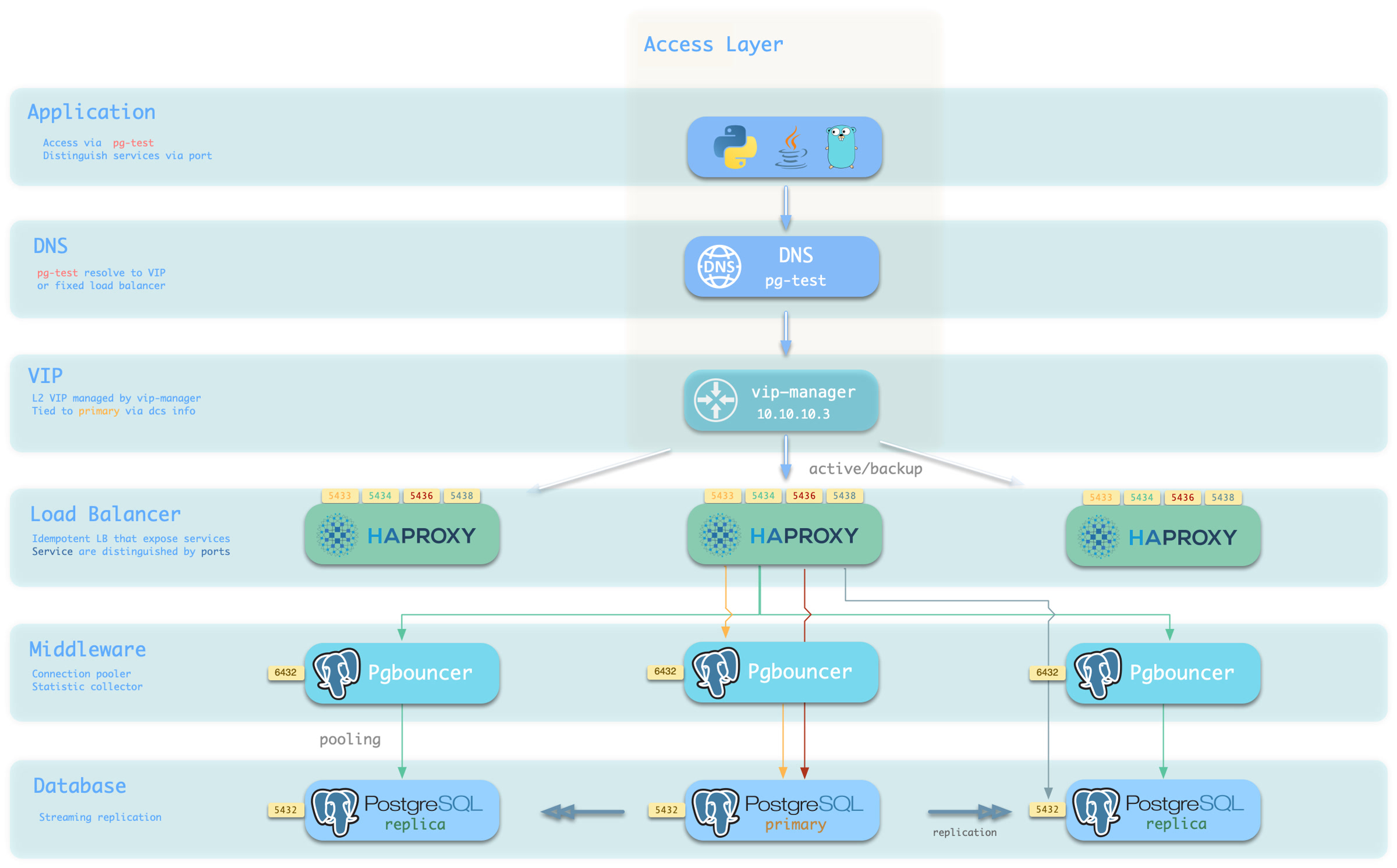
You can use different host & port combinations, which provide PostgreSQL services in different ways.
Host
| Type | Example | Description |
|---|---|---|
| Cluster Domain Name | pg-test | Access via cluster domain name (resolved by dnsmasq @ infra nodes) |
| Cluster VIP Address | 10.10.10.3 | Access via L2 VIP address managed by vip-manager, bound to primary |
| Instance Hostname | pg-test-1 | Access via any instance hostname (resolved by dnsmasq @ infra nodes) |
| Instance IP Address | 10.10.10.11 | Access any instance IP address |
Port
Pigsty uses different ports to distinguish pg services
| Port | Service | Type | Description |
|---|---|---|---|
| 5432 | postgres | database | Direct access to postgres server |
| 6432 | pgbouncer | middleware | Go through connection pool middleware before postgres |
| 5433 | primary | service | Access primary pgbouncer (or postgres) |
| 5434 | replica | service | Access replica pgbouncer (or postgres) |
| 5436 | default | service | Access primary postgres |
| 5438 | offline | service | Access offline postgres |
Combinations
Override Service
You can override the default service configuration in several ways. A common requirement is to have Primary service and Replica service bypass Pgbouncer connection pool and directly access PostgreSQL database.
To achieve this, you can change pg_default_service_dest to postgres, so all services with svc.dest='default' in the service definition will use postgres instead of the default pgbouncer as the target.
If you’ve already pointed Primary service to PostgreSQL, then the default service becomes redundant and can be removed.
If you don’t need to distinguish between personal interactive queries and analytics/ETL slow queries, you can consider removing the Offline service from the default service list pg_default_services.
If you don’t need read-only replicas to share online read-only traffic, you can also remove Replica service from the default service list.
Delegate Service
Pigsty exposes PostgreSQL services with haproxy on nodes. All haproxy instances in the cluster are configured with the same service definition.
However, you can delegate pg service to a specific node group (e.g., dedicated haproxy lb cluster) rather than haproxy on PostgreSQL cluster members.
To do so, you need to override the default service definition with pg_default_services and set pg_service_provider to the proxy group name.
For example, this configuration will expose pg cluster primary service on haproxy node group proxy with port 10013.
It’s user’s responsibility to make sure each delegate service port is unique among the proxy cluster.
A dedicated load balancer cluster example is provided in the 20-node production environment simulation sandbox: conf/ha/simu.yml
Was this page helpful?
Thanks—your feedback helps us improve this page.
What got in the way? (optional)