Cluster Model
In Pigsty, functional modules are organized as “clusters”. Each cluster is an Ansible group containing several node resources with defined instances.
PGSQL Module Overview: Key Concepts and Architecture Details
The PGSQL module is organized as clusters in production environments, which are logical entities composed of a set of database instances associated by primary-replica relationships. Each database cluster is an autonomous business service unit consisting of at least one database (primary) instance.
Entity Relationship
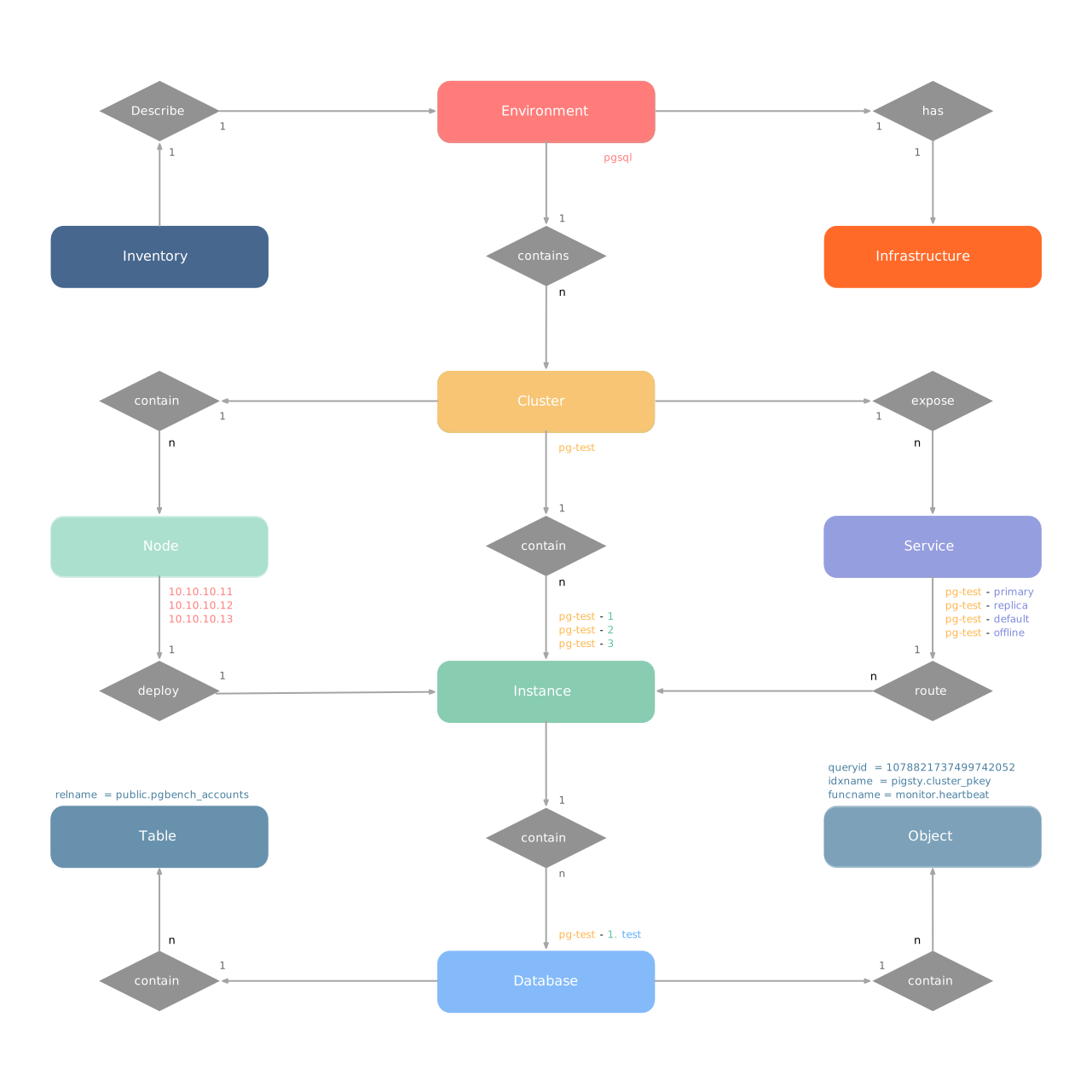
Let’s start with the ER diagram. In Pigsty’s PGSQL module, there are four core entities:
- Cluster: An autonomous PostgreSQL business unit, serving as the top-level namespace for other entities.
- Service: A named abstraction of cluster capability that routes traffic and exposes PostgreSQL services using node ports.
- Instance: A single PostgreSQL server consisting of a running process and database files on a single node.
- Node: An abstraction of hardware resources, which can be bare metal, virtual machines, or even Kubernetes pods.

Naming Conventions
- Cluster names should be valid DNS domain names without dots, matching the regex:
[a-zA-Z0-9-]+ - Service names should be prefixed with the cluster name and suffixed with specific words:
primary,replica,offline,delayed, connected by-. - Instance names are prefixed with the cluster name and suffixed with a positive integer instance number, connected by
-, e.g.,${cluster}-${seq}. - Nodes are identified by their primary internal IP address. Since databases and hosts are deployed 1:1 in the PGSQL module, the hostname is usually the same as the instance name.
Identity Parameters
Pigsty uses identity parameters to identify entities: PG_ID.
Besides the node IP address, pg_cluster, pg_role, and pg_seq are the minimum required parameters for defining a PostgreSQL cluster.
Using the sandbox environment test cluster pg-test as an example:
pg-test:
hosts:
10.10.10.11: { pg_seq: 1, pg_role: primary }
10.10.10.12: { pg_seq: 2, pg_role: replica }
10.10.10.13: { pg_seq: 3, pg_role: replica }
vars:
pg_cluster: pg-test
The three cluster members are shown below:
| Cluster | Seq | Role | Host / IP | Instance | Service | Node Name |
|---|---|---|---|---|---|---|
pg-test | 1 | primary | 10.10.10.11 | pg-test-1 | pg-test-primary | pg-test-1 |
pg-test | 2 | replica | 10.10.10.12 | pg-test-2 | pg-test-replica | pg-test-2 |
pg-test | 3 | replica | 10.10.10.13 | pg-test-3 | pg-test-replica | pg-test-3 |
This includes:
- One cluster: The cluster is named
pg-test. - Two roles:
primaryandreplica. - Three instances: The cluster consists of three instances:
pg-test-1,pg-test-2,pg-test-3. - Three nodes: The cluster is deployed on three nodes:
10.10.10.11,10.10.10.12, and10.10.10.13. - Four services:
- Read-write service:
pg-test-primary - Read-only service:
pg-test-replica - Direct admin service:
pg-test-default - Offline read service:
pg-test-offline
- Read-write service:
In the monitoring system (Prometheus/Grafana/Loki), corresponding metrics will be labeled with these identity parameters:
pg_up{cls="pg-meta", ins="pg-meta-1", ip="10.10.10.10", job="pgsql"}
pg_up{cls="pg-test", ins="pg-test-1", ip="10.10.10.11", job="pgsql"}
pg_up{cls="pg-test", ins="pg-test-2", ip="10.10.10.12", job="pgsql"}
pg_up{cls="pg-test", ins="pg-test-3", ip="10.10.10.13", job="pgsql"}
Feedback
Was this page helpful?
Thanks for the feedback! Please let us know how we can improve.
Sorry to hear that. Please let us know how we can improve.